

Riff: Fast Easy Photo Edits
- 73.00
- 4.2
- Installs
- 50.00K
- Price
- Free

Screenshots




Analysis by Reviewed
I approached Riff: Fast Easy Photo Edits as a quick photo-editing tool rather than a full replacement for a desktop editor. Its focus is easy visual changes: trying different outfits, adjusting body types, adding details, and cleaning unwanted distractions from an image. That makes it interesting for people who want to experiment with a picture without learning a complicated editing workflow.
My overall impression is that Riff works best when the goal is a noticeable change with very little setup. It belongs to the Photography category, comes from Riff AI, and can be used without an upfront payment. At the same time, its AI-oriented approach means the result depends heavily on the source photo and on how carefully the edit is described or selected. It is convenient, but convenience does not always mean perfect control.
How Riff feels to use in everyday photo editing
The first thing I noticed is that the app is aimed at people who want to get to the visual result quickly. Traditional editors often make you think in terms of layers, masks, brushes, selections, curves, and export settings. Riff presents a more direct idea: start with a photo, choose the kind of change you want, and let the app handle much of the difficult work.
That approach is especially useful when I am editing a casual portrait for a profile picture, testing how a different style might look, or removing something distracting from the background. I do not need to understand advanced retouching terminology before beginning. The app’s appeal comes from reducing the number of decisions between the original image and a shareable result.
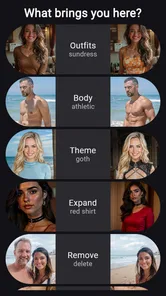
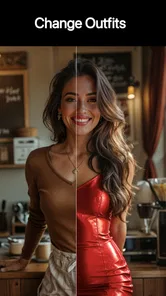
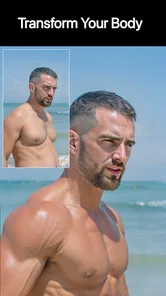
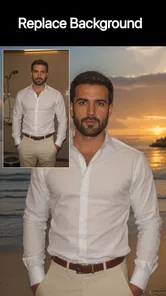
The store summary describes its main abilities clearly: swapping outfits, changing body types, adding details, and removing distractions. Those are not minor corrections; they can alter the identity, mood, or visual balance of a photograph. I would therefore treat Riff as a creative transformation tool, not merely a brightness-and-crop utility.
The app is free to install, although in-app purchases range from a few dollars to considerably more per item. That matters because a person may be happy with the first experiment but need to think carefully before relying on repeated edits. I would begin with simple, low-stakes images and make sure the available editing experience fits my needs before spending money.
Readability and navigation for different users
Riff’s strongest accessibility quality is conceptual simplicity. The central tasks are easy to understand even for someone who has never used a professional editor. “Change the outfit” or “remove a distraction” is a more approachable instruction than “create a non-destructive mask around the subject.” For new editors, older users, and anyone who feels overwhelmed by technical interfaces, that difference can make the app feel much less intimidating.
More From Our News Desk

 Gmail
GmailGmail in a Busy Inbox: Who Benefits Most?
From first account to crowded workday, Gmail earns its place through dependable search and flexible sorting—but its best fit depends on how much inbox maintenance you can tolerate.

 Prime Video
Switching to Prime Video: What Changes in Your Viewing Routine
Prime Video can make a compelling second home for streaming, but switching means learning a different catalog, rental layer, and route from browsing to playback.

 Universal TV Remote Control
Universal TV Remote Control Works Best as a Reliable Backup
A phone remote earns its place through quick setup and reliable habits. Here is how to get more from Universal TV Remote Control—and where its limits show.

 Weather - By Xiaomi
Weather by Xiaomi Review: Clear at a Glance, Less Clear Up Close
Xiaomi’s weather app makes everyday forecasts quick to scan, but its calm surface can leave useful details and recovery paths harder to find than they should be.

 X
XX Under Pressure: Can It Recover When Posting Goes Wrong?
A resilience-focused review of X, examining setup, mistaken posts, interruptions, weak connections, and the gaps that matter when recovery needs to be dependable.

 Clash of Clans
Clash of Clans Is Won Between the Battles
Its raids are quick; its community is a long-term project of coordination, teaching, rivalry, and shared responsibility—with all the friction that entails.
Latest News



I also find this style useful when I am working quickly on a phone. A small screen is not an ideal place for detailed brushwork, particularly when controls are crowded or when a user has difficulty distinguishing tiny icons. A task-focused workflow can reduce the amount of visual searching required. Instead of exploring a large toolbox, I can concentrate on the intended change.
Still, simple does not automatically mean equally clear for everyone. AI editing can hide important decisions behind a single action. If the result changes a face, hand, garment edge, or background object in an unexpected way, the user may need to inspect the image closely to understand what happened. A visible before-and-after comparison is particularly valuable here, because it lets me judge the change rather than trusting the preview blindly.
For better readability, I would use the app in a well-lit environment and keep the original image available. On a phone, subtle artifacts can disappear into a small preview and become obvious only after sharing. I would also avoid judging a portrait at a glance. Zooming in on hair, fingers, clothing boundaries, and facial features is a practical habit whenever an edit changes a person’s appearance.
Navigation is most comfortable for users who prefer guided choices over detailed manual control. Someone who wants exact brush size, feathering, layer order, or a carefully adjustable mask may find the experience less satisfying than a conventional editor. That is not necessarily a flaw; it is a trade-off. Riff prioritizes a shorter path, while manual editors prioritize precision and repeatability.
Motor and sensory considerations
For people with limited fine motor control, an automated edit can be easier than drawing a precise selection with a fingertip. Removing a background distraction manually often requires steady movement around irregular edges. A more guided process can reduce that burden, especially for a quick personal image where absolute precision is not essential.
There is a useful distinction between choosing an edit and correcting an edit. Selecting a broad transformation may require little physical effort, but reviewing the result can still demand careful tapping, zooming, and scrolling. If the app asks me to position or identify an area, small controls may become a challenge. I would not assume that an AI feature eliminates the need for hand accuracy; it simply moves some of the work away from manual drawing.
Users sensitive to visual changes should approach body-type and outfit transformations thoughtfully. These edits can be entertaining, but they may also produce an image that feels unfamiliar or uncomfortable. The ability to change a person’s appearance is not automatically a benefit in every context. I would use the tool with consent when another person appears in the photo, and I would avoid presenting a heavily altered image as if it were an untouched record of reality.
For users who process information better through a small number of clear actions, Riff’s narrow purpose is a positive. It is easier to explain to a friend than a complex editing suite. On the other hand, people who need strong visual confirmation at every stage may want to slow down and inspect each result. AI-generated changes can be visually persuasive while still being inaccurate in small but important areas.
A practical technique is to make one type of change at a time. I would first remove a distracting object, save or preserve that version, and only then test an outfit or body adjustment. Combining several major changes in one session makes it harder to tell which instruction caused an unwanted result. This staged workflow is also kinder to users who need extra time to evaluate visual information.
Situational access: where the app makes sense
Riff is particularly useful in situations where time, screen size, or editing experience is limited. Imagine taking a quick portrait before leaving for an event and noticing a bright object behind you. A conventional editor can solve that problem, but opening a large suite and manually selecting the object may feel excessive. Riff is better suited to that quick correction, provided the background is not too complex.
It can also help someone prepare a few versions of a social profile image. I might test a different outfit or add a visual detail, then compare the results before deciding which version feels natural. This is more useful for exploration than for professional styling, because the app lets me consider possibilities without requiring a wardrobe change or a photo session for every variation.
Another realistic use is preparing a family photo for sharing when a small background distraction pulls attention away from the people. Here I would keep the edit modest. Removing an isolated object can improve the composition, but changing several people’s bodies or clothing could alter the meaning of the photograph. Riff gives me creative control, but good judgment still matters more than the number of available transformations.
The app can be a reasonable choice for users who rely mainly on a phone and do not want to transfer images to a computer. Its minimum operating-system requirement is Android 8.0, which gives it a relatively broad starting point among Android devices. The experience will still depend on the phone itself, the quality of the image, and how demanding the requested edit is, so I would not expect identical results on every device.
Riff is also suitable for casual creators who want to explore visual ideas without committing to a subscription-style professional workflow. The free entry point makes experimentation approachable. However, the purchase range means frequent users should consider the cost of repeated edits, especially if they are producing images for work or client-facing projects.
For a person who needs a dependable, repeatable result across a large batch of product photos, I would choose a more controlled workflow. AI transformations are valuable when creativity and speed matter, but commercial images often require consistent lighting, exact proportions, and predictable retouching. Riff is more convincing as a flexible personal tool than as the only stage in a demanding production process.
What it does better than ordinary alternatives
Compared with a basic phone gallery editor, Riff reaches beyond cropping, exposure, color, and simple filters. Its distinctive value is the ability to rethink the content of the image itself. A gallery editor can make a photo brighter; Riff is intended for more substantial changes to clothing, body shape, added details, and unwanted objects.
Compared with a professional manual editor, Riff is less intimidating and potentially much faster for a single creative adjustment. I do not need to spend time learning selection tools before trying a new visual idea. That makes it a good companion for casual experimentation, especially when the image does not justify a long editing session.
The trade-off is control. Manual tools let me decide exactly which pixels change and which remain untouched. With an AI-based transformation, the surrounding area may be interpreted as part of the edit. A clothing change might affect nearby hair or hands; a distraction removal might subtly reshape a background pattern. I would therefore compare the result with the original rather than assuming that a visually smooth output is technically accurate.
Riff also differs from a standard filter app because its main appeal is not a preset mood. Filters usually apply a broad visual style, while the changes here are more object- and person-focused. That makes the app more useful for a specific problem, but it also raises the stakes: an inaccurate outfit or body adjustment is more noticeable than a slightly warm color grade.
Practical habits that improve the results
The quality of the starting photo matters more than many first-time users expect. I would choose an image with a clear subject, reasonable lighting, and enough separation between the person and the background. When clothing, hair, or the object to be removed blends into nearby textures, the app has less visual information to work with and the result becomes harder to trust.
I would avoid judging an edit only by its thumbnail. A small preview can hide warped edges, repeated textures, or unnatural transitions. Before sharing, I would inspect the areas most likely to reveal mistakes: hands, jewelry, hair, sleeves, waistlines, and the boundary between a removed object and the background.
For outfit changes, a front-facing or clearly visible garment gives me a fairer test than a heavily folded or partially hidden outfit. For body-type adjustments, I would keep expectations realistic and review the entire frame, not just the person. A transformation that looks acceptable around the subject can still bend a chair, doorway, railing, or nearby pattern.
When removing distractions, I would start with one isolated object rather than a crowded group of items. That makes it easier to see whether the surrounding texture has been reconstructed naturally. If the background is important to the story of the image, I would preserve the original and treat the edited version as an alternate interpretation, not a replacement.
One of my most useful workflow rules is to keep edits reversible at the decision level: preserve the source, make a single change, review it, and only then continue. Even when an app feels fast, rushing through several transformations can create a result that is difficult to diagnose. This method is especially helpful for users who need a calm, predictable process or who are editing photos for someone else.
Remaining barriers and reasons to choose another tool
The biggest barrier is the gap between a simple request and a perfect result. Riff may make an ambitious edit feel easy to start, but the user still has to decide whether the outcome is believable, respectful, and appropriate for the situation. People looking for automatic perfection may become frustrated when a transformation needs another attempt or when a fine detail is not preserved.
Another limitation is the reduced sense of manual ownership. In a traditional editor, I can often explain exactly how an image was changed. With an AI-led process, the transformation can feel more like a suggestion from the app. That is enjoyable for creative play, but less suitable when I need a precise, documented editing process.
The purchase model deserves attention from anyone planning regular use. Free access makes it possible to try the concept, but paid items can become significant if I edit many images or repeatedly test variations. I would decide in advance whether I need occasional experimentation or a dependable high-volume tool. Those are different needs, and Riff’s convenience should not hide that distinction.
Privacy-conscious users should also make their own comfort judgment before editing personal portraits or sensitive images. I would be especially careful with children’s photos, identity documents, private medical images, or pictures belonging to someone who has not agreed to an appearance change. The ability to edit an image quickly does not remove the responsibility to handle it respectfully.
People who need strong accessibility customization, exact visual controls, or a highly predictable manual workflow may prefer a conventional editor with more adjustable tools. Likewise, users creating professional composites, detailed retouching, or consistent commercial assets may outgrow Riff. Its most compelling advantage is reducing effort, not replacing every specialized editing method.
My inclusive verdict on Riff
Riff is a thoughtful option for people who want substantial photo changes without the steep learning curve of a professional editor. I like its focus on practical transformations rather than endless menus, and I can see it helping users who find manual selection tools tiring, confusing, or difficult to operate on a phone. The free starting point also makes it easy to decide whether the workflow suits a particular editing style.
Its inclusive value comes from lowering the knowledge and motor demands of some common edits, not from guaranteeing an effortless experience for every person. Users still need to review results carefully, and anyone with visual, motor, or sensory needs should judge whether the app’s controls and previews are comfortable on their own device. A simple task can still produce a complicated image that deserves close inspection.
The app has earned a 4.2 average from over 500 ratings, with more than 50 thousand installs, which suggests that it has found an audience among people interested in quick creative edits. It is rated for Everyone, and its current version is marked as June 5, 2026. I would read those details as signs of an accessible starting point, not as a promise that every edit will be equally reliable.
I would recommend Riff to casual photographers, social-media users, and curious creators who want to test outfit ideas, reshape a portrait, add visual details, or clean up a distracting background. I would skip it as my primary tool if I needed pixel-level control, consistent batch results, or a fully manual record of every adjustment.
My bottom line is that Riff is most successful when I treat it as a fast creative assistant, not an unquestionable editor. Start with a clear photo, make one change at a time, inspect the details, and preserve the original. Used that way, it can make ambitious edits feel approachable while leaving room for the judgment that an automated result still needs.
Riff: Fast Easy Photo Edits Frequently Asked Questions
Can I use Riff to change outfits or body types in a photo?
Yes. Riff is built for visual edits such as swapping outfits, changing body types, adding details, and removing distractions. These tools can help you experiment with a different look or adjust a photo without working through a complex editing process. Results may depend on the image and the edit you choose, so review the finished picture before sharing it.
What kinds of photos can I edit with Riff?
Riff is a photography app for making quick changes to images, including outfit and body-type edits, added details, and distraction removal. It can suit casual portraits and other everyday pictures where you want to try a creative change or tidy the composition. As with any image editor, the usefulness of a particular tool depends on the photo and the result you have in mind.
What is Riff: Fast Easy Photo Edits, and what can I use it for?
Riff: Fast Easy Photo Edits is designed for quick, approachable photo adjustments rather than complicated professional editing. It is useful for improving everyday pictures, applying creative effects, making visual changes, and preparing images for sharing on social networks. The app focuses on speed and simplicity, so users can edit photos without spending a long time learning advanced tools or navigating an overloaded interface.
Is Riff: Fast Easy Photo Edits suitable for beginners?
Yes, the app is aimed primarily at users who want fast results with minimal effort. Its straightforward editing workflow makes it approachable for beginners who may not understand technical photography terms or advanced image-editing controls. At the same time, users should not expect the same depth as a full desktop editor. It is best suited to casual edits, quick enhancements, and creative experimentation rather than highly precise professional retouching.
Does Riff: Fast Easy Photo Edits require an internet connection?
Basic photo editing may be available directly on the device, but some features can depend on how the app processes effects, delivers content, or handles optional services. Because requirements can change with updates, users should check the current App Store or Google Play listing before downloading if offline access is important. It is also sensible to test the app with a local image and confirm which tools remain available without an active connection.
Pros
- Quick edits make it easy to enhance photos on the go.
- Clean interface is approachable for beginners.
- Useful filters and effects add variety to everyday images.
- Editing tools respond smoothly on most modern devices.
- Good for creating social-ready images without advanced skills.
Cons
- Some premium effects and tools may require a subscription.
- Heavy effects can reduce image quality or look overly processed.
- Export options may feel limited for users needing precise control.
- The app may use noticeable storage for downloaded effects and edits.
- Advanced photographers may find the editing features too basic.










