

RideRTC
- 637.00
- 3.7
- Installs
- 1.00M
- Price
- Free
Screenshots
Analysis by Reviewed
When I plan a trip around Las Vegas, I want to know whether local transit can get me where I need to go before I commit to a route or start walking to a stop. RideRTC is built for that specific job: it brings Southern Nevada transit tools together in one place for residents and visitors. I find its appeal less about replacing every map or travel app on my phone and more about making the bus part of a local journey easier to check and manage.
What free access means for a trip
RideRTC is free to download, which makes it easy to try before you decide whether it fits your routine. It is a travel app from RTC of Southern Nevada, and its focus is local transit rather than general-purpose navigation. I would treat free access as a low-risk way to plan and manage journeys, not as a promise that every ride or optional service is free. Transit fares and app access are separate questions, so check the fare details in the app before boarding instead of assuming the download covers the trip.
That distinction matters most when you are visiting. You can explore the app before leaving your hotel and see whether its route and ticketing tools suit the journeys you actually expect to make. If you only need a one-off walking route or directions across several transport operators, a general map may be more convenient. If your plans depend on Southern Nevada transit, a local app can keep the relevant information closer at hand.
Easy Navigation at Your Fingertips
First things first, let's talk about how user-friendly the RideRTC app is. From the moment you open it, you're greeted with a clean and intuitive interface. It's like the app knows exactly what you're looking for and guides you effortlessly to your destination. You can easily search for bus routes, check schedules, and even track your bus in real-time. No more guessing or waiting around for a bus that may never come!
Planning around a real day
For a practical use, imagine setting out from a hotel to meet someone across town, with a meal or appointment you cannot casually miss. I would check the route and schedule before walking to the stop, then use the live view as a final check while waiting. That order is useful: a live vehicle position can help you judge whether to stay put, but it does not replace checking the route or allowing extra time for the walk to the stop and the rest of the trip.
For a visitor making several separate outings, it can also help to plan each journey when you have a stable connection, rather than trying to work everything out while moving through a crowded area. Keep the next stop or destination clear in your mind, and compare the proposed route with where you are standing before setting off. This is a small habit, but it reduces the chance of following a route that is convenient on screen yet awkward for your actual starting point.
Real-Time Tracking
The real-time tracking feature is a game-changer. As someone who relies heavily on public transport, knowing exactly when my ride will arrive is a huge relief. The app uses GPS technology to provide accurate bus locations, so you can plan your journey down to the minute. This feature alone has saved me countless hours and stress.
More From Our News Desk

 Weather - By Xiaomi
Weather by Xiaomi Review: Clear at a Glance, Less Clear Up Close
Xiaomi’s weather app makes everyday forecasts quick to scan, but its calm surface can leave useful details and recovery paths harder to find than they should be.

 X
XX Under Pressure: Can It Recover When Posting Goes Wrong?
A resilience-focused review of X, examining setup, mistaken posts, interruptions, weak connections, and the gaps that matter when recovery needs to be dependable.

 Clash of Clans
Clash of Clans Is Won Between the Battles
Its raids are quick; its community is a long-term project of coordination, teaching, rivalry, and shared responsibility—with all the friction that entails.

 Android Auto
Android Auto Makes the Case for Quieter Car Software
The car interface is no longer judged by how much it can do, but by how quietly it helps. Android Auto shows what drivers now expect—and what still gets in the way.

 MobiOffice: Word, Sheets, PDF
MobiOffice: Transforming Mobile Productivity with Seamless Integration
MobiOffice: Word, Sheets, PDF is redefining mobile productivity with a surprising blend of functionality and innovation.

 EA SPORTS FC Soccer Mobile 26
EA SPORTS FC™ Mobile Soccer: Redefining Mobile Sports Gaming
Dive into EA SPORTS FC™ Mobile Soccer, where immersive gameplay and strategic depth transform mobile sports gaming.
Latest News



I still would not treat a moving bus marker as a guarantee of an exact arrival. Vehicle location is most valuable as a decision aid: if the bus is approaching, you can get ready; if it appears farther away, you may have a little more time before leaving your current spot. For a transfer or an appointment, I would build in a cushion rather than plan around the most optimistic timing. A printed timetable or a route search may be preferable when you want to compare options calmly, while live tracking is the more useful check once you have chosen a bus.
Seamless Ticketing
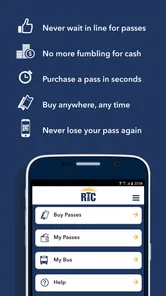
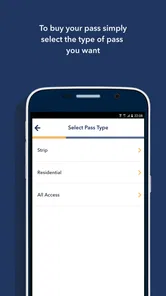
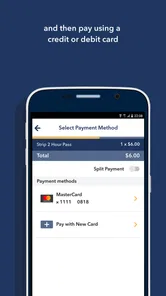
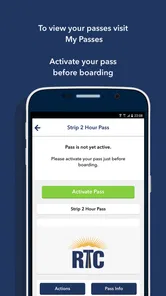
Gone are the days of fumbling for change or worrying about losing your bus pass. The RideRTC app offers a seamless ticketing system that allows you to purchase tickets directly from your phone. Just a few taps, and you're good to go. Plus, the app stores your tickets, so you never have to worry about misplacing them. It's like carrying your own personal ticket booth in your pocket!
Before boarding, I would make a point of opening the ticket section and checking that the ticket I intend to use is available. That quick check is particularly sensible if you are travelling with someone else or juggling bags, directions, and a boarding decision at once. Keeping a phone charged is part of relying on mobile ticketing, too; anyone who prefers a physical backup or does not want to depend on a phone during a trip may be more comfortable using another fare option when available.
When the local focus is an advantage
For someone visiting Las Vegas for a few days, the practical question is often not “Which app has the most features?” but “Can I make this particular trip by bus without making the day harder?” I would use RideRTC to investigate one or two planned journeys before building a whole itinerary around transit. That helps reveal whether a bus route makes sense from the actual starting point, rather than assuming that a nearby-looking destination is automatically easy to reach.
There is also a useful distinction between choosing a route and managing the wait. A general map is often better for comparing walking, driving, and multiple transport choices across a broad area. Once I know I want a Southern Nevada bus, a transit-specific app is the more focused place to check its schedule, watch its approach, and deal with ticket access. Keeping both kinds of tool available can be more practical than expecting one app to answer every travel question.
Explore Las Vegas Like a Local
One of the coolest things about the RideRTC app is how it makes exploring Las Vegas a breeze. The app provides suggestions for attractions and popular destinations, making it perfect for tourists who want to get the most out of their visit. Even as a local, I've discovered new spots I hadn't known about before. It's like having a tour guide right in your pocket, ready to show you the hidden gems of the city.
That local focus is also the main trade-off. RideRTC makes the most sense when your plans involve public transportation in Southern Nevada; it is not the app I would choose as my only tool for a road trip, a walking tour, or travel across a wide range of cities. A general map app is usually better for combining different modes and places, while a transit-focused tool is easier to use when you want route, schedule, tracking, and ticket information in one local place. If you are staying near your destinations and expect to walk or use taxis instead, the app may add little to your day.
Small habits that make the app more useful
I would check the next leg of a journey while I still have time to change plans, not only when I am already at the stop. This is especially helpful on an outing with several destinations: a route that works for the first trip may not be the most sensible choice for the return. Looking at the schedule before leaving a venue can help me decide whether to head for the stop now or stay a little longer, while keeping a second route option in mind avoids treating one itinerary as the only possible way home.
For a group, I would settle the destination and fare plan before boarding rather than trying to coordinate everyone while the bus is arriving. One person can check the route while another keeps track of the group’s starting point and walking direction. That small division of attention can reduce confusion, particularly in an unfamiliar area. I would also keep the phone’s battery in mind if I expect to use stored ticket access; the convenience of a digital ticket depends on being able to show it when needed.
Who will get the most from it
I would recommend RideRTC first to residents who use local buses regularly and to visitors who expect transit to be part of their Las Vegas plans. It may be especially handy for someone who wants to check a bus before leaving a venue, or who would rather keep ticket access on a phone than carry loose fare. A first-time visitor can also use it to think through whether a transit journey is practical before committing to a day’s itinerary.
By contrast, occasional visitors who only need a broad overview of the city may prefer a familiar map app, and people who need a guaranteed arrival time should avoid relying on any live transit estimate as their sole plan. I would also skip treating the app as a substitute for checking the actual fare and route details. Its strongest value is convenience for the local transit part of a journey, not a guarantee that every trip will be simpler than walking, driving, or choosing another option.
Questions worth settling before you rely on it
If you are wondering whether the app itself means you can ride without paying, the answer is no: free downloading and fare costs are different things. I would open the ticket and fare information for the journey I intend to take and make sure I understand what I need before heading to the stop. That is a better approach than assuming a ticket shown in the app is automatically the right one for every trip.
If you are asking whether the live bus view is enough to plan an appointment, I would use it as a helpful check, not a promise. A vehicle marker can inform your decision about when to leave, but it cannot remove the need to allow time for walking, waiting, and the rest of the journey. And if you are visiting outside Southern Nevada, this is not the local transit companion I would choose for that other destination; a general map or the relevant local transit option will fit better.
RideRTC has an average rating of 3.8 from around 1,700 ratings, with about 593 written reviews, and has passed 500,000 installs. It is rated for Everyone, was released in 2016, and version 7.8.35 supports Android 6.0 and up. Those figures suggest a well-established local utility, though they do not tell me whether it will suit every traveller. For me, its value depends on whether I will actually use Southern Nevada transit: when I do, having route planning, bus tracking, and ticketing together is a practical convenience; when I do not, a general map or another way of getting around is the better choice.
My verdict on its value
For a resident who rides local buses often, the time saved by keeping route checks, vehicle tracking, and ticket access close together can make this a sensible everyday tool. A visitor has a narrower reason to install it: I would do so when at least one planned trip depends on Southern Nevada transit, then decide whether it earns a permanent place on my phone. Since the download is free, trying it carries little financial commitment, but that does not remove the need to check fares or keep a backup plan for important arrivals.
I would skip it if my plans were mostly walking, driving, or travelling beyond the area it serves, and I would not make it my only source of timing for a time-critical commitment. For the right local journey, though, I like having a transit-focused option instead of forcing a broad map app to do all the work. My recommendation is straightforward: try it when Southern Nevada buses are part of your routine or itinerary, and use it alongside a general map when the wider trip calls for one.
In conclusion, the RideRTC app is more than just a navigation tool; it's a complete transit solution. With its easy-to-use interface, real-time tracking, and seamless ticketing system, it takes the stress out of public transportation. Whether you're commuting to work or exploring the city, this app ensures you do it efficiently and enjoyably. So, next time you find yourself in Las Vegas, make sure you have RideRTC downloaded on your phone. Trust me, your travel experience will never be the same!
RideRTC Frequently Asked Questions
Who is RideRTC intended for?
RideRTC is aimed at both Southern Nevada residents and visitors who want a mobile tool for public transit. Its focus on the region makes it relevant for people exploring local routes as well as those who regularly travel around the Las Vegas area. The app is free to download and is rated for Everyone, so it may suit a broad range of users.
What devices and software versions can run RideRTC?
RideRTC is available for Android and iOS devices. On Android, the listed minimum requirement is version 6.0, so it is worth checking your device’s software before installing. The app’s current version is 7.8.35. Keeping an app updated can help you use its available features and maintain compatibility with your device.
What is RideRTC and how does it work?
RideRTC is a convenient mobile application developed by the Regional Transportation Commission of Southern Nevada. It allows users to plan, track, and pay for their public transportation needs in the Las Vegas area. By using the app, you can access real-time bus tracking, view schedules, and purchase digital tickets directly from your smartphone. This streamlines your travel experience, making it easier to navigate the city efficiently.
Is RideRTC available for both Android and iOS devices?
Yes, RideRTC is available for both Android and iOS platforms. You can download it for free from the Google Play Store for Android devices and the Apple App Store for iOS devices. The app is designed to be user-friendly, ensuring that both Android and iOS users have a smooth experience when managing their public transportation needs in Las Vegas.
Are there any costs associated with using RideRTC?
While downloading the RideRTC app is free, users will incur expenses when purchasing tickets or passes for public transportation. The app provides various ticketing options, including single ride tickets and multi-day passes. Prices vary depending on the type of ticket or pass you choose, but using the app to buy tickets often offers convenience and potential savings through special promotions.
Pros
- User-friendly interface with intuitive navigation.
- Wide range of transportation options available.
- Real-time updates on bus and train schedules.
- Affordable pricing for frequent commuters.
- Integration with local transit systems.
Cons
- Limited coverage in rural or remote areas.
- Occasional app crashes or slow loading times.
- Requires constant internet connection.
- In-app advertisements can be intrusive.
- Limited payment options for certain users.











