

Rhinoplasty App: Nose Editor
- 3.00
- 1.7
- Installs
- 100.00K
- Price
- Free
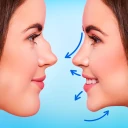
Screenshots
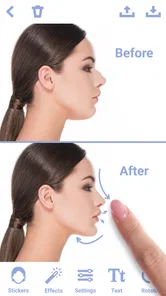
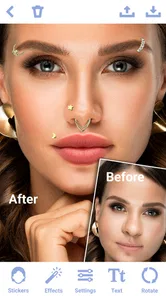
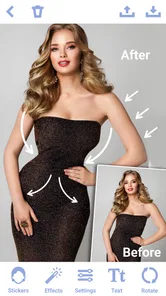
Analysis by Reviewed
Ever found yourself staring at your reflection, pondering how a little tweak to your nose might change your look? Say hello to the Rhinoplasty App: Nose Editor, a nifty tool to toy around with your facial features without the commitment of actual surgery. It’s like a digital mirror that lets you experiment with your nose until you find that perfect look.
The first-week appeal
When I first try a focused nose-editing app, the appeal is immediate: I can make a visible change to a portrait without learning a full photo-editing suite. This free beauty app is aimed at Teen users, and its simple premise makes sense for a quick experiment, a playful profile-picture idea, or a private comparison before deciding whether a certain look suits me. The developer is Photo Editors & Games. I’d treat the result as a creative mock-up, not a preview of what surgery would actually produce.
A practical first session is to begin with a clear, front-facing photo and make one small adjustment at a time. I’d save the untouched original separately, then compare the edit at the same screen size and zoom. That helps me notice when a subtle tweak starts to distort nearby details, such as the nostrils or the line between the nose and cheek. The useful test is not whether the edit looks dramatic, but whether it still feels like the same person.
Playful Transformation
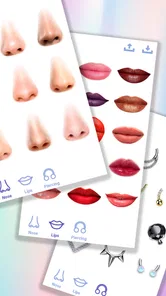
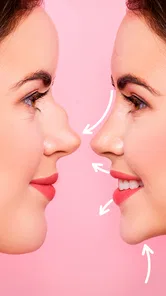
First off, let’s talk about what the app does. It’s not just about editing your nose; it’s a whole new world of facial remodeling. With a simple swipe, you can elevate your nose bridge, narrow down the nostrils, or even experiment with different shapes and sizes. The user interface? Super intuitive. You don’t need a degree in graphic design to navigate this app. Just tap, drag, and pinch to your heart’s content.
Features That Make You Go Wow!
The app is packed with cool features. One that caught my eye is the before-and-after slider. It’s a real treat to see your original photo side by side with your edited masterpiece. Also, the app offers a plethora of filters and effects to enhance the final image. You can even adjust the lighting to see how your new nose would look in different conditions. It’s like having a mini photo studio in your pocket!
Another standout feature is the ability to share your edited photos directly from the app. Whether you’re looking to get opinions from friends or simply flaunt your new look on social media, this feature makes it seamless. Just a few taps and you’re good to go.
Making a useful comparison
For a casual, nose-specific experiment, this kind of editor is more direct than a general photo app: I can focus on one feature rather than search through broad retouching controls. A full photo editor is still the better choice if I need precise masking, layered adjustments, or a polished portrait with changes across the whole image. For trying makeup or face effects, a general filter app may be more useful; for judging a possible cosmetic procedure, neither should stand in for a qualified professional’s advice.
More From Our News Desk

 Gmail
GmailGmail in a Busy Inbox: Who Benefits Most?
From first account to crowded workday, Gmail earns its place through dependable search and flexible sorting—but its best fit depends on how much inbox maintenance you can tolerate.

 Prime Video
Switching to Prime Video: What Changes in Your Viewing Routine
Prime Video can make a compelling second home for streaming, but switching means learning a different catalog, rental layer, and route from browsing to playback.

 Universal TV Remote Control
Universal TV Remote Control Works Best as a Reliable Backup
A phone remote earns its place through quick setup and reliable habits. Here is how to get more from Universal TV Remote Control—and where its limits show.

 Weather - By Xiaomi
Weather by Xiaomi Review: Clear at a Glance, Less Clear Up Close
Xiaomi’s weather app makes everyday forecasts quick to scan, but its calm surface can leave useful details and recovery paths harder to find than they should be.

 X
XX Under Pressure: Can It Recover When Posting Goes Wrong?
A resilience-focused review of X, examining setup, mistaken posts, interruptions, weak connections, and the gaps that matter when recovery needs to be dependable.

 Clash of Clans
Clash of Clans Is Won Between the Battles
Its raids are quick; its community is a long-term project of coordination, teaching, rivalry, and shared responsibility—with all the friction that entails.
Latest News



There’s also a social trade-off. Sharing can make a playful edit more enjoyable, but I’d think twice before sending a heavily altered face as though it were an honest representation. If I’m asking friends for reactions, I’d label it as an edit and keep the original nearby. That keeps feedback focused on the imagined style rather than creating confusion about what the photo shows.
Why You Might Love It
So, why should you give the Rhinoplasty App: Nose Editor a shot? For starters, it’s fun and incredibly easy to use. Plus, it offers a chance to see potential changes without any surgical risks. It’s also a great conversation starter. Imagine showing your friends how you’d look with a different nose—it’s bound to spark some laughs and intriguing discussions!
One thing I personally love is the app’s ability to help users explore self-expression. In today’s world, where individuality is celebrated, having a tool that allows you to experiment with your appearance is quite empowering. It’s all about embracing change and seeing yourself in a new light.
Month-to-month value
The first few edits are likely to be the most entertaining. After that, I’d ask whether I have a recurring reason to open it: maybe I enjoy making alternate portraits, comparing a few styles for a personal project, or sharing a lighthearted edit with someone close. If I only wanted one quick novelty photo, I might not keep returning. That’s not a flaw so much as the nature of a narrowly focused tool; its value depends on whether this particular kind of experiment fits into my routine.
Its audience numbers suggest that other people have tried it, but the average rating is low: it has over 100,000 installs and averages 1.7 from around 140 ratings. I’d take that as a reason to approach it with modest expectations and judge the actual results on my own device, rather than assume popularity means a consistently satisfying experience. It is free, which makes a brief trial easy to justify, but free access alone doesn’t make it worth keeping if the edits don’t look natural to me.
Maintenance and sources of fatigue
There is little reason to turn a one-off photo experiment into a chore. I’d keep the workflow simple: choose a suitable image, make restrained changes, compare against the untouched shot, and save only versions I genuinely like. Repeating tiny edits without a clear goal can become tiring, especially when each new pass makes the image less believable. A realistic everyday use might be checking a portrait before changing a profile picture: I can test a subtle look at home, leave it for a while, then decide whether I still like it with fresh eyes.
The main limitation is that a photo edit cannot tell me how a real change would look from every angle, in motion, or under different conditions. Lighting, camera position, and expression can all affect the apparent shape of a nose. I’d also be careful not to let a playful tool turn into a source of pressure about my appearance. If editing starts making me feel worse about an ordinary photo, stepping away is the better choice.
Rhinoplasty App: Nose Editor runs on Android 5.1 or later and is rated Teen. It was released on September 24, 2024, so it is a relatively recent option rather than a long-established editing habit. I’d check that my phone meets the operating-system requirement before trying it, and I’d decide whether I’m comfortable sharing any edited image before using the share option. Those small choices make the experience more intentional and help keep a casual experiment in perspective.
The Final Verdict
All in all, the Rhinoplasty App: Nose Editor is a delightful addition to the world of photo editing apps. It’s engaging, user-friendly, and offers a unique twist on traditional photo enhancement. Whether you're just curious or considering a real-life change, this app serves as a fantastic starting point. So why not give it a whirl? You might just discover a new side of yourself.
My longer-term verdict is more measured: I’d recommend it to someone who wants a quick, nose-focused visual experiment and is happy to treat the result as playful editing. I’d skip it if I needed professional-grade control, a dependable guide to surgery, or a photo tool I could use for many different jobs. The app earns space on my phone only if I keep finding a reason to revisit that specific experiment; otherwise, enjoying it briefly and moving on is a perfectly reasonable outcome.
Choosing photos that make the edit more useful
Photo choice has more influence on the result than I expected from a tool with such a focused purpose. A front-facing picture taken in even light gives me a steadier point of comparison than a selfie shot from above or at an angle. Strong shadows can make the bridge or nostrils look different before I touch anything, while a tilted head can make a small adjustment appear much larger. I’d start with a familiar, ordinary portrait rather than a carefully posed image, because it is easier to judge whether the change still looks like me.
I’d also avoid comparing pictures taken under different conditions. If I use one image with bright window light and another with a beauty filter or a different camera angle, I can’t tell whether I prefer the nose edit or simply the lighting. A useful little discipline is to keep the base photo fixed and change one thing per version. That makes the before-and-after view more informative and helps prevent the app’s effects from becoming a pile of overlapping alterations.
A low-pressure way to try it
For someone curious but uncertain, I’d make the first experiment private and deliberately small. I would edit a copy, leave the original untouched, and take a break before deciding whether the result feels appealing. Looking again later is a better test than repeatedly nudging the controls while focused on one detail. When I stare at a face for too long, tiny differences can start to feel more important than they would in an everyday conversation or a normal photo feed.
This is also why I wouldn’t use an edited image to set a target for a real procedure. The app can help me communicate an aesthetic idea in broad terms, but a still image cannot account for healing, anatomy, facial movement, or the way a change would work with the rest of someone’s features. If a cosmetic decision is serious, the right next step is a conversation with a qualified clinician, not treating a phone edit as a prediction. Used lightly, though, the app can help someone articulate what they are curious about without making a commitment.
Who is likely to get something from it?
I can see the strongest fit for someone who enjoys making playful portrait variations, wants a simple place to test a nose-focused look, or needs a visual prompt for a conversation with a trusted friend. It may also suit a casual creative project where the point is to explore a character’s appearance rather than present a realistic photograph. The narrow focus is a benefit in those situations: I don’t have to turn a small idea into a full editing session with a complicated set of tools.
On the other hand, I’d steer away if I wanted detailed retouching across an entire portrait, precise control over edges, or a dependable way to assess a medical outcome. A general editor is more sensible for broader photo work, while someone looking for a professional surgical consultation needs a human expert. I’d also recommend skipping it if appearance editing tends to trigger unhelpful comparisons. A free, easy experiment is only worthwhile when it stays fun or genuinely clarifies an idea.
Keeping the novelty from turning into a habit
The app’s best maintenance plan is probably no maintenance plan at all. I wouldn’t set reminders or feel obliged to make new edits just because the app is on my phone. Instead, I’d keep it available for a specific occasion: a playful comparison, a personal portrait idea, or a short experiment with a photo I already like. If those moments don’t come up again, deleting it would be a reasonable way to keep my phone focused on tools I use more often.
There is a subtle fatigue risk with single-feature editors: once I’ve tried the main transformation, later sessions can turn into searching for a more impressive result rather than solving a new problem. I’d stop when the image starts looking less believable, not keep pushing just because another adjustment is possible. That stopping point protects both the quality of the portrait and my perspective on the face in the original. The app works best as a brief creative detour, not a daily measuring stick.
What to expect before sharing
Sharing is convenient for getting a reaction, but I’d choose the audience and framing carefully. A friend may respond differently if they think a photo is genuine than if they know it is a playful edit, so a little context matters. I’d also use a copy of a portrait I’m comfortable circulating and keep the unedited version for my own reference. That simple separation makes it easier to enjoy the experiment without confusing an altered image with a personal record.
For a profile-picture decision, I’d look at the result at the size people will actually see rather than judging it only zoomed in. Tiny edits can disappear in a thumbnail, while strong changes may draw attention in a way I didn’t intend. I’d ask myself whether the whole picture feels natural, not just whether the nose shape matches an imagined preference. That practical check is more useful than polishing details nobody will notice on a small screen.
Lasting value depends on the reason for returning
After the novelty wears off, I don’t think this needs to become a regular part of anyone’s routine. Its appeal is tied to a particular question—how might this portrait look with a different nose shape?—and that question may be answered in one sitting. For me, that can still justify trying it, especially because there is no purchase price to weigh against a short experiment. But I’d judge it by whether the result gives me a useful or enjoyable comparison, not by how long I keep the app installed.
In the end, this is a small, specialized creative tool with a clear boundary. It can make a portrait experiment accessible, help me compare a few ideas, and offer a quick way to share a clearly edited image. It cannot replace a full photo editor, provide medical guidance, or promise a realistic view of a real-world change. If I go in with those limits in mind and keep the process light, I can see why someone would try it; if I need more than a playful visual mock-up, I’d choose another route.
Rhinoplasty App: Nose Editor Frequently Asked Questions
Who developed Rhinoplasty App: Nose Editor, and what kind of app is it?
Rhinoplasty App: Nose Editor is a beauty app from Photo Editors & Games. Its focus is editing nose photos with face filters and stickers, so users can explore a changed look in an image. It is a photo-editing experience rather than a medical tool, and its results are best treated as visual edits for personal exploration.
What age rating does Rhinoplasty App: Nose Editor have?
Rhinoplasty App: Nose Editor has a Teen content rating. That makes the age label worth checking before downloading, particularly if a younger person will use the app or a parent is choosing apps for a device. The rating describes the app’s content classification; it does not make the editor a source of medical guidance or a way to predict surgical results.
What is Rhinoplasty App: Nose Editor?
Rhinoplasty App: Nose Editor is an innovative mobile application designed to help users visualize potential changes to their nose's appearance. Using advanced photo editing tools, this app allows individuals to simulate the effects of rhinoplasty or other cosmetic adjustments in a virtual environment. It's ideal for those considering surgery or simply exploring aesthetic possibilities.
How does Rhinoplasty App: Nose Editor ensure accuracy in its simulations?
The app utilizes sophisticated image processing algorithms to provide realistic simulations of nose alterations. By allowing users to upload photos and apply various filters and adjustments, it mirrors potential surgical outcomes. However, it's essential to understand that the app offers approximations and should not replace professional medical advice or consultations with a qualified surgeon.
Is Rhinoplasty App: Nose Editor safe to use on my device?
Yes, Rhinoplasty App: Nose Editor is safe to use on both Android and iOS devices. The app adheres to standard security protocols, ensuring that your data and personal information remain private and secure. Regular updates are provided to enhance functionality and security, making it a reliable choice for users interested in cosmetic simulations.
Pros
- Intuitive user interface for easy navigation.
- Realistic editing effects enhance photos.
- Fast processing with minimal lag time.
- Offers a variety of editing tools.
- No intrusive ads during usage.
Cons
- Limited free features
- premium needed.
- Occasional crashes on older devices.
- In-app purchases can be costly.
- Lacks advanced editing for professionals.
- Privacy concerns with photo access.













