Beauty Plus Princess Camera
- 3.00
- 4.6
- Installs
- 500.00K
- Price
- Free
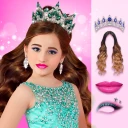
Screenshots
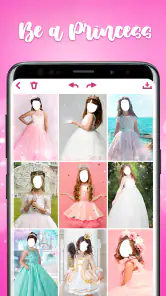
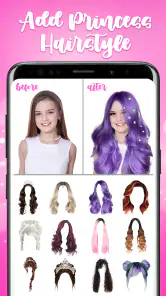
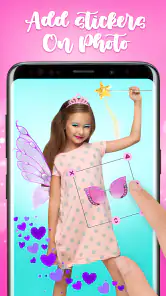
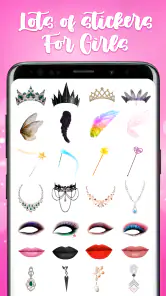
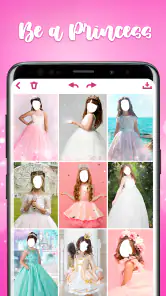
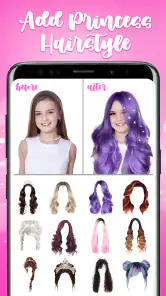
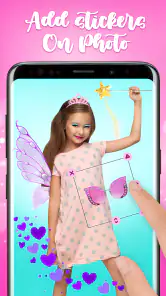
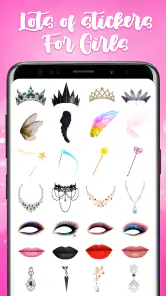
Analysis by Reviewed
I’m drawn to Beauty Plus Princess Camera for one clear reason: it turns a portrait into a playful princess-style makeover without making the process feel like a serious editing project. That focus suits quick, imaginative edits better than painstaking retouching. I’d reach for it when I want a lighthearted result to share with friends, not when I need precise control over every detail of a finished photo.
What the transformation is for
The appeal is the change in mood as much as the change in appearance. A portrait can feel more whimsical with a beauty treatment, decorative effects, and a fairy-tale touch. The app is in the beauty category, and its princess theme gives it a more specific purpose than a general photo editor: it’s for trying out a themed look and enjoying the process, rather than correcting every possible flaw in an image.
That distinction matters if you’re choosing between this and the editor already on your phone. A built-in editor is usually the sensible option for a crop, a small exposure adjustment, or a natural-looking finish. I’d choose this app when the goal is deliberately fanciful. If you want restrained, consistent edits for a work profile or product shot, a conventional editor is likely the better fit.
Making a portrait work
I’d start with a clear, front-facing photo in even light. That gives a beauty effect a better chance of looking intentional, while a busy background or strong shadows can compete with decorative details. Before saving anything, I’d compare the original and edited versions and check the face at normal viewing size; an effect that looks charming while zoomed in can feel overpowering in a small social post.
A useful approach is to make one change at a time. Try the beauty treatment first, then add decoration only if the picture still feels balanced. This keeps the portrait recognizable and makes it easier to spot which part of the edit is doing the work. For a group picture, I’d be more cautious: a princess treatment that suits one face may not look even across several people, so a single-person portrait is the safer starting point.
A quick everyday use
Imagine a friend sends a plain selfie before a themed get-together and asks for something playful to post. I’d use the app to test a few looks, keep the version that still feels like them, and share it as a joke or invitation. That’s a better match than using the same treatment on every photo in an album, where the novelty could wear thin.
For a beauty app, the practical question is whether it’s approachable enough for an occasional user. The Play Store shows an average rating of 4.6 from around 1,500 ratings, and more than 500,000 installs. It’s free to download, with in-app purchases listed at $1.99 per item, so I’d treat optional purchases as a reason to check the choices carefully rather than assume every extra is included. The Teen content rating is also worth considering if a younger family member will use it.
More From Our News Desk

Clash of Clans Is Won Between the Battles

Android Auto Makes the Case for Quieter Car Software

MobiOffice: Transforming Mobile Productivity with Seamless Integration

EA SPORTS FC™ Mobile Soccer: Redefining Mobile Sports Gaming

How Microsoft OneDrive Became a Mobile Productivity Giant

How Google Translate Breaks Language Barriers Effortlessly
A Royal Transformation
When I first launched the Beauty Plus Princess Camera, I was greeted with a sleek and intuitive interface. It's like the app knew I wanted to get straight to the fun stuff. The main feature, of course, is the ability to give yourself that fairy-tale look, and boy, does it deliver. With a plethora of filters and effects, you can tweak everything from your skin tone to adding sparkles that would make Cinderella jealous.
User Experience
The user experience is quite seamless. I found the navigation to be straightforward, with everything laid out in a manner that even the most tech-averse would find welcoming. The editing tools are robust yet easy to use. From adjusting brightness and contrast to adding whimsical borders, it’s all there at your fingertips.
One feature I particularly enjoyed was the live preview. As you select different filters, you can see the changes in real-time. It’s like having a magic mirror that tells you exactly what you'll get before committing to the edit. This is definitely a plus for those who want to experiment without fear.
Creativity Unleashed
Beyond just princess transformations, this app provides a canvas for creativity. You can layer effects, add text, and even incorporate themed stickers to your photos. It’s a bit like having a digital scrapbook that lets you express yourself fully. I spent a good few hours tinkering with various combinations, and it’s safe to say, I wasn’t bored!
Moreover, the app updates its library frequently, which means there's always something new to try. Whether it’s seasonal themes or trending styles, you’ll find fresh content that keeps the app exciting.
Using the effects with intention
The live preview is most useful when I treat it as a comparison tool, not just a way to chase the most dramatic option. I pause on a look, inspect the face, then switch back to the unedited image before deciding. That small habit helps me notice whether the effect is adding a playful mood or simply covering up the details that made the portrait feel personal in the first place.
For a shareable image, I’d also plan the crop before spending time on decorations. A sticker or border can look balanced in the full photo but become crowded once the image is displayed as a small square or circle. I’d keep the subject near the center, leave some breathing room around the face, and avoid adding several competing accents. The point is not to use every available treatment; it’s to make one clear choice that reads at a glance.
Text and themed stickers make the app more useful for a quick invitation or greeting than a plain filter tool. I’d keep any message short and check that it remains readable against the photo. If the image is meant to be saved for a birthday card or a family group chat, a restrained combination of one decorative element and a brief caption is easier to understand than a collage of effects.
Where it fits among photo editors
Compared with a standard phone editor, this app is the more playful choice. The built-in option is usually faster for routine fixes and better suited to keeping a natural look; here, the appeal is a themed portrait and the chance to experiment with a princess-inspired finish. That makes the two approaches complementary rather than interchangeable. I’d make basic corrections elsewhere if needed, then use this app when the image should feel deliberately fanciful.
It also occupies a different lane from a dedicated retouching editor. Someone who wants careful control over tiny facial adjustments, repeatable presets, or a uniform look across a portfolio will probably be happier with a tool built around precision. The princess styling is the point here, and that focus can be a strength when the brief is fun but a limitation when the brief is subtle. I wouldn’t choose it for a professional headshot or a product image where decorations could distract from the subject.
If you are deciding whether to install it before a one-off event, think about how you normally use photos. For an occasional themed selfie, a free app with optional purchases can be an easy way to try a different look. If you regularly edit many images, compare the time spent opening a separate editor with the control and consistency you need. A specialized effect is worthwhile when you want that style; it is less useful as a replacement for every photo tool on your phone.
Trade-offs before you save
The main trade-off is that a strong beauty or decorative treatment can make faces look less like themselves. That may be exactly what someone wants for a playful post, but it can feel awkward when the image is meant to be a straightforward memory. I’d ask the person in the photo whether they like the result before sharing it, especially if the edit changes the overall impression of their appearance.
Another practical consideration is how much time you want to spend browsing combinations. A live preview makes experimentation inviting, but endless tweaking can turn a quick edit into a longer session. I find it helps to decide on the mood first—sweet, sparkly, or simply silly—then stop once the picture communicates that mood. If none of the looks feels right, keeping the original is a perfectly good outcome.
The free download does not mean every possible extra is necessarily part of the basic experience. In-app purchases are listed at $1.99 per item, so I’d review any purchase prompt before confirming and make sure a child understands that distinction. The Teen rating is another reason to use ordinary judgment about who is using the app and what they are sharing. A themed camera is still a place to think about privacy and consent when other people’s faces are involved.
It’s also worth being realistic about the intended finish. A princess-themed portrait is a novelty edit, not a substitute for thoughtful lighting or a carefully composed photograph. Starting with a clear image makes the effect easier to judge; no decorative treatment can make a distracting background or an unflattering angle disappear in a natural way. If the underlying photo matters more than the playful transformation, I’d retake it or use a straightforward editor first.
Who will enjoy it most
I think it suits someone who likes casual portrait play, wants a quick themed result, and doesn’t need every adjustment to be exact. It can also be a fun option for friends who want to make a lighthearted invitation or create a silly image together. The key is being comfortable with an intentionally stylized finish rather than expecting a subtle camera improvement.
I’d steer away from it if your priority is realistic retouching, a clean professional image, or editing a large batch of photos to match. It is also not the right pick for someone who dislikes decorative effects or would rather have one dependable, neutral editor for all image tasks. In those cases, the phone’s built-in tools or a precision-focused photo editor are likely to feel more useful.
If you’re wondering whether it is suitable for an older Android device, the app supports Android 5.1 and later. It was released on December 13, 2020, and is developed by Photo Editors & Games. Those details make it easier to judge basic compatibility, though I’d still consider how well any app fits your own device and editing habits before making it part of your routine.
Final Thoughts
As a beauty app developed by Photo Editors & Games, it makes the most sense for someone who enjoys themed portrait edits and wants a low-pressure way to experiment. I’d skip it if I needed dependable fine retouching, a natural result, or a consistent visual style across a large batch of images. The version released on December 13, 2020 supports Android 5.1 and later, which may help when deciding whether it suits an older device.
In the age of social media, where every picture speaks a thousand words, Beauty Plus Princess Camera certainly helps you stand out. It's a delightful blend of simplicity and creativity, making it a must-have for anyone looking to add a touch of magic to their photos. Whether you're prepping for a themed party or just want to have some fun, this app is your go-to.
Give it a whirl, and who knows? You might just find your inner princess waiting to be unveiled.
Beauty Plus Princess Camera Frequently Asked Questions
Is Beauty Plus Princess Camera suitable for teens?
Beauty Plus Princess Camera is a beauty app intended for users aged Teen and older. Its focus is photo editing and playful princess-themed effects, so it may appeal to people who enjoy adding decorative touches to selfies. As with any photo app, teens should consider what images they choose to edit and share, and follow their family’s guidance about using camera and photo features.
What features does Beauty Plus Princess Camera offer?
Beauty Plus Princess Camera provides a range of features designed to enhance your photos, including filters, stickers, and effects that give your images a princess-like transformation. Users can also enjoy tools for skin smoothing, eye enlargement, and smile enhancement, catering to beauty enthusiasts who want to add a magical touch to their selfies.
Is Beauty Plus Princess Camera free to use?
Beauty Plus Princess Camera is available as a free download with optional in-app purchases. While many features are accessible for free, some premium filters and effects require a purchase. Users can choose to buy these additional features to enhance their photo editing experience further. In-app items cost $1.99 each, so it is worth checking purchase details before choosing an extra.
How user-friendly is Beauty Plus Princess Camera for beginners?
Beauty Plus Princess Camera is designed to be user-friendly, with an intuitive interface that makes it easy for beginners to navigate. The app provides simple instructions and tooltips to guide new users through the editing process, allowing them to create stunning photos with minimal effort and technical knowledge.
Can I use Beauty Plus Princess Camera offline?
Yes, Beauty Plus Princess Camera can be used offline once it is fully downloaded and installed on your device. However, some features that rely on online resources, such as downloading new filters or effects, will require an internet connection. Basic editing functions remain accessible without connectivity.
Pros
- Intuitive and user-friendly interface.
- Wide range of filters and effects.
- High-quality photo editing tools.
- Frequent updates with new features.
- Easy sharing options to social media.
Cons
- Contains in-app advertisements.
- Limited features in free version.
- Requires in-app purchases for full access.
- May consume significant device storage.
- Occasional app crashes reported.
- Category
- Beauty
- Version
- Varies with device