

Jewelry Women Jewellery Photo
- 10.00
- 4.5
- Installs
- 1.00M
- Price
- Free

Screenshots
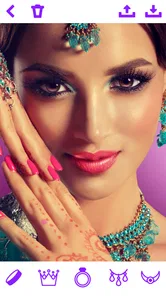
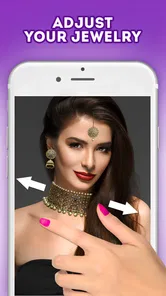
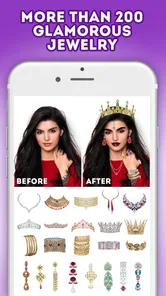
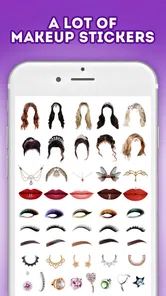
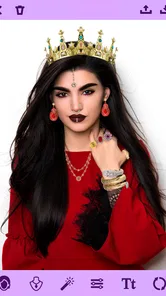
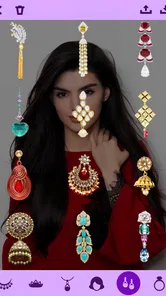
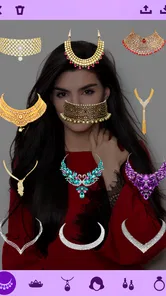
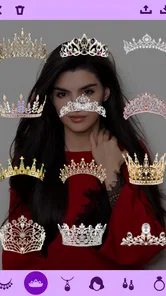
Analysis by Reviewed
I like the idea of testing a jewelry look before committing to it, especially when I’m choosing an accessory for a photo rather than shopping for a specific item. Jewelry Women Jewellery Photo is a beauty photo-editing app built around that simple task: adding jewelry to a picture and adjusting the result. I’d treat it as a playful styling tool, not a precise preview of how a real piece will fit or look in person. That distinction matters, and it makes the app most useful when you want to explore an image or get a second opinion.
What the app is designed to do
The basic appeal is direct: choose a photo, place jewelry on it, and see whether the combination works. The app is free to install, with in-app purchases listed at $1.99 per item. It comes from Photo Editors & Games and is aimed at people who want a beauty-focused edit without learning a full image-editing workflow. Its Teen content rating is worth keeping in mind if you are choosing apps for a younger user.
It has been available since August 11, 2020, and runs on Android 5.1 or later. That release date tells me the app has been around for a while, but it does not by itself tell me what has changed over time. The current public snapshot is a 4.5 average from around 2,500 ratings, with over a million installs. Those figures suggest that many people have tried it, though a rating alone cannot tell you whether its editing style will suit your photos.
Trying a look without turning it into a shopping decision
I find this kind of editor most useful for visual play and presentation. You might be putting together a profile picture, testing an accessory idea for a party photo, or simply wondering whether a necklace shape draws attention toward your face. In those situations, the goal is not to prove that a particular product will fit. It is to see how an added detail changes the mood and balance of an image.
A practical way to use it is to start with a clear, front-facing portrait and make one change at a time. Try an earring style first, then compare the result with a necklace added separately. If you add several pieces at once, it becomes harder to tell which one is helping the composition. I would also keep the original image beside the edit so that the accessory stays a choice rather than taking over the whole portrait.
Where the editing idea has limits
Any sticker-style jewelry edit depends heavily on how well the added piece aligns with the photo. A turned head, hair covering an ear, a high neckline, or a shadow across the neck can make placement look less convincing. Even careful resizing and rotation cannot make a flat graphic behave exactly like jewelry responding to a person’s pose, lighting, or movement. I would use the result to judge general style and placement, not material quality, weight, comfort, or an exact fit.
That is also why I would not use an edited picture as the only basis for buying an expensive piece. A digital overlay cannot establish whether a chain length is right or whether a metal tone matches your skin in natural light. If you are comparing real products, a seller’s measurements, return terms, and real-world photographs are more useful. This app is better for brainstorming than for replacing those checks.
More From Our News Desk

 Gmail
GmailGmail in a Busy Inbox: Who Benefits Most?
From first account to crowded workday, Gmail earns its place through dependable search and flexible sorting—but its best fit depends on how much inbox maintenance you can tolerate.

 Prime Video
Switching to Prime Video: What Changes in Your Viewing Routine
Prime Video can make a compelling second home for streaming, but switching means learning a different catalog, rental layer, and route from browsing to playback.

 Universal TV Remote Control
Universal TV Remote Control Works Best as a Reliable Backup
A phone remote earns its place through quick setup and reliable habits. Here is how to get more from Universal TV Remote Control—and where its limits show.

 Weather - By Xiaomi
Weather by Xiaomi Review: Clear at a Glance, Less Clear Up Close
Xiaomi’s weather app makes everyday forecasts quick to scan, but its calm surface can leave useful details and recovery paths harder to find than they should be.

 X
XX Under Pressure: Can It Recover When Posting Goes Wrong?
A resilience-focused review of X, examining setup, mistaken posts, interruptions, weak connections, and the gaps that matter when recovery needs to be dependable.

 Clash of Clans
Clash of Clans Is Won Between the Battles
Its raids are quick; its community is a long-term project of coordination, teaching, rivalry, and shared responsibility—with all the friction that entails.
Latest News



Who may enjoy it, and who may prefer another editor
If you like experimenting with portraits, making playful before-and-after images, or asking friends which styling direction they prefer, this is an approachable place to start. The narrow focus can be a plus: you do not have to build a collage or learn a general-purpose editor just to see a jewelry-inspired variation. Someone who only wants a quick visual idea may find that focused approach less distracting than a large editing suite.
If you need precise retouching, realistic lighting adjustments, detailed layers, or a polished product mock-up, a broader photo editor is probably a better fit. Those tools tend to offer more control over masks, shadows, color, and edge cleanup. The trade-off is that they can take longer to learn. For a casual portrait edit, this app’s focused purpose may be convenient; for a professional presentation, its limited scope is a reason to move on.
I would also skip it if your main aim is to inspect a real item before purchasing. A decorative overlay can help you decide whether you like the idea of a bold earring or a fine necklace, but it is not a substitute for trying on the item or viewing an accurate retailer preview. Keeping that boundary clear avoids expecting a beauty editor to do a job it was not designed for.
Making a portrait edit look more considered
For a more useful comparison, choose a photo with enough room around the face and neck. A close crop can cut off the area where a necklace would sit, while a busy background can make a small accessory hard to judge. If you are choosing between two looks, keep the photo and crop identical; changing both the jewelry and the framing makes the comparison less fair.
A realistic everyday workflow
Imagine getting ready for a family event and deciding between a simple neckline and a more dressed-up look for a portrait. I would take or choose a well-lit photo, make a copy to preserve the untouched version, and test one accessory at a time. Then I would look at the image at normal screen size rather than zooming in immediately. At a close zoom, tiny alignment flaws can dominate; at the size people will actually see, the overall impression matters more.
Before sharing, I would check the edges around the ears and neck, since those are the spots where an overlay can look detached. A slight adjustment in size or angle may help, but forcing a piece into a position that conflicts with the pose usually makes the edit less believable. If it still looks pasted on, I would choose a different portrait rather than spending time trying to rescue a poor match.
Small choices that improve the result
One useful trade-off is to favor a photo whose lighting already resembles the look you want. A bright, evenly lit portrait gives you a cleaner basis for judging a light accessory; a dramatic shadow can make even a well-placed graphic seem out of place. This does not make the overlay physically realistic, but it reduces the visual mismatch between the added detail and the picture.
I would also avoid judging color from a single screen or under one viewing condition. Display settings affect how warm gold or cool silver appears, so treat the edit as a composition test rather than a color guarantee. If you are deciding what to wear, compare the image with the actual accessory in ordinary daylight when possible. That quick check is more dependable than relying on a phone edit alone.
For advice from friends, send two restrained alternatives instead of a crowded collage of every option. A simple comparison makes it easier for someone to comment on the shape or overall effect. It also helps you notice your own preference: if you keep returning to one version, that may be a better clue than asking others to choose from a dozen busy edits.
Sharing and keeping control of the image
The app is presented as a way to share finished looks, which can make it handy for informal feedback or a lighthearted post. I would still review the full image before sending it anywhere. Check that the chosen portrait is one you are comfortable sharing and that the edit does not expose details you would rather keep private. The same care applies when asking for opinions in a group chat: the image can travel beyond the first person who receives it.
If you are editing a photo of someone else, get their permission before sharing the result. That is especially important for a portrait that could be mistaken for a genuine photo of them wearing a particular item. A small note that it is an edited styling idea can prevent confusion, particularly if the image is being used to discuss a purchase or outfit.
What its history can—and cannot—tell you
The app’s release date gives a useful point of context: it is not a newly launched concept, and its continued presence alongside a sizable install base suggests ongoing interest in this kind of quick photo play. But age and popularity do not establish that the editing experience has evolved in a particular way. I would avoid assuming that a current interface includes features simply because similar apps have added them.
For someone who has used it before, the sensible test is practical rather than historical: open a portrait you know well, try a simple accessory placement, and decide whether the result is easy enough to make and share. If the available choices and controls meet your needs, there is no need to switch just because a newer editor exists. If you now want more nuanced retouching or more control over how an object blends into a scene, that is a clear reason to compare alternatives.
What I would check before settling on it
Because a focused editor can feel very different depending on the photo, I would test it with the kind of image I actually plan to use—not just a sample portrait that happens to be easy to edit. Look at whether the accessory remains aligned when the face is angled, whether its size seems balanced against the features, and whether the final picture still looks like the person. Those checks are more useful than trying to make every image fit the same template.
It is also reasonable to start with the free download and decide whether the available experience is enough before considering any paid item. The listed in-app purchase price is $1.99 per item, so I would make a purchase only if a specific option is useful to me, rather than paying in the hope that it will solve a mismatch caused by the source photo. A better portrait often improves the result more than adding another decorative choice.
My overall take
I see Jewelry Women Jewellery Photo as a small, purpose-built option for people who want to test jewelry-inspired styling on a portrait without taking on a complicated editing project. It is at its best when the stakes are low: trying out a visual direction, making a fun image, or asking someone which version feels more balanced. Its limitations matter when realism, exact product decisions, or professional-level control become important.
So my recommendation is conditional. If you enjoy quick beauty edits and understand that an overlay is only an approximation, it is worth trying as a free starting point. If you need a dependable preview of a real purchase, detailed image compositing, or a result that stands up to close inspection, I would choose a more specialized tool or an actual try-on option instead. The best use is to let the app spark an idea, then make the final decision with the real accessory and the real-world details in view.
Have you ever found yourself dreaming of how you'd look adorned in exquisite jewelry but couldn't quite visualize it? Well, the Jewelry Women Jewellery Photo app is here to make those dreams a reality, without having to leave the comfort of your home. This app is a delightful little tool that allows you to virtually try on a dazzling array of jewelry pieces and see how they complement your style. Let's dive into what makes this app a must-try for any jewelry enthusiast!
Discover Your Style with Ease
First things first, the app is incredibly easy to use. You simply upload a photo of yourself, and voila! You're ready to start experimenting with different jewelry pieces. The interface is straightforward and user-friendly, which means you don't need to be a tech wizard to navigate through it. The app provides a wide selection of necklaces, earrings, and more. It's like having a virtual jewelry box that you can dip into whenever you feel like playing dress-up.
Customization at Your Fingertips
One of the coolest features of this app is the level of customization it offers. You can adjust the size and angle of the jewelry pieces to make them fit perfectly on your uploaded photo. This means you can get a realistic view of how each piece will look on you, which is super helpful if you're planning to purchase a similar item in real life. The app even allows you to mix and match different pieces to create your perfect look. It's like having a personal stylist right on your phone!
Realistic Visuals
Now, let’s talk about the visuals. The app boasts high-quality graphics that make the jewelry look incredibly realistic. You can almost feel the sparkle and shine jumping off the screen. This attention to detail is what sets this app apart from other virtual try-on apps. Whether you're trying on a pair of diamond-studded earrings or a simple gold chain, the app ensures that each piece looks as lifelike as possible.
Perfect for Sharing
Once you've crafted your ideal look, the app makes it easy to share your creations with friends and family. Whether you're seeking advice on which piece suits you best or just want to show off your style, you can share your photos directly to social media platforms or via messages. It's a fun way to engage with others and get feedback on your style choices.
All in all, the app is a fantastic tool for anyone who loves jewelry and wants to experiment with different looks. It's easy to use, offers a ton of customization options, and provides realistic visuals that make virtual try-ons a breeze. So, why not give it a whirl and see how you can sparkle?
Jewelry Women Jewellery Photo Frequently Asked Questions
Does Jewelry Women Jewellery Photo need an internet connection?
Before downloading, it is useful to consider how you plan to use the app. Jewelry Women Jewellery Photo is a beauty photo editor for adding jewelry to photos, so you can explore its photo-editing purpose and check which features are available on your device. If you expect to use it while offline, review the app’s behavior after installation and try the features you need before relying on them away from a connection.
What is Jewelry Women Jewellery Photo app?
Jewelry Women Jewellery Photo is an innovative mobile application that allows users to virtually try on various pieces of jewelry. The app includes a wide array of necklaces, earrings, rings, and other accessories that you can overlay on your photos. This helps users envision how different pieces of jewelry might look on them before making a purchase, making it a fun and practical tool for fashion enthusiasts.
How does Jewelry Women Jewellery Photo app work?
The app utilizes augmented reality technology to superimpose jewelry items onto your photos or real-time images. Users can either upload a photo from their gallery or use the live camera function to see how different pieces of jewelry look in real-time. The app's intuitive interface makes it easy to adjust the size and position of the jewelry to ensure the best fit.
Is Jewelry Women Jewellery Photo app free to use?
While the app offers a selection of jewelry items and basic functionalities for free, it also includes premium features that require in-app purchases. These premium options may include access to exclusive jewelry collections, advanced editing tools, or ad-free experiences. It's essential to review the app's pricing details in the app store to understand what is available for free and what requires payment. In-app purchases are listed at $1.99 per item.
What are the main features of Jewelry Women Jewellery Photo app?
Jewelry Women Jewellery Photo app boasts a variety of features designed to enhance user experience. Key features include a vast library of jewelry styles, easy-to-use editing tools for resizing and positioning, and the ability to save and share your creations on social media. Additionally, the app regularly updates its jewelry collection, ensuring users have access to the latest trends.
Pros
- Intuitive design and easy navigation.
- Large collection of jewelry options.
- High-quality photo output.
- Fast processing and rendering.
- Regular updates with new features.
Cons
- Contains in-app advertisements.
- Limited free features available.
- Requires internet connection.
- Occasional bugs and crashes.
- Some features locked behind paywall.













