

Revealed Travel Guides
- 63.00
- 3.9
- Installs
- 10.00K
- Price
- Free

Screenshots
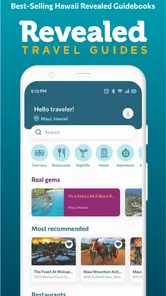
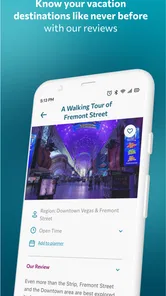
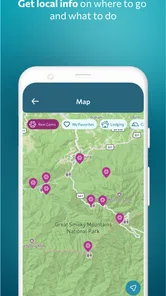
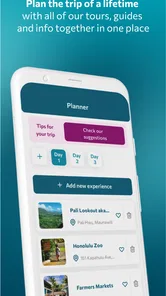
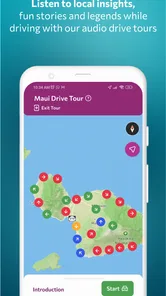

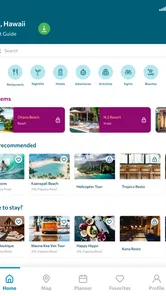
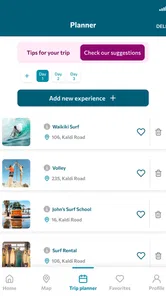
Analysis by Reviewed
Planning a trip around Hawaii can become surprisingly complicated once you move beyond choosing a hotel and booking a flight. You may want background about a place, directions that make sense while driving, and enough context to decide whether a stop deserves part of your day. Revealed Travel Guides aims to bring those pieces together through destination guides and GPS-audio drive tours, with a focus on Hawaii and other travel locations.
I found the app most interesting as a companion for a shared road trip rather than as a complete replacement for every travel tool. One person can handle navigation, another can listen for the next point of interest, and the whole group can make better decisions about where to pause. That division matters in a car, where constantly switching between a map, a browser, and a separate audio guide quickly becomes distracting.
The app is free to download and is listed for everyone, which makes it easy to consider for a household trip. It comes from Wizard Publications, Inc., and sits in the Travel & Local category. Its current version is 6.29.21, and it runs on Android 7.0 or later. The practical question is not simply whether it contains travel information; it is whether the format helps your particular group travel with less planning friction.
How Revealed Travel Guides fits into a shared trip
When I’m planning a trip with other people, I find it helps to decide in advance who will manage the guide and how the group wants to use it. That small agreement keeps the driver focused and makes the audio feel like a shared part of the journey, rather than another phone competing for attention.
A useful role for the passenger’s phone
In a realistic family or group scenario, I would not give the driver the job of exploring the app. The better arrangement is to place it on the passenger’s phone, start the relevant guide before leaving, and let that person listen for the next useful detail. The driver can concentrate on the road while the passenger decides whether a story, landmark, or nearby stop is worth sharing with everyone.
This sounds simple, but it changes how the app should be judged. A printed guide is easy to pass around, yet it cannot react to the drive. A general map is excellent for route planning, but it usually does not provide the same sense of place or spoken context. A standalone travel podcast may offer stories, but it is not built around the movement of your vehicle. The GPS-audio approach sits between those options.
I especially like that arrangement for a day when the group has no fixed schedule. Instead of researching every viewpoint in advance, the passenger can keep an eye on the route and bring attention to places that fit the time available. This is more useful than it may sound: a short stop can be worthwhile when everyone knows why it matters, while an apparently famous location may not justify a long detour for a tired group.
More From Our News Desk

 Weather - By Xiaomi
Weather by Xiaomi Review: Clear at a Glance, Less Clear Up Close
Xiaomi’s weather app makes everyday forecasts quick to scan, but its calm surface can leave useful details and recovery paths harder to find than they should be.

 X
XX Under Pressure: Can It Recover When Posting Goes Wrong?
A resilience-focused review of X, examining setup, mistaken posts, interruptions, weak connections, and the gaps that matter when recovery needs to be dependable.

 Clash of Clans
Clash of Clans Is Won Between the Battles
Its raids are quick; its community is a long-term project of coordination, teaching, rivalry, and shared responsibility—with all the friction that entails.

 Android Auto
Android Auto Makes the Case for Quieter Car Software
The car interface is no longer judged by how much it can do, but by how quietly it helps. Android Auto shows what drivers now expect—and what still gets in the way.

 MobiOffice: Word, Sheets, PDF
MobiOffice: Transforming Mobile Productivity with Seamless Integration
MobiOffice: Word, Sheets, PDF is redefining mobile productivity with a surprising blend of functionality and innovation.

 EA SPORTS FC Soccer Mobile 26
EA SPORTS FC™ Mobile Soccer: Redefining Mobile Sports Gaming
Dive into EA SPORTS FC™ Mobile Soccer, where immersive gameplay and strategic depth transform mobile sports gaming.
Latest News



Where the app helps more than a normal map
Maps answer practical questions such as where to turn, how long a route may take, and what businesses are nearby. They are not always good at explaining the character of the landscape between those points. Revealed Travel Guides is better suited to the “what am I looking at?” question during a drive. That makes it a natural addition to a navigation app, not necessarily a substitute for one.
My preferred workflow would be to use a map for the actual route, then use the travel guide for interpretation and timing. Before setting off, I would choose the broad destination and identify the person responsible for the audio. During the drive, I would avoid making route changes based on a spoken suggestion without checking the map first. This keeps the app in its strongest role: enriching the journey without asking it to do every travel task.
There is also a social benefit. When one person silently reads a web page, the information stays with that person. Spoken guidance can become a shared moment, giving everyone in the car the same starting point for conversation. That is particularly helpful when older children or relatives are joining the trip and do not want to spend the whole day following a formal tour.
Setting expectations before leaving
I would prepare the app while the group still has time and a stable connection. Travel tools are easiest to evaluate when they are opened calmly, rather than for the first time at a roadside pull-off with people waiting. Browse the available guides, identify the destination you actually plan to visit, and decide whether the passenger will manage playback or whether the phone will be passed around.
This preparation is also where household boundaries become important. If several people share a tablet or spare phone, decide whose device will be used for the trip and keep the driver’s phone available for navigation and calls. A shared device can make the guide accessible to everyone, but it can also create confusion if multiple people change screens or settings at once.
I would not treat the app as a reason to hand a phone to a young child in the back seat and assume the trip will manage itself. The experience works best when an adult or responsible older passenger controls the timing. Children can certainly listen and ask questions, but the person managing the device should understand that the app is part of the travel plan, not a babysitting substitute.
Account and purchase boundaries in a household
The free entry point makes it straightforward to try the app without committing immediately. At the same time, in-app purchases range from $0.99 to $29.99 per item, so I would establish a clear rule before letting other household members browse. The simplest approach is to have one adult decide whether a paid guide is worthwhile and complete any purchase personally.
This matters more on a shared device than on a private phone. A child or guest may reasonably assume that tapping a guide is part of normal browsing, while the account holder may see a charge. I would therefore avoid leaving purchase decisions to whoever happens to be holding the phone. The app can still be shared as a listening tool, but spending authority should remain with the person organizing the trip.
I also prefer keeping the travel app separate from the navigation responsibility. If the same person is expected to buy content, select a route, monitor directions, and answer questions from the back seat, the arrangement becomes unnecessarily messy. One adult can handle purchases and planning before departure; another passenger can manage the actual listening once everyone is moving.
Coordinating different travel styles
Every group has a mixture of travelers. One person wants historical context, another wants photographs, and someone else simply wants to reach the beach. An audio guide can help, but it cannot make everyone interested in the same stop. I would use the app as a prompt for discussion rather than as a strict itinerary.
A practical compromise is to agree on a small number of moments when the group will pay attention. For example, the passenger can announce that an interesting section is coming, lower the volume afterward, and let the driver decide whether a safe stopping place is available. This prevents the audio from dominating the entire drive and gives the group room for ordinary conversation.
The app is also useful when plans change, but only if the group treats its guidance as flexible. Weather, traffic, fatigue, and opening hours can all affect a day in Hawaii. If a suggested area no longer fits the route, there is no reason to force it. The value is in adding context to the journey you are already taking, not in obeying every recommendation regardless of circumstances.
Why the GPS-audio format can be a good compromise
GPS-triggered audio has one clear advantage over a conventional guidebook: it can make information feel connected to the road in front of you. Instead of stopping to read a long description, passengers can listen while the landscape changes. That is a more natural fit for scenic drives, where the experience is spread across many miles rather than concentrated at one entrance.
It also avoids some of the weaknesses of a live tour. You do not have to match a group’s schedule or stay with a guide’s pace. A private car can pause, skip, or continue according to the needs of the household. For families with younger travelers, that flexibility is valuable because meal breaks and attention spans rarely follow a tour operator’s timetable.
The trade-off is that an audio guide is less interactive than a person who can answer a specific question. If someone wants detailed advice about accessibility, current road conditions, or a niche interest, a local expert or official source may be more useful. I would use Revealed Travel Guides for orientation and atmosphere, then check practical details elsewhere before making a major detour.
Age, trust, and responsible use
The everyone rating makes the app approachable for a mixed-age household, but an age label does not remove the need for adult judgment during a drive. The main safety boundary is behavioral: nobody should operate the phone while driving, and nobody should treat an audio prompt as permission to stop somewhere unsafe. The passenger should handle the screen and communicate any possible stop well in advance.
For younger children, I would turn the guide into a conversation. Ask them what they noticed, let them choose between two already-approved stops, and explain that the phone is being used for the group rather than for unrestricted browsing. This gives them a role without handing over control of purchases or navigation.
For teenagers, the app can be a good way to share responsibility. A teenager who enjoys geography or photography might manage the listening queue, note places the group wants to revisit, and help compare the guide’s suggestions with the planned route. I would still keep final decisions about driving, spending, and detours with the adults.
Trust also applies to the information itself. I would encourage everyone to treat the narration as travel context rather than a complete authority on every current condition. Roads, closures, weather, and local rules can change independently of an audio guide. The best household routine is to combine the app’s storytelling with current navigation and common sense.
What I would do on an actual day out
Imagine a household leaving in the morning with a broad plan but no desire to schedule every minute. Before departure, an adult opens the app, chooses the relevant Hawaii guide, and gives the passenger control of the phone. The driver starts the route in a familiar map application. Once the car is moving, the passenger listens and shares the most useful sections with the group.
When the audio points toward an area that sounds appealing, the passenger checks whether it fits the route and whether there is a safe, legal place to stop. The group can then choose between continuing, taking a planned break, or saving the idea for another day. This workflow uses the app’s strongest feature without allowing it to disrupt navigation.
For a shared device, I would use the same approach but add a charging plan. A tablet or spare phone may be comfortable for passengers to see, yet it should be secured so it does not become a loose object in the car. If the device is passed around, pause the audio first and make one person responsible for returning it to its holder. These small habits make the experience calmer than having several people reach for the screen.
Where the experience may feel limited
The app’s usefulness depends on whether its guide format matches your travel style. If you prefer building a detailed itinerary with reservations, exact arrival times, and carefully filtered restaurants, you will still need other planning tools. A GPS-audio guide can add atmosphere, but it is not a full trip-management system.
It may also be less appealing to travelers who dislike listening while driving or who want complete control over the order of information. Some people prefer reading a guidebook in advance and arriving with a fixed plan. Others want spontaneous exploration with no narration at all. In those cases, a general map, official destination information, or a traditional book may be the better choice.
Another trade-off is group attention. Audio that delights one passenger may annoy another, especially on a long drive. I would keep the volume moderate, ask before starting a lengthy section, and use pauses rather than forcing the whole car to listen continuously. The app supports shared discovery, but the group still needs to agree on how much shared listening is enjoyable.
Value compared with the usual alternatives
Because the app is free to start, it has a lower barrier than booking a private tour. That makes it attractive for travelers who want some guidance without paying for a scheduled experience or committing to someone else’s timetable. The paid items mean the full value depends on which guides a traveler chooses, so I would begin with the destinations that directly match the current trip.
Compared with a printed guidebook, the app is more convenient during a drive and less useful for quietly comparing many options at a hotel. Compared with a standard map, it offers more narrative context and less precision for detailed route planning. Compared with online articles, it can be easier to consume while moving, but articles remain better for checking current practical details and comparing alternatives side by side.
That makes the app a companion rather than a universal answer. I would recommend it to someone who wants a road trip to feel more informed without turning the day into a formal excursion. I would point a highly organized traveler toward a combination of official sources, mapping tools, and reservation services instead, using this app only for the scenic or educational layer.
My household verdict
Revealed Travel Guides works best when one passenger takes ownership of it, the driver stays focused on driving, and the household agrees on purchases before the trip begins. Its Hawaii-focused travel material and GPS-audio drive tours give a shared car journey more context than a basic map, while the flexible format is easier to fit around children, older relatives, and changing energy levels than a scheduled tour.
I would skip it if I wanted a single app to manage every booking, route decision, and current travel warning. I would also skip it for a group that strongly dislikes shared audio or prefers completely self-directed exploration. Those are not failures of the app; they are signs that its guided listening format is not the right match.
For the right household, though, it is a thoughtful addition to the travel folder. The free price makes trying it sensible, and the everyone rating supports mixed-age use when adults keep control of the device and spending. With an average rating of 3.9 from over a hundred ratings, it has a modest but positive reception, and its install base has passed ten thousand. My recommendation is to test one relevant guide before the main drive, assign a passenger to manage it, and treat the narration as a way to notice more—not as a replacement for safe navigation and good judgment.
Revealed Travel Guides Frequently Asked Questions
Who publishes Revealed Travel Guides, and what destinations does it cover?
Revealed Travel Guides is published by Wizard Publications, Inc. Its focus includes Hawaii, with the app also offering guides and GPS-audio drive tours for destinations beyond the islands. That combination may suit travelers who want destination-specific context while exploring by car, as well as people who are still comparing places to visit. The app is listed in the Travel & Local category.
What is Revealed Travel Guides, and what can I use it for?
Revealed Travel Guides is a travel-planning app designed to help users discover destinations, organize sightseeing ideas, and find useful information before and during a trip. It can be helpful when you want inspiration for places to visit, practical recommendations, and a more structured way to plan an itinerary instead of relying on scattered notes, browser tabs, or printed guidebooks.
Does Revealed Travel Guides work offline?
Offline availability may depend on the specific guide, destination, and app version. Some travel-guide content may be accessible after it has been downloaded, while features that require live maps, updated listings, booking information, or location services may still need an internet connection. It is best to download the relevant destination content before leaving Wi-Fi and test it in advance.
Is Revealed Travel Guides free to download and use?
The app is free to download, while certain guides, destinations, premium features, or additional content may be available through in-app purchases. Prices range from $0.99 to $29.99 per item, and included features can vary depending on the platform and the guide selected. Before confirming a purchase, check the payment screen carefully so you understand what is included and whether the purchase is one-time or subscription-based.
What permissions does Revealed Travel Guides request?
Depending on the features you use, Revealed Travel Guides may request access to your location, internet connection, notifications, or device storage. Location access can support nearby recommendations and map features, while storage access may help save guides for offline use. You can usually manage these permissions in your phone settings, although disabling some may limit specific app functions.
Pros
- Detailed destination guides with useful local recommendations.
- Works well for planning trips around specific interests and locations.
- Clean interface makes browsing travel content straightforward.
- Helpful suggestions can inspire visits beyond the main tourist attractions.
- Suitable for travelers who prefer curated information over generic lists.
Cons
- Coverage may be limited for less popular destinations.
- Some recommendations may become outdated as venues and services change.
- The app may require internet access for complete guide information.
- Content depth can vary noticeably between different destinations.
- It may not replace dedicated tools for maps
- bookings
- or live transport updates.











