Restaurant365
- 590.00
- 4.7
- Installs
- 100.00K
- Price
- Free

Screenshots
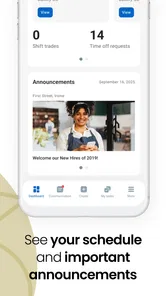
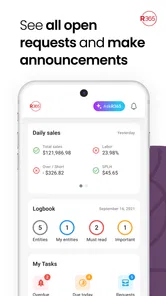
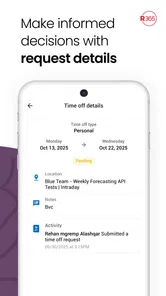
Analysis by Reviewed
Restaurant365 is the kind of business app that makes its value clear only after it becomes part of a working routine. I found the first impression fairly modest: this is not an app built around entertainment or visual novelty, but a mobile companion for restaurant operations from Restaurant365. Its role is to put restaurant-related work closer to the people who need to check, record, or follow up on it while they are away from a desk.
That distinction matters. A restaurant team does not need another app simply because it has a mobile interface. It needs something that reduces the number of small delays between noticing an issue and dealing with it. In my experience, this app is most convincing when used as a practical extension of an existing Restaurant365 workflow rather than as a complete replacement for every desktop task.
The app is free to install and has an Everyone content rating, which makes it approachable for a broad workplace audience. It has reached over 100 thousand installs and holds a 4.7 average from around 10 thousand ratings, a strong sign that many users find it useful in daily restaurant work. Still, those figures should not be mistaken for a guarantee that it will suit every role. Its usefulness depends heavily on how a restaurant already organizes its information and responsibilities.
What the first week feels like in real restaurant work
During the first week, the strongest appeal is convenience. Restaurant work is full of moments when opening a laptop is unrealistic: a manager is moving between areas, checking a shift, receiving a delivery, responding to a staffing question, or trying to close out a busy period. A mobile app can earn its place quickly when it lets that person stay in the flow instead of postponing every small action until later.
I would approach the first setup with a specific question: which recurring tasks should move closer to the floor? That is more useful than trying to make every employee use the app for everything immediately. A manager might begin with checking operational information during a shift, while an owner or administrator may use it for oversight across restaurant activity. The right starting point is the workflow that currently creates the most interruptions or follow-up notes.
One practical scenario shows where the mobile format makes sense. Imagine a manager handling a busy dinner service who notices an issue that needs attention but cannot sit down at a computer. The value of Restaurant365 is not that it makes the problem disappear; it gives the manager a better chance of capturing or checking the relevant information before the shift becomes a blur. Later, that record can support a more orderly handoff instead of relying on memory or a message sent to the wrong person.
The first-week experience also depends on role clarity. A restaurant owner, general manager, shift leader, accountant, and hourly employee do not approach business software in the same way. If everyone is given the app without a clear reason to use it, adoption can become superficial. People open it once, decide it is not relevant, and return to familiar habits. I found that the app makes more sense when each person knows which decisions or checks belong in the mobile workflow.
More From Our News Desk

Weather by Xiaomi Review: Clear at a Glance, Less Clear Up Close

X Under Pressure: Can It Recover When Posting Goes Wrong?

Clash of Clans Is Won Between the Battles

Android Auto Makes the Case for Quieter Car Software

MobiOffice: Transforming Mobile Productivity with Seamless Integration

EA SPORTS FC™ Mobile Soccer: Redefining Mobile Sports Gaming
Another early benefit is reduced dependence on scattered alternatives. Without a shared business system, restaurant teams often combine paper notes, text messages, spreadsheets, email, and memory. That mixture may appear flexible, but it makes follow-up difficult. Restaurant365 is more valuable when it helps bring restaurant work back into one recognizable environment instead of adding one more isolated channel.
At the same time, I would not describe the first week as completely frictionless. A mobile business tool can feel slower than an informal message when the task is tiny and urgent. Someone may still reach for a text because it is familiar, especially if the information does not need to become part of a formal record. The app has to prove that the extra structure is worth it.
The current version is 11.7.3(7942), and the app supports devices running Android 8.0 or later. That makes it accessible on a wide range of Android phones, including older workplace devices, although the experience will naturally depend on the phone’s screen, speed, and reliability. For staff using a shared or aging device, a short trial during an actual shift is more informative than a quick test in a quiet office.
Where it beats familiar restaurant habits
The usual alternative is not always another restaurant platform. Often it is a collection of tools that were never designed to work together. A spreadsheet may be easier for a detailed one-off analysis. A messaging app may be faster for a quick question. Paper may be convenient during a rush. But those options become weak when a restaurant needs consistent visibility and a repeatable process.
Restaurant365 has an advantage when the organization wants mobile access connected to its restaurant business environment rather than a separate note-taking tool. I would choose it over a generic productivity app when the work needs to remain tied to restaurant operations and shared accountability. I would choose a simpler alternative when the goal is only to make a private checklist or send a quick update.
A useful early habit is to decide what should never remain only in a chat. If a detail affects a later decision, a recurring check, or a handoff between shifts, it deserves a more dependable home. This is one of the less obvious ways to get value from the app: use it to protect important operational context from disappearing inside fast-moving conversations.
Why the value either grows or fades after the first month
The novelty of a mobile business app fades quickly. After the first month, Restaurant365 has to earn attention through repetition. Its lasting value is not measured by how impressive the first login feels, but by whether it helps a restaurant maintain a dependable rhythm of checking, recording, and following up.
I see the strongest long-term case in multi-person operations where information must travel between shifts or locations. A mobile workflow can reduce the gap between what happens on the floor and what decision-makers learn later. That does not eliminate the need for meetings or proper review, but it can make those conversations more grounded in current operational information.
For a smaller restaurant with one owner who is already present every day, the benefit may be narrower. If the owner can see everything directly and has a simple routine that already works, adopting a business app may feel like extra administration. In that situation, the app needs to replace a real source of friction, not merely offer another place to look.
Month-to-month value also comes from consistency. A restaurant should not judge the app only by the number of times it is opened. Some of its value may appear in fewer forgotten follow-ups, cleaner shift transitions, or less time spent asking where a piece of information went. Those improvements are easy to miss because they look ordinary once the routine is established.
My advice is to review the workflow regularly rather than expanding usage without a reason. After several weeks, ask which actions are genuinely being completed through the app and which are still happening elsewhere. If the same information is entered twice, the process is probably poorly designed. If staff members use the app only when a manager reminds them, the routine has not yet become sustainable.
One concrete technique is to connect mobile use to natural transition points: before opening, during a manager handoff, after a notable service issue, or during closing review. These moments are easier to remember than an abstract instruction to “check the app.” The goal is not constant phone use. It is to make the right check happen at the right point in the shift.
Another trade-off appears when a restaurant has several layers of responsibility. More visibility can improve accountability, but it can also create anxiety if people feel every small update is being watched without context. Managers should explain why information is being captured and what action follows. Otherwise, staff may treat the app as surveillance rather than a shared operational tool, which can damage adoption even if the software itself works well.
The app is also not a substitute for management judgment. A mobile record can show that something was noted, but it does not decide whether the issue is urgent, who should own it, or how a team should respond. The best long-term use combines the app with clear ownership. Every recurring entry should lead to a person or a next step, or it risks becoming digital clutter.
The maintenance cost nobody notices at installation
Restaurant software requires maintenance even when the app itself is easy to open. The largest burden is usually not technical. It is operational: keeping responsibilities clear, removing outdated routines, and making sure employees know which information belongs in the system.
Restaurant365 can remain useful only if the surrounding process stays clean. When roles change, new staff join, or a restaurant adjusts its procedures, managers need to revisit how the app is used. An old habit can survive long after it stops helping. That is why I would schedule a brief workflow review rather than assuming that initial setup will remain correct forever.
Training should be practical and role-based. A new manager does not need the same explanation as someone who only needs occasional access. Showing people the exact moment when the app saves time is more effective than describing every possible function. For example, demonstrate how it fits into a handoff or a recurring check, then let the employee practice that task during a normal shift.
Device maintenance matters too. Older Android support is helpful for restaurants that do not replace phones frequently, but a supported operating system does not guarantee a smooth experience on every device. A phone with a small display, weak battery, or unreliable connection can make any mobile workflow frustrating. Before standardizing use, I would test the app on the actual devices staff carry, not only on a newer personal phone.
There is also a human maintenance cost. If supervisors continue accepting updates through every possible channel, employees have no reason to change behavior. A restaurant may technically have Restaurant365 in place while still depending on texts and paper for the important work. The solution is not to ban every alternative overnight; it is to define which records must live in the main workflow and consistently refer back to them.
This is where the app compares favorably with generic tools but also demands more discipline. A generic notes app can be adopted in minutes because it asks little of the organization. Restaurant365 is more meaningful when connected to restaurant operations, but that connection means the team has to agree on procedures. The payoff is potentially stronger, while the setup and upkeep are less casual.
What can cause fatigue over time
The first source of fatigue is repetition without visible consequence. If employees enter information and never see a decision, correction, or follow-up, the process feels ceremonial. Managers should close the loop by acknowledging useful records and acting on issues that matter. Otherwise, even a well-designed workflow becomes another box to tick.
The second is duplication. If a manager records the same event in Restaurant365, a spreadsheet, and a group chat, the app becomes part of the burden instead of reducing it. Before adding a new mobile task, remove or simplify an older one wherever possible. The app earns long-term space when it replaces work, not when it merely documents work already done elsewhere.
A third problem is overuse during service. Restaurant teams need to stay focused on guests, food, safety, and people. A mobile system should support those priorities, not force staff to stare at a screen during the busiest moments. I would reserve detailed review for calmer intervals and keep in-shift actions limited to information that truly needs to be captured immediately.
There is also a risk of confusing access with usefulness. Having business information available on a phone is convenient, but convenience can encourage checking without acting. A manager may repeatedly look at updates while postponing the actual conversation or decision. The better habit is to use the app as a prompt for action, then return attention to the restaurant.
For owners managing several restaurants, fatigue may come from switching contexts. Mobile access can make oversight easier, but it can also make work feel permanently present. I would set boundaries around review times and avoid treating every notification or update as an emergency. The app should improve visibility without turning every quiet moment into another management session.
Finally, not every restaurant needs this level of structure. A very small operation with straightforward routines may find a simpler checklist or shared document easier to maintain. A business that is not already using the wider Restaurant365 environment may also need to think carefully about whether this mobile app alone solves a meaningful problem. I would skip it if the team cannot identify a recurring workflow that needs better continuity.
My long-term verdict on keeping it installed
After the novelty fades, Restaurant365 earns lasting space when it becomes part of a clear restaurant routine: a manager checks the right information at a transition point, a handoff preserves useful context, and follow-up no longer depends entirely on memory. That is a practical kind of value, and it is more durable than a flashy first impression.
I would recommend it to restaurant owners, operators, and managers who need mobile access to a shared business workflow and are willing to establish rules around usage. It is especially sensible when several people contribute to the same operational picture or when important details are currently scattered across informal channels.
I would be more cautious for a solo operator with very simple needs, a team that refuses structured record-keeping, or anyone looking only for a basic personal checklist. In those cases, a lighter tool may be faster and easier to keep current. The fact that the app is free does not remove the cost of training, consistency, and attention.
Restaurant365 comes from Restaurant365 and sits in the business category, but I judge it less as a general business download than as a mobile piece of restaurant management. Its 4.7 average and broad install base suggest strong user satisfaction, while the real test is more personal: does it make your team’s recurring work easier after the first few weeks?
For me, the answer is yes when the app is assigned a specific job and supported by a consistent process. It is not a magic replacement for communication, judgment, or good management. It is a practical way to keep restaurant work closer to the people doing it, provided the organization avoids duplication and gives every entry a purpose.
With its release on April 17, 2019, the app has had time to move beyond being a new mobile experiment, and its current release shows that it remains an active part of the product experience. I would install it for a restaurant team that wants a more connected daily routine, test it during real shifts, and keep it only if it reduces missed context or unnecessary follow-up. The lasting test is simple: if the app helps the next shift start with better information, it has earned its place.
Restaurant365 Frequently Asked Questions
Who is the Restaurant365 app designed for?
Restaurant365 is a business app aimed at people who manage or support restaurant operations, including owners, operators, managers, and accounting teams. It is not a dining guide or a food-ordering app for customers. Its mobile experience is most relevant to users whose restaurant business already uses Restaurant365 and who need access to work-related tools while away from a desktop.
What is Restaurant365 used for?
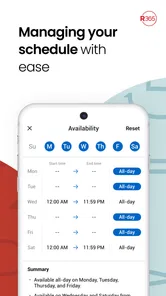
Restaurant365 is a restaurant management and accounting platform designed to bring daily operations into one system. It can help businesses manage accounting, sales data, inventory, purchasing, labor information, scheduling, payroll-related workflows, and financial reporting. It is mainly intended for restaurant owners, operators, accountants, and multi-location groups rather than casual diners or individual users.
Is Restaurant365 suitable for small restaurants and independent operators?
Restaurant365 can be useful for independent restaurants as well as growing restaurant groups, but the value depends on the size and complexity of the business. Smaller operators may appreciate having accounting, inventory, and reporting tools connected in one place, while some may find the platform more extensive than necessary. Before subscribing, review the available plans, implementation requirements, and features included for your specific operation.
Does Restaurant365 include accounting and financial reporting tools?
Yes. Accounting is one of Restaurant365’s central functions. The platform is designed to support restaurant-focused bookkeeping, accounts payable, bank and credit card reconciliation, financial statements, budgeting, and operational reporting. Its restaurant-specific structure can reduce the need to combine several unrelated tools, although businesses should confirm whether the available accounting features, integrations, permissions, and reporting formats match their accountant’s workflow.
Can Restaurant365 manage inventory, purchasing, and food costs?
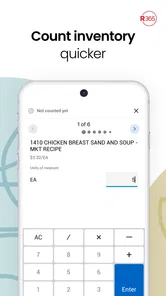
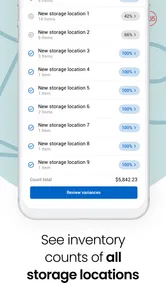
Restaurant365 includes tools intended to help restaurants track inventory, organize purchasing, manage vendors, and monitor food costs. Depending on the configuration, users can work with recipes, invoices, counts, order guides, and cost reports to identify waste or changes in ingredient prices. Results will depend on accurate data entry, consistent inventory counts, and proper setup of products, recipes, suppliers, and units of measurement.
Pros
- Combines accounting
- scheduling
- inventory
- and payroll tools in one platform.
- Real-time reporting helps owners track sales
- labor
- and restaurant performance.
- Automates invoice processing and can reduce repetitive back-office work.
- Supports multi-location businesses with centralized oversight and controls.
- Integrates with many restaurant POS and payment systems.
Cons
- Most useful features require a paid plan and may be costly for small restaurants.
- The extensive feature set can feel overwhelming for first-time users.
- Setup and data migration may require considerable time and staff training.
- Some advanced tools depend on third-party integrations working correctly.
- Designed for restaurant operators
- so it may be excessive for a single small venue.











