ReSound Smart 3D
- 2.88K
- 4.4
- Installs
- 1.00M
- Price
- Free

Screenshots
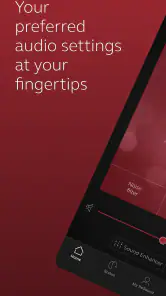
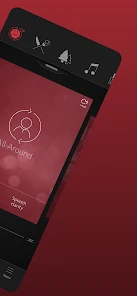
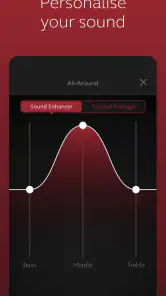

Analysis by Reviewed
The first few days with a hearing-aid companion app can feel surprisingly freeing: instead of treating every listening situation as fixed, I can reach for my phone and make an adjustment. That convenience is the main appeal of ReSound Smart 3D, a free medical app from GN Resound for people who use compatible ReSound hearing aids. Its value is less about novelty than whether those controls become useful in an ordinary routine.
What feels useful in the first week
At first, the most encouraging part is having hearing-aid controls close at hand. A change of setting can be handy when I move from a quiet room into a busy café, or when I want a different listening setup without stopping to work out the hearing aids themselves. The app’s purpose is practical: it gives compatible users a phone-based way to personalize how they hear.
That first-week appeal depends on the hearing aids, of course. This is not a general sound-enhancement app that can replace hearing devices, and downloading it alone will not make a phone into a hearing aid. If I were choosing it for a family member, I’d first check that their particular ReSound devices work with it and that they are comfortable using a smartphone for adjustments. Those two details determine whether it feels like a helpful remote or an extra step.
Personalized Hearing at Your Fingertips
First off, let me tell you how incredibly intuitive the ReSound Smart 3D app is. From the moment I opened it, I was greeted with a user-friendly interface that made navigation a breeze. The app allows users to personalize their hearing experience by adjusting volume levels, choosing sound profiles, and even focusing on specific sounds in various environments. Whether you're at a noisy restaurant or enjoying a quiet evening at home, the app adapts to your needs seamlessly.
The Magic of Remote Audiology
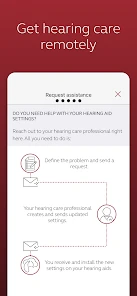
One of the standout features of this app is its remote fine-tuning option. Imagine not having to visit your audiologist for every little adjustment! With ReSound Smart 3D, you can request remote assistance and get your hearing aids fine-tuned directly through the app. This means more freedom and fewer appointments, which is a huge plus for anyone with a busy lifestyle.
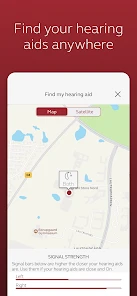
Another nifty feature is the "Find My Hearing Aids" function. If you're anything like me, keeping track of small devices can be challenging. This tool ensures that losing your hearing aids is a thing of the past. Just open the app, and it will guide you to their location.
Connectivity and Compatibility
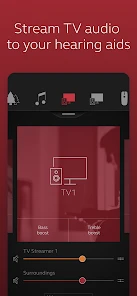
The app doesn’t just stop at personalization. It also offers top-notch connectivity options. Compatible with a range of devices, it allows for direct streaming from your phone, TV, or even your favorite music apps. This means you can enjoy calls, music, and more, directly through your hearing aids, making them double up as high-quality wireless earbuds.
More From Our News Desk

Clash of Clans Is Won Between the Battles

Android Auto Makes the Case for Quieter Car Software

MobiOffice: Transforming Mobile Productivity with Seamless Integration

EA SPORTS FC™ Mobile Soccer: Redefining Mobile Sports Gaming

How Microsoft OneDrive Became a Mobile Productivity Giant

How Google Translate Breaks Language Barriers Effortlessly
Additionally, the app supports integration with other smart devices, which means you can control your hearing aids through voice commands using your smart home assistant. Talk about living in the future!
Making adjustments part of a real routine
For a useful everyday test, picture arriving at a restaurant after a quiet commute. Rather than deciding that the hearing aids are simply “wrong” for the room, I can try a different sound profile or adjust volume, then see whether conversation becomes easier. The useful habit is to make small changes and notice what helps; constant tweaking can become distracting, especially when I’m trying to follow a conversation.
Remote fine-tuning has a different role from those quick personal adjustments. It is useful when I want professional help refining the hearing-aid setup, rather than expecting the app to diagnose a hearing problem or replace an appointment for every concern. If a setting repeatedly fails in a particular situation, keeping track of when that happens gives me a clearer point to discuss with my hearing-care professional.
Where the convenience has limits
The app makes most sense for someone who already wears compatible ReSound hearing aids and wants more control between visits. It is a poor fit for someone looking for a hearing test, a standalone listening aid, or a way to manage hearing devices from another brand. Compatibility is the first practical question to settle, and phone-based control also means the phone needs to be available when I want to make changes.
There is a trade-off between convenience and attention. In a busy setting, opening an app and choosing a profile can be less discreet than leaving a familiar setting alone; sometimes the better choice is to ask a conversation partner to move or reduce background noise. The app can help shape the listening experience, but it cannot make every room easy to hear in.
Month-to-month value and upkeep
After the novelty wears off, the strongest reason to keep using it is a recurring need: adjusting for changing environments, keeping track of the hearing aids, or contacting an audiologist for remote fine-tuning. If I mostly leave my hearing aids on one setting and rarely need support, I may open the app less often. That does not make it useless; it means its value is tied to how often those specific controls solve a real problem.
For maintenance, I’d treat the app as one part of the hearing-aid routine rather than a replacement for caring for the devices or keeping up with professional support. A sensible habit is to check that the app and hearing aids are connected before relying on a change in an important situation, such as a meeting. If the connection or a control does not behave as expected, I would avoid repeatedly changing settings in the middle of a conversation and troubleshoot when I have time.
Compared with generic phone audio tools, this app is aimed at controlling compatible hearing aids, not applying broad sound effects to anything played through a phone. Compared with relying only on the hearing aids’ existing controls, it offers a more visual way to adjust and access support. Which approach is better depends on the person: someone who prefers a simple, set-and-forget routine may not gain much from extra app controls, while a user who often moves between listening environments may appreciate having them nearby.
A practical check before depending on it
Before building it into a routine, I’d test the app in a low-pressure moment rather than waiting until a crowded room makes an adjustment feel urgent. Confirming that the hearing aids connect, finding the controls I expect to use, and trying a small change at home gives me a better sense of the workflow. It also makes clear whether reaching for the phone is genuinely easier than using the hearing aids’ usual controls.
For someone helping a parent or partner, the same trial can answer a useful question: can the wearer make the changes independently, or will they need help navigating the phone? A companion app only adds practical independence if its controls feel manageable to the person wearing the devices. If the phone is often elsewhere, or the user would rather not handle settings, a simpler routine may serve them better.
A Few Final Thoughts
In my experience, the ReSound Smart 3D app is a must-have for anyone using compatible hearing aids. It puts control right in your hands, making life just a tad bit easier and more enjoyable. The convenience of remote adjustments and the ability to personalize your hearing experience are unmatched. Plus, the added connectivity features make it a versatile tool in today’s tech-savvy world.
So, if you're looking for a way to enhance your hearing experience without the hassle of frequent audiologist visits, give the ReSound Smart 3D app a try. You won’t be disappointed!
Who is most likely to keep it installed?
I’d recommend it most to someone who already uses compatible devices, is comfortable handling simple phone settings, and has a reason to adjust hearing from place to place. A quieter home routine may call for little app use, while someone who regularly shifts between home, transit, work, and social settings could find the controls more worthwhile. People who do not use ReSound hearing aids should look to the companion app made for their own devices instead.
There is also a learning curve in deciding when to change a setting and when to leave it alone. I’d avoid trying to perfect every sound in real time; a small, familiar adjustment is easier to evaluate than several changes made at once. The same restraint helps when streaming calls or music: those options can be convenient, but they serve a different purpose from choosing how surrounding conversation comes through.
When another approach may be better
If the main difficulty is understanding speech in a particular room, changing the app setting is only one possible response. I would also consider practical changes such as choosing a quieter seat, facing the person speaking, or asking for a little less background noise. Those steps do not depend on phone access and can be more useful than searching through controls while everyone waits.
Likewise, someone who wants general amplification without ReSound hearing aids should not expect this app to fill that role. A hearing-care professional can help determine what device or support is appropriate, while an owner of another hearing-aid brand will usually be better served by that manufacturer’s own companion app. The important distinction is that this is a control companion, not a universal hearing solution.
Lasting value, not just a new control panel
ReSound Smart 3D has an average rating of 4.4 from around 41,000 ratings, and it has passed a million installs. It is rated for Everyone, was released on April 27, 2017, and version 1.41.0 supports devices running Android 8.0 or later. Those details make it a well-established option, though an older phone that does not meet the minimum system requirement will need another route to control the hearing aids.
My long-term verdict is that this app earns its place when its tools become part of a realistic routine, not because I expect to use every feature every day. The remote support and personalized adjustments can save friction for the right user, while compatibility, phone access, and the temptation to keep fiddling are genuine considerations. If those trade-offs suit you, it is worth trying alongside your ReSound hearing aids; if they do not, the devices’ usual controls or guidance from your hearing-care professional may be the simpler choice.
ReSound Smart 3D Frequently Asked Questions
Can I use ReSound Smart 3D to adjust my hearing aids in different listening situations?
Yes. ReSound Smart 3D is intended to help users personalize the experience of their ReSound hearing aids, including making sound adjustments for different environments. The app also includes a sound enhancer, giving you ways to tailor what you hear to the situation. The exact controls available can depend on your compatible hearing aids, so explore the options shown after pairing.
Can a hearing care professional help me through ReSound Smart 3D without an in-person visit?
The app supports remote fine-tuning by a hearing care professional, so it can be used to receive personalized adjustments without relying only on controls you make yourself. This may be useful if your hearing needs change or you want guidance with your settings. Availability and the way remote assistance is arranged can depend on your professional and your hearing-aid setup.
Is ReSound Smart 3D free to download, and what devices can install it?
ReSound Smart 3D is a free medical app from GN Resound, made for use with ReSound hearing aids. It is available for Android and iOS, and the Android version requires Android 8.0 or later. Before installing, check that your phone meets the requirements shown in its app store and that you have compatible ReSound hearing aids to use the app’s hearing-related controls.
What is ReSound Smart 3D and who should use it?
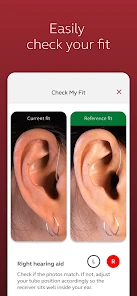
ReSound Smart 3D is a comprehensive app designed for individuals using ReSound hearing aids. It allows users to personalize their hearing experience by adjusting sound settings, managing accessories, and getting remote assistance from their hearing care professional. The app is ideal for users who wish to take control of their hearing aid settings and improve their auditory experience with ease and convenience.
How do I connect my ReSound hearing aids to the Smart 3D app?
To connect your ReSound hearing aids to the Smart 3D app, first ensure your device's Bluetooth is enabled. Open the app and follow the on-screen instructions to pair your hearing aids. Typically, this involves selecting your hearing aid model and allowing the app to search for nearby devices. Once detected, confirm the connection and your hearing aids should sync with the app for seamless operation.
Pros
- Intuitive interface for easy navigation.
- Seamless connection with hearing aids.
- Comprehensive personalization options.
- Real-time adjustments on the go.
- Battery status monitoring feature.
Cons
- Requires compatible hearing aids.
- Limited features for non-ReSound users.
- Occasional connectivity issues.
- No offline functionality available.
- High battery consumption.
- Category
- Medical
- Version
- 1.41.0