

ReS56 - Christmas Snow Globe
- 2.00
- 4.1
- Installs
- 1.00K
- Price
- $1.49
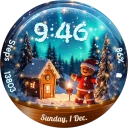
Screenshots
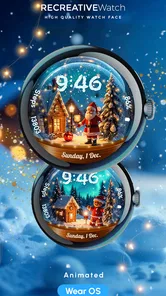
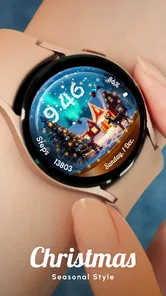
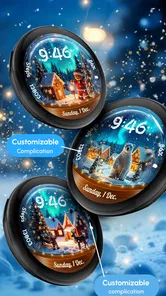
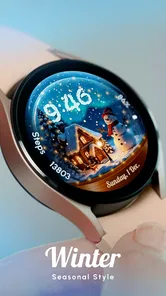
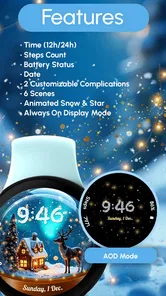
Analysis by Reviewed
Before I put a seasonal face on my watch, I ask a simple question: will I enjoy seeing it in the small gaps of an ordinary day, or only while setting it up? That distinction matters with ReS56 - Christmas Snow Globe. It is a Wear OS personalization app built around a wintry, animated look, so the appeal is less about changing how I manage tasks and more about making a familiar wrist glance feel festive.
Check the watch before choosing the look
The first practical step is compatibility. This is a watch face for Wear OS, not a general phone wallpaper, so I would confirm that my watch runs Wear OS before paying. If I use another smartwatch platform, or mainly want a decorative image on my phone, I would look for a product designed for that purpose instead. That quick check prevents the most avoidable disappointment: liking the idea but having nowhere suitable to use it.
It is a paid personalization download from RECREATIVE Watch Faces, priced at $1.49, and rated for Everyone. It has a 4.1 average from around 64 ratings and over 1K installs. I take those figures as useful context, not a guarantee that the design will suit my wrist: the seasonal style and the way I use a watch are more important to the decision.
Choosing a watch face for the season
Before installing it, it helps to decide what you want your watch face to do. If your priority is a quiet Christmas mood and animated visual detail, ReS56 is a more focused choice than a plain digital face or a minimal design. If you rely on a face for glanceable information above all else, though, a simpler option may suit your routine better. I would treat the snow effect as the point of the purchase, not assume the watch face is a productivity tool.
A Touch of Winter Magic
The ReS56 - Christmas Snow Globe app is like carrying a piece of winter magic wherever you go. Once you open it, you're greeted with a beautifully rendered snow globe on your screen. The realism is uncanny; it feels like you could reach out and touch the glass. Give your phone a gentle shake and watch as snowflakes dance gracefully around the scene, settling softly before you shake it up again.
Features That Spark Joy
One of the first things you'll notice is the variety of scenes available. Whether you're in the mood for a cozy cabin in the woods, a bustling town square, or a serene church in the snow, there's a scene for every festive fantasy. The app also allows you to customize the snowfall intensity and choose different music tracks to accompany your globe, adding a personal touch to your snowy escape.
For those who love to share the festive spirit, the app includes a feature to send a virtual snow globe to friends and family. It's a unique way to spread holiday cheer and let loved ones know you're thinking of them.
More From Our News Desk

 Gmail
GmailGmail in a Busy Inbox: Who Benefits Most?
From first account to crowded workday, Gmail earns its place through dependable search and flexible sorting—but its best fit depends on how much inbox maintenance you can tolerate.

 Prime Video
Switching to Prime Video: What Changes in Your Viewing Routine
Prime Video can make a compelling second home for streaming, but switching means learning a different catalog, rental layer, and route from browsing to playback.

 Universal TV Remote Control
Universal TV Remote Control Works Best as a Reliable Backup
A phone remote earns its place through quick setup and reliable habits. Here is how to get more from Universal TV Remote Control—and where its limits show.

 Weather - By Xiaomi
Weather by Xiaomi Review: Clear at a Glance, Less Clear Up Close
Xiaomi’s weather app makes everyday forecasts quick to scan, but its calm surface can leave useful details and recovery paths harder to find than they should be.

 X
XX Under Pressure: Can It Recover When Posting Goes Wrong?
A resilience-focused review of X, examining setup, mistaken posts, interruptions, weak connections, and the gaps that matter when recovery needs to be dependable.

 Clash of Clans
Clash of Clans Is Won Between the Battles
Its raids are quick; its community is a long-term project of coordination, teaching, rivalry, and shared responsibility—with all the friction that entails.
Latest News



Making it fit a daily routine
A watch face is something you glance at repeatedly, so my practical advice is to give the animation a little time before deciding whether it belongs on your wrist. Notice whether the motion feels charming during a quiet moment or distracting when you are checking the time in a hurry. A useful test is to wear it through an ordinary day: check it outdoors, while moving between tasks, and when the watch is resting on a desk. That helps you judge the design in context instead of only enjoying it during setup.
The handoff between phone and watch matters too. This is a Wear OS watch face, so the intended destination is a compatible watch rather than a phone wallpaper. The phone may be where you find or manage the download, but the result you are paying for is the watch’s appearance. I would check that my watch uses Wear OS before buying; someone with a different smartwatch platform should look for an option made for that system instead.
Small choices that change the experience
I would approach setup as a short trial rather than trying to perfect the face immediately. Start with one scene and wear it during a normal stretch of the day; then change the snowfall intensity only if the motion feels too busy or too quiet. This makes it easier to tell which choice actually improves the glance, instead of cycling through every option and forgetting what felt comfortable.
There is also a useful distinction between a face you enjoy looking at and one that works well in every setting. A detailed winter scene can feel charming at home but compete for attention when you are moving quickly or checking the time in bright surroundings. I would test it during the situations when I most often glance at my watch, not just while sitting still and admiring the art.
Interactive and Immersive
The app isn't just about watching snow fall; it's interactive. Tap on different parts of the scene and watch as little surprises unfold. Perhaps a light will turn on in the cabin, or a tiny figure will wave from the window. These small interactions make the experience feel personal and keep you coming back to discover more.
Who will enjoy the trade-off
This is a good fit for someone who likes a distinctive seasonal face and is happy for decoration to lead. It may also make a pleasant festive touch for a person who already changes watch faces to match the time of year. By contrast, if you prefer a restrained look all year, find animation tiring, or depend on a particularly information-dense face, I would choose a different design rather than expect this one to replace it comfortably.
Compared with the usual alternatives in personalization, this makes a different promise from a static holiday face or a minimal digital layout. A static design is the safer pick if you want an uninterrupted, predictable glance; a restrained everyday face makes more sense if your priority is keeping the display visually quiet throughout the year. ReS56 is for the person who values a little seasonal movement enough to accept that it is not a universal choice.
There is a practical compromise with any animated watch face: the visual movement is part of the attraction, but a still design is often calmer for quick glances. I would try the available scene and snowfall choices in the settings rather than assume the most animated presentation is best. A softer effect may feel more appropriate for work or a busy day, while a more noticeable look can be saved for downtime. The ability to personalize the globe is useful precisely because the same level of motion will not suit everyone.
Perfect for All Ages
What's great about the ReS56 - Christmas Snow Globe app is its universal appeal. Kids will love the interactive elements and whimsical scenes, while adults will appreciate the nostalgic nod to childhood snow globes. It's an app that bridges generations, making it a perfect addition to your holiday traditions.
In a real everyday scenario, I can imagine checking the time between errands and getting a brief festive lift without needing to open a separate app. Later, at home, I could spend a little longer choosing a scene or adjusting the snowfall for a more relaxed look. That split—quick visual enjoyment while out, more deliberate customization when there is time—is where a watch-face format makes sense. The $1.49 cost is easiest to justify if I expect to wear it repeatedly during the season, rather than install it for a brief novelty and switch away immediately.
When another option makes more sense
I would skip this if I need my watch face to serve mainly as a compact dashboard, if animated visuals quickly become irritating, or if I want a design that still feels appropriate once the holidays have passed. It is also not the right purchase for someone whose watch is not on Wear OS. In those cases, a simple face, a static seasonal design, or a platform-compatible alternative is a better match than buying this and hoping its central look will matter less in daily use.
If I were choosing it as a small seasonal gift, I would first check what kind of smartwatch the recipient wears and whether they enjoy changing its appearance. A festive face is personal in a way that a neutral accessory is not; someone who keeps the same practical layout all year may not want the visual change. That check is more helpful than assuming a Christmas theme will appeal to everyone simply because it is cheerful.
Where it may not fit
Its seasonal identity is also its clearest limitation: a Christmas snow globe is a specific mood, and it may feel out of place once you want a neutral or year-round watch face. I would not buy it expecting a broad library of unrelated styles. The release date is Nov 3, 2024, and the developer is RECREATIVE Watch Faces; those details provide context, but my decision would still come down to the watch-face style and whether I want that look on my wrist.
One other question is whether the visual effect will feel comfortable over repeated use. I would judge that personally rather than assume that animation is automatically better: some people enjoy a little movement in every glance, while others prefer the stable readability of a static face. If you are unsure, think about your normal day and whether you usually look at your watch for the time alone or pause to enjoy its design. That distinction is more useful than choosing based only on a festive preview.
Deciding after the first day
My best test would be to leave the face in place for a full ordinary day rather than judging it from an initial setup moment. Notice whether you still enjoy the scene after repeated glances, whether its movement distracts during a quick time check, and whether you find yourself wanting a different look for work or evenings. If you keep returning to the snow globe because it makes the watch feel more personal, the seasonal purchase has done its job. If you mostly stop noticing it or want more information at a glance, switching back to a practical face is a sensible outcome, not a failure.
Overall, I see ReS56 - Christmas Snow Globe as a specific seasonal treat rather than an essential watch utility. Its strongest case is for someone with a compatible Wear OS watch who likes interactive winter scenery and expects to enjoy it often enough to make the paid download worthwhile. If that describes you, it can add a small moment of festive character to everyday wrist checks. If you want a year-round, information-first face, I would choose something calmer instead.
ReS56 - Christmas Snow Globe Frequently Asked Questions
Is ReS56 - Christmas Snow Globe made for phones or smartwatches?
ReS56 - Christmas Snow Globe is a Wear OS watch face, rather than a phone-based snow globe app. Its focus is on personalizing a compatible smartwatch with a Christmas look, animated snow, a magic spark, and six scenes. Before downloading, check that you use a Wear OS watch, since that is the device this app is designed for.
What is ReS56 - Christmas Snow Globe app all about?
ReS56 - Christmas Snow Globe is a delightful app designed to bring the festive spirit of Christmas right to your mobile device. It offers a virtual snow globe experience, complete with customizable scenes, snow effects, and holiday music, making it a perfect way to add a touch of Christmas magic to your phone.
Is ReS56 - Christmas Snow Globe free to download and use?
ReS56 - Christmas Snow Globe costs $1.49 to download. The purchase gives you access to this Christmas-themed Wear OS watch face, with animated snow effects, a magic spark, and six scenes. As it is a watch-face app, its appeal is mainly in decorating a compatible smartwatch rather than providing a free-standing phone snow globe experience.
What customization options are available in ReS56 - Christmas Snow Globe?
The app provides a range of customization options, allowing users to personalize their snow globe scenes. You can choose different backgrounds, adjust snow intensity, and select from a variety of holiday-themed music. Some options might be locked behind in-app purchases, offering premium content for a more personalized experience.
Does ReS56 - Christmas Snow Globe require an internet connection to function?
ReS56 - Christmas Snow Globe does not require an internet connection for its basic functionalities. However, an internet connection might be needed for downloading additional content, accessing premium features, or when making in-app purchases. Offline use still allows you to enjoy the majority of the app's features.
Pros
- Beautiful and festive graphics
- Interactive snow globe feature
- Includes holiday music
- User-friendly interface
- Regular updates with new content
Cons
- Limited customization options
- Contains ads
- In-app purchases needed
- Requires internet connection
- May drain battery quickly













