

RepairsMe-AI Repair Assistant
- 6.00
- 3.6
- Installs
- 50.00K
- Price
- Free

Screenshots

Analysis by Reviewed
I found RepairsMe-AI Repair Assistant most useful when a household problem was easy to describe but difficult to identify. Instead of starting with a long search through manuals and forum posts, I could bring the equipment into view, add photos, and work through a guided conversation about the fault. That makes this free House & Home app from REPAIRSME feel more practical than a simple collection of repair articles.
My overall impression is positive but measured. The idea is strong, especially for people who want help before calling a technician, yet an AI repair assistant should be treated as a guide rather than an authority. A wrong guess about a loose cabinet hinge is inconvenient; a wrong guess about electricity, gas, heat, or a moving machine can be dangerous. The value of this app depends heavily on how clearly the user can show the problem and how willing they are to stop when a repair goes beyond their ability.
How the app feels to read and navigate
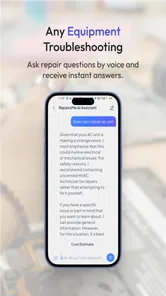
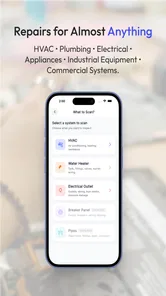
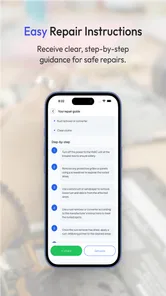
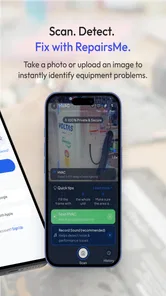
The central workflow is easy to understand: scan equipment, upload photos, chat about the issue, and follow the suggested steps. I like that these actions match the way people actually approach a broken appliance. Most users do not begin with the correct technical name. They begin with “this is leaking,” “it will not turn on,” or “it makes a strange sound.” A visual starting point can reduce that vocabulary barrier.
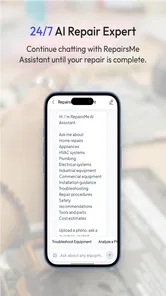
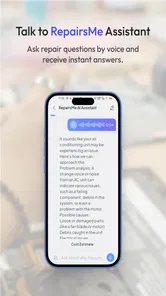
The conversational format also makes RepairsMe less intimidating than a traditional manual. Manuals are precise when you already know the model and part, but they can be frustrating when the first page assumes technical knowledge. Here, the user can describe symptoms in ordinary language and add an image to provide context. That is a meaningful advantage for first-time renters, older householders, and anyone who does not feel comfortable with repair terminology.
At the same time, a chat interface can become difficult to follow when the problem has several branches. A user may need to remember which switch was tested, which panel was removed, or whether a sound changed after a previous step. I recommend taking a moment to read the entire instruction before touching anything, then completing one step at a time. If the conversation becomes unclear, restating the current symptom and what has already been tried is more useful than sending a series of short, frustrated messages.
Readability matters here because repair instructions are often consulted while standing in a cramped kitchen, garage, or utility room. The app’s strongest design idea is its plain-language conversation, but the real test is whether each instruction remains understandable when the user is distracted by water on the floor, a noisy motor, or a device that is difficult to reach. I would keep the phone nearby, enlarge system text if needed, and avoid relying on memory for steps involving panels, plugs, or controls.
The app is currently at version 3.3.7 and supports Android 7.0 and later. That broad compatibility is helpful for households using an older phone as a dedicated home device, although an older handset may make photo capture and reading less comfortable than a newer one. The age rating is Everyone, which fits the general household-help purpose, but that does not mean every suggested repair is suitable for every person.
More From Our News Desk

 Gmail
GmailGmail in a Busy Inbox: Who Benefits Most?
From first account to crowded workday, Gmail earns its place through dependable search and flexible sorting—but its best fit depends on how much inbox maintenance you can tolerate.

 Prime Video
Switching to Prime Video: What Changes in Your Viewing Routine
Prime Video can make a compelling second home for streaming, but switching means learning a different catalog, rental layer, and route from browsing to playback.

 Universal TV Remote Control
Universal TV Remote Control Works Best as a Reliable Backup
A phone remote earns its place through quick setup and reliable habits. Here is how to get more from Universal TV Remote Control—and where its limits show.

 Weather - By Xiaomi
Weather by Xiaomi Review: Clear at a Glance, Less Clear Up Close
Xiaomi’s weather app makes everyday forecasts quick to scan, but its calm surface can leave useful details and recovery paths harder to find than they should be.

 X
XX Under Pressure: Can It Recover When Posting Goes Wrong?
A resilience-focused review of X, examining setup, mistaken posts, interruptions, weak connections, and the gaps that matter when recovery needs to be dependable.

 Clash of Clans
Clash of Clans Is Won Between the Battles
Its raids are quick; its community is a long-term project of coordination, teaching, rivalry, and shared responsibility—with all the friction that entails.
Latest News



Photos are more useful when they answer a question
A casual photo of the whole appliance is a reasonable first step, but it rarely gives enough detail for a good diagnosis. I got more value by taking a wide image for context and then closer images of the control panel, warning light, damaged area, label, connector, or visible obstruction. Good lighting matters more than artistic composition. Reflections on glossy appliances can hide cracks and markings, so changing the angle is often better than simply taking more pictures.
One of the less obvious benefits of the photo workflow is that it encourages a more disciplined description of the fault. Before uploading anything, I would note what happened immediately before the problem, whether it is constant or intermittent, and whether the equipment still performs part of its normal function. Those details help separate “does not start” from “starts but stops,” which can lead to very different next steps.
There is also a privacy consideration that is easy to overlook. Household photos can accidentally include addresses, documents, children, personal photographs, or other identifying details. I would crop or retake images to show only the equipment and relevant area. This is not a reason to avoid the app; it is simply sensible housekeeping whenever photos are used for troubleshooting.
Using it across different abilities and situations
I find that accessibility is not just about whether someone can read the chat; it also depends on whether they can safely reach the equipment, frame a useful photo, and manage the steps in their surroundings. A helper can make the visual parts easier while leaving the user in control of describing the problem and deciding when to stop. Those practical differences shape who is likely to benefit most.
Motor considerations: reducing awkward handling
Repairs often require more than knowledge. They may involve holding a flashlight, balancing a phone, turning a stiff knob, kneeling beside a machine, or reaching behind furniture. RepairsMe can reduce the thinking burden by breaking a problem into conversational steps, but it cannot remove the physical demands of the repair itself. Someone with limited grip strength, reduced reach, tremor, joint pain, or fatigue may still need another person to perform the hands-on work.
I would use the app before moving heavy equipment or opening anything difficult to access. A photo-first assessment can help decide whether the likely next action is a simple inspection or whether it is better to call for assistance immediately. This is a useful trade-off: the app may save a needless service visit for a loose visible part, while also helping a user recognize that a hidden or hazardous fault should not become a do-it-yourself project.
A practical workaround is to prepare the workspace before beginning the chat. Put the phone on a stable surface, improve the lighting, and make sure the equipment is not positioned where the user must hold an uncomfortable posture. If a step requires both hands, read it first and then put the phone down. The assistant is most helpful when it supports the person’s actions rather than forcing them to operate the phone continuously.
Voice control or other phone accessibility settings may help some users, but I would not assume that every part of the repair conversation is equally convenient through those tools. Photos still need to be framed, labels may need to be read, and a visual instruction may need confirmation. For a user with low vision, a trusted helper can take the photographs while the user describes the symptoms and decides which questions to ask. That keeps the person involved without pretending that visual troubleshooting has no limitations.
Sensory and cognitive load
Repair environments can be noisy, dim, hot, or visually cluttered. A conversation that feels clear in a quiet room may be harder to follow beside a running extractor fan or a washing machine. I found it sensible to pause the equipment when safe, move to a better-lit position, and review the instruction away from the immediate hazard. The app cannot compensate for an environment that makes careful reading or listening difficult.
For users who process information slowly or find long instructions overwhelming, the best approach is to ask for one action at a time and confirm the result before continuing. Keeping a short note such as “power checked,” “filter removed,” or “leak still present” can prevent repeated steps. This is especially important when several family members share the same device and one person resumes a conversation started by another.
People with hearing loss may prefer written chat because it avoids depending on spoken explanations, while users with reading difficulties may benefit from phone-level text enlargement and a helper who can read instructions aloud. These are practical accessibility supports around the app, not claims that the product itself provides a specialized accessibility mode. The important point is that the assistant’s usefulness changes with the way a person can see, hear, read, and physically reach the equipment.
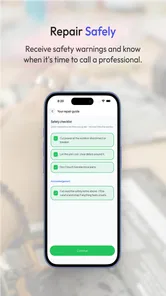
There is a cognitive safety issue as well. A confident-sounding sequence can feel like permission to continue, even when the user is uncertain. I would stop whenever an instruction involves exposed wiring, fuel, high heat, pressurized components, structural damage, or a heavy object that could fall. The app is better at organizing basic investigation than replacing professional judgment in high-risk situations.
Situational access in real homes
Imagine a refrigerator that is warm but still humming late in the evening. A user may not know the model number, may have poor lighting behind the appliance, and may not want to dismantle anything. RepairsMe can be useful at the first stage: photograph the controls and vents, describe the temperature change, and check whether the visible airflow or settings suggest a simple issue. If the suggested inspection requires pulling the refrigerator away from the wall or handling electrical parts, the sensible endpoint is a technician, not a more ambitious experiment.
Another realistic case is a dripping washing-machine connection in a rented apartment. Photos can show whether the water appears to come from the hose, door seal, detergent drawer, or floor beneath the machine. That distinction helps a tenant communicate clearly with a landlord or repair service. It may also prevent the common mistake of tightening the wrong fitting and making the leak worse. In this situation, the app’s greatest value may be diagnosis and documentation rather than completing the repair personally.
The same workflow can help when language or technical vocabulary is a barrier. A user can point the camera at a component instead of naming it, then describe what changed. That is more approachable than searching for “inlet valve,” “drain pump,” or “thermal cutoff” before knowing whether those parts are relevant. However, the assistant still depends on the quality of the image and the accuracy of the symptom description, so visual help does not eliminate communication errors.
For people with limited internet access, a shared family phone, or an older device, the app may be less convenient than a printed manual or a local technician. Photo uploads and chat are naturally dependent on having the phone available at the repair location. If access is intermittent, I would photograph the equipment first and prepare the key facts before starting. That makes the interaction more efficient and avoids repeatedly moving between the appliance and another room.
Where the usual alternatives are better
A manufacturer’s manual remains the better source for exact model-specific procedures, safety warnings, replacement-part references, and warranty-sensitive work. RepairsMe is more approachable when the model is unknown or the symptom is vague, but a manual is usually more authoritative once the exact equipment has been identified. I would use the app to frame the problem, then compare important instructions with the appliance documentation.
Video tutorials have a different strength. They show hand position, panel location, and the amount of force involved, which can be valuable for users who learn visually. Their weakness is that a video may describe a similar-looking model rather than the user’s exact one. RepairsMe can offer a more interactive route, but its advice should not be accepted simply because it sounds specific.
A local repair professional is the better choice for urgent leaks, electrical faults, gas appliances, refrigeration systems with suspected sealed-system problems, and anything that could cause injury or major property damage. The app can still help prepare a useful report with photographs and symptoms, potentially making that professional conversation more efficient. It should not be viewed as a substitute for qualifications, tools, or accountability.
Costs, expectations, and practical limits
RepairsMe is free to install, which makes it easy to try before deciding whether the workflow suits you. The app also includes in-app purchases ranging from fifty cents to seventy-nine dollars and ninety-nine cents per item. Because repair advice can lead to spending on parts or services, I would check the purchase prompt carefully and avoid treating a paid option as proof that the diagnosis is correct.
The app has reached over fifty thousand installs and holds a 3.6 average from around fifty ratings, with a small number of written reviews. That suggests a real but still relatively modest user base. I would interpret the rating as a reason to keep expectations realistic: the concept may be useful, but results can vary with equipment type, image quality, and the complexity of the fault. It is not a guarantee that every household problem will receive a complete answer.
The developer, REPAIRSME, has positioned the product around practical repair assistance rather than entertainment or general home organization. That focus is helpful because the interface has a clear purpose. Still, focused does not mean universal. If your main need is a catalog of appliance manuals, parts ordering, scheduled maintenance, or booking a vetted tradesperson, a dedicated alternative may serve you better.
Remaining barriers before I would rely on it
The biggest barrier is uncertainty. An AI can interpret a picture incorrectly, overlook a hidden cause, or recommend a plausible step that is unsuitable for a particular model. Users who are easily pressured by authoritative wording should set a firm rule: no action involving a serious hazard without independent confirmation. That rule is more important than saving time.
Another barrier is the physical context. A person may understand every instruction and still be unable to reach the component, hold the tool, or safely isolate the equipment. In that case, the app supports planning but not completion. I appreciate that distinction because it prevents accessibility from being reduced to screen readability alone.
There is also a risk of stopping too early after a temporary improvement. If a reset makes an appliance work again, that does not necessarily explain why it failed. I would record the original symptom, keep the photos, and monitor whether the problem returns. When contacting a professional, those details are more useful than simply saying that an AI suggested a reset.
Finally, users should not confuse a friendly conversation with a service relationship. The app can help organize observations and possible next steps, but responsibility for safe decisions remains with the person using it. That is particularly important for children, people working alone, and anyone who cannot easily judge whether a component is live, hot, pressurized, or structurally unstable.
My inclusive verdict
I recommend RepairsMe-AI Repair Assistant for cautious household troubleshooting, especially when the fault is visible, the equipment is familiar, and the user wants help turning vague symptoms into a sensible checklist. Its photo-and-chat approach is more approachable than searching technical terms from scratch, and it can make a repair conversation less stressful for people who need plain language or extra time to organize information.
I would not recommend relying on it alone for hazardous repairs, complex machinery, hidden faults, or situations where the user cannot safely handle the equipment. People with motor, visual, hearing, or cognitive access needs may find parts of the workflow helpful, but they may also need phone accessibility settings, a second person, better lighting, or professional assistance. The app supports access to information; it does not guarantee physical access to the repair.
My best tip is to use it as a preparation tool: photograph carefully, describe the symptom and timeline, ask for small steps, keep notes, and stop at the first safety concern. Used that way, RepairsMe-AI Repair Assistant can be a useful first stop for everyday home problems without pretending to replace manuals, experienced helpers, or qualified technicians.
For me, the deciding strength is not that it promises to fix everything. It is that it can help a person ask better questions and understand what to inspect next. That is a worthwhile role for a free House & Home app, provided users keep their expectations realistic and choose safety over finishing the chat.
RepairsMe-AI Repair Assistant Frequently Asked Questions
What information should I have ready before using RepairsMe-AI Repair Assistant?
Before starting a repair conversation, identify the equipment and describe what it is doing, when the problem began, and any changes you have already noticed. Clear details make it easier for the assistant to offer relevant suggestions. The app’s summary also describes scanning equipment and uploading photos, so having a useful image ready may help explain visible damage or the equipment’s condition.
Can I use RepairsMe-AI Repair Assistant with photos or equipment scans?
The app is described as letting users scan equipment and upload photos, alongside chatting with AI for step-by-step repair guidance. These options can help you show what you are working on rather than relying only on a written description. Keep photos focused on the issue and avoid including personal or sensitive information in the frame. Treat any guidance based on a scan or image as a starting point, not a confirmed diagnosis.
What is RepairsMe-AI Repair Assistant and what can it do?
RepairsMe-AI Repair Assistant is designed to help users understand and troubleshoot common repair problems using artificial intelligence. Depending on the supported device or service, you can describe an issue, review suggested causes, and follow step-by-step guidance. It is most useful for initial diagnosis and practical recommendations, but it should not be treated as a replacement for a qualified technician, especially when safety or complex electrical work is involved.
Is RepairsMe-AI Repair Assistant suitable for beginners?
The app is generally aimed at people who want clear repair guidance without needing advanced technical knowledge. Its conversational approach can make it easier to explain a problem and receive organized suggestions. However, the instructions may still involve tools, disassembly, electrical components, or model-specific procedures. Beginners should read every step carefully, confirm that the advice matches their equipment, and stop if a repair appears unsafe or beyond their experience.
Can RepairsMe-AI accurately diagnose every repair problem?
No repair assistant can guarantee a correct diagnosis for every situation. RepairsMe-AI can provide useful possibilities based on the information you enter, but the quality of its recommendations depends on how detailed and accurate your description is. Symptoms can have several causes, and an AI-generated answer may overlook hidden damage or model differences. Always verify the suggested solution with official documentation or a professional before replacing parts or opening a device.
Pros
- AI guidance can help identify likely causes before contacting a technician.
- Useful for organizing repair steps in a clear
- easy-to-follow format.
- Can save time when troubleshooting common household or device problems.
- Helpful for preparing a list of symptoms and questions for a professional.
- Accessible on demand without needing an immediate service appointment.
Cons
- AI suggestions may be inaccurate for unusual or complex repair issues.
- Some repairs require tools
- skills
- or safety precautions the app cannot provide.
- Users may need to enter detailed information for useful recommendations.
- It should not replace qualified technicians for electrical or hazardous repairs.
- Availability and quality of features may depend on the app’s subscription plan.







