Remodel AI - Home Renovation
- 549.00
- 4.6
- Installs
- 1.00M
- Price
- Free

Screenshots







Analysis by Reviewed
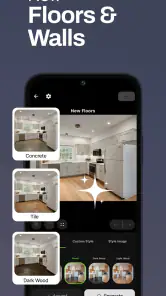
When a room feels dated, the hardest part is often deciding what to change first. I find it much easier to think about a remodel when I can compare a few visual directions instead of trying to imagine them from a paint chip or a saved inspiration photo. Remodel AI - Home Renovation is aimed at that early, exploratory stage: it gives you a way to consider changes to an existing space and to think through possible interior and exterior looks before committing time or money.
Where people can get stuck
AI design tools are most useful when the question is broad—“Would this room feel better with a warmer look?”—and less decisive when you need a construction-ready answer. A generated concept can help you narrow your taste, but it should not be treated as a precise plan for dimensions, materials, structural work, or final color matching. I would use the image as a conversation starter, not as a promise of exactly what a finished renovation will look like.
The biggest practical hurdle is often the input image. A cluttered room, a very dark corner, or a camera angle that hides the walls can make it harder to judge the result. Before drawing conclusions about a design, I would take a clear photo from a position that shows the area I want to change, with the room reasonably tidy and the lighting as even as I can manage. That small bit of preparation makes comparisons more useful because I am changing the design idea, not also changing the view.
There is also a difference between liking a visual and being ready to act on it. A room can look appealing in a concept while the proposed furniture arrangement would block a walkway or while a finish would be impractical for a busy household. I try to ask a second question after every attractive result: would this still work for how I actually use the space? Keeping that distinction in mind makes the app more valuable and helps prevent an exciting image from turning into an expensive assumption.
Setup checks before exploring designs
Remodel AI is a free Art & Design app from ReImage AI Inc., with optional in-app purchases listed from $4.99 to $89.99 per item. It is rated for Everyone, has a 4.6 average from around 25 thousand ratings, and has passed one million installs. It first appeared on April 17, 2023; the current version is 1.3.2+20251204T184915.f47303ba.683315f1, and it supports Android 7.0 and later. That gives you a quick sense of its reach and compatibility, while the paid items are worth keeping in mind if you want to explore beyond what is available at no cost.
When I start a room-design session, I decide what I want to learn before I take or choose a photo. For example, I might be comparing a light, calm living room with a more dramatic one, rather than asking the app to solve lighting, storage, furniture, and flooring all at once. A focused question makes the output easier to judge. It also gives me a sensible stopping point: once I know which general direction I prefer, I can move on to checking real materials and practical constraints.
Recovering a useful workflow
If the first result feels off, I would not immediately assume the whole idea is wrong. I would check whether the original photo clearly shows the room, then adjust one part of the brief at a time and compare again. Changing several things together can make it difficult to tell which choice improved the result. Saving a small set of distinct directions is more helpful than collecting many near-identical images that all leave the same decision unresolved.
More From Our News Desk

Weather by Xiaomi Review: Clear at a Glance, Less Clear Up Close

X Under Pressure: Can It Recover When Posting Goes Wrong?

Clash of Clans Is Won Between the Battles

Android Auto Makes the Case for Quieter Car Software

MobiOffice: Transforming Mobile Productivity with Seamless Integration

EA SPORTS FC™ Mobile Soccer: Redefining Mobile Sports Gaming
It helps to treat this as a visual brainstorming tool rather than a complete renovation service. The app’s appeal is the chance to explore a room or home exterior without first buying samples or booking a design consultation. The trade-off is that an AI-generated image cannot replace a site visit, a contractor’s measurements, or advice about electrical, plumbing, structural, and code requirements. I would use the concepts to explain what I like, then ask a qualified person whether the idea can be carried out safely and realistically.
When the app is not the cause
Sometimes the obstacle is not the design tool but the decision itself. If two options both look good, I find it useful to compare them against everyday needs: who uses the room, what must stay, how much maintenance I am willing to do, and whether the proposed change fits the home’s existing style. If I am still uncertain, I can show the alternatives to someone who shares the space or to a professional who understands the property. Their practical feedback may matter more than another round of image generation.
Transforming Spaces with Ease
First off, I have to say, the user interface of Remodel AI - Home Renovation is incredibly intuitive. You don’t need to be tech-savvy to navigate through its features. The app offers a plethora of design ideas, from modern minimalistic styles to more classic, cozy vibes. It’s like Pinterest but with real-time customization options. You can literally see how a new shade of paint or a different style of furniture would look in your actual home, thanks to its augmented reality capabilities.
Design Like a Pro
This app is a game-changer for anyone looking to renovate their home without breaking the bank on professional designers. The AI-driven suggestions are surprisingly spot-on, often suggesting combinations that I would never have thought of. It’s like having a design guru whispering in your ear, "Try this, you’ll love it!" And honestly, most of the time, you actually do.
Another feature worth mentioning is the ability to create mood boards. You can mix and match different elements and save your favorite looks. It’s perfect for those who need to visualize their ideas before making any commitments.
Seamlessly Connect with Professionals
If you do decide to bring in the experts, the app offers a directory of professionals. You can easily connect with contractors, painters, and interior designers right through the app. It’s a one-stop-shop for all your renovation needs, which is super convenient if you're juggling a busy schedule.
The app also comes with a cost estimator feature. This is a lifesaver for budgeting your projects. You get a ballpark figure of how much your dream space will cost, and you can tweak your plans accordingly. No more nasty surprises when the bills roll in!
Why You’ll Love It
One of the standout features of Remodel AI - Home Renovation is its community aspect. You can share your designs and get feedback or inspiration from other users. It’s like being part of a community of DIY enthusiasts who are just as excited about home makeovers as you are.
Who gets the most from it
I think this works best for someone who has a room they want to refresh but has not yet settled on a style. A renter planning a reversible makeover, a first-time homeowner comparing exterior directions, or a couple trying to agree on the mood for a shared living room can all use visual concepts to make the conversation less abstract. It is especially handy when one person thinks in colors and another needs to see a whole-room idea before forming an opinion.
For a realistic weekend example, imagine you are deciding whether a spare room should become a quiet work area or remain a flexible guest room. I would photograph it in its current state, explore a restrained office look and a warmer multipurpose look, then save only the strongest alternatives. From there, I would list what must remain accessible, such as storage or a clear path to the door, and check whether the favorite concept can accommodate those needs. The useful outcome is not necessarily a finished plan; it may simply be agreement on the direction before buying anything.
Using visual ideas without overcommitting
A good way to get more value from generated concepts is to separate decisions into layers. Start with the overall atmosphere—bright, cozy, minimal, or more traditional—before worrying about small decorative details. Once you have a preferred direction, consider one substantial choice at a time, such as wall treatment or furniture character. This reduces the chance of choosing a look because several attractive elements appeared together when only one of them suits your home.
I would also keep a simple note beside saved concepts: what I like, what seems unrealistic, and what I need to verify. For instance, a design might feel appealing because the room looks uncluttered, but the real reason could be that the image leaves out the storage you depend on. Writing that down helps turn inspiration into a practical brief for a contractor or a shopping list, rather than treating every visual detail as an instruction to copy.
There is a useful trade-off between broad exploration and consistency. Trying contrasting styles can reveal preferences you did not know you had, but comparing too many directions at once can make a project feel more confusing. I would first choose a few genuinely different possibilities, then use the same room photo and the same practical requirements to judge each one. That makes the comparison fairer and keeps a striking but unsuitable look from winning simply because it is novel.
How it differs from familiar design tools
Compared with a mood-board app or a social image feed, the main appeal here is connecting design inspiration to a photo of your own space. A collection of beautiful rooms can help you discover taste, but it often leaves you guessing whether an idea suits your particular walls, windows, and existing furniture. A room-planning program can be a better choice when exact measurements and placement are the priority. Remodel AI sits closer to visual ideation: it helps you imagine possible directions, while detailed planning still belongs elsewhere.
That distinction matters if you are shopping. A concept can guide the style of a sofa or the general warmth of a finish, but it is not a dependable substitute for checking dimensions, samples, availability, and how colors look in your home’s actual light. I would use it to narrow choices before visiting a showroom or asking a professional for options, not to order materials based on an image alone.
What to expect from cost and professional help
The cost estimator can be useful as an early budgeting prompt, but I would treat any estimate as a starting point rather than a quote. Renovation costs depend on the property, local labor, material choices, and work hidden behind walls; a broad visual concept cannot account for all of those details. If a project involves structural changes or services such as wiring and plumbing, an on-site assessment is the sensible next step.
The professional directory may help you move from inspiration toward a conversation with someone who can assess the space. I would arrive with a short list of priorities and a saved concept, while making clear which parts are preferences and which are essential requirements. That gives a professional something concrete to react to without implying that the AI image has already settled the technical plan.
Choosing whether to install it
Because the app is free to install and includes optional purchases, I would start by exploring the available experience before deciding whether a paid item is worthwhile. The in-app purchase range runs from $4.99 to $89.99 per item, so it is sensible to check what a purchase covers and whether it matches the amount of design exploration you expect to do. I would not pay simply because one generated idea looks promising; first make sure the app is helping with a real decision you need to make.
It is a less suitable fit for someone who wants exact construction drawings, guaranteed cost planning, or a replacement for a qualified designer or contractor. It may also frustrate users who already know their preferred materials and need precise room measurements more than visual inspiration. In those cases, a measurement-focused planning tool or a direct consultation is likely to be more useful than generating additional looks.
In conclusion, if you’re contemplating a home renovation, this app should definitely be on your radar. It simplifies the entire process, makes it fun, and gives you the confidence to make design choices. With Remodel AI - Home Renovation, transforming your home is just a tap away. So, why not give it a go and see where your creativity takes you?
Remodel AI - Home Renovation Frequently Asked Questions
Can I use Remodel AI - Home Renovation to explore both interior and exterior designs?
Yes. Remodel AI - Home Renovation is described as supporting AI interior design, exterior home design, and remodeling, so it can be useful when you are considering changes inside the house as well as its outside appearance. Think of it as a way to explore visual directions and compare ideas. The generated concepts are best treated as inspiration, not as final architectural or construction documents.
What operating system version do I need to run Remodel AI - Home Renovation?
The listed minimum operating system requirement is Android 7.0, so check your device’s Android version before downloading if you plan to use the Android app. The app is also described as available for iOS, but the operating-system requirement provided here applies to Android. Make sure you install the version intended for your device, and keep your operating system and app updated for the best chance of smooth use.
Is Remodel AI - Home Renovation appropriate for children?
Remodel AI - Home Renovation has an Everyone content rating, which makes it broadly suitable from a content-rating perspective. Its focus is home design and renovation imagery rather than entertainment or social networking. Parents should still consider whether the app’s features, any account or photo-sharing choices, and possible in-app purchases are appropriate for a child’s device and household rules before allowing a download.
Who is Remodel AI - Home Renovation designed for?
Remodel AI - Home Renovation is an Art & Design app for people who want to explore ideas for changing their home. Its AI interior design, exterior home design, and remodeling focus can help homeowners and anyone planning a renovation picture possible looks before deciding what direction to take. It is rated for Everyone.
What is Remodel AI - Home Renovation?
Remodel AI - Home Renovation is an innovative application designed to help users visualize and plan home renovations using artificial intelligence. It allows users to upload photos of their current spaces and generate realistic renovation ideas, offering a virtual glimpse into possible design changes. The app is available for both Android and iOS devices.
Pros
- Easy-to-use interface for beginners
- Wide range of design templates
- Real-time 3D visualization
- Affordable subscription plans
- Regular updates with new features
Cons
- Limited free version features
- Requires stable internet connection
- Occasional rendering lags
- May not support all device models
- No offline mode available
- Category
- Art & Design
- Version
- 1.3.2+20251204T184915.f47303ba.683315f1











