Reliant
- 2.80K
- 4.8
- Installs
- 500.00K
- Price
- Free

Screenshots

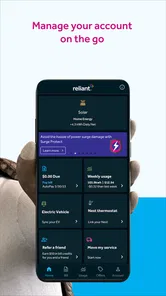
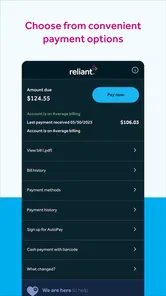
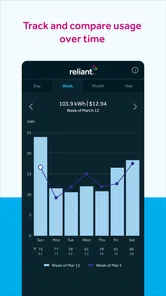
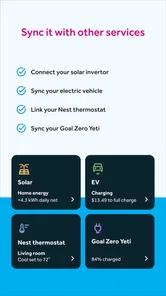
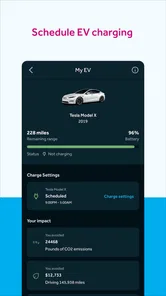
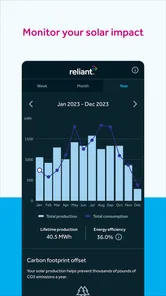

Analysis by Reviewed
Managing an electricity account is rarely something I want to turn into a separate chore. I usually want to check a balance, understand a recent charge, make a payment, or find account information without opening a browser and searching through several pages. That is the practical space Reliant occupies. It is a free business app from Reliant Energy Retail Holdings, LLC., designed for customers who want a mobile route into their Reliant account.
My view is straightforward: this is most useful when you already use Reliant for your electricity service and want a convenient account companion. It is not a general energy-saving tool, a marketplace for comparing every provider, or a replacement for customer support in complicated situations. The decision is therefore less about whether the app is impressive in isolation and more about whether it fits the way you manage a Reliant account.
Reliant has been available since July 12, 2013, and its current version is 9.8.0. It has a 4.8 average from around 9,200 ratings, with about 2,800 written reviews and over 500,000 installs. Those figures suggest that the app has become a familiar option for a substantial number of customers, while the long release history points to an established product rather than a newly launched experiment.
What I would check before choosing a utility app
For an electricity account app, I judge the experience by a few very practical questions. Can I reach the information I need quickly? Is the account view easier to understand than the provider’s website? Does it help me act before a payment or billing issue becomes urgent? And does it remain useful after the initial setup, rather than becoming an icon I never open?
Those questions matter more here than visual effects or a long list of optional tools. A utility app earns its place when it reduces small points of friction: checking what is due while away from a computer, reviewing an account before making a payment, or confirming that I am looking at the correct service account. If it makes those moments simpler, it has done its job.
I would also consider who manages the account. If I am the person responsible for the household bill, a direct account app can be worthwhile. If someone else pays the bill and I only need occasional information, installing it may not add much. Likewise, renters, families, and people who move between addresses should think about whether they need one stable account view or a more flexible service that handles several providers in one place.
Another useful criterion is the device requirement. Reliant lists minimum operating system version 10, so I would check the phone before downloading rather than assuming every older device will run the current release. The app is rated for Everyone, which makes it suitable for a broad household audience, although the account holder still needs to handle the sensitive financial decisions and login details responsibly.
More From Our News Desk

Weather by Xiaomi Review: Clear at a Glance, Less Clear Up Close

X Under Pressure: Can It Recover When Posting Goes Wrong?

Clash of Clans Is Won Between the Battles

Android Auto Makes the Case for Quieter Car Software

MobiOffice: Transforming Mobile Productivity with Seamless Integration

EA SPORTS FC™ Mobile Soccer: Redefining Mobile Sports Gaming
The everyday job it handles best
Imagine I am leaving work and remember that I need to review my electricity account before the evening. I do not want to find a laptop, remember a web address, and navigate a desktop page on a small screen. An app gives me a more natural place to begin: open the account tool, check the current information, and decide whether I need to take action now or later.
That kind of short session is where I see the strongest reason to use Reliant. It is not necessarily about spending several minutes exploring the app. It is about making a routine task available at the moment I remember it. The convenience is modest, but utility apps are often valuable precisely because they remove repeated minor obstacles.
Why the provider connection is its main advantage
The biggest strength is the direct relationship with Reliant. A provider-specific app can be more relevant than a generic finance app because the information is tied to the electricity account rather than being reconstructed from bank transactions or email notices. When I want to understand a utility charge, seeing it in the provider’s own context is generally more useful than seeing only a withdrawal in a banking app.
This also makes the app a better fit for people who want one place for their Reliant-related tasks. I would rather use a dedicated account view than rely on a collection of reminders, screenshots, and browser bookmarks. That does not mean the mobile app replaces every other method, but it can become the first place I check when the question concerns my Reliant service.
The strong average rating and broad install base reinforce that the basic idea works for many customers. I would not treat popularity as proof that every account situation will be smooth, but it does make the app easier to recommend to an existing Reliant customer than to someone who has no connection with the provider.
Small habits that make the app more useful
My first practical tip would be to open the app during a calm moment, not only when a payment is already urgent. That gives me time to confirm that I am signed into the right account and understand where the important information is located. A few minutes of preparation can prevent a rushed search when a due date or billing question is already on my mind.
My second tip is to use it as a checking point before relying on a separate budgeting system. A bank app can show that money left an account, but it may not explain the utility context clearly. I would review the Reliant account first, then record the amount in my household budget if I need a longer-term spending history. This two-step workflow is more reliable than treating a bank transaction as the complete explanation.
A third useful habit is to keep the app for account verification even if I prefer another payment method. Some people may be more comfortable paying through their bank or another established routine. In that case, Reliant can still serve as the place to inspect the provider-side information before and after the payment process. This separates “where I verify the bill” from “how I move money,” which can make personal finance routines clearer.
I would also avoid opening the app only after a problem has become confusing. If a charge looks unfamiliar or the account information does not match my expectations, checking recent account details early gives me a better starting point for contacting support. The app may not resolve every issue itself, but it can help me describe the problem more precisely than saying only that the bill “looks wrong.”
Where the experience may feel limited
The same provider focus that makes Reliant relevant can also make it narrow. If I want a complete household view across electricity, water, internet, and other recurring services, this app will not be my central dashboard. I would need a separate budgeting or bill-management tool for that broader picture. Reliant is better understood as a direct account channel than as an all-purpose financial organizer.
There is also a difference between convenience and control. An app can make account access easier, but it does not change the underlying service terms, the amount of electricity a home uses, or the complexity of a disputed charge. I would not install it expecting the interface alone to solve a billing disagreement or provide the kind of detailed financial planning found in a dedicated budgeting application.
Mobile access can introduce its own friction. I may prefer a larger browser screen when comparing several billing details, reading lengthy information, or handling an unusual account situation. The app is likely to be most comfortable for focused checks and routine actions, while the full website or direct customer support may be better for tasks that require more space or explanation.
That is an important trade-off for people who rarely use mobile apps. If I already have a reliable browser routine and only review the account a few times a year, the download may not save enough time to matter. The app becomes more compelling when I value quick access, handle the account regularly, or want a dedicated shortcut instead of remembering the web process.
How it compares with the usual alternatives
The closest alternative is usually the provider’s website. A browser can be the better choice when I am on a shared computer, using a device that cannot run the current app, or trying to read a large amount of account information at once. It also avoids adding another app to a phone. On the other hand, the mobile route is more convenient for brief checks and fits naturally into moments when I am already using my phone.
A banking app is useful for confirming whether a payment has left my account and for viewing broader household finances. It is less useful for explaining the provider-side meaning of a charge. I see the two as complementary rather than direct substitutes: the bank shows the movement of money, while Reliant is the more relevant place to inspect the electricity account itself.
General bill-organizing apps can be preferable for households with several providers or people who want one reminder system across recurring expenses. Their advantage is breadth. Their weakness, from my perspective, is that they may not offer the same direct connection to a Reliant account. If my main concern is electricity service with Reliant, a general tool may add organization while losing some account-specific context.
Finally, customer support remains the right alternative when the question is unusual, urgent, or too complicated for a self-service screen. I would not judge Reliant harshly for that boundary. A mobile app should make routine account management easier, but a person may still be needed when an account requires explanation, correction, or a decision that cannot be reduced to a button.
What switching to the app really costs
The financial cost is simple: Reliant is free to download and use. The more relevant cost is attention. I have to install it, sign in, learn where the useful account information lives, and decide whether it deserves a regular place in my routine. For some users, that setup is a minor one-time effort. For others, especially people who already use a browser comfortably, it may feel unnecessary.
There is also a privacy and device-management consideration with any account app. I would use a screen lock, avoid sharing login details, and be careful when accessing the account on a public or borrowed device. Those are sensible habits for a utility account because the app connects convenience with personal billing information. The Everyone age rating describes broad suitability, not a reason to treat account access casually.
Switching from a browser does not have to be permanent. I can try the app for routine checks while keeping the website available for more involved tasks. That makes the decision low-risk from a workflow perspective: I am testing whether the mobile experience saves time, not abandoning every other way to manage the account. If it does not improve my routine, removing it is reasonable.
For someone moving into a Reliant account for the first time, I would set expectations carefully. The app is most valuable after the account relationship already exists. It is not a reason by itself to choose an electricity provider, and it should not outweigh service terms, availability, or household needs. The app supports the customer relationship; it is not the whole relationship.
Who should use it, and who should skip it?
I would recommend Reliant to an existing Reliant customer who manages a household electricity account from a phone and wants a quicker alternative to repeated browser visits. It is especially sensible for people who check account information regularly, prefer provider-specific access, or want to separate utility details from general banking activity.
I would be more cautious if I manage several utility providers, need a unified bill calendar, or mainly want detailed spending analysis. In those cases, a broader budgeting or bill-management app may be a better primary tool, with Reliant kept as a secondary account reference. Someone who strongly prefers desktop workflows may also gain more from the website than from installing another mobile application.
I would also skip it if I am not a Reliant customer. The provider connection is the reason to use it, so there is little value in downloading a dedicated account app without a relevant account to manage. Choosing a neutral utility organizer or banking tool would make more sense for a household that changes providers or wants a provider-independent system.
My final recommendation
After weighing the convenience against the narrow focus, I see Reliant as a practical companion rather than a complete financial tool. Its best quality is directness: it gives Reliant customers a mobile place to manage the account instead of forcing every routine check through a browser or a bank statement. The free price removes the main financial barrier, and the established release history and high user rating make it a credible option for the intended audience.
My recommendation is simple: install it if Reliant is your electricity provider and you regularly manage the account from your phone. Give it a fair trial during ordinary, low-pressure account checks, then keep it only if it genuinely shortens that routine. If you need cross-provider budgeting, extensive bill analysis, or help with a complicated dispute, pair it with a broader tool or use the website and customer support when appropriate.
In my experience, the app’s value is not in trying to do everything. It is in making one specific relationship easier to handle. For the right customer, that focused approach is a strength. For everyone else, it is a reminder that the best alternative may be a general finance app, a browser workflow, or simply the support channel designed for the issue at hand.
Reliant Frequently Asked Questions
Who develops Reliant, and is it the right app for me?
Reliant is a business app developed by Reliant Energy Retail Holdings, LLC. Its store summary is “Power Your Way,” and the short description is “Reliant.” If you are considering it for access to Reliant’s services on a mobile device, check that the app and its available features suit your needs before downloading.
What is Reliant, and what can I use it for?
Reliant is an application designed to help users access its main services and features from a mobile device. Depending on the version and region, the app may provide account management, service information, notifications, support tools, or other related functions. Before downloading, check the official store description to confirm that the available features match your needs and are supported in your location.
Is Reliant free to download and use?
Reliant is free to download. Some services, purchases, subscriptions, or account-related charges can still depend on how you use the application. Installing the app does not always mean that every feature is free. Review the pricing information, terms of service, and any in-app purchase details shown on Google Play or the App Store before creating an account or requesting a paid service.
What devices and operating systems are compatible with Reliant?
Reliant is intended for supported Android and iOS smartphones, although compatibility can vary according to the operating system version, device model, and app release. The current version is 9.8.0, and it requires Android 10 or later. Check the official store listing before installation, and make sure your device has enough storage, a stable internet connection, and an updated operating system.
Does Reliant require an account or personal information?
Some features of Reliant may be available immediately, while others can require registration, login, or verification. Depending on the service, the app may request information such as your name, email address, phone number, location, or account details. Read the privacy policy and permission requests carefully before continuing, and only provide information that is necessary for the features you plan to use.
Pros
- Simple interface makes essential features easy to find.
- Useful for managing Reliant-related services from one place.
- Account access is convenient on a mobile device.
- Notifications can help users stay updated on important activity.
- Available on mobile
- making access possible while away from home.
Cons
- Some features may require an active Reliant account or service.
- Performance can vary depending on device and internet connection.
- The app may offer limited value to users outside Reliant’s service area.
- Occasional sign-in issues could interrupt access to account information.
- Background notifications may affect battery life if left enabled.











