ReelMe AI: Art Video Generator
- 11.00
- 3.9
- Installs
- 50.00K
- Price
- Free

Screenshots
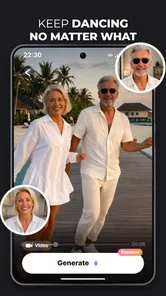
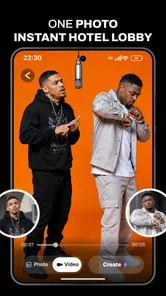
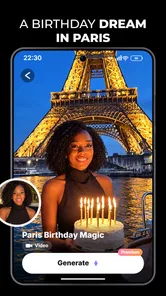

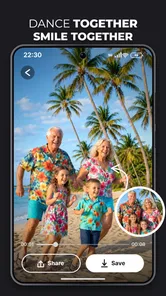
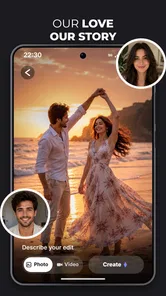
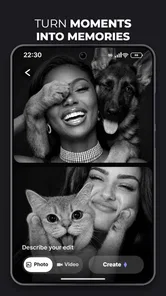
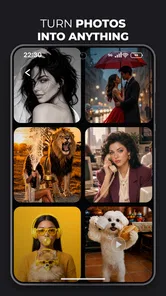
Analysis by Reviewed
I would approach ReelMe AI as a quick way to turn an idea into a short, visually engaging video, rather than as a replacement for a full video-editing studio. That distinction matters when you first open an AI video tool: the exciting part is getting from a rough concept to something shareable, while the less exciting part is that the result may need another pass before it feels like yours. For a first-time user, I’d keep the goal simple: make one small video, judge how well it matches your idea, and only then decide whether to spend more time with it.
What to expect from an AI art video app
ReelMe AI: Art Video Generator is an Art & Design app from SuperMinds. Its focus is using AI to make videos in a short workflow, so it makes most sense for people who want an expressive visual starting point without assembling every frame by hand. It is free to install, rated for Everyone, and has a 3.9 average from around 130 ratings. That’s a mixed but respectable signal: I’d treat it as a tool worth trying, not as a guarantee that every output will be polished.
The appeal is convenience. If you have a visual idea but no patience for learning a timeline editor, an AI-first app can help you get to a draft faster. It may also be useful when you want a creative prompt for a social post, a mood piece, or a small personal project. The important expectation is that “fast” and “finished” are different things. AI-generated visuals can be surprising, but they can also miss a detail or interpret a concept in a way you didn’t intend.
The app has passed 50,000 installs, which suggests it has found an audience among people exploring AI video creation. I wouldn’t read that as proof that it suits every workflow. A beginner making a playful clip and a creator needing precise control over timing, typography, or a consistent brand look are asking for different things. ReelMe AI is more compelling when experimentation matters more than exact edit-by-edit control.
There are in-app purchases, with items ranging from $4.99 to $69.99. I’d start with the free experience and see whether the app’s style and process fit the project before considering any purchase. If you’re just curious, there’s no reason to decide on paid options before you know what kind of result you can get. If you have a specific deadline or a client deliverable, test the workflow early rather than assuming a paid option will solve every limitation.
Start with a small, clear idea
My advice for a first attempt is to choose one subject, one mood, and one purpose. “A dreamy video about a rainy evening” gives an AI tool a clearer direction than a long paragraph mixing several scenes, moods, and visual styles. This is a useful general rule for AI creation, but it matters especially when you’re still learning how ReelMe AI interprets your input. A focused brief makes it easier to tell whether the output is genuinely close or simply attractive by accident.
Think about where the finished clip will go before you create it. A video meant to sit in a social feed has a different job from a private birthday greeting or a visual experiment you’ll keep on your phone. Keeping that purpose in mind helps you decide what counts as success: an immediate mood, a recognizable subject, or a coherent sequence. It also stops you from judging a quick creative tool by the standards of a high-control editing suite.
More From Our News Desk

Weather by Xiaomi Review: Clear at a Glance, Less Clear Up Close

X Under Pressure: Can It Recover When Posting Goes Wrong?

Clash of Clans Is Won Between the Battles

Android Auto Makes the Case for Quieter Car Software

MobiOffice: Transforming Mobile Productivity with Seamless Integration

EA SPORTS FC™ Mobile Soccer: Redefining Mobile Sports Gaming
Getting ready for the first attempt
ReelMe AI is currently at version 4.3.0 and requires Android 7.0 or later. If you’re using an older device, check compatibility before planning a project around it. The app is free to download, so a sensible first step is to install it and explore the initial flow without treating that as a commitment to buy anything. I’d also have a rough concept ready before opening the creation process; deciding on the idea as you go can make the first session feel less focused.
Before making a video, write a one-sentence brief for yourself. Include the main subject and the feeling you want the viewer to get. Then remove details that don’t affect the image or mood. For example, if you’re making a clip to accompany a message to a friend, the central idea might be a quiet, celebratory scene rather than a list of every personal detail you want represented. This gives you a useful benchmark when you see the result and makes it easier to decide what to change next.
A practical first-session plan is to make a draft for a low-stakes purpose. A casual social post, a visual greeting, or a private test is better than a campaign asset that must match exact colors and messaging. This isn’t because the app can’t produce something appealing; it’s because AI output is easiest to evaluate when you have room to experiment. You can learn what kind of concept it handles well without putting an important deadline on your first try.
Making the first result useful
For your first meaningful success, aim for a clip that communicates one clear feeling. Don’t begin by trying to recreate a complicated scene or produce a sequence with lots of distinct characters and events. A narrow idea gives you a better chance of recognizing the parts that work, and it makes any mismatch easier to diagnose. If the result is close in mood but wrong in subject, you know what needs attention; if it is visually appealing but confusing, you can simplify the idea.
One useful workflow is to judge the draft in two passes. First, watch it without pausing and ask whether the overall feeling fits your intention. Then watch again for the specific thing that matters most: perhaps the main subject, the atmosphere, or whether the visual progression makes sense. This avoids getting distracted by small imperfections before you know whether the clip works at all. If the broad idea is off, revise the concept; if the broad idea lands, then focus on a more specific adjustment.
For an everyday example, imagine you want a short visual to share alongside a note about a weekend art project. Instead of trying to show the entire process, choose the finished object and a mood that matches the message. The result can work as an atmospheric accompaniment even if it doesn’t document the real making of the object. That distinction helps you use an AI video generator for what it does best: creating a visual impression, not necessarily recording events with documentary accuracy.
Another good use is making a few alternative visual directions before committing to a larger piece. You might have a general idea for a personal project but not know whether it should feel playful, calm, or dramatic. Treat the first video as a sketch that helps you choose a direction. That’s a more realistic and useful role for an AI art tool than expecting a single prompt to produce a finished, precisely controlled production.
Where beginners can get confused
The most common misunderstanding with AI video tools is expecting a prompt to behave like a detailed editing instruction. A concept may describe what you want, but it doesn’t necessarily give you frame-by-frame control. If the result changes an element or emphasizes something unexpected, that isn’t automatically a failure; it may be a sign that the brief leaves too much open. Make the next attempt more focused rather than adding a long list of competing instructions.
It also helps to separate visual quality from usefulness. A striking clip may still fail if it doesn’t suit the message, while a less elaborate result might be exactly right as a quick background or mood piece. I’d ask, “Would this help someone understand or feel what I meant?” rather than “Does this look like a professional film?” That keeps expectations fair and makes the app easier to assess on its own terms.
Another point worth keeping in mind is the difference between AI generation and conventional editing. Traditional editors are usually the better choice when you need dependable control over cuts, exact timing, captions, or a sequence built from specific footage. ReelMe AI is more attractive when the challenge is getting a visual idea started. If you already have video clips and want to trim, arrange, and refine them precisely, a conventional editor may save you frustration.
There’s also a practical cost question. Since purchases are available, it’s easy to assume that paying is the next step if a first result isn’t perfect. I wouldn’t make that leap. First decide whether the issue is the concept, the kind of output you need, or the app’s fit for your workflow. Spending money makes sense only if you’ve found a recurring use and understand what you’re paying to access. For occasional experiments, the free starting point is the more sensible test.
Who will get the most from it
I can see ReelMe AI fitting first-time creators who want to try AI-made visuals without beginning with a complex editing process. It may suit someone preparing a casual social clip, exploring an art idea, or looking for a visual accompaniment to a personal message. It’s also useful for people who like trying different creative directions and don’t mind treating the first output as a draft rather than a final answer.
I’d be more cautious if your work depends on exact visual continuity or detailed editing control. A business that needs consistent branded assets, a creator matching a precise storyboard, or anyone assembling footage to a strict beat may be better served by a tool designed around manual editing. That isn’t a knock on an AI-focused approach; it’s a different set of priorities. ReelMe AI’s value is in helping you explore an idea quickly, not in promising that exploration will remove the need for judgment.
The app is for Everyone, but an all-ages content rating doesn’t tell you whether the creative workflow will suit a particular person. Younger users may enjoy experimenting with visual concepts, while adults may prefer it for quick personal or social content. In either case, I’d keep the first project simple and review the result before sharing it. The creator still needs to decide whether the video represents the intended message clearly and appropriately.
What to try after the first draft
Once you’ve made a first video, don’t immediately chase a more elaborate prompt. Identify one thing that worked and one thing that didn’t. Keep the successful part of your idea, then change a single element for the next attempt. This small-step approach gives you a clearer sense of how your instructions affect the result. If you change the subject, mood, and intended use all at once, it becomes harder to learn what made the second output better or worse.
If the first clip has a strong atmosphere but doesn’t show the subject clearly, make the subject the center of your next brief. If it communicates the subject but feels too busy, reduce the number of ideas you’re asking it to express. These are practical improvements rather than hidden settings: they help you work with the uncertainty of AI generation instead of fighting it. They also make the app more useful as a creative partner, because you’re bringing a clearer point of view to each round.
For a repeatable workflow, save your own short notes about the concepts that tend to suit your needs. You don’t need a complicated system; a few phrases describing a successful mood or a useful type of project can be enough to spark the next idea. That is particularly helpful if you use the app sporadically and don’t want to rediscover your approach each time. It also prevents a common trap: repeatedly asking for a broad “cool video” and getting a result that looks interesting but has no clear purpose.
ReelMe AI is best judged as a low-friction place to turn a visual hunch into a draft. I’d recommend trying it if you’re curious about AI-generated art videos and are comfortable refining your idea after seeing the first result. I wouldn’t choose it as my only tool for a tightly controlled edit, but for a personal clip or an early creative sketch, it has a clear use. Start with a small brief, evaluate the result for its actual purpose, and consider paid options only after the free experience has shown you a reason to return.
ReelMe AI: Art Video Generator Frequently Asked Questions
What is ReelMe AI: Art Video Generator?
ReelMe AI is an app for creating stylized videos and artwork with the help of artificial intelligence. Depending on the tools and options available in your version, you can choose an effect or template, add a photo or other input, and let the app transform it into an animated or artistic result. The available styles and features may change with updates.
How do you create a video with ReelMe AI?
The usual workflow is to select a creation tool or style, provide the requested photo or other content, and start the generation process. Review the preview before saving or sharing, since results can vary based on the input and selected effect. Some tools may require an account, an internet connection, or credits, and generation time can depend on the effect and service availability.
Is ReelMe AI free to use?
The app may be available to download without an upfront charge, but that does not necessarily mean every feature is free. AI generations, premium styles, exports, or an ad-free experience may be limited by a subscription, in-app purchase, or usage allowance. Check the current store listing and the payment screen for prices, trial terms, renewal details, and cancellation instructions before subscribing.
Does ReelMe AI require an internet connection, and what happens to uploaded photos?
AI video and image generation often relies on online processing, so a stable internet connection may be needed to create or download results. If you upload personal photos, review the app’s privacy policy and permissions to understand how content is processed, stored, and shared, and whether it may be retained for a period. Avoid uploading sensitive images unless you are comfortable with those terms.
Can I share or use ReelMe AI creations commercially?
You can generally save creations and share them through supported options, but the rights and restrictions depend on ReelMe AI’s terms, the source material, and any platform rules. Using a person’s likeness, copyrighted characters, music, or other protected content may require permission, especially for commercial work. Check the app’s current terms and export options before publishing or monetizing a generated video.
Pros
- Turns photos and text prompts into short AI-generated videos.
- Offers a quick way to create shareable clips without editing skills.
- AI effects can give portraits and artwork a distinctive animated look.
- Useful for experimenting with visual ideas before making a polished video.
- Designed for creating content suited to social media feeds.
Cons
- AI results may differ from the preview or your prompt.
- Some effects may require a paid plan or in-app purchases.
- Generation time can vary with network conditions and demand.
- The app may need access to photos or other personal media.
- AI-generated clips can include visual glitches or unnatural motion.











