

Red Rover K12
- 1.16K
- 4.6
- Installs
- 100.00K
- Price
- Free

Screenshots


Analysis by Reviewed
When a K12 employee needs to report an absence quickly, the difficult part is often not deciding to stay home; it is getting the information into the school’s staffing process before the morning becomes chaotic. Red Rover K12 is built for that narrow but important job. It is a free Education app from Red Rover Technologies LLC that gives school employees and substitute teachers a mobile way to register and fill absences.
I see it as a work utility rather than an all-purpose school app. It is not trying to replace a learning platform, a staff communication suite, or a calendar. Its value comes from reducing the number of steps between “I cannot work today” and “the absence is visible to the people who need to cover it.” That focus makes it useful for a particular audience, although it also means the experience depends heavily on whether a school or district already uses the Red Rover system.
How the current Red Rover K12 experience fits a school day
The app’s purpose is easiest to understand through a realistic morning. Imagine a teacher wakes up ill before the first bell. Instead of waiting for an office to open, searching for an email address, and hoping the message reaches the right person, the employee can use the mobile app to submit the absence through the school’s established process. A substitute can then use the same general ecosystem to look for available work and accept an assignment when one suits them.
That workflow is more practical than a collection of informal messages because it places the absence inside a staffing system rather than leaving it in a text thread or an individual inbox. In my view, this is the app’s strongest idea: it turns an urgent staffing request into a structured task. The benefit is especially clear for districts with many campuses, rotating substitutes, or office teams that need a shared view of open assignments.
The short description, “Red Rover K12,” is brief, but the actual audience is quite specific. This is for K12 employees and substitutes, not for parents checking attendance or students looking for homework. A school employee who only wants a personal reminder app would be better served by the phone’s calendar or task tools. A substitute who is not connected to a participating organization may also find the app less useful than a general job-search service, because the important information comes from the school system using it.
What I found useful about the mobile workflow
The main advantage of handling absences on a phone is timing. School staffing problems rarely occur at a convenient desk-based moment. Employees may be commuting, caring for a child, or dealing with an illness when they need to notify the district. A mobile-first route can make the action feel more immediate than signing into a desktop portal, especially for people who do not regularly sit at a computer before work.
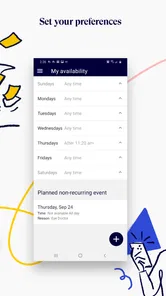
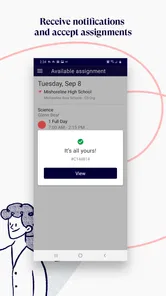
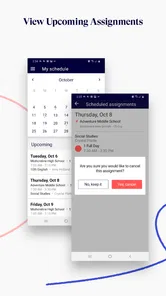
For substitutes, the value is different. The app can serve as a practical place to check whether work is available and respond to it without relying on a phone call from an office. That does not guarantee that every assignment will match a substitute’s preferences, but it gives the substitute a more direct way to participate in the district’s coverage process.
More From Our News Desk

 Instagram
Instagram’s Power Comes From Its Place in Your Phone
A close look at how Instagram turns Meta’s reach, recommendation systems and everyday camera habits into durable platform power—and what that costs users.

 Gmail
GmailGmail in a Busy Inbox: Who Benefits Most?
From first account to crowded workday, Gmail earns its place through dependable search and flexible sorting—but its best fit depends on how much inbox maintenance you can tolerate.

 Prime Video
Switching to Prime Video: What Changes in Your Viewing Routine
Prime Video can make a compelling second home for streaming, but switching means learning a different catalog, rental layer, and route from browsing to playback.

 Universal TV Remote Control
Universal TV Remote Control Works Best as a Reliable Backup
A phone remote earns its place through quick setup and reliable habits. Here is how to get more from Universal TV Remote Control—and where its limits show.

 Weather - By Xiaomi
Weather by Xiaomi Review: Clear at a Glance, Less Clear Up Close
Xiaomi’s weather app makes everyday forecasts quick to scan, but its calm surface can leave useful details and recovery paths harder to find than they should be.

 X
XX Under Pressure: Can It Recover When Posting Goes Wrong?
A resilience-focused review of X, examining setup, mistaken posts, interruptions, weak connections, and the gaps that matter when recovery needs to be dependable.
Latest News



I also appreciate the separation between the two roles. An employee reporting an absence has a different goal from a substitute searching for work. Keeping those actions within the same K12 staffing environment can make the overall process easier for a district to coordinate, even though each person may use only one part of it.
Where the experience depends on the organization
Red Rover K12 is not an independent tool that delivers the same experience to everyone immediately after installation. Its usefulness is tied to the school or district configuration behind it. That is an important distinction before downloading: installing the app is not the same as gaining access to a complete substitute marketplace.
In practical terms, employees should expect to use the account or organization details connected with their school. Substitutes should confirm that their district works with Red Rover and understand how that district handles registration, availability, and assignment acceptance. If an administrator has not enabled the relevant workflow, the app cannot solve that organizational problem by itself.
This dependence is not necessarily a weakness; it is the trade-off for having a system designed around school staffing rather than a generic marketplace. Still, it can create friction for someone who expects a public sign-up experience. I would check with the school office or district staffing contact first, particularly if the app is being introduced during a busy absence period.
What the current release says about the product’s direction
The current version is 7.0.2, while the app was released on August 10, 2020. That combination suggests a product that has moved beyond its initial launch and is being maintained as an established tool rather than treated as a one-time experiment. I would not interpret a version number alone as proof of a specific feature, but it does make the app feel like part of a continuing service used by real school communities.
The app has an average rating of 4.6 from around 7.9 thousand ratings, with roughly 1.2 thousand written reviews. It has also passed 100 thousand installs. Those figures do not tell me that every employee will have a smooth experience, because school configuration and local procedures matter, but they do indicate that the app has reached a meaningful audience and that many users have taken the time to evaluate it.
Red Rover Technologies LLC appears to be maintaining a focused product rather than expanding the app into unrelated education features. That focus is sensible. An absence-management tool should be judged by whether it helps people submit, find, and coordinate coverage reliably, not by how many extra screens it adds.
How the evolution affects people already using it
For existing users, a newer release can be helpful when it makes familiar tasks feel more stable or easier to complete. The best improvements in this kind of app are often quiet ones: fewer confusing transitions, clearer status information, and less hesitation about whether an action was accepted. Those details matter because absence reporting is time-sensitive, and uncertainty can lead to duplicate calls or messages.
At the same time, updates can change where familiar controls appear or how a user reaches a task. Someone who has used an older version for a long time may need a short adjustment period, especially if they normally open the app only when they are already under pressure. I recommend that employees sign in and look around before an emergency morning arrives. A quick practice session can reveal whether the account is active and whether the expected absence workflow is available.
Substitutes benefit from the same preparation. Checking the app when there is no immediate assignment gives them time to understand how opportunities are presented and what action is required to respond. It is much better to learn the process on a quiet afternoon than while trying to accept a last-minute classroom assignment.
Practical habits that make the app more dependable
My first tip is to treat the app as one part of the district’s official procedure, not as a replacement for every local instruction. If a school says that certain emergencies also require a call to the office, completing the mobile step should not be assumed to cancel that requirement. The app can organize the absence, while the school may still have separate communication rules.
My second tip is to verify the result after submitting an absence or responding to an assignment. Look for the clearest confirmation available in the app and keep the district’s contact method nearby until the process is familiar. This is not about distrusting the software; it is about avoiding an uncomfortable morning in which an employee assumes the school has coverage information that was never fully submitted.
A third useful habit is to keep role boundaries clear. Employees should not use a substitute-oriented workflow when they need to report their own absence, and substitutes should not assume that browsing available work is the same as being assigned to it. In a staffing system, those distinctions affect who is responsible for the next step.
Finally, I would avoid relying on a single screen as a permanent record of every detail. If a substitute has accepted an assignment or an employee has reported a particularly important absence, noting the relevant information in the district’s normal way can provide useful backup. The app is most effective when it is integrated into a school’s process rather than used in isolation.
Where it compares well with ordinary alternatives
The usual alternative for an employee is a phone call, email, paper form, or a desktop staff portal. A call can be personal and immediate, but it may depend on office hours and one person answering. Email creates a written trail, yet it can be missed among other messages. Paper forms are familiar in some workplaces but are poorly suited to last-minute changes. A desktop portal may offer more room for information, though it is less convenient when the employee is away from a computer.
Red Rover K12 sits between those options. It offers the convenience of a phone while directing the request into a staffing process intended for schools. That is a meaningful advantage for districts that need a shared system for absences and substitutes. It can reduce the administrative burden of manually matching messages with available people.
For substitutes, the comparison is with waiting for calls, checking a district website, or using a general scheduling tool. A district-specific app is usually more relevant because the assignments come from the organization where the substitute is eligible to work. The trade-off is that the app is less useful outside that network. A general employment platform may expose more kinds of work, while Red Rover K12 is more closely aligned with K12 coverage.
I would choose this app over informal communication when my school already uses it and I need a clear, official route for the absence. I would not choose it as a standalone substitute marketplace, personal planner, or universal school communication tool. That distinction prevents disappointment and makes the app’s focused design easier to appreciate.
Who should use it and who may want something else
This app is a strong fit for teachers, school staff, and approved substitutes whose districts have adopted Red Rover. It is also useful for administrators who need absences and coverage requests to move through a common system instead of being scattered across calls and messages. People who regularly work across several schools may especially value having a mobile entry point, provided each organization supports the same service.
It is a weaker fit for students, families, private tutors, and employees whose workplaces do not use Red Rover. It is also not the right tool for someone looking for lesson planning, grade management, classroom communication, or professional development. Those needs belong to other education apps with broader teaching or learning features.
Substitutes who prefer complete control over their schedule should also consider the limits of a district-based system. Available assignments depend on what the participating schools publish and on the substitute’s eligibility. A general scheduling app may be better for organizing commitments across unrelated employers, while Red Rover K12 is better for participating in one school network’s established coverage workflow.
Remaining gaps and the details I would watch
The biggest remaining gap is not necessarily a missing button; it is the relationship between the app and local administration. A polished mobile interface cannot clarify an unclear district policy, fix an inactive account, or guarantee that a substitute is approved for a particular assignment. New users should therefore judge the whole process, including school instructions and account setup, rather than judging the app in complete isolation.
I would also like users to pay attention to how clearly the app communicates status. In absence management, “submitted,” “seen,” “pending,” and “covered” are not interchangeable. Employees need confidence that their notice reached the right workflow, while substitutes need to know whether responding to an opportunity actually completes their obligation. If any part of that chain feels ambiguous, the district’s support process remains important.
Another trade-off is simplicity versus depth. A focused app can make the most common action faster, but it may not provide the broad planning tools found in a full staff portal. That is acceptable if the mobile experience handles urgent tasks well. It becomes a limitation for users who want to manage every employment detail from one place.
Future changes should be judged by whether they make the core workflow more transparent, not merely by whether they add more options. I would watch for improvements that help users understand the state of an absence, reduce duplicate communication, and make assignment responses easier to distinguish from final confirmations. Those changes would have more practical value than decorative additions.
Compatibility is another sensible consideration. The app supports Android devices running version 7.0 or later, so people using very old phones should check their system before planning around it. For most current Android users, that requirement should be manageable, but a district should still have a fallback procedure for employees whose devices cannot run the app or whose access fails at a critical moment.
The Everyone age rating fits the app’s workplace and education purpose, although the audience is still primarily adult K12 employees and substitutes. I would not mistake the age rating for a sign that the app is designed for children. Its usefulness comes from staffing administration, not student entertainment or classroom activities.
My recommendation after looking at the whole workflow
I recommend Red Rover K12 to school employees and substitutes when their district uses Red Rover as an official absence and coverage system. It offers a sensible mobile answer to a problem that is often handled through slow, fragmented communication. The free price removes one barrier for individual users, and the established release history, current version 7.0.2, and substantial user adoption make it feel like a serious working tool rather than a temporary experiment.
My recommendation comes with an important condition: confirm the school’s process before depending on the app. The best experience comes when the district has configured roles, explained the steps, and made clear what counts as a completed absence or assignment. Without that context, even a well-designed app can feel confusing.
For a teacher reporting an unexpected absence, the app’s main benefit is speed and structure. For a substitute, it is the convenience of checking relevant school work through a mobile channel. For a district, it can help bring two sides of the coverage problem into the same operational space. Those are practical benefits, not broad promises, and they match what this app is actually designed to do.
I would skip it if I wanted a general education planner, a student-facing learning environment, or a universal job platform. I would also keep another official contact method available until I had successfully used the workflow and understood my district’s expectations. With those boundaries in mind, Red Rover K12 is a focused, worthwhile tool for the people it serves: a mobile bridge between reporting an absence and organizing classroom coverage.
Red Rover K12 Frequently Asked Questions
What is Red Rover K12, and who is it designed for?
Red Rover K12 is a school communication and engagement platform intended for K–12 communities. It can help schools, districts, teachers, staff, parents, and guardians share announcements, updates, reminders, forms, and other important information in one place. The exact features available may depend on how a particular school or district has configured its account and communication tools.
Can I use Red Rover K12 to register and fill absences?
Yes. Red Rover K12 is designed for K–12 employees and substitute staff to register and fill absences. It is an education app developed by Red Rover Technologies LLC, and the absence workflow is intended to help participating school communities manage these staffing needs through the app. Your ability to use the relevant tools will depend on your school or district’s setup and your account access.
How do I access my school or district in Red Rover K12?
Access usually depends on an invitation, school-provided credentials, or an account connected to your child’s school records. After installing the app, you may need to select your organization and sign in using the email address or phone number registered with the school. If your school is not listed or your login does not work, contact the school office or district administrator rather than creating multiple accounts.
What notifications can I receive from Red Rover K12?
Red Rover K12 may send notifications for school announcements, emergency messages, schedule changes, attendance-related information, reminders, and other updates selected by your organization. Notification categories and delivery methods can vary between schools. Before relying on the app, review its notification settings and your phone’s permission settings, since disabling alerts could cause you to miss time-sensitive information.
Does Red Rover K12 support multiple children or schools in one account?
In many school communication systems, families can view information for more than one student from a single account, but the experience depends on how each child or school is linked to your profile. If a student is missing, the school may need to update your contact details or household association. Confirm that every child is connected correctly before assuming that all notices are appearing.
Pros
- Simple interface makes classroom activities easy to organize.
- Supports active participation instead of passive screen time.
- Works well for short lessons
- warm-ups
- and review sessions.
- Can encourage teamwork and communication among students.
- Suitable for different age groups and classroom settings.
Cons
- Requires teacher preparation to create meaningful activities.
- Limited value when students lack reliable device access.
- Some features may depend on an internet connection.
- Younger students may need help navigating the app.
- Activity variety may feel repetitive with frequent use.











