

Recreation.gov
- 9.71K
- 4.8
- Installs
- 1.00M
- Price
- Free

Screenshots
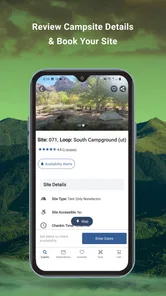
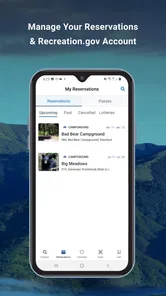
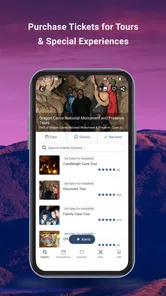
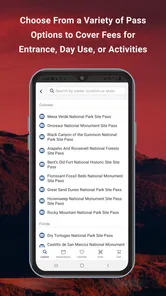
Analysis by Reviewed
Some apps earn a place on my phone because I use them every week; others are worth keeping for the one moment when I need them. Recreation.gov is closer to the second kind for many people: its value becomes clear when I’m turning an outdoor idea into a specific reservation, permit, or ticket. I’d keep it handy if public-land trips are part of my routine, but I wouldn’t expect it to replace every map or planning tool I use outdoors.
Why the first week feels useful
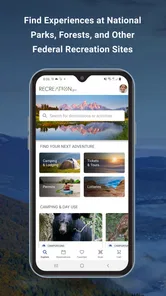
My first impression is that Recreation.gov is practical rather than playful. It’s a free travel and local app from Booz Allen Hamilton, Inc., focused on finding and booking recreation opportunities. The search can be narrowed by location, activity, and facilities, which helps when a vague idea such as “camp near water” needs to become a shortlist. The app is rated for Everyone, and its 4.8 average across around 81,000 ratings suggests many users find that core task worthwhile.
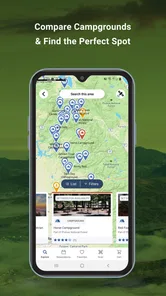
A useful planning habit is to search before the group has settled on one destination. Compare several suitable places, then save likely options instead of committing too early. That makes it easier to discuss travel distance, facilities, and the type of outing everyone wants. The app’s appeal is not that it makes those decisions for you; it puts relevant recreation choices and booking steps in one place.
Discovering the Great Outdoors
When I first stumbled upon Recreation.gov, I was immediately drawn to its ease of use. The app's interface is straightforward and intuitive, making it a breeze to navigate through its vast array of options. Whether you’re into camping, hiking, fishing, or just looking for a serene spot to relax, this app has got you covered.
Features that Stand Out
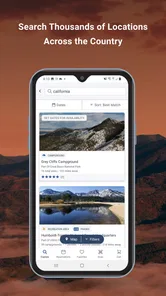
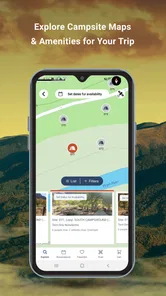
One of the standout features of Recreation.gov is its comprehensive search functionality. You can search for locations by name, activity, or even specific facilities you might need. I found the filtering options incredibly helpful, allowing me to narrow down my search to exactly what I was looking for. Want a campsite with a view of the lake? No problem! The app lets you find that and more.
Another feature that I appreciate is the reservation system. It’s seamless and efficient. You can book campsites, permits, and even tickets to attractions directly through the app. No more dealing with cumbersome booking processes – it’s all right there at your fingertips.
Planning Your Adventure
Planning a trip can often be the most daunting part of any adventure, but Recreation.gov simplifies this with its detailed trip planning tools. You can create itineraries, save your favorite spots, and even get notifications about upcoming reservations. I particularly loved how the app keeps you informed about any changes or updates to your plans, ensuring you’re always in the loop.
More From Our News Desk

 Weather - By Xiaomi
Weather by Xiaomi Review: Clear at a Glance, Less Clear Up Close
Xiaomi’s weather app makes everyday forecasts quick to scan, but its calm surface can leave useful details and recovery paths harder to find than they should be.

 X
XX Under Pressure: Can It Recover When Posting Goes Wrong?
A resilience-focused review of X, examining setup, mistaken posts, interruptions, weak connections, and the gaps that matter when recovery needs to be dependable.

 Clash of Clans
Clash of Clans Is Won Between the Battles
Its raids are quick; its community is a long-term project of coordination, teaching, rivalry, and shared responsibility—with all the friction that entails.

 Android Auto
Android Auto Makes the Case for Quieter Car Software
The car interface is no longer judged by how much it can do, but by how quietly it helps. Android Auto shows what drivers now expect—and what still gets in the way.

 MobiOffice: Word, Sheets, PDF
MobiOffice: Transforming Mobile Productivity with Seamless Integration
MobiOffice: Word, Sheets, PDF is redefining mobile productivity with a surprising blend of functionality and innovation.

 EA SPORTS FC Soccer Mobile 26
EA SPORTS FC™ Mobile Soccer: Redefining Mobile Sports Gaming
Dive into EA SPORTS FC™ Mobile Soccer, where immersive gameplay and strategic depth transform mobile sports gaming.
Latest News



For those of us who are indecisive or just looking for inspiration, the app also offers curated trip ideas. These are perfect for when you’re not quite sure what you want to do but are open to suggestions.
Making it work beyond the novelty
The lasting value depends on how often you use the kinds of recreation opportunities it covers. If I camp, seek permits, or plan visits to bookable attractions several times a year, saved places and reservation updates can make the app a repeat-use tool instead of a one-trip download. If I mostly take spontaneous walks or visit nearby parks without booking, I’d use it occasionally rather than give it a permanent place in my planning routine.
For a realistic weekend scenario, I might check options during a weekday lunch break, save two or three candidates, and talk through them with my travel companions that evening. Once we settle on a place, I can use the reservation flow and keep the plan together. I’d still verify practical details before leaving, such as the route, local conditions, and what to bring; a reservation app helps organize a visit, but it doesn’t replace preparation for the outdoors.
Where it fits among other tools
Compared with a general map or travel app, Recreation.gov is more useful when the next step is finding a recreation opportunity that can be reserved through its system. A map is usually better for orientation and route choices, while local recommendations can be more helpful for spontaneous stops, food, or businesses nearby. I see them as complementary: use this app to identify and arrange a suitable activity, then use other tools for navigation and broader destination research.
There is a trade-off in that focus. The app’s usefulness is tied to the places and booking tasks it supports, so it is not my first choice for an unplanned neighborhood outing or a trip where I only need turn-by-turn directions. Nor would I treat a saved idea as a complete itinerary. Checking the details that matter to your group before confirming plans is a sensible step, especially when access, facilities, or timing will shape the whole day.
Keeping the planning burden manageable
To avoid letting trip planning become a chore, I’d save only places I could realistically visit and revisit that shortlist when dates become clearer. That is more useful than collecting dozens of possibilities and forgetting why they looked appealing. Notifications can help with reservation changes, but they don’t remove the need to review plans yourself or keep essential trip information accessible when you’re away from a reliable connection.
The app is a strong fit for campers, families coordinating a bookable outing, and anyone who regularly plans visits to public recreation destinations. It may be less compelling for people who rarely reserve activities, prefer to decide everything on arrival, or need one tool to handle every part of travel. Recreation.gov has reached more than a million installs, and version 2.2.25 is available for devices running at least iOS 11.
Small habits that make repeat trips easier
After the first search, I’d use the app as a decision aid rather than a running scrapbook. When I save a candidate, I’d make a quick note for myself about why it made the shortlist: the kind of outing, the facilities that matter, or how well it suits the group. That tiny bit of context makes saved places useful weeks later, when several options start to blur together. It also helps avoid choosing a destination just because it was easy to find.
For a family or group, I’d separate “possible” from “chosen” in conversation before starting the booking process. One person may care most about the setting, another about practical facilities, and someone else about how much time the trip will take. The app can help surface options, but those priorities still need a human conversation. Settling them first makes the reservation step less frustrating and reduces the chance of booking a place that only one person wanted.
What to check before committing
A search result is a starting point, not a promise that every detail will suit your plans. Before I finalize a reservation, I’d read the information for the exact location and date, then check anything that could change the shape of the visit: access, timing, facilities, and the rules relevant to the activity. This is especially worthwhile when traveling with children, bringing someone with mobility needs, or coordinating a group that cannot easily change plans at the last minute.
I’d also keep the practical plan outside the app in a form I can reach easily. A booking and its updates are valuable, but an outdoor day may involve patchy service or a phone battery that needs saving for navigation and emergencies. I wouldn’t assume every planning detail will be convenient to retrieve on the spot; reviewing the reservation beforehand and keeping essential details available is a sensible bit of preparation.
Who gets the most from it
The best match is someone whose trips regularly involve reservable recreation, rather than someone who simply wants inspiration for any kind of holiday. A camper comparing possible sites, a household arranging a planned visit, or a permit-seeker can have a clear reason to return. It can also help a friend who is usually tasked with organizing the group: searching and saving a shortlist gives everyone something concrete to discuss instead of a vague exchange of destination ideas.
I’d be less likely to recommend making it a central travel app for someone whose outdoor plans are mostly spontaneous, nearby, and free of reservations. If the main need is discovering restaurants, checking a city transit route, or navigating a trail, a dedicated tool for that job may be more useful. The choice is not really between this app and every other travel app; it is whether its booking-focused role comes up often enough to justify the space and attention.
Where the routine can start to feel tiring
Reservation planning can make an outing feel more organized, but it can also pull the fun out of a flexible weekend if every choice becomes another task to monitor. I’d avoid checking saved possibilities repeatedly before the group has dates or a realistic plan. A short list and a clear decision point are better than browsing indefinitely. That is a personal limit, not a flaw unique to the app: tools for planning are useful only while they reduce effort rather than create more of it.
There is also a difference between getting an alert and being fully prepared. I’d treat notifications as prompts to check the relevant plan, not as a replacement for reading the reservation details or communicating changes to the people coming along. For group trips, I’d share the final arrangement in whatever way everyone can access, rather than assume that every companion will open the same app or notice the same update.
Ending Thoughts
In a world where we’re constantly glued to our screens, Recreation.gov encourages us to step outside and explore the natural beauty our country has to offer. It’s more than just an app; it’s a gateway to adventure. Whether you’re a seasoned explorer or a newbie to the outdoor scene, this app is a must-have for anyone looking to connect with nature.
So, if you’re itching for your next outdoor adventure, give Recreation.gov a try. Trust me, you won’t be disappointed!
My long-term verdict
I’d keep it installed if booking a campsite, permit, or attraction is a recurring part of my year. In that case, the convenience of returning to a familiar search and reservation workflow can outlast the initial excitement of browsing trip ideas. For occasional users, it can still be useful when a specific trip calls for it, but I wouldn’t confuse a handy specialist tool with a complete outdoor companion.
The app’s strongest lasting quality is its practical focus: it helps connect the idea of an outing with the steps needed to arrange one. Its limits are just as important. I’d pair it with maps, current local information, and my own preparation, and I’d choose another option when the task is navigation or spontaneous discovery rather than booking. If that balance matches how you travel, it earns a place on your phone for the moments when a good plan needs to become a real day outside.
Recreation.gov Frequently Asked Questions
What can I use Recreation.gov for when planning an outdoor trip?
Recreation.gov is a Travel & Local app focused on finding and arranging outdoor recreation. You can use it to explore options such as campsites, cabins, permits, and tours at national parks, forests, and other federal recreational facilities. It can also bring different reservations into one planning process, which is helpful when your trip includes more than one kind of activity.
Do I need an account to search Recreation.gov, or only to book?
You can explore available recreation options by searching for a location or activity, then sign in or create an account when you are ready to make a reservation. Having an account is also useful afterward, since you can return to your booking details and manage a reservation through your account. Review the listing and booking instructions for the activity you want.
Is Recreation.gov free to download, and what devices can run it?
Recreation.gov is free to download and is listed for everyone. It is a Travel & Local app for Android and iOS, with the current version requiring iOS 11 or later. Before installing, check that your device meets that requirement and has enough space for the app. Some reservations or activities may involve charges, so review the details shown during booking.
Who develops Recreation.gov, and what is the app intended for?
Recreation.gov is developed by Booz Allen Hamilton, Inc. Its store summary, “Camp, RV, and Explore Outdoors,” captures the app’s focus: helping people find and arrange outdoor recreation. The app is intended for planning visits and reservations through Recreation.gov, rather than serving as a general travel guide. Its listing shows a 4.8 average from around 81,000 ratings, giving prospective users a sense of its reception.
What is Recreation.gov?
Recreation.gov is a comprehensive platform that provides information and booking capabilities for a variety of outdoor activities across the United States. It allows users to discover and reserve campsites, cabins, permits, and tours at national parks, forests, and other federal recreational facilities, making outdoor planning more accessible and convenient.
Pros
- User-friendly interface
- Comprehensive trip planning
- Wide range of activities
- Secure payment options
- Real-time availability updates
Cons
- Limited offline access
- Occasional booking glitches
- In-app ads
- No loyalty program
- Requires account creation











