Recraft
- 63.00
- 2.9
- Installs
- 1.00M
- Price
- Free

Screenshots
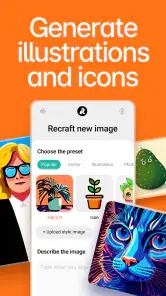

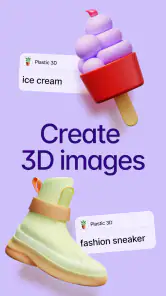
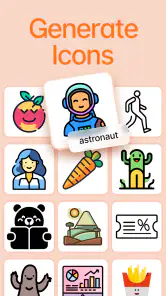

Analysis by Reviewed
Recraft is best approached as a creative workspace for making visual ideas quickly, not as a guaranteed shortcut to finished professional artwork. I like the appeal of building a design from a starting point and shaping it into something personal, especially when I want to explore vector art, icons, illustrations, or 3D graphics. But I’d go in with practical expectations: the experience still depends on your own direction, and the modest average rating suggests it may not satisfy everyone equally.
A practical place to begin
The most useful way to judge a visual tool is to give it a small, real task rather than an open-ended brief like “make something good.” I’d choose one clear outcome—a badge for a group chat, a simple event graphic, or an icon concept—and decide what needs to be recognizable before I start. That makes it easier to tell whether the app is helping me solve a design problem or simply encouraging more experimentation.
I’d also keep the first pass deliberately rough. Try a few broad directions, then pause and compare them at the size where the graphic will actually appear. A design that feels lively when enlarged can become crowded on a phone screen. This small check is a better use of time than polishing details that may disappear in the final context.
Who will get the most from it
I can see this app fitting people who need a visual draft more often than they need a polished, print-ready deliverable. A student putting together a presentation, a small-business owner sketching out an icon, or a hobbyist trying different illustration styles can use a mobile art tool to get ideas moving without first setting up a desktop design workflow. Its Art & Design focus makes that creative use clearer than treating it as a general photo editor.
A realistic use would be making a quick graphic for a club announcement during a commute: start with the central idea, try a few visual directions, and keep the version that reads best at a glance. My practical tip is to decide the purpose and shape of the graphic before experimenting. A simple brief—what it should communicate and where it will appear—helps prevent endless tweaking and makes it easier to judge whether a result is actually useful.
It may also suit someone who wants to build a small family of related visuals instead of one isolated image. For example, I’d settle on a limited set of colors and a recurring visual motif before making several club or project graphics. That gives the work a more consistent identity, and it reduces the temptation to restart every design from scratch. The trade-off is that consistency takes a little planning: the app can help with making images, but I still need to make the decisions that tie them together.
Where it sits among design tools
Compared with a conventional drawing app, Recraft’s emphasis on vector-style work and varied visual output is attractive when I want clean shapes or an icon concept rather than a hand-drawn page. A template-led design tool may be quicker for a familiar social post, while a full desktop editor is still the safer choice when I need precise control over a complex layout or a production workflow. I would treat Recraft as a flexible idea-making option between those approaches, not assume it replaces either one.
More From Our News Desk

Clash of Clans Is Won Between the Battles

Android Auto Makes the Case for Quieter Car Software

MobiOffice: Transforming Mobile Productivity with Seamless Integration

EA SPORTS FC™ Mobile Soccer: Redefining Mobile Sports Gaming

How Microsoft OneDrive Became a Mobile Productivity Giant

How Google Translate Breaks Language Barriers Effortlessly
That distinction matters when choosing what to make. For a quick concept or a graphic whose main job is to communicate one idea, a phone-based creative workspace can be convenient. For a document with many carefully aligned elements, exact typography requirements, or several output sizes, I’d rather use a tool built around detailed layout control. Recraft makes more sense when exploration is part of the task; it is less compelling when the brief is already fixed and precision is the priority.
One useful trade-off is to separate exploration from finishing. I’d use the app to test composition, colors, and the general look, then check the result at the size and against the background where it will be used. Small details that seem clear while editing can lose impact in a compact icon. Keeping an early draft also gives me a reference if later changes take the design in the wrong direction.
Getting Started with Recraft
So, what’s the first thing you notice about Recraft? It’s the sleek, user-friendly interface that makes even a novice feel like a pro. Upon launching the app, you're greeted with a clean layout that’s both inviting and easy to navigate. The app doesn’t bombard you with overwhelming options; instead, it guides you step-by-step, making it super intuitive for anyone to use.
Features that Stand Out
Let’s dive into what makes this app tick. One of the standout features is the extensive library of templates. Whether you're designing a social media post, a business card, or even a logo, Recraft has got you covered. The templates are professionally designed, giving your projects a polished look right from the get-go.
Another feature worth mentioning is the drag-and-drop editor. It's incredibly smooth and makes customizing your designs a breeze. You can easily tweak colors, fonts, and layouts to match your vision. Plus, the app supports layering, so you can stack elements and create depth in your designs, similar to what you’d do in more advanced desktop software.
For a more deliberate workflow, I’d think of layers as a way to keep changes reversible in practice, even when I’m still experimenting. I might separate the main subject from accents and background elements, then adjust the accents without rebuilding the central idea. This is especially useful when a design needs a quieter version for a different setting. The cost is a little extra organization up front; if I throw everything together, later edits can become more fiddly than they need to be.
Unleash Your Creativity
Recraft is not just about pre-made templates; it’s about unleashing your creativity. The app offers a plethora of design elements like icons, shapes, and lines that you can incorporate into your projects. And if you’re someone who loves to experiment, the app’s color palette tool is a dream come true. You can create and save custom palettes, ensuring your designs always have a cohesive look.
What’s even cooler is the app’s ability to integrate with your photo library. You can easily import photos and use them as backgrounds or focal points in your designs, adding a personal touch to your creations.
There’s a useful decision to make before bringing in a photo: should it carry the message, or should it merely set the mood? If it is the focal point, I’d give it breathing room and avoid competing with it using extra shapes. If it is a background, I’d keep the foreground simple enough to remain legible. That distinction helps prevent a common mobile-design problem: treating every available element as something that needs to be added.
Making the most of a small screen
On a phone, I’d keep each project focused rather than trying to assemble a complicated campaign in one sitting. Work out the main silhouette or image first, then add supporting details only if they remain readable when viewed small. Layers are helpful here: keeping separate elements apart makes it easier to adjust one part without disturbing the rest. A saved color palette can also prevent a set of related graphics from drifting into slightly different shades over time.
Imported photos offer another useful route, but I’d use them with a clear purpose. A photo can provide context or serve as a focal point, while icons and shapes can keep the rest of the composition tidy. If the image is already visually busy, adding many decorative elements may make the design harder to read. In that case, simplifying the layout is more effective than adding another effect.
One practical habit is to stop periodically and view the whole composition, rather than judging each selected object up close. On a compact display, it is easy to spend attention on a small icon or line and miss that the overall balance has shifted. I’d check whether the main subject still draws the eye first, whether the text has enough room, and whether the image works against its intended background. Those checks are simple, but they catch problems that are hard to notice while zoomed into individual details.
Limits worth considering
The main caution is that a friendly interface and convenient editing do not automatically make every result distinctive. Templates are a fast start, but a design can still feel familiar if I leave its structure untouched. I’d change the hierarchy, color choices, or supporting elements to give the work a reason to belong to my project. People who want complete control over every technical detail may find a dedicated desktop tool a better fit, while anyone expecting the app to make all creative decisions for them may be disappointed.
I would also separate the question “Can I make a good-looking draft?” from “Is this ready for every use?” A draft can be helpful for choosing a direction, but a final asset may need checks for legibility, consistency, and suitability for its destination. If a design is going into a formal presentation or a business identity, I’d review it on a larger screen and get another person’s reaction before treating it as finished. That is not a knock on a mobile app; it is a sensible quality check for any visual work.
Recraft is free to install, though it includes in-app purchases ranging from $11.99 to $599.99 per item, so I’d review any purchase choices carefully before committing. It is developed by recraft, is rated for Teen audiences, and has reached over a million installs. Its average rating is 2.9 from around 1,600 ratings, with 63 written reviews; that mixed reception is a reason to try it for your own workflow rather than assume it will suit every designer. Version 2.0.22 requires Android 10 or later.
The purchase range is worth considering before building a routine around the app. I’d first decide whether the free experience supports the sort of work I actually plan to do, then look carefully at the terms shown in the app before paying for anything. In particular, I would not treat an appealing early result as proof that a purchase is necessary. If my needs are occasional and simple, a paid commitment may not make sense; if I use it regularly, I’d still want to understand exactly what a chosen purchase covers.
Is it a good fit for a first design app?
For a beginner, I think the strongest reason to try it is the chance to learn by making rather than staring at a blank canvas. Templates and movable elements can help explain how a composition comes together, while saved palettes encourage more deliberate color choices. But it is not a substitute for learning basic visual judgment. I’d still ask whether the most important element stands out, whether the layout feels balanced, and whether someone seeing the image for the first time can understand it quickly.
Someone who already draws by hand may find a conventional sketching app more natural for developing a line-based illustration from scratch. Someone producing brand assets that must meet strict technical requirements may prefer a desktop design program. Recraft’s more convincing role is as a place to explore a direction, make a compact visual, or try a few treatments before committing to a more exacting workflow elsewhere.
Ending on a High Note
In the world of graphic design apps, Recraft stands out as a versatile and powerful tool. It’s perfect for both beginners and seasoned designers looking for a quick and effective way to produce high-quality visuals. Whether you’re crafting a simple flyer or an intricate illustration, this app provides the tools you need to bring your ideas to life.
So next time you’re in need of a design fix, give Recraft a spin. It’s like having a personal graphic designer at your fingertips, ready to turn your creative dreams into reality. Happy designing!
Who should pass, and who should try it
I’d recommend giving it a try if you enjoy visual experimentation, need quick concepts, or want a convenient way to assemble simple graphics on a phone. It can be particularly useful when the first obstacle is getting started: choosing a direction, testing a color combination, or seeing whether an icon idea has promise. A student or hobbyist who is comfortable making their own design decisions is likely to get more out of it than someone who wants a finished result with no editing.
I’d skip it as my main tool if my work depends on exact placement, intricate hand-drawn control, or a tightly specified professional production process. I would also avoid paying before I know how it fits my routine. The app’s broad creative appeal is real, but a narrower tool can be a better choice when the task is clearly illustration, photo editing, or precise page layout rather than visual exploration.
My verdict
For me, the case for Recraft is strongest when I treat it as a mobile idea studio: it helps turn a vague visual thought into something I can inspect, refine, and share or develop further. Its mix of vector-oriented work, illustrations, icons, and 3D graphics gives it a more exploratory feel than a basic photo editor, while the templates and editable elements lower the barrier to making a first draft. The result still depends on my choices, and I would not confuse convenient creation with guaranteed professional finish.
The mixed user response and wide range of in-app purchase prices make a cautious trial the sensible approach. Start with a small project, test whether its editing style suits you, and only then decide whether it belongs in your regular toolkit. If you want a flexible place to explore visual ideas, I think it is worth considering. If you need exact technical control or a dependable production workflow above all else, I’d choose a more specialized editor instead.
Recraft Frequently Asked Questions
What devices and operating system versions can run Recraft?
Recraft is an Art & Design app for Android and iOS, and the Android version requires Android 10 or later. Before downloading, check that your device meets that requirement and has enough room for an art app and its saved projects. The app is intended for creating vector art, icons, digital illustrations, and 3D graphics, so a larger screen may make detailed work more comfortable.
What should I check before downloading Recraft?
Before downloading Recraft, consider whether its creative focus matches what you want to make: the app is aimed at vector art, icons, digital illustrations, and 3D graphics. It is rated for Teen audiences, so that rating is worth checking for younger users. Also review the device requirement and potential in-app purchases, especially if you plan to use the app regularly or explore paid features.
What is Recraft and what does it offer?
Recraft is a versatile app that allows users to create, modify, and share multimedia content easily. It offers tools for editing images, videos, and even 3D models, making it suitable for both personal and professional use. With its user-friendly interface, Recraft caters to beginners and experienced creators alike, ensuring a smooth creative process.
Is Recraft free to use or does it require a subscription?
Recraft is free to download, but it also offers in-app purchases ranging from $11.99 to $599.99 per item. The app is focused on creating vector art, icons, digital illustrations, and 3D graphics. Before committing to a purchase, check the options shown in the app and consider whether the available tools fit your needs; the free download lets you begin exploring without paying upfront.
Who develops Recraft, and how popular is it?
Recraft is developed by recraft and is listed in the Art & Design category. It has over one million installs, with an average rating of 2.9 from around 1,600 ratings and 63 written reviews. Those figures give a useful sense of its reach and mixed user feedback, but individual experiences can vary depending on the device and the kind of creative work someone wants to do.
Pros
- User-friendly interface for easy navigation
- Customizable templates enhance creativity
- Fast rendering and export of designs
- Supports multiple file formats for flexibility
- Regular updates with new features
Cons
- Limited free version features
- Occasional glitches on older devices
- Requires constant internet connection
- High battery consumption
- In-app purchases can be expensive

- Category
- Art & Design
- Version
- 2.0.22











