ReadAnywhere
- 1.04K
- 3.3
- Installs
- 500.00K
- Price
- Free

Screenshots

Analysis by Reviewed
I find ReadAnywhere most useful when I treat it as a companion to coursework rather than a general ebook reader. It is a free Books & Reference app from McGraw-Hill Global Education, built for people who already use McGraw Hill Connect and want to read their course books away from a desk. If your reading is tied to classes, that focus can save time; if you mainly want to browse novels or collect books from different stores, a broader reader is likely a better fit.
Start with the course material you actually need
The useful question is not simply whether you can read on your phone, but whether the book you need is available through your Connect account. I would check that before planning around the app. It is aimed at Connect users, so it makes the most sense when a course already relies on that material; it is not a place to build a mixed library from unrelated ebook stores.
That focus changes how I would use it compared with a standard ebook reader. A general reader is usually better for browsing and organizing books from different sources, while ReadAnywhere is more practical as a doorway to assigned course reading. If you already have your course books in Connect, this narrower approach saves you from treating a textbook as just another file to locate. If you do not use Connect, the app has little reason to become part of your routine.
Making course reading fit the day
My practical routine is simple: open the library before leaving home, choose the material I need, and use spare moments to work through a section instead of trying to carry a textbook everywhere. A student could read a few pages between lectures, then return to the same material later for a longer study session. That makes the app useful for short windows of time, though a phone screen is not my first choice for hours of dense reading.
A steady reading workflow
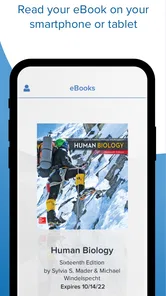
The app opens to your library, and with a few taps you can return to where you left off. I would use search when I need to locate a particular passage, rather than scrolling back through a long chapter. A helpful habit is to search for the key term from a lecture or assignment, read the relevant passage, and then continue from your saved place. That keeps quick reference sessions focused instead of turning into an unplanned reread.
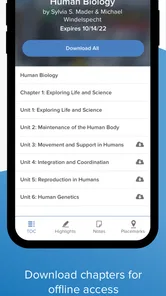
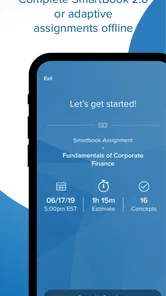
Before relying on a book during a commute or trip, I would check that the needed content is available offline. Downloading it while connected gives you a more dependable reading plan when service drops, and it avoids discovering mid-journey that you cannot open the section you wanted. Offline access is especially handy for travel, but it still depends on preparing the material in advance.
Settings that matter during longer sessions
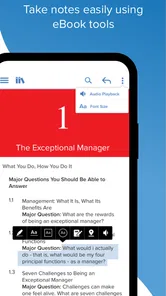
Font size, background color, and screen brightness are worth adjusting before settling in. I would start with a comfortable text size and a brightness that suits the room, then change the background if a bright page feels tiring. These options help make reading more comfortable, but they do not turn a small phone into a full-size textbook page. For diagrams, tables, or side-by-side comparisons, I would switch to a larger screen when one is available.
More From Our News Desk

Weather by Xiaomi Review: Clear at a Glance, Less Clear Up Close

X Under Pressure: Can It Recover When Posting Goes Wrong?

Clash of Clans Is Won Between the Battles

Android Auto Makes the Case for Quieter Car Software

MobiOffice: Transforming Mobile Productivity with Seamless Integration

EA SPORTS FC™ Mobile Soccer: Redefining Mobile Sports Gaming
One useful trade-off is to avoid changing every display setting each time you open the app. I would find a comfortable text size and page appearance during a quiet session, then leave them alone for quick study breaks. That keeps a short visit focused on the chapter rather than on repeatedly adjusting the screen. Brightness still needs to suit the room, but the reading layout can be a dependable starting point.
Faster patterns for short study windows
Small, repeatable habits make the mobile format work better: choose the chapter before a short break, use search for a known topic, and reserve longer reading for a place where you can concentrate. The advantage is not that every study task becomes effortless; it is that course material is easier to reach when a few spare minutes appear.
For a realistic day, I would select the next reading before leaving home, download it while connected, and use a gap between classes to look up a concept mentioned in a lecture. Later, I could continue from the reading position instead of trying to remember where I stopped. This split workflow is more useful than opening the app without a purpose and hoping to make progress through a whole chapter on a small screen.
Search is most helpful when I already have a clue: a term from class, a heading from an assignment, or a phrase I want to check. It is less useful as a substitute for learning the chapter’s overall argument. I would use it to reach the relevant passage, then read enough of the surrounding material to understand the context. That small discipline helps prevent a quick lookup from becoming a misleading answer taken out of context.
Where it fits—and where it does not
This is a focused option for Connect users, not a replacement for a general ebook library. Unlike a broad reading app intended to collect books from many sources, it centers on course materials associated with McGraw Hill Connect. That is a sensible trade-off if your classes already use that platform. If you want one reader for unrelated books, or prefer studying on a laptop with several pages visible, another option will suit you better.
The main limitation I would keep in mind is the difference between access and study tools. Having a textbook close at hand is convenient, but the app does not make a complicated chapter easier to understand by itself. I would use it for reading and quick lookups, then switch to a desk or larger display for dense material that needs note-taking or careful comparison. It is also wise to check your Connect access before planning a study session around a particular book.
That distinction matters for questions students often have before relying on it: the app’s purpose is reading Connect course books, rather than replacing a full study setup. If your work depends on comparing several pages, making extensive notes, or consulting other materials at the same time, a laptop or tablet may be more comfortable. I would keep the mobile app for access and brief review, not assume it can handle every part of coursework equally well.
Who will get the most from it
Students with assigned Connect books are the clearest audience, especially commuters or anyone who wants to use gaps between classes. A realistic routine might be to download the day’s chapter before leaving, read a few pages on the bus, and search for a concept again before class. The app is less compelling for people without Connect course materials, readers looking for a wide-ranging personal library, or anyone who dislikes doing extended reading on a phone.
It can also suit a student who wants to check a definition or revisit a short section without bringing a laptop to a study group. In that situation, I would search for the relevant term and read the surrounding passage before using it in discussion. But if the group needs to compare diagrams or work through a complex table together, a larger display is the sensible choice. The app is handy for quick access, not a guarantee that every textbook layout will be comfortable on a phone.
ReadAnywhere has an average rating of around 3.6 from roughly 7,100 ratings, and it has passed 500,000 installs. It is rated for Everyone; its current version is 3.0.22, and it requires Android 10 or later. Those details make it easy to judge whether it fits your device and expectations, but the more important question is whether your course books are already part of your Connect routine.
What to expect from the mobile format
A phone makes it easier to pick up reading in places where a textbook would be awkward, but the convenience comes with a real limit: screen space. Prose is often manageable in short sessions, while dense pages, diagrams, and tables can ask for more zooming or concentration than I want during a commute. I would treat mobile reading as a useful supplement, not a promise that every course task will feel equally clear on a small display.
For someone deciding whether to install it, the practical test is straightforward: do you already have Connect course books, and are there regular moments when you want to read them away from a computer? If both answers are yes, the app has a clear role. If you mainly want leisure reading, or your study style depends on annotating and comparing multiple pages, a broader ebook app or a larger-screen setup is likely to fit better.
My verdict after building a routine
For me, the strongest case is convenience with a clear boundary: it puts relevant course reading within reach, but it is not a universal reading or study solution. I would set up offline access ahead of travel, tune the display once, and use search for targeted review rather than forcing every reading task onto a phone. That combination makes the app a useful everyday tool for the right student, while leaving room for a larger screen and other readers when the job calls for them.
When I first stumbled upon ReadAnywhere, my inner bookworm did a little happy dance. It's like carrying a library in my pocket! Whether you're a student trying to sneak in some textbook reading between classes or just a book lover like me, this app is a game-changer.
User-Friendly Interface
I was genuinely impressed by how intuitive the interface is. The app opens up to your library, and with just a few taps, you're right back where you left off. The navigation is smooth, and the search function is a lifesaver, especially when you're trying to find that one quote or passage you bookmarked ages ago.
Seamless Integration
One of the standout features is how well it integrates with various learning platforms. I could easily sync it with my school account, and all my textbooks were right there, ready to be read. Plus, the offline mode means you can download content and read it without needing an internet connection. This is perfect for those long flights or when you're stuck in a no-service zone.
Customizable Reading Experience
Customization is key, and ReadAnywhere nails it. You can adjust the font size, background color, and even the screen brightness to suit your reading comfort. This might seem trivial, but trust me, when you're reading for extended periods, these little tweaks make a world of difference.
In conclusion, if you haven't already jumped on the ReadAnywhere bandwagon, now's the time. It's not just an app; it's a lifestyle upgrade for any avid reader or student. With its user-friendly interface, seamless integration, and customizable features, it's genuinely changed the way I read on the go. So go ahead, download it, and let your reading adventures begin!
ReadAnywhere Frequently Asked Questions
What devices and operating systems can I use ReadAnywhere on?
ReadAnywhere is intended for mobile use, so it may be useful when you want to carry your McGraw Hill course reading on a phone or tablet. Before downloading, check that your device meets the minimum operating-system requirement: version 10. The app is available for Android and iOS, and device compatibility can affect how comfortably you read and work with your materials.
Who develops ReadAnywhere, and what is it designed for?
ReadAnywhere is developed by McGraw-Hill Global Education and belongs to the Books & Reference category. It is designed for McGraw Hill Connect users who want to access their books while away from a computer. Its focus is course reading rather than serving as a general-purpose library, so it is most relevant if you already use McGraw Hill materials for your studies.
What is ReadAnywhere and how does it work?
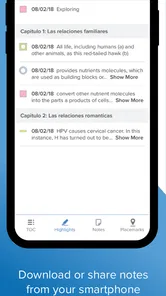
ReadAnywhere is an app designed to provide users with easy access to their textbooks and course materials on the go. It allows students to read, highlight, and take notes on their textbooks directly from their smartphones or tablets. The app syncs with your account, ensuring that your progress is updated across all devices. Whether you're commuting or taking a break between classes, ReadAnywhere ensures that you have access to your study materials anytime, anywhere.
Is ReadAnywhere compatible with all types of textbooks?
ReadAnywhere is specifically compatible with textbooks and materials from McGraw-Hill Education. If your course textbooks are published by McGraw-Hill, you can easily access them using the app. However, it's important to check if your specific textbook is supported by the app before downloading to avoid any inconvenience.
How can I download and install ReadAnywhere on my device?
You can download and install ReadAnywhere directly from the Google Play Store for Android devices or the Apple App Store for iOS devices. Simply search for 'ReadAnywhere' in the respective app store, click on the app icon, and hit 'Install'. Once installed, you will need to log in with your McGraw-Hill Education account to access your materials.
Pros
- Access textbooks offline
- Highlight and annotate text
- Syncs across devices
- User-friendly interface
- Supports multiple formats
Cons
- Limited free content
- Requires account to access
- Occasional sync issues
- Ads in free version
- No dark mode option












