

RatePunk: Cheap Flights
- 185.00
- 4.4
- Installs
- 100.00K
- Price
- Free

Screenshots





Analysis by Reviewed
Finding a flight on a phone sounds simple until the search becomes a moving target. Prices change, departure times need checking, and a deal that looks attractive can become less useful once baggage, airport location, or a tight connection enters the picture. I tested RatePunk: Cheap Flights as a travel and local app from Ratepunk, focusing less on the promise of cheap tickets and more on how it feels when you are using it on the move. My main conclusion is that it works best as a quick deal-finding companion, not as a complete replacement for careful airline research.
The app is free to download, aimed at everyone, and currently requires Android 8.0 or later. It has reached over 100 thousand installs and holds a 4.4 average from around 5.5 thousand ratings, which suggests that plenty of travelers find its central idea useful. The basic appeal is clear: instead of beginning with one airline and manually checking several routes, I can use RatePunk to explore affordable flight possibilities in one place. That is especially handy when my dates or destination are flexible.
How RatePunk feels when the network is part of the journey
When I’m searching for flights on the move, the network shapes more than speed: it affects whether I can compare options calmly or need to pause and try again later. I treat a stable connection as part of the search routine, not a guarantee that a displayed fare will hold. With that in mind, the next section looks at how I make the most of flexible searches before handing a shortlist over for closer checks.
Useful when a search needs to stay flexible
The strongest part of the experience is the early stage of planning. I do not always know whether I want to leave on a Thursday evening, Friday morning, or Saturday afternoon. In that situation, a flight-search app is more helpful when it encourages comparison rather than locking me into the first route I imagine. RatePunk fits that kind of thinking well. I can approach a trip as a price hunt, then narrow the options according to dates, airports, and practical travel time.
That workflow is different from opening an airline app with a fixed route already in mind. Airline apps are usually better once I know exactly which carrier and flight I want. RatePunk is more useful before that decision, when I am asking, “What is realistically available?” rather than “Can I book this particular flight?” This makes it a good first stop for weekend breaks, visits where dates can move, and trips where a nearby airport might make a meaningful difference.
There is an important connectivity catch. A flight search depends on current information, so the app is at its most useful when the phone has a stable connection. On a strong home network, the process feels straightforward. On mobile data, it can still be convenient, but I would avoid treating the first result as permanent. Search results are time-sensitive, and the final availability or price can change while I am moving from discovery to booking.
Why a live connection changes the decision
When I am comparing flights, connectivity is not just a technical detail. It affects how much confidence I can place in what I am seeing. A weak signal can interrupt a search at exactly the moment I am comparing an early flight with a cheaper late one. It can also make a result feel more final than it really is if parts of the journey have not refreshed properly. My practical habit is to wait for the complete result before making notes, then repeat the search when I am back on a reliable connection if the choice matters.
More From Our News Desk

 Weather - By Xiaomi
Weather by Xiaomi Review: Clear at a Glance, Less Clear Up Close
Xiaomi’s weather app makes everyday forecasts quick to scan, but its calm surface can leave useful details and recovery paths harder to find than they should be.

 X
XX Under Pressure: Can It Recover When Posting Goes Wrong?
A resilience-focused review of X, examining setup, mistaken posts, interruptions, weak connections, and the gaps that matter when recovery needs to be dependable.

 Clash of Clans
Clash of Clans Is Won Between the Battles
Its raids are quick; its community is a long-term project of coordination, teaching, rivalry, and shared responsibility—with all the friction that entails.

 Android Auto
Android Auto Makes the Case for Quieter Car Software
The car interface is no longer judged by how much it can do, but by how quietly it helps. Android Auto shows what drivers now expect—and what still gets in the way.

 MobiOffice: Word, Sheets, PDF
MobiOffice: Transforming Mobile Productivity with Seamless Integration
MobiOffice: Word, Sheets, PDF is redefining mobile productivity with a surprising blend of functionality and innovation.

 EA SPORTS FC Soccer Mobile 26
EA SPORTS FC™ Mobile Soccer: Redefining Mobile Sports Gaming
Dive into EA SPORTS FC™ Mobile Soccer, where immersive gameplay and strategic depth transform mobile sports gaming.
Latest News



This is also why I would not rely on RatePunk as my only travel reference during a connection at an airport. It is designed around finding and booking flight deals, not around replacing a boarding pass, airline notification, or airport information source. Before leaving home, I would save the important booking details through the service used for the purchase and keep the airline’s own app or website available when possible. RatePunk can help me discover the route, but it should not become the sole place I expect to manage every later stage of the trip.
Using it on a small screen without rushing
Phone-based flight shopping is convenient because it fits into spare moments: sitting on a train, waiting for a friend, or having coffee before work. The trade-off is that a small display encourages quick decisions. A low headline fare can look excellent until I inspect the departure time, airport, duration, or conditions attached to the ticket. I found that RatePunk is most valuable when I use it to build a shortlist rather than immediately choosing the first inexpensive option.
For a realistic example, imagine that I am planning a short city break and can leave after work on Friday. I might first search broadly, notice that a nearby airport offers a lower fare, and then compare the cost of reaching that airport by public transport. If the cheaper flight requires an expensive transfer or an overnight stay, the apparent saving may disappear. RatePunk helps expose the flight possibilities, but the final calculation still belongs to me.
That is one of the app’s less obvious lessons: the cheapest flight is not always the cheapest trip. I use the app to identify candidates, then check the surrounding journey before committing. This is particularly important for airports with similar city names, long surface transfers, or departure times that make public transport impractical.
What happens when a search fails or the connection drops
Travel apps are judged differently from casual entertainment apps because a failed refresh can happen at an inconvenient moment. If a search stalls, my first response is not to keep tapping repeatedly. I check whether the phone has actually regained a usable connection, then restart the search once. Repeating actions while the network is unstable can create confusion about whether the result is new or simply an old screen that has not updated.
RatePunk is easier to use when I separate discovery from confirmation. During an unreliable connection, I can remember or note the route options I was considering, but I would wait for a complete refresh before assuming the deal is still available. If the app sends me toward a booking flow, I would pay close attention to the point where the provider’s terms and final total become visible. A search result is a lead; the booking screen is where I verify what I am actually buying.
This recovery approach also answers a question many travelers have: what should I do if the price changes? I would treat that as normal in flight shopping rather than as a sign that the app is broken. I would search again, compare nearby dates, and check whether a different airport produces a better overall result. If the fare remains unsuitable, I would move to the airline or another established flight comparison service to see whether the difference is specific to one route or part of the wider market.
Using mobile data without wasting attention
RatePunk is not the kind of app I would open repeatedly just to browse without a plan, especially on a limited mobile-data allowance. Flight searches can involve changing results and several steps, so I prefer to decide what I am testing before I begin: a destination, a date range, a departure area, or a nearby airport. That makes each connected session more purposeful and reduces the temptation to refresh the same search over and over.
A simple workflow works well for me. First, I choose the broad trip idea. Next, I compare the most realistic date or airport variations. Then I write down the two or three routes worth checking in detail. Finally, I verify the total journey cost and timing through the booking path or the airline. This is more efficient than treating every inexpensive result as a separate possibility.
On a phone, I also avoid making a final decision while distracted by poor reception, low battery, or a crowded public place. Flight details are easy to misread when I am rushing. A stable connection and a few quiet minutes are more valuable than saving a moment by accepting the first result. The app makes searching portable, but portability should not be confused with suitability for hurried booking.
Where it fits beside airline apps and traditional comparison tools
Compared with an airline’s own app, RatePunk is better suited to discovering alternatives across a broader set of possibilities. An airline app becomes the stronger choice when I already trust a particular carrier, need to manage an existing reservation, or want the carrier’s direct travel information. I would not expect a flight-finding tool to replace those functions.
Compared with a desktop browser, the phone app wins on convenience. I can test an idea while away from my computer and return to the search when I have time. The desktop still has an advantage for complicated trips, because a larger screen makes it easier to compare several dates, airports, and journey lengths at once. For a multi-city itinerary, I would be more comfortable using a full browser and checking each segment carefully rather than relying only on a compact mobile view.
Compared with a general travel marketplace, RatePunk’s focus is narrower, which can be a benefit. I am not distracted by hotel or activity choices when my immediate problem is finding a flight. The limitation is that I still need other tools for the rest of the trip. This is not a criticism so much as a reason to use it at the right point in the planning process: start with flight discovery here, then complete the broader travel picture elsewhere.
Who will get the most from it
I would recommend RatePunk to travelers who can adjust their dates, compare departure airports, or simply dislike checking airlines one by one. It is also a sensible option for someone who often starts planning from a budget rather than from a fixed destination. The app’s free entry point makes that experimentation easy, while the Everyone content rating keeps it suitable for a broad audience.
It is less convincing for travelers with strict requirements. If I must depart from one exact airport at one exact time, the app has less room to add value because my search is already narrowly defined. The same applies if I need a complex itinerary, detailed loyalty-program handling, or extensive post-booking support. In those cases, an airline’s direct service or a more comprehensive travel platform may be the better main tool.
I would also be cautious about using any flight-search app as the final authority on baggage, seating, changes, or cancellation conditions. Those details can determine whether a fare is genuinely suitable. RatePunk can help me find the opportunity, but I still read the conditions attached to the selected booking before paying. That extra minute is worthwhile, particularly when the lowest fare has restrictions that do not fit my plans.
Version, cost, and the small print of the experience
The current Android release is version 3.14.4, and the app itself is free. There are in-app purchases ranging from $2.49 to $109.99 per item, so I would look carefully at any optional paid step before confirming it. The free download is enough to make the app worth trying for ordinary flight discovery, but “free” should not be interpreted as meaning every possible service or upgrade inside the app has no charge.
That pricing range is one reason I would keep the booking flow deliberate. I would confirm what a paid item provides, whether it is relevant to my trip, and whether I can achieve the same goal through the airline or another service. I do not see optional purchases as automatically negative, but they make it more important to distinguish between finding a flight and paying for an additional product.
Ratepunk is the developer behind the app, and the current public response is encouraging without being a guarantee that every search will suit every traveler. Around 180 written reviews accompany the broader rating picture, giving prospective users some indication that the app has an active user base. I still judge it by my own route, dates, and connection quality, because flight-search results are inherently dependent on those circumstances.
My practical routine for getting better results
My preferred routine begins with a wide search and ends with a narrow verification. I first allow flexibility where I genuinely have it, then remove options that create unreasonable transfer times or awkward airport journeys. After that, I compare the complete trip rather than the fare alone. This prevents the common mistake of choosing a flight that is technically cheap but inconvenient enough to cost more in transport, time, or stress.
A second useful habit is to search again before paying if the first result appeared during a weak connection. I want to know that the route, timing, and total are still current. I also keep the booking reference and provider details accessible outside the search process, because a travel day is not the moment to depend on finding the same result again from scratch.
Finally, I use the app as a decision aid rather than an instruction. It can show me where a worthwhile option may exist, but it cannot know whether I value a late arrival, a short transfer, a particular airport, or a flexible ticket more than the lowest visible price. The better I define those priorities, the more useful the search becomes.
My connectivity verdict
RatePunk: Cheap Flights is a useful mobile starting point for travelers who want to explore flight deals without beginning inside one airline’s ecosystem. Its strongest role is discovery: comparing possibilities, spotting flexible routes, and turning a vague trip idea into a manageable shortlist. The free app, broad age suitability, and Android 8.0 support make it approachable, while its 4.4 average shows that the concept resonates with many users.
Its limits are equally important. The experience depends on a live connection, search results should be rechecked before payment, and the app does not remove the need to inspect airport transfers, baggage conditions, booking terms, and airline information. I would skip it as my primary tool for a rigid or complicated itinerary, but I would happily use it when I am flexible and want to see whether a better flight option is hiding beyond the first airline I thought of.
My final advice is simple: use RatePunk when you are still exploring, use a stable connection when the decision matters, and verify the complete journey before you buy. For that specific stage of travel planning, it is a practical companion rather than a magic shortcut. Its real strength is helping me widen the search before I narrow the choice.
RatePunk: Cheap Flights Frequently Asked Questions
What devices and operating systems can I use RatePunk: Cheap Flights on?
RatePunk: Cheap Flights is a travel app for finding and comparing airfare, and it is available for Android devices running Android 8.0 or later. Before downloading, check your device’s operating system version and make sure you have enough space for the app. If you use an iPhone or iPad, look for its listing in the relevant app store to confirm compatibility with your device.
Who makes RatePunk, and is the app intended for everyone?
RatePunk: Cheap Flights is developed by Ratepunk and is intended for a general audience. Its purpose is to help travelers look for affordable flight deals, so it may be useful whether you are planning a vacation well in advance or comparing options for an upcoming trip. As with any travel search tool, review the booking provider’s details before making a reservation.
What is RatePunk: Cheap Flights, and how does it help find affordable airfare?
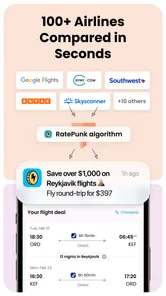
RatePunk: Cheap Flights is a travel app designed to help users compare flight prices and identify cheaper booking options. After entering your departure city, destination, dates, and passenger details, the app searches available offers and highlights potentially better prices. It can also help compare airline websites and travel agencies, making it easier to decide where and when to book.
Is RatePunk free to download and use?
RatePunk can generally be downloaded without paying an upfront fee, allowing users to search for flights and explore available deals. However, some features, alerts, or premium tools may depend on the current version of the app and its subscription model. The final flight purchase is usually completed through an airline or travel provider, whose price and booking conditions should be checked carefully.
Can I book flights directly through RatePunk?
RatePunk primarily works as a flight search and price-comparison service rather than acting as the airline operating the journey. When you select an offer, you may be redirected to an airline or online travel agency to finish the reservation and payment. Before confirming, review baggage rules, cancellation terms, passenger information, currency, and any additional fees shown by the final provider.
Pros
- Compares prices across multiple booking platforms in one search.
- Price alerts help track fare changes for selected routes.
- Includes a browser extension for checking hotel and flight prices.
- Shows price history to help judge whether a fare is genuinely low.
- Useful filters make it easier to narrow results by stops
- airlines
- and times.
Cons
- Some offers redirect to third-party sites to complete the booking.
- Displayed prices may change before checkout due to live fare updates.
- Extra fees and baggage costs may not appear in the initial result.
- The best features may require a paid subscription or premium access.
- Search results and coverage can vary depending on the route and travel dates.











