randstad: jobs for workers
- 1.16K
- 4.5
- Installs
- 1.00M
- Price
- Free

Screenshots


Analysis by Reviewed
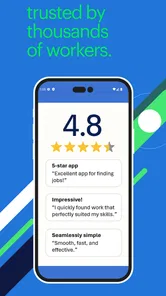
Before relying on any job-search app, I would ask a simple question: does it make the next useful step easier without making the search feel like another full-time task? Randstad: Jobs for Workers is geared toward finding nearby and temporary work on a phone, so it may suit people who want a direct way to check openings and keep related conversations together. It is a free business app from randstad at work, with an Everyone age rating. Its 4.5 average from around 5,700 ratings is encouraging, but the real test is whether the roles it surfaces match your location, experience, and availability.
Readability and navigation while looking for work
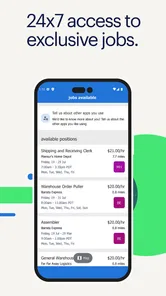
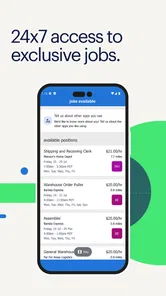
The app is built around a practical task: finding work and managing the steps that follow. A profile, job suggestions, location filters, messages, and alerts can make a phone-based search easier to keep together than scattered notes and browser tabs. I would treat the profile as the foundation: details about your experience and skills help make the suggestions more relevant, while an incomplete profile can make a tailored feed less useful.
That setup is especially helpful if you are applying to several roles and need to remember where each conversation stands. I would check a listing carefully before acting on it, then use the app’s messages and application updates as a place to follow the thread. The app has passed half a million installs, but its usefulness still depends on the range and fit of openings available where you live.
Getting Started with Randstad
First things first, downloading and setting up Randstad: Jobs for Workers is a breeze. Available on both Android and iOS, this app is incredibly user-friendly. From the moment you log in, you’re greeted with a clean interface that's easy to navigate, even for those who might not be the most tech-savvy.
Upon entering the app, you’ll notice the option to create a profile. This is where you can really make yourself stand out. You can upload your resume, add your skills, and even link to your LinkedIn profile. It’s like having your own personal job-hunting assistant right in your pocket.
Features That Stand Out
One of the standout features of the app is the personalized job recommendations. The app uses your profile information to suggest jobs that match your skills and experience. It’s not just a random list of jobs; it’s tailored to what you’re actually looking for. How cool is that?
Another feature I was particularly impressed with is the in-app messaging. You can communicate directly with potential employers without ever leaving the app. It streamlines the whole process, making it easier and faster to make those crucial connections.
More From Our News Desk

Weather by Xiaomi Review: Clear at a Glance, Less Clear Up Close

X Under Pressure: Can It Recover When Posting Goes Wrong?

Clash of Clans Is Won Between the Battles

Android Auto Makes the Case for Quieter Car Software

MobiOffice: Transforming Mobile Productivity with Seamless Integration

EA SPORTS FC™ Mobile Soccer: Redefining Mobile Sports Gaming
For a better first pass, I’d make the profile specific rather than trying to list every possible strength. Clear job history and skills can help you judge whether suggested roles genuinely fit, and it gives you a more useful basis for comparing openings. If you are changing fields, be selective about what you emphasize; recommendations are only as helpful as the profile they draw on.
Oh, and let’s not forget about the notifications! The app keeps you updated with real-time alerts about job openings and application statuses. So, you’re always in the loop without having to constantly check your phone.
Alerts are convenient, but they can also interrupt a shift, a commute, or time with family. I’d use them as prompts to review an opportunity rather than as a reason to apply immediately. Taking a moment to check location, duties, and timing can prevent a promising notification from turning into a poor match.
Motor and sensory considerations
A phone-first job search can be useful when sitting at a computer is inconvenient, but it is not automatically comfortable for everyone. Reading listings on a small screen, typing work history, and moving between application steps can take patience, particularly if you have limited dexterity, low vision, or find frequent notifications distracting. I would complete longer profile edits when I have time and a comfortable setup, then use the app for shorter checks and follow-ups.
That division of labor is a practical trade-off: the app keeps opportunities close at hand, while a larger screen may be easier for reviewing a resume or carefully comparing job details. If the interface or text is difficult to use on your device, the phone’s own display and input settings may help, but individual results will vary.
Situational access: a realistic job-search routine
Imagine you finish a shift and have a short break before heading home. You can check nearby openings, compare the location with your commute, and save time by following up through the same app rather than trying to reconstruct the conversation later. If a role looks suitable, read the details when you can focus; if it does not fit your hours or travel options, move on instead of treating every alert as an urgent lead.
This is where the app can beat a broad job board for someone seeking local or temporary work: it puts the search and follow-up in a single phone-based routine. A general-purpose job site may be better if you want to compare a much wider range of employers or career paths, while direct employer pages can be useful when you already know where you want to apply. I would use Randstad as one channel, not assume it replaces every other route.
Making a focused search work in practice
For someone balancing unpredictable shifts, the useful habit is to separate discovery from decision-making. I would check new suggestions when I have a spare moment, but save careful reading for a quieter period. That makes it less likely that I’ll mistake a convenient notification for a suitable job, and it gives me time to consider practical details such as transport, working hours, and whether the role matches the experience I want to use.
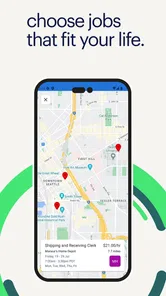
Location is more than a pin on a map. A nearby opening can still be difficult to reach at the start or end of a shift, and a role farther away may be manageable if the schedule lines up with existing travel. I’d compare each listing with the route I can realistically take, rather than filtering by distance alone. This is a small but meaningful way to avoid spending time on applications that look close on screen but do not fit the day-to-day reality.
If I were applying to several roles, I would keep a brief external record of the employer, position, date of contact, and any promised follow-up. The app can help keep messages in one place, but a separate note makes it easier to compare progress across different search channels. It also gives me a quick reference before replying, so I can remember which role the conversation concerns without rereading every thread.
Real-World Impact
Now, you might be wondering, does this app really work? In my experience, it absolutely does. I’ve seen firsthand how Randstad: Jobs for Workers can open doors. Whether you’re looking for a temporary gig or a long-term career move, this app gives you access to a vast network of employers.
One thing that really struck me is the variety of jobs available. From entry-level positions to more specialized roles, there’s something for everyone. Plus, the app allows you to filter jobs by location, making it easy to find work that’s convenient for you.
Who benefits most, and when to widen the search
I’d recommend trying it if you are actively looking for local or temporary work, prefer doing quick checks on your phone, and are comfortable keeping your profile current. It is particularly suited to a person who wants one place to review recommendations and continue conversations without returning to a desktop for every small update. People exploring several options while holding another job may also appreciate being able to check in around their schedule rather than setting aside a long search session every time.
On the other hand, I would not make it my only tool if I were pursuing a narrow profession, searching across a large region, or targeting particular employers. A specialist job board or an employer’s own careers page may provide a more direct route in those cases. A broad job site can also help you compare listings beyond one service. The sensible approach is to use this app for the kind of nearby and temporary openings it is designed to surface, then widen the net when your goals call for it.
There is also a difference between getting a match and getting a good fit. A recommendation can be relevant to your listed skills while still conflicting with your availability, travel options, or preferred work conditions. I would treat suggestions as leads to evaluate, not endorsements. That distinction keeps the app useful without letting an automated-looking feed make the decision for you.
Where it may not be the right fit
Randstad is most appealing if you want to look for work from your phone and value nearby or temporary opportunities. It is less compelling if your search depends on a highly specialized field, a particular employer, or detailed comparisons across many job boards. In those cases, I would widen the search rather than relying on a single feed. Location filters help narrow results, but a nearby listing is not necessarily a practical one: travel time, shift hours, and the role itself still matter.
The app is a business tool rather than a guarantee of a placement. I would keep a copy of my resume and application details outside the app, and make a simple note of roles I have contacted if I am applying in several places. That small habit makes it easier to stay organized if you switch devices or use another search channel as well.
For a first-time user, the practical questions are whether there are suitable openings nearby, whether the app’s suggested roles reflect a complete profile, and whether phone-based reading and typing are comfortable. I’d start by filling in the experience and skills that matter to the work I actually want, then review the recommendations rather than judging the service from a sparse profile. If few relevant roles appear, I would expand the search elsewhere instead of repeatedly refreshing the same feed.
An inclusive verdict for everyday use
The current version is 7.3.0, and the app has been available since November 12, 2021. For me, its best quality is keeping job discovery and communication within reach, especially for someone balancing work, travel, and applications. The main compromise is that mobile convenience does not remove the effort of reading listings carefully, maintaining a useful profile, and deciding whether an opening fits real-life needs.
Its inclusive value is therefore practical rather than universal: a phone can make checking work opportunities easier in some settings, while small-screen reading, typing, and alerts may create friction for others. I’d use the device’s own accessibility and notification controls where they help, and switch to a larger screen for tasks that need careful attention. That flexible routine is more realistic than expecting one interface to suit every ability or situation equally well.
In conclusion, if you’re in the market for a new job or just curious about what’s out there, give Randstad: Jobs for Workers a try. It’s packed with features that make job hunting less of a chore and more of an adventure. And let’s be honest, in today’s competitive job market, having a tool like this at your fingertips is invaluable.
randstad: jobs for workers Frequently Asked Questions
Can I use randstad: jobs for workers to search for nearby work?
Yes. The app is designed to help you find jobs near you, including temporary work, from your phone. You can explore opportunities that fit your search and use the app to manage the process in one place. It is a practical option if you want to look for local openings without relying only on a computer.
What features does the Randstad app offer to job seekers?
The Randstad app provides a comprehensive platform for job seekers, offering features such as personalized job recommendations, a simple application process, and real-time job alerts. Users can upload their resumes, track their application status, and communicate with potential employers directly through the app, making the job search process more streamlined and efficient.
How does Randstad ensure the quality of job listings?
Randstad ensures the quality of job listings by partnering with reputable employers and conducting thorough checks on the job postings. This vetting process helps to maintain a high standard of listings, ensuring users access legitimate and current job opportunities across various industries and locations.
Is the Randstad app free to use for job seekers?
Yes, the Randstad app is completely free for job seekers. Users can download the app, create profiles, search for jobs, and apply to positions without any cost. This accessibility allows job seekers to explore a wide range of opportunities without worrying about subscription fees or hidden charges.
Can users receive job alerts from the Randstad app?
Absolutely. The Randstad app offers customized job alerts based on user preferences and search history. Users can set up notifications to receive real-time updates on new job postings that match their criteria, ensuring they never miss out on potential opportunities that align with their career goals.
Pros
- User-friendly interface
- Wide range of job listings
- Real-time job alerts
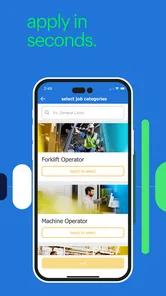
- Easy application process
- Strong customer support
Cons
- Limited to certain regions
- Requires stable internet
- Some outdated job listings
- Occasional app crashes
- Limited freelance options











