

RAISE-365
- 154.00
- 3.6
- Installs
- 100.00K
- Price
- Free

Screenshots
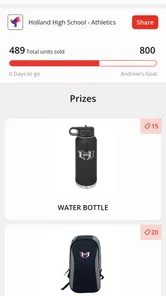
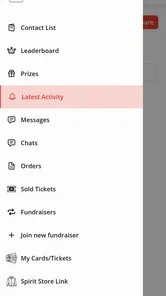
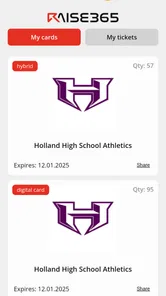
Analysis by Reviewed
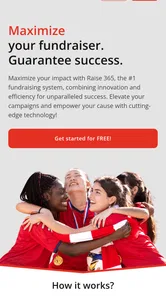
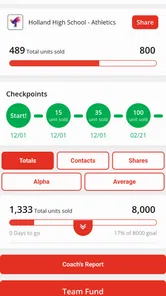
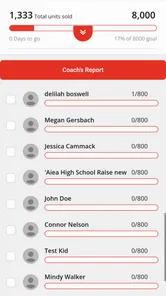
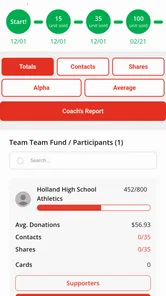
Fundraising usually starts with good intentions and then becomes a surprisingly demanding organizational job. Someone has to explain the cause, invite supporters, keep track of participation, and make sure the whole experience feels positive rather than awkward. RAISE-365 is an Events app from Raise 365 that aims to make that process easier and more enjoyable. I found it most useful as a focused companion for people taking part in a fundraising activity, rather than as a complete replacement for every tool an organizer might need.
The first thing to understand is its role. This is not a general social network, a banking app, or a broad event-planning suite. Its purpose is tied to fundraising, so the value appears when there is a clear campaign, event, or cause behind what you are doing. The app is free, rated for Everyone, and available for Android devices running version 7.0 or later. That makes it approachable for families, community groups, schools, clubs, and casual participants who do not want to pay for another service before they have even started.
Getting from installation to a useful fundraising start
Before I invite anyone else, I like to make sure the app has a clear job in the fundraiser: helping me stay oriented around one event and take a useful next step. I’d begin with the event details and a short explanation of why I’m involved, then check that both make sense to someone outside the organizing team. That small test sets up the next section’s closer look at what new users should expect.
What to expect before you begin
RAISE-365 has a straightforward promise: reduce the friction around fundraising and make participation feel more engaging. In practice, that means you should approach it with one immediate goal in mind. Do not install it expecting an empty app to somehow create a complete campaign for you. It works best when you already know what event or fundraising effort you are joining, what cause you are supporting, or what action you want to take first.
That distinction matters because first-time users often judge an event app too quickly. If you open it without any context, you may wonder where to begin or what information you are supposed to enter. A better approach is to have the event name, the organization or cause, and the people you expect to involve ready before you start. This small amount of preparation makes the app feel much less mysterious and helps you recognize whether you are entering the right fundraising experience.
In my experience, the strongest reason to try it is convenience for participants. A supporter who only wants to take part, share their involvement, or stay connected to a fundraising activity may prefer a dedicated app over a chain of emails and scattered messages. The app gives that activity a more visible home on the phone, which can make it easier to remember and revisit.
It is also worth setting realistic expectations about its audience. The app has a 3.7 average from around 293 ratings and more than 100K installs, so it has attracted a meaningful group of users without being universally loved. I read that as a reason to try it for a specific fundraising need, not as a reason to assume it will suit every organization. The experience can depend heavily on how clearly the event itself has been organized.
More From Our News Desk

 Gmail
GmailGmail in a Busy Inbox: Who Benefits Most?
From first account to crowded workday, Gmail earns its place through dependable search and flexible sorting—but its best fit depends on how much inbox maintenance you can tolerate.

 Prime Video
Switching to Prime Video: What Changes in Your Viewing Routine
Prime Video can make a compelling second home for streaming, but switching means learning a different catalog, rental layer, and route from browsing to playback.

 Universal TV Remote Control
Universal TV Remote Control Works Best as a Reliable Backup
A phone remote earns its place through quick setup and reliable habits. Here is how to get more from Universal TV Remote Control—and where its limits show.

 Weather - By Xiaomi
Weather by Xiaomi Review: Clear at a Glance, Less Clear Up Close
Xiaomi’s weather app makes everyday forecasts quick to scan, but its calm surface can leave useful details and recovery paths harder to find than they should be.

 X
XX Under Pressure: Can It Recover When Posting Goes Wrong?
A resilience-focused review of X, examining setup, mistaken posts, interruptions, weak connections, and the gaps that matter when recovery needs to be dependable.

 Clash of Clans
Clash of Clans Is Won Between the Battles
Its raids are quick; its community is a long-term project of coordination, teaching, rivalry, and shared responsibility—with all the friction that entails.
Latest News



Setting up your first experience
When I first approach an app like this, I prefer to complete only the essential setup. If the app asks for information connected with an event or campaign, I would enter the details that make the activity identifiable and leave optional polishing for later. The goal is to reach a meaningful action quickly: finding the correct fundraising activity, joining it, or preparing something that can be shared with supporters.
Before confirming anything, check the spelling of the event or cause and make sure you are using the intended account or participant identity. Fundraising tools are more sensitive to small mistakes than ordinary social apps. A wrong event selection can place your activity in the wrong context, while an incomplete profile can make it harder for friends or family to understand what they are supporting.
A useful first-time workflow is to keep the app open while you gather the information you need, rather than repeatedly switching between messages, notes, and the app. Write down the short explanation you want to give supporters: what the fundraiser is for, how you are involved, and what you hope they will do. Even if RAISE-365 helps organize the process, a clear human explanation remains more persuasive than a bare request.
The current version is 2.0.10, and the app was released on July 1, 2021. Those details suggest a product that has had time to establish its basic direction, but I would still update it before beginning an important campaign. A current version is especially sensible for an event app, where compatibility and reliable access matter more than experimenting with an older installation.
Finding the first successful action
Your first success should be something concrete and easy to verify. For a participant, that might mean locating the correct event and becoming ready to take part. For someone helping with outreach, it could be preparing the first supporter message or sharing the fundraising activity with one trusted person. Do not measure your first session by how much information you entered. Measure it by whether another person could understand what you are doing after you finish.
I recommend starting with someone who already knows you. A family member, close friend, or teammate is a better first recipient than a large, impersonal audience. Ask them to look at the information you have prepared and tell you whether the cause, event, and requested action are clear. This is a practical test of the app’s real-world usefulness: if the process leaves you unsure what to tell people, the setup needs more attention before you expand your reach.
One non-obvious advantage of this approach is that it separates app problems from communication problems. If a supporter does not respond, that does not automatically mean the app failed. They may not understand the cause, may not recognize the event, or may feel that the request is too vague. By testing with one familiar person, you can correct the message without creating confusion among everyone else involved.
Once the first interaction works, repeat the same path rather than changing several things at once. Keep the wording consistent, make sure the event identity remains correct, and use the app as the central point for the activity. This gives you a simple routine that is easier to maintain during a busy fundraising period.
Where new users may feel confused
The most likely source of confusion is assuming that every fundraising task belongs inside the app. RAISE-365 can support the fundraising experience, but it does not remove the need for basic planning. You still need to know who the audience is, what the event is asking people to do, and how you will follow up. If you treat it as a magic campaign generator, the first session may feel underwhelming.
Another common mistake is mixing the organizer’s perspective with the participant’s perspective. An organizer may care about coordination and consistency, while a participant mainly wants a quick way to understand the event and involve supporters. Before you tap through the app, decide which role you are playing. That single decision helps you judge whether a screen or action is useful to you instead of expecting every part of the experience to serve both roles equally.
There is also a practical difference between an event app and a full donor-management system. If your organization needs detailed accounting, formal reporting, complex supporter records, or extensive campaign administration, you may need another solution alongside this one. I would not choose RAISE-365 as the only tool for a large operation without first checking whether its workflow matches the organization’s responsibilities. Its appeal is simplicity and participation, not the promise of replacing every administrative system.
Privacy and communication habits deserve attention as well. Before sharing anything, review what you are sending and make sure you are comfortable with the audience. Fundraising often involves personal stories, names, photos, or details about a cause. The app can make sharing more convenient, but convenience should not replace judgment. Use the smallest audience that makes sense for the first message, then broaden it only when the content and context are clear.
A realistic everyday scenario
Imagine that I am taking part in a community fundraising event and want to involve relatives who live in different places. Instead of sending each person a different explanation, I would first identify the event inside RAISE-365, confirm that my participation is attached to the right activity, and prepare one short message. I would explain why I am involved, point people toward the relevant fundraising action, and ask one close relative to check whether the message makes sense.
After that test, I would send the same basic explanation to a small group. The important part is not sending it everywhere immediately. It is creating a repeatable path: identify the event, make the request understandable, invite a response, and return to the app when I need to stay connected with the activity. That routine is more manageable than trying to improvise a new message for every person.
For a school or club, the app may be useful as a shared reference point for participants who need a clearer connection to the event. The organizer can explain the purpose separately, while participants use the app as part of their own involvement. The trade-off is that the group still needs someone to communicate expectations clearly. A dedicated app does not automatically solve inconsistent instructions from different adults or team members.
For a family fundraiser, the benefit is different. The app can help give the activity a defined place instead of leaving everything in a long chat thread. That can reduce the chance that an invitation, update, or reminder gets buried. However, relatives who dislike installing apps may still prefer a direct message, so I would keep a simple alternative explanation ready rather than making participation feel conditional on technical enthusiasm.
How it compares with familiar alternatives
The usual alternative is a mixture of email, group messaging, spreadsheets, and social media. Those tools are flexible and familiar, but they split the experience across several places. A spreadsheet may help an organizer track information, while messages handle invitations and social networks provide visibility. RAISE-365 is more appealing when you want the fundraising activity to feel like one recognizable experience instead of a collection of unrelated conversations.
General event-planning apps are often better for schedules, attendance, reminders, and logistics. If your main challenge is arranging a meeting time or managing a complicated timetable, a conventional event tool may be the stronger choice. RAISE-365 makes more sense when the emotional and participatory side of an event matters as much as the calendar details.
Large fundraising platforms can be more suitable for organizations that need extensive campaign administration or established donation workflows. Their strength is breadth, while RAISE-365 is easier to consider when the immediate need is helping people participate in a fundraising event. I would choose between them based on the job: use a broader platform for heavy administration, and consider this app when a lighter participant-focused experience is the priority.
Social media remains powerful for reach, but it can be noisy and unpredictable. A fundraising activity can disappear quickly among ordinary posts. RAISE-365 offers a more focused setting for the people already connected to the event, although it may not provide the same broad discovery that a public social network can. In practice, the two approaches can complement each other: use focused participation for clarity and wider channels only when you are ready to explain the cause properly.
Practical habits that improve the experience
My first tip is to create a short “event brief” before inviting anyone. Keep the cause, your role, the desired action, and the next step in a few plain sentences. This prevents the common problem of sharing an app without explaining why the recipient should care. It also gives you a consistent message when several people ask similar questions.
My second tip is to treat the first supporter as a usability test. Ask whether they can identify the event, understand your connection to it, and tell what you want them to do. This is more revealing than simply asking whether the app looks easy. A screen can appear simple while still leaving a supporter uncertain about the purpose of the request.
My third tip is to use a small-circle rollout. Start with a few people, observe where they hesitate, and adjust your explanation before involving a larger group. This is particularly useful for younger participants or mixed-age families, where some people may be comfortable with apps and others may need a direct explanation. The gradual approach protects the fundraiser from avoidable confusion.
My fourth tip is to keep a backup communication route. That does not undermine the app; it acknowledges how real groups work. Someone may have an older device, limited interest in installing another app, or a preference for ordinary messages. If the fundraiser matters, make sure the invitation remains understandable even when a person does not follow your preferred digital path.
Who should use it, and who should skip it
I would recommend RAISE-365 to individuals joining a defined fundraising event, families coordinating support for a cause, and community groups that want participants to have a more focused digital experience. It is also a reasonable option for first-time fundraisers who feel overwhelmed by the idea of organizing everything through several disconnected tools. The free price lowers the barrier to trying it for a real event rather than making a long-term commitment immediately.
I would be more cautious if you are managing a complex nonprofit operation, need rigorous financial administration, or expect advanced reporting and detailed donor records. In those situations, a specialized fundraising platform may be a better foundation, with this app used only if it fits the participant side of the workflow. I would also skip it if your audience strongly resists apps and already responds well to a simple, well-managed message-based process.
The age rating of Everyone is reassuring for broad community use, but that does not mean every fundraising message is automatically suitable for every audience. Organizers should still choose language and shared material responsibly, especially when children, schools, or sensitive causes are involved. The rating describes accessibility; it does not replace thoughtful moderation by the people running the event.
My next step after the first session
After completing the first successful action, I would avoid immediately exploring every possible part of the app. Instead, I would return to the event at a useful interval, confirm that my participation still makes sense, and follow the next instruction connected with the fundraiser. The best value comes from making the app part of a simple routine, not from spending a long time configuring it without involving anyone else.
If I were organizing the activity, I would also ask participants where they became uncertain. Their answers can reveal whether the issue is the app, the event instructions, or the message being shared. That feedback is valuable because fundraising succeeds through people’s understanding and trust, not merely through having a digital destination.
RAISE-365 is not a universal answer to fundraising administration, and its middling average rating shows that the experience will not satisfy every user equally. Still, I see a useful place for it between informal group messages and heavyweight fundraising software. It gives a specific event a clearer home, keeps participation closer to the cause, and can make the first step feel less scattered.
My overall view is positive for the right situation. If you have a real fundraising event in front of you and want a free, approachable way to organize your participation, I think it is worth trying. Start with one event, one clear explanation, and one trusted supporter. The fastest route to success is not filling in everything at once; it is helping one person understand and join the cause. That practical, gradual approach is where RAISE-365 feels most useful.
RAISE-365 Frequently Asked Questions
Can I use RAISE-365 for fundraising events?
RAISE-365 is an events app from Raise 365, and its summary describes it as making fundraising easy and fun. It may be a fit if you are looking for an app connected with fundraising, but check its current app-store description to see whether its features suit the event you have in mind.
Is RAISE-365 free, and what age group is it for?
RAISE-365 is free to download and is rated for Everyone. That makes it accessible to a broad audience, although users should still review the app’s content and privacy information before getting started. Its free price and Everyone rating are useful basics to check when deciding whether it is appropriate for your needs.
What is RAISE-365 and what can I use it for?
RAISE-365 is designed to support users with ongoing personal development, daily motivation, and goal-oriented routines throughout the year. Depending on the version and available features, it may provide structured activities, reminders, progress tracking, educational content, or tools for building healthier habits. Before downloading, review the app’s current description carefully to confirm that its focus matches your specific needs and expectations.
Is RAISE-365 free to download and use?
RAISE-365 is free to download. Some functions may require payment, so review any purchase or subscription terms shown in the app before committing to paid options. Checking the current pricing details before registering can help you understand what is included at no cost and make an informed decision about any additional features.
Does RAISE-365 require an account or an internet connection?
The requirements can vary according to the platform and the feature you are using. RAISE-365 may ask you to create an account so it can save progress, synchronize information, or personalize recommendations. Certain content might work offline after being downloaded, while updates, cloud synchronization, login verification, and online services generally require internet access. Check the permission list and privacy information before creating a profile.
Pros
- Clear daily structure makes it easy to build consistent habits.
- Progress tracking helps users stay motivated over time.
- Short activities fit conveniently into busy schedules.
- Simple design keeps navigation accessible for most users.
- Useful reminders can encourage regular participation.
Cons
- Some features may require a subscription or in-app purchase.
- Content can feel repetitive after extended daily use.
- Limited personalization may not suit every user’s goals.
- Results depend heavily on maintaining consistent daily use.
- Reminder frequency may become distracting for some users.











