RadarX: Weather Radar/Forecast
- 22.54K
- 4.6
- Installs
- 1.00M
- Price
- Free
Screenshots
Analysis by Reviewed
I often open a weather app for one simple reason: I need to decide whether to leave now, take a jacket, or change a plan. The annoying part is jumping between a forecast, a radar map, and alerts to piece together the answer. RadarX: Weather Radar/Forecast is built around that practical need, putting map-based weather information and forecasts in one place. I find that approach useful when conditions look unsettled, though no app can make every forecast certain.
Why a map can save time
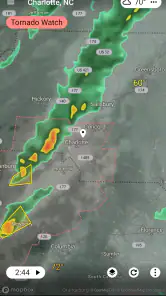
A radar view is most helpful when the question is about timing and direction, not just the day’s general outlook. Before a walk or drive, I can look at the map to judge whether a patch of rain appears close enough to affect my plans. That is a different kind of check from reading a single temperature or rain icon: it helps me think about what is happening around my location, too.
There is a trade-off. A radar picture can look precise without answering exactly when rain will reach one particular street. I use it as context, then check the forecast and alerts rather than treating the moving map as a guarantee. If I only want a quick temperature glance, a basic phone weather widget may be faster and less demanding.
Who will get the most from it
I’d consider this app for people whose plans often depend on changing conditions: commuters choosing when to head out, parents planning outdoor activities, or anyone who likes checking a storm’s progress instead of relying on a broad daily summary. It is less compelling if you rarely look beyond the current temperature, or if you prefer a minimal screen with no map to explore.
A useful habit is to check the radar before leaving, then use alerts for weather changes that matter while you are busy. That splits the work sensibly: the map helps with a decision now, while a notification can draw attention to a change later. I would avoid turning on every alert just because the option exists; choosing only relevant conditions makes notifications easier to trust and less likely to become background noise.
Where it fits among weather apps
Many familiar weather apps lead with a current-condition tile and a forecast list. RadarX puts more emphasis on the radar experience, which suits someone who wants to inspect nearby weather rather than stop at a summary. It can complement a default weather app if that app is convenient for quick checks but weak for exploring a weather system. On the other hand, someone who wants a highly compact glance at the day may prefer the built-in option they already use.
For a realistic morning routine, I would check the map before a school run or commute if rain is possible, look at the forecast for the rest of the day, and keep only useful alerts enabled. That takes a moment and can prevent an avoidable detour or a damp wait outdoors. It is still worth checking again when plans are important, because conditions can change and forecasts are guidance, not a promise.
More From Our News Desk

Clash of Clans Is Won Between the Battles

Android Auto Makes the Case for Quieter Car Software

MobiOffice: Transforming Mobile Productivity with Seamless Integration

EA SPORTS FC™ Mobile Soccer: Redefining Mobile Sports Gaming

How Microsoft OneDrive Became a Mobile Productivity Giant

How Google Translate Breaks Language Barriers Effortlessly
First Impressions
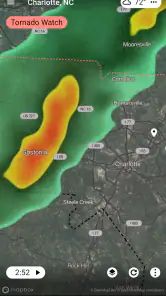
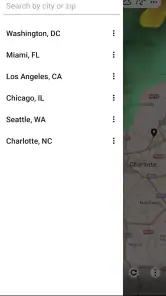
Upon launching RadarX, I was immediately struck by how clean and intuitive the interface is. No clutter, no unnecessary distractions—just straight-up weather information. The app opens up to a detailed radar map that gives you a clear picture of what's going on weather-wise in your area. It's like having a personal meteorologist in your pocket! The radar loads quickly, and you can zoom in and out to get a detailed view of your neighborhood or a broader look at the entire country.
Features that Shine
One of the standout features of RadarX is its real-time updates. The app keeps you informed with the latest weather patterns, and I found it incredibly reliable in predicting sudden changes. Whether you're planning a hike or just trying to decide if you need an umbrella for your commute, RadarX has got you covered.
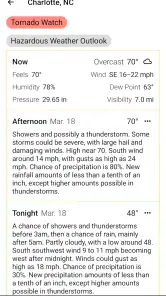
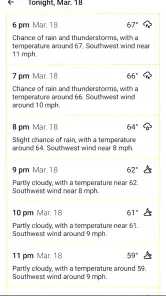
The forecasting capabilities are also top-notch. You get hourly updates, which are super helpful for those planning their day. Plus, the 7-day forecast gives you a heads-up on any significant weather events coming your way.
User Experience
As someone who isn’t exactly tech-savvy, I appreciate how easy RadarX is to use. Everything is laid out in a way that makes sense, and even my grandma could figure it out! The app is responsive and doesn't lag, which is a huge plus when you're in a hurry.
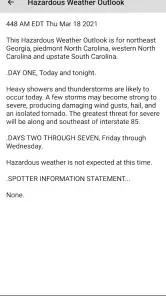
I also love the customization options. You can set alerts for specific weather conditions, so you’ll never be caught off guard. The app’s notifications are timely and not overbearing, striking just the right balance.
Reading the map without overreacting
When I use a radar map, I try not to treat every colored patch as a reason to cancel plans. I first look at its position relative to where I need to be, then consider whether the forecast suggests a broader change. This is a practical way to use RadarX: the map helps me ask better questions, while the forecast supplies the wider context. If I am planning a short trip, I care more about whether weather is moving across the route than whether it is raining at home at that exact moment.
For an outdoor event, I would check once while making the plan and again closer to departure. The second check matters because an earlier view is only a snapshot, not a reservation of future conditions. I also avoid zooming in so far that I start reading the map as a street-by-street promise. That restraint makes the radar more useful, not less; it keeps a visual aid from creating false confidence.
Everyday decisions it can simplify
One useful case is deciding when to walk a dog or fit in a quick errand between showers. Rather than repeatedly stepping outside or refreshing several screens, I can use the radar to judge whether waiting a little looks worthwhile, then use the forecast to see how the rest of the day may shape up. It will not make the choice for me, but it can reduce needless checking and help me leave with a sensible backup plan.
It can also help when a commute involves waiting outdoors. I would check the map before leaving, but I would not assume that a clear patch will remain clear throughout the journey. If the trip is important, I would leave room for changing conditions rather than trying to time everything to the minute. That is where the app saves friction: it gives me one place to inspect nearby weather without pretending that weather can be scheduled exactly.
For someone who enjoys outdoor plans, the best use may be deciding whether to bring a rain layer rather than deciding whether an activity is absolutely safe. A forecast and radar view can inform that everyday packing decision. For hazardous weather or a plan with serious consequences, I would consult official guidance as well and be ready to change course.
What a first-time setup should accomplish
I would begin by making sure the displayed location is the one I actually care about. That might be home for a daily routine, or a destination when I am planning a visit. Then I would spend a little time learning how the map changes as I zoom out and in. A broad view is useful for seeing the general movement of a system; a closer view helps orient that picture around a local decision. Switching between those views is more valuable than staring at one scale.
Next, I would choose only alerts that could change what I do. A notification is useful when it interrupts a routine for a good reason; a stream of low-value notices trains me to ignore the phone. The same principle applies to checking the app: start with the map when timing is the issue, use the forecast for the day’s outline, and stop once you have enough information to make a reasonable choice.
What it cannot replace
A radar display is not a personal guarantee that a particular street, trail, or event will stay dry. Weather changes, and a map can be difficult to interpret when the area of interest is small or the conditions are shifting. If I am responsible for other people or need to make a high-stakes decision, I would not rely on this app alone. Its strength is routine planning and situational awareness, not certainty.
It also may not be the right tool for someone who wants a quiet, glanceable forecast and nothing more. A home-screen widget or the simplest weather view on a phone can be more convenient for checking the temperature before getting dressed. RadarX makes more sense when I have a reason to inspect what is approaching. That distinction helps me avoid installing another app just to duplicate a glance I already get elsewhere.
Final Thoughts
In my opinion, RadarX is more than just a weather app; it’s a powerful tool for anyone who needs reliable weather information at their fingertips. Whether you're a weather enthusiast or just someone who likes to be prepared, this app offers everything you need in a simple, effective package. It's become my go-to for weather updates, and I highly recommend giving it a try!
So, if you're on the hunt for a weather app that combines functionality with ease of use, look no further. Download RadarX and see for yourself why it’s quickly becoming a favorite among users.
Practical setup and sensible expectations
RadarX is a free weather app from Appd Lab LLC, rated for Everyone and available on Android from version 5.0 onward. It has a 4.6 average from around 69,000 ratings, with over a million installs, so it has found a substantial audience. The current version is 2.5.19; optional in-app purchases range from $4.99 to $5.99 per item. I would start with the free experience, set a location, and decide which alerts genuinely help before considering any purchase.
The app has been around since January 24, 2013, and its focus remains straightforward: radar, alerts, and forecasts. When comparing it with another weather service, I would judge it by the practical questions I need answered—whether the map is easy to interpret, whether the forecast is convenient to scan, and whether alerts fit my routine. A high rating is reassuring, but local weather performance and personal preferences matter more than popularity alone.
Making a fair comparison
Compared with a standard forecast-first app, RadarX is most appealing when I want to see weather in motion rather than read a summary and move on. A general forecast can be better for planning several days ahead, while a radar-focused check can be more useful when deciding whether to head out soon. I would not expect one screen to replace every weather tool: the right comparison is whether its map and alerts answer questions my usual app leaves me with.
There is also a difference between a map that is engaging and one that is genuinely helpful. If I find myself zooming around without changing a decision, I have probably reached the point where a simple forecast is enough. When the radar changes what I pack, when I leave, or whether I take an alternate route, it is earning its place on my phone. That is the standard I would use before making it part of a daily routine.
Limits that matter in daily use
Radar is useful for seeing the broad shape of changing weather, but it is not a substitute for official warnings or careful planning in severe conditions. I would not rely on a phone notification as my only safety check, especially before travel or an outdoor event that would be difficult to postpone. A second forecast source can be sensible when the stakes are high, while routine decisions usually call for less effort.
There is also a small attention cost to map-first weather. Zooming around can answer a specific question, but it can become more effort than necessary when all I need is a quick yes-or-no check. In that moment, a widget or a compact forecast screen is the better tool. The useful trick is to match the app to the decision: use RadarX when nearby movement matters, and keep simple checks simple.
Who should choose another approach
I would steer away from RadarX if I wanted nothing beyond a fast temperature reading, disliked looking at maps, or expected a forecast to settle every uncertain decision. In those cases, a basic widget or a familiar forecast list is likely to feel simpler. It is also sensible to use another trusted source for consequential travel or severe-weather decisions, rather than making a single app responsible for safety.
By contrast, people who regularly plan around rain, commute on foot, or organize outdoor activities may appreciate having the radar and forecast together. The benefit is not that weather becomes predictable; it is that checking the situation takes fewer steps. If that particular friction is not part of your day, the app may offer less value than it does for someone who watches conditions closely.
My recommendation
I’d recommend RadarX to anyone who wants an approachable radar map alongside forecasts and configurable weather alerts, particularly if rain timing regularly affects their day. It is less suited to people who want only a bare-bones temperature display or who expect a map to predict conditions with certainty. Used as a planning aid rather than a promise, it can reduce the back-and-forth that makes checking the weather feel like a chore.
RadarX: Weather Radar/Forecast Frequently Asked Questions
Is RadarX suitable for someone who only wants a quick look at the weather?
RadarX is a weather app built around radar, alerts, and forecasts, so it may suit both quick checks and more detailed weather monitoring. Its store summary highlights fast weather radar, alerts, and forecasts. If you mainly want to see what conditions may be coming, radar views and forecasts provide more context than a simple glance at a temperature.
Can I use RadarX to keep track of weather in more than one place?
RadarX supports multiple locations, which can be useful if you regularly check conditions somewhere besides your current location. For example, you may want to keep an eye on weather where family members live or where you plan to travel. Having several places available can make it easier to compare local conditions without relying on a single forecast.
Is RadarX: Weather Radar/Forecast available for my phone, and is it free to download?
RadarX: Weather Radar/Forecast is a weather app from Appd Lab LLC, and it is free to download. It requires Android 5.0 or later, so checking your device’s software version before installing can help avoid compatibility surprises. The app is rated for Everyone. Some optional in-app purchases are available, so the free download does not necessarily mean every feature is included at no cost.
What features does RadarX: Weather Radar/Forecast offer?
RadarX: Weather Radar/Forecast provides real-time weather updates, detailed forecasts, and interactive radar maps. Users can view precipitation patterns, track storms, and receive severe weather alerts. The app also offers customizable notifications and supports multiple locations, making it a comprehensive tool for weather enthusiasts and casual users alike.
Is RadarX: Weather Radar/Forecast free to use?
RadarX offers both a free version with essential features and a premium subscription that unlocks additional functionalities such as ad-free experience, advanced radar layers, and extended forecast data. Users can choose according to their needs, with the free version being quite robust on its own. In-app purchases are listed from $4.99 to $5.99 per item, so review the purchase options before paying for extras.
Pros
- Accurate weather predictions
- User-friendly interface
- Real-time weather alerts
- Detailed radar maps
- Customizable weather settings
Cons
- Can drain battery quickly
- Ads can be intrusive
- Requires internet connection
- Limited free features
- Occasional slow updates
- Category
- Weather
- Version
- 2.5.19