

Race CommandIQ
- 70.00
- 3.4
- Installs
- 10.00K
- Price
- Free

Screenshots
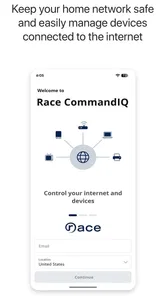
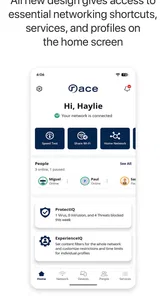
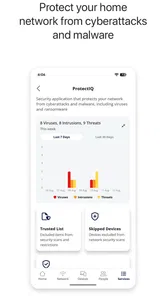
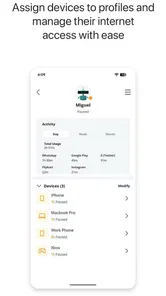
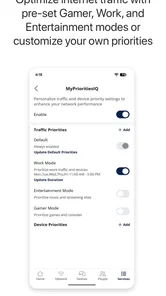
Analysis by Reviewed
Managing home internet can feel strangely difficult when the connection itself is working but the controls are scattered across different places. That is the problem Race CommandIQ tries to solve. I tested it as a smart-home management app from Race Communications, and my overall impression is that it is most useful when you want one clear place to handle the connected side of your home rather than relying on guesswork or calling support for every small check.
The app is free and aimed at everyone, but that does not mean every setup feels effortless. The experience depends heavily on the Race Communications equipment and service connected to your home. If your household uses compatible Race equipment, the app can become a practical daily tool. If you are looking for a universal Wi-Fi controller that works independently of your internet provider, I would look elsewhere.
Getting past the first points of friction
The first place I would expect many people to get stuck is account and home recognition. An app that manages a household network has to know which service and equipment it belongs to, so opening it is not the same as opening a general-purpose smart-home dashboard. Before blaming the app, I would make sure I am using the Race Communications account associated with the service and that the phone is connected to the home network I am trying to manage.
That simple check matters because a phone can be online through mobile data or a different Wi-Fi network while the user assumes everything is connected correctly. In that situation, the app may appear unhelpful even though the underlying internet service is fine. I found it more sensible to begin from the home connection, keep mobile data available only as a backup, and give the app a moment to identify the household environment.
Another common sticking point is expecting the application to repair a service problem automatically. Race CommandIQ is a control and management layer, not a replacement for the modem, router, wireless access point, or Race Communications account. If the physical equipment has lost power, if a cable is loose, or if the service itself is interrupted, tapping through the app will not restore a broken line. The app may help you understand the situation, but it cannot overcome a hardware or provider outage.
I also recommend starting with one task rather than exploring every screen at once. If the immediate goal is to check the home network, begin there. If the goal is to manage a connected device or household access, complete that task before changing other settings. This reduces the chance of confusing a temporary loading delay with a configuration mistake.
The most important practical lesson is to separate an app problem from a home-network problem. A blank or incomplete screen can be caused by account recognition, local connectivity, equipment availability, or a temporary communication delay. Treating all four as the same issue usually leads to unnecessary resets.
More From Our News Desk

 Gmail
GmailGmail in a Busy Inbox: Who Benefits Most?
From first account to crowded workday, Gmail earns its place through dependable search and flexible sorting—but its best fit depends on how much inbox maintenance you can tolerate.

 Prime Video
Switching to Prime Video: What Changes in Your Viewing Routine
Prime Video can make a compelling second home for streaming, but switching means learning a different catalog, rental layer, and route from browsing to playback.

 Universal TV Remote Control
Universal TV Remote Control Works Best as a Reliable Backup
A phone remote earns its place through quick setup and reliable habits. Here is how to get more from Universal TV Remote Control—and where its limits show.

 Weather - By Xiaomi
Weather by Xiaomi Review: Clear at a Glance, Less Clear Up Close
Xiaomi’s weather app makes everyday forecasts quick to scan, but its calm surface can leave useful details and recovery paths harder to find than they should be.

 X
XX Under Pressure: Can It Recover When Posting Goes Wrong?
A resilience-focused review of X, examining setup, mistaken posts, interruptions, weak connections, and the gaps that matter when recovery needs to be dependable.

 Clash of Clans
Clash of Clans Is Won Between the Battles
Its raids are quick; its community is a long-term project of coordination, teaching, rivalry, and shared responsibility—with all the friction that entails.
Latest News



Setup checks that save time
My preferred setup routine is deliberately boring. I first confirm that the phone has a stable connection, then check whether the home networking equipment has power, and only after that open the app. If the service was recently installed, changed, or restarted, I avoid making several changes in quick succession. Network equipment often needs time to settle, and repeated taps can make it harder to tell which action actually helped.
It is also worth checking the app version before spending time on troubleshooting. The current version is 26.2.1, and the app requires iOS or Android 10 or newer. That requirement is easy to overlook when an older phone has been working normally for years. If the device does not meet the operating-system requirement, changing home settings will not solve the compatibility issue; the practical choices are updating the device software when possible or using another supported device.
Because the developer is Race Communications, I would keep the service account details close at hand during setup. I would not assume that a general email address, a household member’s login, or a saved password from another provider will identify the correct home. A mismatch here can look like missing equipment or an empty home profile rather than an obvious sign-in error.
When a screen does not load, I would use a short recovery sequence: close the app, reconnect the phone to the home Wi-Fi, reopen the app, and wait before trying the same action again. If that does not help, restarting the phone and checking the home equipment is reasonable. I would avoid factory-resetting networking hardware as a first response. A reset can remove working configuration and create a much larger problem than the original loading issue.
One useful habit is to note what changed immediately before the trouble began. Did the phone switch networks? Did the router restart? Did the user change an account password? Did a device disappear after a power cut? That small timeline often points to the right layer of the problem. It also makes a support conversation with Race Communications much more efficient.
How I would use it during an ordinary day
Imagine a family evening when a child says a tablet has stopped connecting, while a television is streaming normally and a work laptop is still online. I would not begin by restarting the entire home network. I would use Race CommandIQ to check the household connection and then focus on the affected device or local wireless situation. If only one device is struggling, the likely answer may be that device, its distance from the router, or a temporary wireless issue rather than a complete service failure.
This is where the app’s value becomes more practical than its short store description suggests. A single place for home-management checks can help a household move from “the internet is broken” to a narrower question: is the problem affecting everything, one room, one device, or the provider connection? That distinction prevents unnecessary disruption to everyone else in the home.
I would also use it before making changes for guests or remote work. A quick check can confirm that the home connection is behaving normally before an important video call. If the issue is isolated to a phone or laptop, I would troubleshoot that device separately rather than changing the network configuration for the whole household.
For people who are not comfortable with networking terminology, the app’s biggest advantage is centralization. Instead of remembering which browser page, hardware label, or support number applies to a particular task, the user can begin in the Race Communications environment. The trade-off is that centralization only helps when the account, service, and equipment are correctly linked.
Recovering a workflow without making things worse
When a task fails halfway through, I would resist the temptation to repeat it rapidly. First, I would check whether the original action actually took effect. Sometimes a screen can lag while the underlying network change has already been accepted. Repeating the command may create confusion or produce a result different from what I intended.
If the app appears stuck, I would return to the starting screen, confirm the phone’s connection, and try again after a brief pause. If the same action fails repeatedly while other parts of the home connection work, I would record the exact task and the visible message rather than experimenting with unrelated settings. That information is more useful than saying only that “the app does not work.”
A particularly sensible recovery rule is to change one variable at a time. Do not switch from Wi-Fi to mobile data, restart the router, reinstall the app, and change the account password all in one sequence. If the problem disappears, there is no reliable way to know why. A controlled approach takes slightly longer at the beginning but saves time when the issue returns.
Reinstalling can be a reasonable later step for a damaged local app session, but I would not treat it as a universal fix. It does not repair a provider outage, a powered-off router, an unsupported operating system, or an account mismatch. Before reinstalling, I would make sure I know the correct Race Communications login so the recovery process does not create a second problem.
The same caution applies to restarting network hardware. A restart can help after a temporary communication failure, but it interrupts every connected device in the home. I would choose it when the equipment itself appears unresponsive or when the service needs a clean reconnection, not merely because one phone is having trouble.
When the app is not the cause
There are several situations where I would stop troubleshooting Race CommandIQ and look elsewhere. If every device in the home loses access at the same time, the provider connection or networking equipment deserves attention before the app. If only one device fails, I would inspect that device’s Wi-Fi state, software, and location. If the app opens but shows stale information, I would consider a communication delay between the phone and the home equipment rather than assuming the settings have vanished.
Physical conditions matter too. Thick walls, distance, interference, and crowded wireless environments can affect a device even when the internet service is healthy. An app can expose useful management controls, but it cannot change the basic radio environment inside a house. Moving the affected device closer to the networking equipment, testing another device in the same room, and comparing results can reveal whether the problem is local.
There is also a difference between an account issue and a service issue. If the app cannot identify the home but other household devices are online, I would focus on account association and sign-in details. If the app identifies the home but nothing online can reach the internet, I would focus on the equipment or Race Communications service. Keeping those cases separate avoids wasting time inside the wrong screen.
This is also where the app may not be the best choice. Someone with a mixed network built from several brands may prefer a vendor-neutral management tool, provided their equipment supports one. A technically experienced user who wants detailed controls beyond the provider’s environment may prefer the manufacturer’s own router interface. Race CommandIQ makes more sense for a Race Communications customer who values provider-linked convenience over a broad, independent control system.
What the store figures suggest about maturity
Race CommandIQ has an average rating of 3.4 from around 183 ratings, with around 70 written reviews. I read that as a sign to keep expectations realistic: the app is useful for some households, but the experience is not universally smooth. Ratings at this level often reflect the fact that network-management apps are judged not only on design but also on account linking, equipment communication, and the quality of the underlying service.
The app has passed 10 thousand installs, which gives it a real user base without making it feel like a universal household standard. It was released on March 28, 2022, and its continuing version number shows that it has developed beyond its initial release. Still, a newer version does not guarantee that every home configuration will behave identically. The equipment and service relationship remains central to the experience.
I appreciate that it is free, because the app is part of managing a service rather than an extra purchase I have to justify. The Everyone rating also makes sense for a household utility. Parents, roommates, older relatives, and less technical users can all benefit from a simpler starting point, although the person doing the setup should still understand which changes affect the whole home.
Who should use it and who should skip it
I would recommend Race CommandIQ to Race Communications customers who want a convenient way to stay involved with their home network. It is especially suitable for households where several people need a straightforward place to check connectivity, understand whether a problem is local, and manage the connected-home side of their service without opening a traditional router administration page.
It can also suit someone who regularly helps family members from the same household. A centralized app is easier to explain than a collection of hardware labels and browser addresses. The best results come when the user approaches it as a practical control panel, not as a magical repair button.
I would skip it if I do not use Race Communications service or if I need a tool that can manage unrelated routers and access points from multiple manufacturers. I would also look elsewhere if my priority is advanced network diagnostics, highly granular configuration, or complete independence from an internet provider. In those cases, a dedicated networking platform may offer more depth, even if it is less approachable.
My practical verdict
After using it, I see Race CommandIQ as a focused household utility rather than an all-purpose smart-home platform. Its strength is the connection between Race Communications service and everyday home-network management. That makes it easier to begin a diagnosis and more convenient for users who do not want to deal with technical interfaces.
Its weakness is the same dependency that gives it purpose. When account recognition, equipment communication, or the provider service is not behaving, the app can feel responsible even when the real cause is elsewhere. The most successful users will check the phone, account, home equipment, and service in that order instead of repeatedly tapping the same control.
My recommendation is therefore qualified but positive: if Race Communications supplies your home connection and your phone meets the operating-system requirement, this free app is worth trying as the first place to manage and investigate household connectivity. I would keep a second troubleshooting route in mind for provider outages and hardware faults, and I would choose a different tool if I needed cross-brand or advanced network control. Used within its proper role, it can turn a vague “the Wi-Fi is acting up” complaint into a much clearer next step.
Race CommandIQ Frequently Asked Questions
Is Race CommandIQ free to download, and what devices can install it?
Race CommandIQ is free, and its content rating is Everyone. It is a House & Home app from Race Communications, with a minimum operating-system requirement of version 10. Before downloading, check that your phone or tablet meets that requirement. The app is intended to help manage smart-home networking, so having a compatible network installation is also important for making practical use of it.
Who develops Race CommandIQ, and is it widely used?
Race CommandIQ is developed by Race Communications. It has more than 10,000 installs, with an average rating of 3.4 from 183 ratings and 70 written reviews. Those figures offer a quick sense of its reach and reception, but the app’s usefulness will depend most on whether your home network supports it and whether its management tools match what you need.
What is Race CommandIQ, and what can I use it for?
Race CommandIQ is a companion app designed to help manage and monitor compatible Ruckus network equipment, particularly Wi-Fi systems used in homes and small businesses. From the app, users can typically view connected devices, check network status, configure wireless settings, create guest access, run basic diagnostics, and manage certain security or parental-control options. Its exact features depend on the supported hardware and service configuration.
Is Race CommandIQ compatible with my router or Wi-Fi system?
Compatibility is the most important point to check before downloading Race CommandIQ. The app is intended for specific Ruckus networking products and may not work with ordinary third-party routers or every Ruckus device. During testing, the available controls were closely tied to the connected hardware and account permissions. Check your equipment model, firmware requirements, and service provider instructions in the app listing before installing it.
Do I need an account or an active internet connection to use Race CommandIQ?
In most cases, Race CommandIQ requires an account associated with a supported network installation, and many management features need an active internet connection. The app communicates with the network system and may also rely on cloud services for remote monitoring or configuration. Some local information might remain visible during a temporary outage, but complete setup, remote access, updates, and diagnostics can be unavailable without connectivity.
Pros
- Clear network status and performance insights
- Useful parental controls and device management tools
- Guest network setup is simple and convenient
- Remote troubleshooting can reduce support calls
- Works well for managing supported home Wi‑Fi systems
Cons
- Features depend heavily on a compatible Race network device
- Some advanced options may require a subscription or provider access
- Performance reports can be confusing for less technical users
- App usefulness is limited when the internet connection is offline
- Occasional login or device-sync issues may require restarting the app







