Qwick for Professionals
- 2.84K
- 3.1
- Installs
- 500.00K
- Price
- Free

Screenshots

Analysis by Reviewed
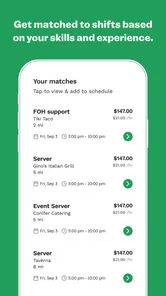
Finding dependable hospitality work is often harder than doing the work itself. Shifts appear at different times, locations change, and a person may need to balance several commitments without wanting a permanent schedule. I tested Qwick for Professionals with that reality in mind. It is a free business app from Qwick GP that connects professionals with flexible food-and-beverage shifts, and its main appeal is straightforward: it puts short-term work opportunities into a mobile workflow instead of making you search through scattered messages, calls, and job boards.
My first impression was that Qwick makes the most sense when I treat it as part of a work system rather than as a magic source of guaranteed income. The app can help me find and manage opportunities, but it does not remove the need to check details carefully, plan travel, protect recovery time, and keep track of money. That distinction matters. Someone who uses it casually may find it inconsistent, while someone with a clear availability routine can get much more value from it.
How Qwick fits into a practical work routine
I use a practical routine to keep flexible shift searching from taking over the week: I first identify the time and travel limits I can genuinely manage, then check Qwick with those boundaries in mind. That makes each opportunity easier to judge on its real fit, not just its appeal on screen. The next section looks at how I turn that plan into a repeatable day-to-day workflow.
Start with a plan before opening the app
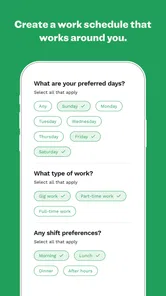
The most useful way to approach Qwick is to decide what kind of work I am actually available for before browsing shifts. I think about the days I can work, the maximum travel time I can accept, the roles I am comfortable taking, and the minimum amount of notice that still lets me arrive prepared. Without those boundaries, flexible work can quietly become a string of rushed decisions.
This is especially important in food and beverage work. A shift may look attractive until I consider transportation, uniform requirements, physical demands, or the possibility that it will interfere with another commitment. I recommend keeping a simple weekly calendar outside the app, even if it is only a paper planner. Qwick is useful for discovering opportunities, but I would not rely on memory to prevent overlapping bookings.
A realistic example is a hospitality professional who has regular weekday employment but wants extra work on selected evenings. Before checking Qwick, I would mark the fixed job, commuting time, meals, and rest. I would then look only for shifts that fit the remaining space. This turns the app from an impulse-driven marketplace into a controlled part of a broader income plan.
Use the shift information as a decision checklist
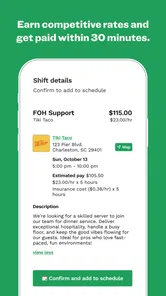
When I see a possible shift, I do not judge it by the pay or title alone. I look at the complete practical picture: where it is, when it starts, what kind of work it involves, and whether I can realistically arrive ready. The best opportunity is not always the one with the most appealing headline. A nearby shift that fits my experience may be better than a more lucrative-looking option that creates an expensive or stressful commute.
More From Our News Desk

Weather by Xiaomi Review: Clear at a Glance, Less Clear Up Close

X Under Pressure: Can It Recover When Posting Goes Wrong?

Clash of Clans Is Won Between the Battles

Android Auto Makes the Case for Quieter Car Software

MobiOffice: Transforming Mobile Productivity with Seamless Integration

EA SPORTS FC™ Mobile Soccer: Redefining Mobile Sports Gaming
One useful habit is to pause before accepting anything and ask three questions: Can I arrive early enough to handle unexpected travel delays? Do I understand the kind of work expected? Will accepting this shift make the rest of my week harder? That short pause prevents a common mistake with flexible-work apps: confusing availability with capacity.
I also find it sensible to keep a personal note for each accepted shift. I can record the venue, start time, arrival instructions, clothing needs, and any questions I want to resolve. Even when the app displays the important information, writing down the details gives me a quick reference when I am preparing away from the screen.
Capture opportunities without letting them take over
Qwick is most helpful when I check it at deliberate times instead of refreshing it constantly. I would create a morning or evening review habit, depending on when I usually plan my schedule. During that check, I can review suitable shifts, compare them with my calendar, and decide whether they support my weekly goals.
This approach also reduces decision fatigue. If I open the app whenever I feel uncertain about work, I may spend too much time browsing possibilities that do not fit. A defined review window gives the search a beginning and an end. I can either accept a suitable shift, save the information for later planning, or close the app and continue with the rest of my day.
The app’s value is therefore partly organizational. It gathers flexible opportunities in a place I can revisit, but I still need my own method for sorting them. I would group potential shifts mentally into three categories: a strong fit, a possible fit that needs checking, and an unsuitable option. That simple filter is more effective than treating every listing as equally important.
Build a repeatable preparation routine
Once I accept a shift, the real work begins before the shift itself. I would review the location and timing, plan transportation, prepare clothing and supplies, and set reminders that allow for delays. This routine is more important than it sounds because flexible work often involves different venues and expectations. A repeatable checklist keeps one unusual location from disrupting the whole day.
My checklist would include confirming the address, calculating a realistic departure time, checking whether I need to bring anything specific, and making sure my phone is charged. I would also leave a small buffer between the expected arrival and the official start. Arriving at the last second may technically be on time, but it leaves no room to find an entrance, speak with a supervisor, or handle a transit problem.
After the shift, I would record what happened while it is still fresh. Was the location easy to reach? Did the work match my expectations? Would I accept a similar shift again? These notes help me improve future choices. Qwick can help me find work, but my own history helps me identify which opportunities are actually sustainable.
A particularly useful trade-off is separating short-term flexibility from long-term reliability. I may accept varied shifts while I build experience, but I should still notice patterns in the work I prefer. Perhaps certain start times create too much stress, or certain types of food-and-beverage assignments suit me better. Treating each shift as feedback makes the app more valuable over time.
Understand where the workflow can fail
The main limitation is that flexible shift availability is not the same as predictable employment. Someone who needs a fixed number of hours every week may find Qwick frustrating if suitable opportunities do not appear when needed. I would use it as one channel in a larger job strategy rather than replacing a stable role immediately.
There is also a planning risk. A shift can be technically available but practically unsuitable because of distance, transportation cost, or a clash with personal responsibilities. The app cannot make those trade-offs for me. I still have to calculate whether the opportunity is worthwhile after travel and preparation.
Another failure point is accepting work too quickly. Mobile interfaces make it easy to make decisions while distracted, and a missed detail can lead to confusion later. I recommend reading the shift information from top to bottom before committing and checking the calendar immediately afterward. If I cannot explain the assignment, location, and timing in my own words, I am not ready to accept it.
Dependence on a phone can create its own friction. I would avoid waiting until the last minute to review a shift, especially before traveling. Keeping necessary details available in my notes and carrying a backup charging option are simple precautions. These are not glamorous features, but they are the kind of habits that determine whether a flexible-work app feels manageable in real life.
How it compares with familiar alternatives
Compared with traditional job boards, Qwick feels more focused on immediate, flexible hospitality work. A conventional job board is usually better for searching permanent positions, comparing employers over a longer period, and submitting applications for a continuing role. Qwick is more suitable when I want to consider individual shifts and fit work around an existing schedule.
Compared with asking friends, contacting venues directly, or relying on informal group messages, the app offers a more centralized way to look for opportunities. Informal contacts can still be valuable, especially when trust and local knowledge matter, but they are difficult to organize. Qwick gives me a dedicated place to check rather than depending entirely on whoever happens to message me.
That focus also explains what Qwick is not. I would not choose it as my only tool if I wanted a conventional career application process, a guaranteed weekly timetable, or a single employer relationship. It is better for professionals who value choice and can handle some uncertainty. The right comparison is not “which app replaces every other job search method?” but “which tool fits this particular kind of work?”
Who will get the most from it
I think Qwick is a strong match for hospitality professionals who already understand their availability and want more control over when they work. It can suit someone building a schedule around school, another job, family responsibilities, or a changing personal routine. It may also help a professional test different working patterns before committing to a longer arrangement.
The app has reached more than half a million installs, which suggests that it is not an obscure experiment. Its average rating is 3.1 from around 5.8 thousand ratings, so I would approach it with realistic expectations rather than assuming every user experience will be smooth. Those figures do not change my view that the app can be useful, but they reinforce the need to judge it by my own location, skills, and availability.
Qwick is less suitable for someone who dislikes schedule uncertainty, needs guaranteed hours, or cannot travel flexibly. It may also be a poor fit for a person who wants extensive training before taking assignments or prefers to work only for one familiar employer. In those cases, direct employment or a traditional recruitment route may provide a better foundation.
What the app feels like for everyday use
In daily use, I see Qwick as a decision tool rather than a complete employment manager. Its purpose is clearest when I have a specific gap in my schedule and want to see whether a suitable food-and-beverage shift can fill it. The experience becomes less satisfying when I expect the app to solve broader questions about income stability, career progression, or long-term scheduling.
The free price makes it easy to try without adding a subscription decision to the process. Qwick is intended for everyone in terms of its content rating, and the app has been available since April 2019. On Android, the current version is 4.8.1 and requires Android 7.0 or later, so people using very old devices should check compatibility before planning around it.
Those technical details are useful, but they are not the reason I would recommend it. The real question is whether I can use the app consistently without letting flexible work become disorganized. If I keep a separate calendar, review opportunities at set times, and prepare for each assignment, Qwick has a clear place in my routine. If I simply open it whenever I need urgent income and accept the first appealing option, the same flexibility can become a source of stress.
My recommendation after testing the complete workflow
I would recommend Qwick for Professionals to someone who wants access to flexible F+B shifts and is willing to manage the surrounding logistics personally. The app’s strength is convenience: it brings relevant work possibilities into a mobile workflow and can make occasional or supplemental shifts easier to find. Its weakness is equally important: it cannot guarantee that every opportunity will fit my schedule, travel limits, experience, or financial needs.
My advice is to begin with a narrow experiment. Decide which days and locations are genuinely workable, accept only assignments that pass the calendar and travel check, and review the results afterward. Pay attention not only to whether I completed the shift, but also to how much effort the full process required. That is the best way to discover whether the app supports my life or merely fills empty space at a cost.
For me, Qwick works best as one dependable layer in a sustainable productivity system: a place to look for opportunities, not the entire plan. With clear boundaries and a repeatable preparation routine, it can be a practical companion for flexible hospitality work. Without those habits, I would choose a more predictable employment option or use Qwick alongside traditional job searching rather than depending on it alone.
Qwick for Professionals Frequently Asked Questions
Is Qwick for Professionals free to download, and who can use it?
Qwick for Professionals is free to download and is intended for people seeking flexible work in hospitality, food service, events, and related fields. The app has an Everyone age rating, but that does not mean every shift is suitable for every person; individual opportunities may have their own experience, skill, or verification requirements. Check the eligibility details for a shift before applying.
What kind of app is Qwick for Professionals?
Qwick for Professionals is a business app developed by Qwick GP. Its store summary highlights flexible food-and-beverage shifts and daily pay, making it relevant to workers looking for opportunities outside a fixed schedule. The app connects professionals with businesses that need staff for shifts, while the specific work available depends on the location and the opportunities shown in the app.
What is Qwick for Professionals?
Qwick for Professionals is a platform designed to connect hospitality, events, and service-industry workers with businesses that need short-term or on-demand staff. Professionals can create a profile, list their experience and skills, browse available shifts, and apply for suitable opportunities. It is particularly useful for people looking for flexible work rather than a fixed, traditional schedule.
How do I create a professional profile and find shifts?
After downloading the app, you generally need to register, complete your professional profile, add relevant work experience, select your skills, and provide any requested verification details. Once your profile is ready, available shifts can be reviewed according to location, role, date, and pay. Reading the complete shift description is important because duties, dress code, arrival time, and required qualifications may vary.
How does payment work on Qwick for Professionals?
Payment details can depend on the shift, market, employer, and the platform’s current policies. Before accepting an opportunity, review the listed pay rate, expected hours, and any applicable payment information carefully. You may also need to complete identity, tax, or payment-account verification. Keep in mind that processing times, eligibility requirements, and payment methods can change, so the in-app terms should be treated as the most accurate source.
Pros
- Quickly find flexible shifts that match your skills and availability.
- Clear job details help you compare pay
- location
- and shift requirements.
- Useful for building experience and connecting with hospitality employers.
- Mobile-first scheduling makes managing accepted shifts convenient.
- Payment tracking can make short-term work easier to organize.
Cons
- Shift availability may vary significantly by city and profession.
- Some roles require prior experience
- certifications
- or specific documents.
- Competitive listings can be claimed before you have time to apply.
- Last-minute schedule changes may disrupt personal plans.
- The app is mainly useful for hospitality and service-industry professionals.











