Quotes App - Daily Motivation
- 219.00
- 4.7
- Installs
- 100.00K
- Price
- Free

Screenshots

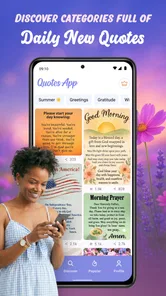

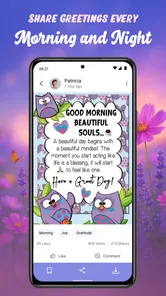



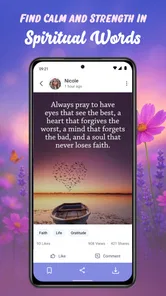
Analysis by Reviewed
Some apps are useful because they solve a large problem, while others earn a place on your phone by making a small daily action easier. Quotes App - Daily Motivation belongs to the second group. I found it most appealing when I treated it as a source of short, shareable words rather than as a complete reading platform. It brings together inspirational quotes, love messages, and other daily material that can be sent to someone quickly, which makes it a practical choice for people who regularly need the right sentence but do not want to write one from scratch.
The app sits in the Books & Reference category, although I would describe its role more simply: it is a lightweight collection for finding a message, feeling, or thought that fits a moment. It is free to install, carries a Teen content rating, and is made by good space. Sprüche & Bilder zum Verschicken. The current version is 5.15.7, and it runs on devices using Android 7.1 or newer, so compatibility should be comfortable for many older phones as well as recent ones.
After using it as part of an ordinary messaging routine, my opinion is positive but specific. Its real strength is reducing the effort between feeling something and expressing it. That sounds modest, yet it matters when I want to encourage a friend, send affection to a partner, or start the morning with a thought that feels more deliberate than a generic greeting. It is less convincing for someone who wants long-form reading, deep commentary, or a carefully organized personal library.
How I used the app for everyday messages
I found the app most useful when I began with the person and occasion in mind, rather than browsing until something looked appealing. That simple habit makes it easier to choose a line that feels appropriate and leaves room for my own words. It also leads into the practical checks I would make before relying on the app as part of a regular messaging routine.
A simple routine works better than random browsing
My baseline workflow was straightforward. I opened the app when I had a particular purpose, looked through the available quote material, chose something that matched the recipient, and then used the sharing action rather than copying the text into another app manually. This approach made the experience feel focused. Instead of scrolling without an end point, I started with a question: do I need something romantic, encouraging, reflective, or suitable for a general greeting?
That small change in habit is important. Quote collections can easily become endless streams where every item looks interchangeable. With this app, I got better results when I decided on the emotional tone before browsing. A message for a tired colleague needs a different level of warmth from a message for a close friend, and a romantic line can feel awkward if it is sent to someone who expects a casual conversation. The app supplies options, but the human judgment still belongs to me.
A realistic example is a busy weekday morning. A friend has an important appointment, and I want to send encouragement before work. Rather than searching the web, opening several pages, and worrying about whether the wording is too dramatic, I can use the app to find a short motivational thought and share it. The benefit is not that the message becomes deeply personal automatically. The benefit is that I have a usable starting point in a few moments.
More From Our News Desk

Weather by Xiaomi Review: Clear at a Glance, Less Clear Up Close

X Under Pressure: Can It Recover When Posting Goes Wrong?

Clash of Clans Is Won Between the Battles

Android Auto Makes the Case for Quieter Car Software

MobiOffice: Transforming Mobile Productivity with Seamless Integration

EA SPORTS FC™ Mobile Soccer: Redefining Mobile Sports Gaming
I also found the app useful for maintaining small social habits. Some people like sending a morning greeting, a weekend message, or a short note when someone is having a difficult day. Repeating that habit can become tiring when I have to invent new wording every time. A quote app offers variety while leaving room for a personal sentence before or after the selected message. That combination feels much more genuine than forwarding a quote with no context.
Choosing a message without making it feel automatic
The main risk is overusing ready-made wording. If every message arrives as a polished quote, the recipient may eventually feel that the app is speaking instead of you. I avoided that by adding a brief personal introduction. For example, I might explain why a particular thought reminded me of the person, then share the quote. That extra line changes the role of the app from a message generator into a tool for expressing something I already wanted to say.
Images and short text also serve different purposes. A visual greeting can be more noticeable in a chat, while plain wording is easier to read, adapt, or combine with a personal note. I would not automatically choose the most decorative option. For a close relationship, a simple message with a specific sentence from me often feels warmer than a polished image. For a quick celebration or a cheerful morning greeting, the visual format may be more suitable.
This is one of the less obvious strengths of the app: it can help with the first draft of a social interaction. I do not have to accept the wording exactly as presented. I can use it as a prompt, shorten it, or let it suggest a tone before writing my own version. People who treat every item as a final answer may find the results repetitive, but people who edit and personalize them can get more value.
What the audience response tells me
The app has built a 4.7 average from around 800 ratings, with more than 200 written reviews, and it has passed 100K+ installs. Those figures suggest that it has found a clear audience among people who want ready-to-share words rather than a complex reference tool. I see that appeal in daily use: the purpose is immediately understandable, and the learning curve is low.
Popularity does not remove the need for judgment, though. A large audience may appreciate convenience while still having different expectations about style, language, and repetition. I would spend a little time deciding whether the available messages match the tone I normally use. If I prefer understated, highly personal writing, some ready-made lines may feel too broad. If I enjoy sending positive greetings and visual messages, the same material may fit naturally into my routine.
Settings and habits that make the experience smoother
One of the first things I recommend is checking the app’s available settings rather than accepting the initial setup without thought. In a quote application, small choices can affect whether it feels helpful or intrusive. I would pay attention to how daily content is presented, whether notifications are enabled, and whether sharing preferences suit the way I normally communicate. A daily reminder can support a habit, but it can also become noise if I already receive many alerts.
I prefer to make notifications intentional. If I want a morning prompt, I would keep that kind of reminder useful by connecting it to a real routine, such as reading the quote with breakfast and sending one thoughtful message during the day. If I am not going to act on the prompt, disabling or reducing interruptions is more sensible. The app works best when it supports a habit I chose, not when it competes for attention throughout the day.
It is also worth checking how the app handles the difference between browsing and sharing. Some users will mainly look for a message to send, while others may simply read a daily thought. I would test both paths early: open a quote, inspect the available action, and see whether the result is convenient in the messaging app I use most. This is a practical step that store descriptions rarely answer, and it helps reveal whether the app fits a particular phone workflow.
Because the minimum operating requirement is Android 7.1, owners of older devices have a reasonable chance of using it without replacing their phone. That is useful for families or users who keep a reliable older handset. Still, I would keep expectations realistic: compatibility does not guarantee that every device will feel equally quick or that every sharing destination will behave identically. The most useful test is to try the app on the actual phone and with the actual messaging service used every day.
The free entry point is another reason to experiment before committing to a routine. In-app purchases range from $1.49 to $39.90 per item, so I would avoid assuming that every available element belongs to the free experience. A sensible approach is to use the basic workflow first, decide whether it genuinely helps, and only then consider optional purchases. For occasional users, the free access may be enough. Frequent users should understand which extras they would really use rather than buying simply because a category looks attractive.
Building a repeatable selection system
Experienced use is less about scrolling faster and more about reducing indecision. I found it helpful to assign a purpose to each visit. On one day I might look for encouragement, on another I might need a warm message for someone close, and on another I might want a neutral thought to share with a wider group. This prevents the app from becoming a vague collection and makes the browsing session shorter.
A second useful habit is to pause before sharing. I ask myself three things: does the wording fit the person, does the emotional intensity fit the situation, and can I add one personal sentence? That check takes almost no time, but it avoids the common mistake of sending a message that sounds too intimate, too dramatic, or simply unlike me. It is a better use of a quote app than forwarding the first attractive item I see.
I would also keep a small mental distinction between discovery and communication. Browsing can be relaxing, but sharing is a social act. A quote that feels meaningful when I read it privately may not make sense to someone else without context. The app gives me a broad selection, yet the final decision should be based on the recipient rather than on how visually appealing the item looks in the moment.
Faster patterns for regular users
For repeated use, I recommend a three-step pattern: choose the emotional purpose, scan only the relevant material, and personalize before sending. This is faster than opening the app with no plan and scrolling through every category. It also produces better messages because the selection is guided by the situation.
Another efficient pattern is to prepare a few occasions in advance without turning the app into an automated messaging service. If I know that a friend is facing a stressful week, I can look for an encouraging thought when I have time, then use it later as a starting point. The important distinction is that I still decide when and why to send it. Preparation reduces pressure, while personal timing keeps the message from feeling mechanical.
For relationship messages, I would use the app as a source of tone rather than a substitute for conversation. A love message can open a chat, but it should not carry the entire emotional exchange. A short quote followed by a specific memory, question, or expression of appreciation is more effective. This is a concrete way to get value from the app without allowing its ready-made language to flatten a personal relationship.
For group chats, restraint matters even more. A broadly positive message may work in a family or community conversation, but sending frequent decorative greetings can quickly become unwanted. I would reserve the app for moments when the message adds something: a celebration, encouragement before an event, or a thoughtful beginning to the day. The app makes sending easy, so the user has to supply the sense of occasion.
There is also a useful distinction between inspiration and information. If I need factual guidance, a dictionary definition, a researched reference, or a serious book recommendation, this is not the right tool. Its value is emotional and communicative. Compared with a general search engine, it is quicker for ready-to-share wording but less flexible for finding a precise quotation by author, source, or historical context. Compared with a notes app, it offers discovery but not the same control over a personal archive.
Where it beats ordinary alternatives
The usual alternative is to search the web whenever a message is needed. That can produce more variety, but it also introduces clutter, inconsistent formatting, and pages designed for browsing rather than immediate sharing. This app is more convenient when I already know I want a short inspirational or affectionate message. It keeps the task centered on the kind of content I am trying to send.
Another alternative is using social media for daily inspiration. Social platforms provide a wider stream, but they also bring unrelated posts, arguments, advertisements, and distractions. A focused quote app is calmer for a user who wants a small piece of positive content without opening a much larger feed. The trade-off is that social platforms may offer more interaction and personalization, while this app is primarily about finding and sharing the message itself.
A personal notes collection is better for people who want complete ownership. I can write my own messages, save favorite passages, and organize them exactly as I wish. Quotes App - Daily Motivation is better at helping me discover wording when my own ideas are not ready. In practice, the two can complement each other: use the app for inspiration, then keep only the lines or rewritten messages that genuinely fit my voice in a separate personal space.
Limits that become clearer with advanced use
The app’s simplicity is both its advantage and its boundary. It is easy to approach because it does not demand a complicated setup, but users looking for deep organization may eventually want more control. If I need detailed tagging, a searchable quotation database, source attribution, or a carefully curated personal collection, I would look toward a dedicated reading or note-taking solution instead.
Repetition is another possible weakness. Ready-made quote services depend on a finite style and recurring themes, so regular users may notice familiar emotional patterns over time. The way to manage that is not to expect endless novelty. I would alternate between browsing for a direct share, rewriting an idea in my own words, and simply sending a personal message without using a quote. That keeps the app useful without making every interaction look the same.
There is also a quality trade-off between speed and precision. A quick message may be perfectly adequate for a casual greeting, but important moments deserve more attention. If someone is grieving, celebrating a major achievement, or asking for serious support, a generic inspirational line can feel insufficient. In those cases, I would write directly and use the app only if a particular thought truly adds sensitivity or clarity.
The Teen content rating is a useful signal for families deciding how broadly to share access, but it should not replace personal judgment. The intended use revolves around quotes, greetings, and messages, yet the appropriateness of a particular item depends on the recipient and context. I would preview anything before sending it to a child, a workplace group, or someone who may interpret romantic language differently from me.
Purchases deserve the same measured approach. Since optional items can cost from $1.49 up to $39.90, frequent users should decide whether extras improve their actual workflow or merely expand the amount of material available. I would not pay for more content simply to solve a problem that is really about choosing better. A paid addition makes sense only when it provides material or convenience I will repeatedly use.
Who should install it, and who should skip it
I would recommend the app to people who send daily greetings, struggle to find encouraging wording, enjoy sharing positive images, or want a quick source of affectionate messages. It is especially suitable for users who value a low-effort starting point and are comfortable adding their own sentence before sharing. Older Android phone owners may also appreciate the broad minimum system requirement.
I would be more cautious for readers who dislike prewritten sentiments, want literary quotations with clear sources, or expect a full digital library experience. Writers who need original language for professional work should not treat the app as a replacement for editing or personal composition. Likewise, anyone who finds notifications distracting should review the setup carefully and keep the app on demand rather than allowing it to shape the day.
My most useful tip is to judge the app by the quality of conversations it helps create, not by how many items I can browse. One well-chosen line that leads to a sincere exchange is more valuable than a long session of scrolling. That mindset also reduces the risk of repetitive sharing and makes the free experience easier to evaluate before considering optional purchases.
My verdict after making it part of a routine
Quotes App - Daily Motivation is a focused, accessible app for finding short words to read and share. I like it because it removes a familiar bit of friction: knowing that I want to send something kind, but not knowing how to phrase it. The categories around inspiration, love, and daily messages make the purpose clear, and the sharing-centered workflow suits quick communication better than a traditional reference book or a blank notes page.
Its best results come from experienced restraint. I choose a purpose before browsing, check the tone before sending, add a personal detail, and avoid turning every conversation into a forwarded greeting. I also treat settings and optional purchases as choices rather than defaults. Those habits make the app feel more personal and prevent its convenience from becoming repetitive.
The rating of 4.7 and the 100K+ install milestone show that many people find this kind of tool worthwhile, and I can understand why. Still, I would not call it a universal recommendation. It is not designed for deep research, long reading, or complete control over a quotation archive. For those needs, a search tool, ebook app, or notes system will be stronger.
For the right audience, however, this is a useful little companion. I would install it if I wanted a dependable source of shareable encouragement or affectionate wording and was willing to keep the final message personal. Use it as a prompt for genuine communication, not as a replacement for it. With that expectation, Quotes App - Daily Motivation earns its place as a practical Books & Reference app for small moments that are easier to express when the right words are already close at hand.
Quotes App - Daily Motivation Frequently Asked Questions
What is Quotes App - Daily Motivation?
Quotes App - Daily Motivation is designed to provide users with inspirational, motivational, and positive quotes for everyday encouragement. After opening the app, you can browse messages intended to improve your mood, support personal growth, or help you start the day with a more optimistic mindset. It is suitable for users who enjoy short, uplifting content rather than long articles or guided coaching sessions.
Is Quotes App - Daily Motivation available for my device?
Before downloading, check that your device meets the app’s operating-system requirement. The app is available for Android devices running version 7.1 or later. It is a Books & Reference app, so it may appeal to people who want brief, easy-to-read messages rather than a full reading or coaching experience. The developer is good space. Sprüche & Bilder zum Verschicken.
What types of quotes can I find in the app?
The app generally focuses on several motivational themes, including success, confidence, happiness, self-improvement, productivity, relationships, and overcoming difficult moments. This variety makes it useful in different situations, whether you need encouragement in the morning, a positive message during a stressful day, or a thought-provoking quote to share with friends. The available categories may vary depending on the app version.
Can I save or share my favorite quotes?
Yes, one of the most useful features is the ability to keep track of quotes that you find meaningful and share them with other people. Depending on the device and version, you may be able to save favorites, copy the text, or send a quote through messaging and social media applications. These options are convenient if you want to revisit a message or use it as a status update. The app’s summary also highlights inspirational quotes and love messages to share.
Does Quotes App - Daily Motivation require an internet connection?
The app may require an internet connection to download new content, display advertisements, synchronize information, or access certain features. However, quotes that have already loaded may remain available for a limited time without an active connection. Offline behavior can differ between Android and iOS versions, so users who plan to use the app while traveling should test the main features before relying on it without mobile data or Wi-Fi.
Pros
- Fresh motivational quotes make daily inspiration easy to access.
- Simple interface lets you browse quotes without a steep learning curve.
- Useful for sharing positive messages with friends and family.
- Can provide a quick mood boost during stressful moments.
- Quote categories help match content to different emotional needs.
Cons
- Some quotes may feel repetitive after frequent use.
- Motivational content can be too general for specific personal problems.
- Ads may interrupt browsing
- depending on the app version.
- Quote sources or authors may not always be clearly identified.
- Daily reminders could become distracting if notifications are frequent.












