Pydroid 3 - IDE for Python 3
- 1.49K
- 4.4
- Installs
- 10.00M
- Price
- Free
Screenshots
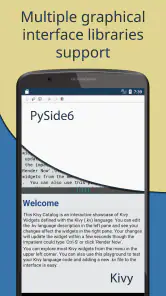
Analysis by Reviewed
I judge a coding app by whether I still reach for it after the novelty of writing code on a phone wears off. Pydroid 3 - IDE for Python 3 has a better chance than most mobile coding tools because it lets me run Python directly on Android, rather than treating the phone as merely a place to read lessons. It is a free education app from Lider Soft KZ, with optional in-app purchases, and its appeal is practical: open a script, try an idea, and see what happens without needing a computer beside me.
A Pocket-Sized Powerhouse
When I first downloaded Pydroid 3, I was skeptical about how well a full-fledged Python IDE would perform on a smartphone. But boy, was I surprised! The app comes packed with features that make coding not only possible but downright enjoyable on a smaller screen. The interface is clean and intuitive, allowing you to focus on what truly matters—your code.
Features That Impress
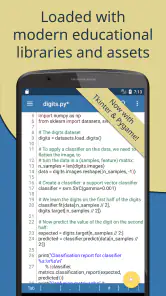
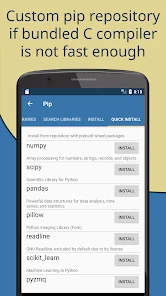
The app supports the latest Python 3 interpreter, which means you’re not missing out on any of the language’s capabilities. It also includes a built-in PIP package manager, making it a breeze to install and manage libraries. This feature is particularly useful for those working with complex Python projects that require numerous dependencies.
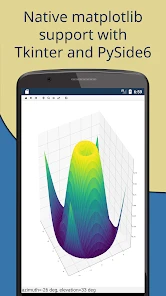
One of the standout features of Pydroid 3 is its offline Python 3.7 interpreter. Yes, you read that right—you can code without an internet connection. This is a lifesaver for those moments when you’re traveling or in areas with spotty Wi-Fi. Plus, the app supports various Python libraries like NumPy, SciPy, and Matplotlib, which are crucial for scientific computing and data analysis.
From First Experiments to a Useful Habit
The offline interpreter changes how I use the app: I can draft a small function during a commute, test it without relying on Wi-Fi, and revisit it later when I have a larger screen. That makes it especially useful for learners who want to experiment between lessons, or for developers who need to check a quick calculation or reproduce a small bug away from their desk. It is less suited to work that depends on a large project setup or sustained typing.
A good way to keep mobile coding manageable is to treat the phone as a scratchpad with runnable code, not as a replacement workstation. I would use short files to test an algorithm, inspect the output, then move the result into my main development environment when the experiment is settled. That workflow avoids turning a small screen into a chore and makes the interpreter useful even after the initial excitement passes.
For a learner, that scratchpad role can make practice easier to fit into ordinary life. I might be following a lesson on loops at home, then use a spare few minutes later to change the input and see how the output shifts. Rather than trying to rebuild the lesson from memory, I can focus on one small question: what happens if I change this condition, or pass an empty list? That kind of experiment is where running code immediately is more helpful than simply reading another explanation.
More From Our News Desk

Clash of Clans Is Won Between the Battles

Android Auto Makes the Case for Quieter Car Software

MobiOffice: Transforming Mobile Productivity with Seamless Integration

EA SPORTS FC™ Mobile Soccer: Redefining Mobile Sports Gaming

How Microsoft OneDrive Became a Mobile Productivity Giant

How Google Translate Breaks Language Barriers Effortlessly
There is also a useful distinction between practicing Python and building an app that other people will rely on. Pydroid 3 can help me check logic and get comfortable with syntax, but a script that grows into a larger project deserves a more deliberate development setup. I would keep notes about what a test is meant to prove, save a clean version before trying a risky change, and transfer successful snippets to a computer rather than letting unrelated experiments accumulate in one place.
Ease of Use
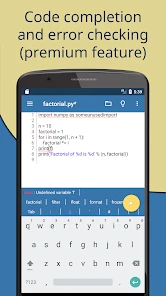
Setting up Pydroid 3 is a walk in the park. The app provides a straightforward installation process, and within minutes, you’re ready to start coding. The on-screen keyboard is well-designed, with convenient access to frequently used symbols and shortcuts, making coding on a mobile device less of a hassle.
Another feature worth mentioning is its support for various coding projects, from simple scripts to more complex applications. The app even allows you to save and execute your projects with ease, thanks to its efficient file management system. It’s like having a mini-computer in your pocket!
For someone deciding whether to install it, the practical question is what they want to do on day one. If the goal is to type a few lines, run them, and learn by changing them, the initial setup is approachable. If the goal is to follow a highly structured course with explanations, quizzes, and a carefully paced curriculum, I would pair Pydroid 3 with a separate learning resource. It is a place to work with Python, rather than a substitute for every kind of teaching.
Small-Screen Workflow and Trade-Offs
For an everyday example, I might use a quiet break to write a short script that cleans a few lines of text or checks the result of a calculation. I can run it immediately, adjust the code, and save the useful version for later. The keyboard shortcuts help with punctuation-heavy Python, but the phone’s display still limits how much code I can inspect at once. A tablet or desktop is more comfortable when I need to compare several files or trace a problem across a bigger project.
The package manager is most useful when I add dependencies deliberately, rather than installing a stack of libraries just because they might come in handy. A small test script makes it easier to tell whether a library is actually needed before I build around it. Libraries such as NumPy and Matplotlib make experimentation with data more plausible on a phone, but package-heavy work can bring extra setup and waiting. For a lesson that only needs basic Python, the built-in interpreter is often the simpler place to start.
Compared with a browser-based coding lesson, Pydroid 3 gives me a more direct way to edit and run my own scripts. Compared with a desktop IDE, it gives up screen space and the comfort of a full keyboard. Those are meaningful differences, not minor inconveniences: someone learning syntax through guided exercises may prefer a teaching-focused app, while someone maintaining a serious codebase will usually be more productive at a computer. I see this as a companion for testing and practice, not a substitute for every tool in a Python workflow.
A small habit that makes the phone workflow less frustrating is to keep each experiment narrow. For example, when I am checking a data transformation, I can use a tiny sample that exposes the edge case instead of trying to inspect a large real-world file on a phone. That makes the result easier to read and avoids confusing a problem in my code with the limitations of working on a small display. It is also a sensible way to decide whether the task belongs in the mobile IDE at all.
People often wonder whether an offline coding app is still useful when a project needs libraries. For basic Python practice, I can work without a connection; when I need to install or update a dependency, internet access may be part of that setup. I would plan ahead before a trip by testing the script and making sure the libraries I need are ready, rather than assuming every new package can be added offline. This is a modest bit of preparation, but it makes the offline strength more dependable.
Room for Improvement?
While Pydroid 3 is impressive, it’s not without its quirks. Occasionally, the app may lag when handling particularly large scripts or numerous libraries. However, this is a minor drawback considering the convenience it offers. Also, being a mobile app, it doesn’t quite replace the experience of coding on a full desktop setup, but it gets pretty darn close.
The biggest recurring source of fatigue is not a complicated feature; it is the physical cost of editing code on a phone. A long line can be awkward to revise, and switching between code, output, and reference material can interrupt concentration. I find that the app is most enjoyable when I set a small target—one function, one bug, or one concept—then stop when the work turns into repeated scrolling and repositioning. That boundary helps keep a useful tool from becoming an irritating one.
Another trade-off is that installing libraries can make a simple session feel more like setup work than learning. I would avoid adding packages before I have a concrete reason, and I would first check whether a short standard-Python version can answer the question. If a project needs several dependencies or repeated package changes, a computer-based environment is usually easier to manage. Pydroid 3 earns its place through quick experiments, not by making every programming task equally comfortable on mobile.
Keeping It Useful Over Time
Its lasting value depends on whether Python already has a place in your routine. If I use it to practice a concept, test a snippet, or work through a small data task every week, the offline interpreter and direct execution give me a reason to keep it installed. If I only want a one-time introduction to programming, the initial appeal may fade once the first few experiments are done. The app works best when I give it a clear job instead of expecting it to become my entire coding setup.
Newcomers can use it to learn by changing a few lines and observing the result, while experienced programmers may appreciate having a quick place to verify an idea. People who need collaborative development, extensive project navigation, or comfortable long sessions should choose a computer-based environment instead. That distinction helps set fair expectations before committing time to a phone-based workflow.
In practical terms, I would recommend it most to a student who already has lessons or exercises and wants somewhere to test them, to a Python learner who benefits from frequent small practice sessions, and to a programmer who occasionally needs a portable scratchpad. I would steer away someone whose priority is a full course experience, team development, or a polished workspace for a large project. The app can support learning and quick checks, but the best choice depends on whether those are the tasks that actually recur in your week.
The longer-term habit I would aim for is simple: keep a few focused scripts that solve real small problems, and revisit them when there is a reason to improve them. A text-cleaning helper, a calculation, or a minimal data experiment gives me a better reason to open the app than an abstract promise to “practice more.” If those tasks keep coming up, the app has recurring value; if they do not, there is no need to force a routine just to justify an install.
Pydroid 3 is free to start, with optional purchases ranging from $0.99 to $29.99 per item. Its Everyone content rating makes it accessible to a broad audience, and its average rating is 4.4 from around 74,000 ratings. With over 10 million installs, it has clearly found a substantial audience, though those figures matter less to me than whether it fits my own habits. I would try the free experience first and only consider paid extras if a specific need comes up.
One practical question is whether I can use it without a connection: yes, its offline interpreter means I can write and run Python when internet access is unavailable. Another is whether it is suitable for learning: I think it is, especially for practicing code directly, though structured lessons may be better for someone who wants instruction step by step. For data work, the named scientific libraries are a useful draw, but I would still move demanding analysis to a computer when screen space or project complexity becomes the bottleneck.
Another point to consider is that some advanced features require a premium upgrade. This might not be ideal for everyone, but for serious developers, the investment is worth the enhanced functionality and support.
I would treat the optional purchase decision as a question of need, not a test of commitment. Start with the kind of script you actually expect to write, then see whether a limitation interrupts that task often enough to matter. If the free experience already handles your practice and quick checks, there is no reason to pay simply because more options exist. If a specific paid feature becomes important to your routine, that is a more grounded reason to consider an upgrade.
Final Thoughts
All in all, Pydroid 3 - IDE for Python 3 is a fantastic tool for anyone who needs to code Python on the go. It’s powerful, versatile, and incredibly user-friendly. Whether you’re a student learning Python or a professional developer, this app has something to offer. While it may not replace your primary coding environment, it’s a solid companion for those times when you need to work away from your desk. So, if you haven’t tried it yet, I’d say give it a shot—you might just find it becomes an essential part of your developer toolkit!
Pydroid 3 - IDE for Python 3 Frequently Asked Questions
Is Pydroid 3 safe and appropriate for younger learners?
Pydroid 3 is an education app for learning and working with Python 3 on Android. Its content rating is Everyone, so it is marked as suitable for a general audience. As with any coding tool, younger users may benefit from guidance when installing libraries or exploring programming concepts, while beginners can use it to experiment with Python directly on a mobile device.
Can Pydroid 3 help me learn Python without a computer?
Yes. Pydroid 3 brings a Python 3 interpreter and IDE to an Android device, so you can practice coding without relying on a desktop computer. You can write and run code in the app and use it as a portable learning environment. It is especially useful for short exercises and experiments, though demanding projects may be more comfortable on a computer.
Can I use Pydroid 3 without an internet connection?
Pydroid 3 is a mobile Python IDE, so you can write and run code on your Android device without treating it like a desktop development setup. Internet access is useful when you want to obtain additional libraries or use online resources, but it is not necessary for every coding session. If offline library installation matters to you, note that it is one of the premium features.
Who develops Pydroid 3, and what is it intended for?
Pydroid 3 is an education app developed by Lider Soft KZ. Its central purpose is to let you learn and work with Python 3 through an interpreter and IDE on an Android device. That makes it useful for practice, experimenting with code, and smaller development tasks when you want a portable environment rather than a computer.
What is Pydroid 3 and how does it work?
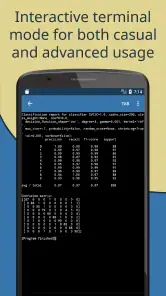
Pydroid 3 is an integrated development environment (IDE) designed specifically for Python 3 on Android devices. It offers a comprehensive platform for writing, running, and debugging Python code directly on your mobile device. With its user-friendly interface, Pydroid 3 supports various libraries and frameworks, making it suitable for both beginners and advanced users who want to code on the go.
Pros
- User-friendly interface for beginners
- Offline Python 3 interpreter available
- Supports numerous Python libraries
- Regular updates with new features
- Integrated PIP for easy package management
Cons
- Limited support for external hardware
- Consumes a lot of device storage
- Occasional performance lags
- Ads in the free version
- No support for Python 2
- Category
- Education
- Version
- Varies with device