Pura
- 1.67K
- 4.4
- Installs
- 100.00K
- Price
- Free

Screenshots
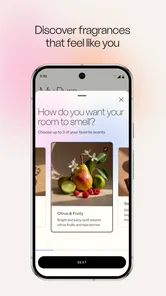
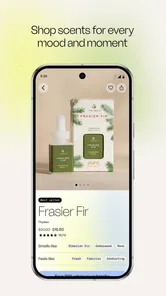
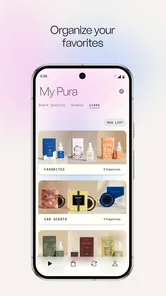


Analysis by Reviewed
I find Pura most useful when I treat scent as part of a room’s routine rather than something to switch on only when guests arrive. A diffuser paired with app controls can make that easier, but the experience depends on the connection between your phone, the diffuser, and your home network. If the connection is unsettled, a schedule or a remote adjustment may not feel as effortless as tapping a button suggests.
When a connection matters
The main convenience is being able to make choices in the app instead of walking over to the diffuser. That’s handy when I’m already in bed and want to adjust the bedroom scent, or when I’m heading home and would like the living area to feel ready. The trade-off is that remote control relies on the device being reachable. I’d set a practical schedule for everyday use, then use on-demand adjustments for exceptions rather than expecting every change to work instantly from anywhere.
A useful habit is to test a schedule while you’re at home before relying on it for a particular occasion. That lets you check that the selected scent and intensity suit the room, and gives you a chance to adjust the timing before it becomes part of your routine. It also reduces the temptation to make several changes at once and then wonder which one produced the result you wanted.
At home, in the car, and between rooms
Pura is a House & Home app from developer Pura, and its appeal is clearest for people who already want app-based fragrance control in their home or car. It is not a general-purpose smart-home controller: I’d choose it for managing compatible fragrance hardware, not as a substitute for broader home automation. If you prefer a basic plug-in scent product with a physical dial, that simpler option may be easier and less dependent on a phone.
For a realistic evening, I might use a gentle setting in the bedroom before winding down, then change the living-room fragrance when friends are coming over. The key is to avoid assuming that one intensity will work equally well in every space. A small room can feel overpowered by a setting that seems subtle in a larger area, so I’d start conservatively and adjust after spending time there. That is more comfortable than trying to correct an overly strong fragrance after the room already smells intense.
What to expect from setup and recovery
The initial Wi-Fi and Bluetooth pairing described in the app experience is a point where patience helps. I’d keep the phone near the diffuser, follow the connection prompts in order, and avoid changing network settings halfway through setup. If control stops responding later, first check that the phone and diffuser have a usable connection, then reopen the app and try a simple adjustment before rebuilding the setup. Repeating the whole pairing process too quickly can create more work than checking the basic connection first.
There is also a small but important planning question: what should happen when you are away or your network is having trouble? I would not build an important scent routine around an assumption that a remote command will always arrive. Schedules are useful for regular patterns, while a manual change is better treated as a convenience rather than a guarantee. For a dinner party or a planned arrival, make the adjustment early enough to confirm the room feels right.
More From Our News Desk

 Gmail
Gmail in a Busy Inbox: Who Benefits Most?
From first account to crowded workday, Gmail earns its place through dependable search and flexible sorting—but its best fit depends on how much inbox maintenance you can tolerate.

 Prime Video
Switching to Prime Video: What Changes in Your Viewing Routine
Prime Video can make a compelling second home for streaming, but switching means learning a different catalog, rental layer, and route from browsing to playback.

 Universal TV Remote Control
 Works Best as a Reliable Backup
A phone remote earns its place through quick setup and reliable habits. Here is how to get more from Universal TV Remote Control—and where its limits show.

 Weather - By Xiaomi
Weather by Xiaomi Review: Clear at a Glance, Less Clear Up Close
Xiaomi’s weather app makes everyday forecasts quick to scan, but its calm surface can leave useful details and recovery paths harder to find than they should be.

 X
X Under Pressure: Can It Recover When Posting Goes Wrong?
A resilience-focused review of X, examining setup, mistaken posts, interruptions, weak connections, and the gaps that matter when recovery needs to be dependable.

 Clash of Clans
 Is Won Between the Battles
Its raids are quick; its community is a long-term project of coordination, teaching, rivalry, and shared responsibility—with all the friction that entails.
Latest News



What is Pura?
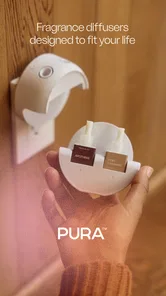
First off, Pura is an app designed to work with the Pura Smart Fragrance Diffuser, which is like having a personal perfumer at your beck and call. Imagine having the power to control the scent of your home from your phone! The app allows you to customize the fragrance experience to align perfectly with your mood and lifestyle. How cool is that?
Setting Up the Scent Magic
Getting started with Pura is a breeze. Once you have your diffuser set up, the app guides you through connecting it to your home’s Wi-Fi. It’s as simple as pairing it with your phone via Bluetooth initially, and then voila! You’re ready to control your home’s scent with just a few taps.
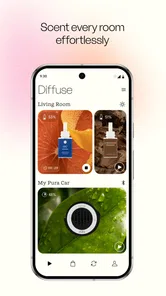
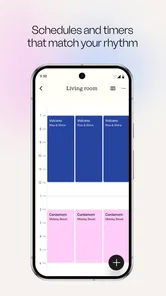
The app interface is super intuitive. You can choose from a library of scents and even set schedules for when each scent should be diffused. It’s like setting a playlist but for your nose! I found myself playing around with different combinations to see how they affected the vibe of each room. Spoiler alert: it’s addictive!
Features That Stand Out
One of the standout features of the Pura app is the ability to adjust the intensity of the fragrance. Whether you want a subtle hint of lavender to help you relax or a bold citrus burst to energize your morning, you can tweak it all to your heart’s content. This kind of personalization is a big win in my book.
Another cool feature is the nightlight option. Yes, the diffuser comes with a customizable nightlight that you can control through the app. Choose from a variety of colors to create the perfect ambiance or turn it off completely if you prefer the dark. It’s these little touches that make the app feel premium and well thought out.
My Personal Take
Honestly, I didn’t think I’d be as into Pura as I ended up being. But here I am, eagerly waiting to try out new scents and see how they transform my living space. The ability to remotely control my diffuser and experiment with different fragrances has made my home feel more inviting and personalized.
If you’re someone who loves having their home smell amazing or just wants to experiment with different scents, I’d say give Pura a shot. It’s user-friendly, offers a ton of customization, and genuinely enhances the atmosphere of any room. Plus, the app is continually updated, so you can expect new features and scents down the road.
In conclusion, Pura is not just an app—it’s a lifestyle enhancer. Whether you’re chilling at home or entertaining guests, this app ensures your space always smells just right. So go ahead, download it, and let your scent journey begin!
Choosing it with realistic expectations
I’d recommend it most to someone who enjoys tuning a home’s atmosphere and is comfortable managing a connected device. The app is free, rated for Everyone, and has a 4.5 average from around 3,000 ratings, with over 100,000 installs. It was released in 2017, and version 3.12.62 is listed for devices running Android 7.0 or later. Those figures suggest an established audience, but they don’t tell you whether the connected routine will suit your home; that comes down to how much you value remote adjustments, scheduling, intensity control, and the diffuser itself.
If fragrance is an occasional extra for you, a simple non-connected alternative may be a better fit: it avoids app setup and network troubleshooting. If you enjoy changing scents by room or by time of day, the app’s controls offer more flexibility than a fixed plug-in or a manually operated diffuser. I’d still keep expectations measured. A phone gives you convenient control, not a guarantee that every room will smell exactly as imagined; room size, placement, and personal sensitivity all affect how a fragrance comes across.
Keeping the routine comfortable and data-conscious
One low-effort way to make the experience more predictable is to change just one variable at a time. Keep the fragrance the same while you adjust intensity, or hold the intensity steady while trying a different scent. That makes it easier to learn what works in a particular room instead of cycling through settings without a clear comparison. I’d also use schedules sparingly at first: a short, familiar routine is easier to evaluate than a complicated plan that runs throughout the day.
Because this is a connected home device, I’d make changes when I have a clear reason rather than repeatedly opening the app to check it. That is a sensible approach for anyone mindful of mobile data and battery, especially while away from home. I would avoid assuming that an app interaction uses no data or that the diffuser can be fully managed without a connection. When connectivity is unavailable, plan around the last routine you have confirmed rather than counting on a fresh remote command.
My connectivity verdict
For me, the strongest case for Pura is the balance of scheduled fragrance and quick personal adjustments, provided the diffuser and phone connection behave reliably in the places I use them. The app’s scent and light controls make it more flexible than a basic fragrance product, while the need to set up and maintain a connected device is genuine friction. Pura is a good match if that flexibility is worth the extra step; if you want scent with no phone, pairing, or network considerations, I’d choose a simpler option instead.
Pura Frequently Asked Questions
Can I use Pura without owning a compatible diffuser?
Pura is designed to work with a Pura fragrance diffuser, which the app connects to so you can manage scent and ambiance from your phone. The app’s controls are most useful when paired with that device. If you are considering downloading it, keep in mind that the fragrance-control features are intended for use with Pura hardware rather than as a standalone scent or home-control app.
What can I control in my home or car with the Pura app?
The app is intended to let you control scent and ambiance in your home and car from your phone. With a connected Pura device, you can adjust fragrance intensity, set schedules, and switch between two scents. This makes it useful for people who want to manage when a fragrance runs and how noticeable it is without changing settings directly on the device.
What is Pura and how does it work?
Pura is a smart home fragrance diffuser designed to provide customizable scent experiences in your home. By connecting the Pura device to your smartphone via the Pura app, you can control the fragrance intensity, set schedules, and even switch between two scents. The app allows for remote access, enabling you to manage your home’s ambiance from anywhere.
Is Pura compatible with both Android and iOS devices?
Yes, Pura is compatible with both Android and iOS devices. The Pura app is available for download on the Google Play Store for Android users and the Apple App Store for iOS users. This ensures that a wide range of users can enjoy the convenience of controlling their home fragrance system through their smartphones.
What type of fragrances can be used with Pura?
Pura offers a diverse range of premium fragrances that are safe and free from harmful chemicals. The scents are crafted to enhance your home environment and are available for purchase directly through the Pura app or website. The fragrance vials are designed exclusively for the Pura diffuser, ensuring optimal performance and safety.
Pros
- User-friendly interface with intuitive navigation.
- High-quality content providing immersive experiences.
- Regular updates with new features and improvements.
- Strong community support and active user engagement.
- Excellent customer service and quick issue resolution.
Cons
- Limited offline functionality for remote areas.
- Occasional bugs affecting app performance.
- Subscription-based model may not suit all users.
- Requires a stable internet connection.
- Some features locked behind a paywall.