Public Storage
- 5.68K
- 3.7
- Installs
- 1.00M
- Price
- Free

Screenshots

Analysis by Reviewed
Keeping track of a storage unit can turn into a string of small chores: remembering a payment date, finding the right account details, and arriving at the gate only to realize the access card is elsewhere. I like that Public Storage brings several of those tasks together on a phone. It is a business app from Public Storage Apps, and its value is most obvious when you already rent space with the company and want fewer errands around managing it.
When convenience matters most
The biggest benefit is not that a phone app changes what storage is; it is that it can reduce the number of small steps between deciding to visit and getting on with the visit. If I am already going across town to collect a box, being able to check an account and use phone-based gate access in the same place is more useful than opening separate tools or searching for a card. That time saving is modest on any one trip, but it can matter if storage is part of a regular routine.
A practical example is a move that unfolds over several weekends. I might make one visit for lamps, another for kitchen items, then return with boxes to put away. The app’s account and payment tools can help keep the rental side of those trips in view, while a separate note or photo album tracks what is inside each box. Keeping those jobs distinct is important: an account app can help manage the unit, but I would not rely on it as a household inventory.
Deciding whether the routine fits
I would set it up before a deadline or a trip, not while standing at a gate with a low battery and a car waiting behind me. Linking the rental account and checking the displayed unit details in advance gives me a chance to resolve an ordinary sign-in or account question at home. It also helps me decide whether the app really replaces a task I currently do, rather than becoming one more icon I only open when something goes wrong.
For renters who share responsibility, I would also agree on a simple division of labor: who checks payments, who keeps the inventory, and who is expected to bring the phone for a visit. The app may centralize account tasks, but a shared household still benefits from one clear source of truth about what is stored and who is handling the next trip. That small bit of planning can prevent a useful tool from creating duplicate reminders or uncertainty.
Where a storage app earns its place
I would not treat this as a general inventory tool or a way to compare storage providers. Its useful role is narrower: helping an existing Public Storage customer handle account and unit-related tasks. If you rent elsewhere, a notes app, calendar reminder, or your facility’s own service is likely a better fit. The app is free, open to everyone by its age rating, and has an average rating of 3.7 from around 42,000 ratings, so I’d approach it as a practical convenience rather than assume every part of the experience will suit every renter.
Getting Started with Ease
The first thing I noticed was how straightforward it was to set up. Right after downloading the app, I was greeted with a friendly interface that didn’t require me to jump through hoops to get started. Signing up was a cinch, and I was able to link my existing storage unit in just a few taps. Talk about convenience!
More From Our News Desk

Clash of Clans Is Won Between the Battles

Android Auto Makes the Case for Quieter Car Software

MobiOffice: Transforming Mobile Productivity with Seamless Integration

EA SPORTS FC™ Mobile Soccer: Redefining Mobile Sports Gaming

How Microsoft OneDrive Became a Mobile Productivity Giant

How Google Translate Breaks Language Barriers Effortlessly
Managing Your Stuff
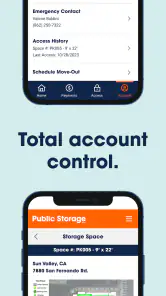
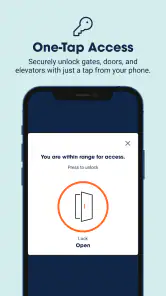
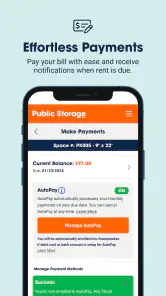
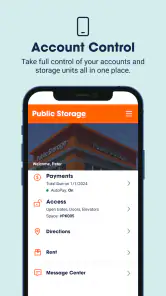
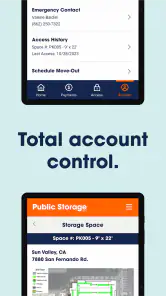
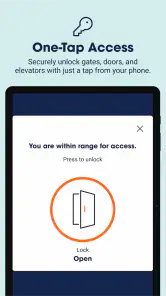
Once inside the app, you have a whole suite of options. The Public Storage app lets you manage multiple units, which is perfect if you're like me and have stuff scattered across town. You can easily check your balance, make payments, and even set up auto-pay so you never miss a due date. Oh, and let’s not forget the nifty feature that lets you open the gate with your phone—no more digging around for that lost keycard!
For a renter with units at different locations, I would use the account view as a quick pre-trip check rather than assume I will remember every detail. Before leaving, I can confirm which unit I intend to visit and whether anything needs attention on the rental side. That is a useful habit when errands are stacked together, because it separates “I need to collect an item” from “I also need to deal with an account task.” The app can support the second; a written list or labeled containers still handles the first.
A smoother visit, with a little planning
The phone-based gate access is most useful when I prepare before leaving: I check that I’m signed into the right account and have my phone ready, rather than sorting it out in the car at the entrance. For a household storing seasonal gear at one facility and furniture at another, keeping multiple units in one place can also make it easier to check which account needs attention. I would still keep a backup plan for access, such as knowing where the facility’s usual entry option is, because relying on a phone means battery and connectivity become part of the visit.
A realistic use is a quick stop after work to pick up winter coats before a cold snap. I can check the account and handle a payment ahead of time, then use phone access at the gate instead of searching through a bag for a card. That saves friction, but it doesn’t replace labeling boxes or keeping a separate list of what is stored where; the app manages the rental relationship, not the contents of the unit.
Small preparations that prevent wasted trips
I would treat phone access as one part of a visit plan, not the whole plan. Before heading out, I can charge my phone, make sure I know which unit I need, and write down the items I am going to retrieve. If I am collecting several things, a short checklist helps me avoid a second trip because I forgot an item in the back of the unit. These habits are especially useful when the app has made the account side quicker: the time saved there is only valuable if I arrive knowing what I came for.
It is also worth thinking through what happens if a companion is the one who reaches the facility first. I would not assume that another person can use my account or phone access without checking the relevant account arrangements. For a shared move, coordinating who will handle entry in advance is simpler than sorting out access at the gate. The app is most convenient when the person using it is also the person prepared to manage the visit.
Security and Peace of Mind
Security is a big deal when it comes to storage, and this app doesn’t skimp. It offers real-time notifications for any changes or activity, which means you can always stay in the loop. Plus, the app keeps all your info secure, so you can rest easy knowing your stuff is safe.
I see notifications as a useful nudge, especially for someone who does not check an account every day. They can bring a change to my attention, but I would still open the account itself before acting on anything important. That is a sensible distinction for any account-based tool: an alert can prompt a check, while the account view is where I should confirm the detail I need to rely on.
What to expect from alerts and account tools
Notifications are helpful as a prompt to check in, but I would not treat an alert as a substitute for verifying an important account detail inside the app. If a payment or access issue matters that day, opening the account directly is the safer habit than relying on a notification alone. Auto-pay can reduce the chance of forgetting a due date, yet it also makes it worth checking the payment method and balance from time to time; convenience works best when you still review the account occasionally.
Auto-pay is most appealing to me when the rental is stable and I have a routine for reviewing the account. It is less of a “set it and forget it” decision than a way to remove one recurring reminder. A calendar prompt can still be useful for a periodic check, particularly if more than one person handles household finances. That pairing keeps the payment process convenient without making me assume that automation means no oversight is needed.
User-Friendly Navigation
Now I’m not the most tech-savvy person, but navigating through this app was a breeze. Everything is laid out cleanly, and the app runs smoothly without any annoying lags or crashes. The developers really seemed to put a lot of thought into making this app as user-friendly as possible.
For someone deciding whether to install it, the key question is how often the account tools will be used. A customer who visits regularly, pays through the phone, or handles several units is more likely to notice the convenience. Someone who stores a few belongings and rarely returns may get nearly the same practical result from a calendar reminder and a short inventory note. I would choose the app based on repeated tasks, not just because a digital option is available.
How it compares with the usual workarounds
Compared with managing storage through a browser, calling the facility, and setting separate calendar reminders, one app can make routine account jobs feel more direct. That advantage matters most if you visit often, have more than one unit, or want phone access at the gate. If you only store a few boxes and visit once or twice a year, a payment reminder and a simple inventory note may be enough; installing another account app may not save you much time. The app is also tied to Public Storage, so it is not a useful hub for rentals with different providers.
Against a general notes or spreadsheet app, the difference is scope. Those tools are better for recording box contents, comparing what is in a unit with what is at home, or keeping a move checklist that spans several companies. Public Storage is more relevant to the rental account and facility visit. I would not try to force one tool to do both jobs: use the storage app for the account relationship and a separate, familiar system for the belongings themselves.
Calling or visiting in person can remain the better choice when a question is unusual, needs a conversation, or cannot be settled through a routine account task. An app reduces friction when the task is straightforward; it does not make every customer-service situation self-explanatory. For a renter who values personal assistance over phone-based management, the usual direct route may feel more dependable even if it takes an extra step.
Who will get the most from it
I’d recommend it to current customers who pay through their phone, manage multiple units, or regularly need gate access. It is less compelling for someone who prefers handling everything in person, does not want to use a phone at the entrance, or mainly needs to catalog belongings. In those cases, a paper inventory, photos, and a calendar reminder can solve the actual problem without adding another digital routine.
I would also pause before making it central to a storage plan if my phone is often unavailable during errands, if I do not want to manage rental tasks digitally, or if my storage is spread across providers. The app’s usefulness depends on being a Public Storage customer and on having a real need for its account and access tools. For a one-time cleanout or a unit that sits untouched for long stretches, a basic reminder and an organized list may be the lower-friction choice.
What I would check before relying on it
Before a time-sensitive visit, I would sign in at home and confirm that the account I need is the one I can access. I would also avoid making the app my only record of important belongings: a separate list with box labels and a few reference photos is easier to use when planning a move or helping someone else retrieve an item. This division of labor is a small but useful trade-off: the app keeps rental tasks close at hand, while an independent inventory remains useful even when I am not managing the account.
On Android, version 2.19.3 requires Android 7.0 or later. The app has been available since December 7, 2020, and has more than one million installs, alongside about 5,700 written reviews. Those figures show that it is an established option, but they do not remove the need to judge it by your own facility visits and account habits. My practical advice is to set up the account before you need to make a rushed trip, check the unit details once, and decide whether the payment and access tools genuinely replace steps you currently take.
In conclusion, if you’re looking for a reliable way to manage your storage units without any hassle, I’d definitely recommend giving the Public Storage app a try. It’s packed with features that make life easier, and it’s designed with the user in mind. So go ahead, download it, and take control of your storage needs!
Public Storage Frequently Asked Questions
Can I use the Public Storage app to manage an existing rental?
Yes. Public Storage is intended to bring storage-related tasks together in one place, which can be useful if you already rent a unit. The app is designed for managing storage rentals and accounts from a mobile device, making it easier to handle relevant tasks while away from a computer. You can also use it to review rental-related information and manage your account.
Can I use Public Storage before I have rented a unit?
The app may also be useful if you are exploring storage options before renting. It is designed to help users manage storage space and rentals, and its rental-related tools can support the process of considering a unit. If you decide to rent, you can continue using the app for storage tasks. The app is focused on Public Storage services rather than general storage comparisons.
What operating system does Public Storage require?
Public Storage is available for Android devices running version 7.0 or later. Before downloading, check your device’s operating-system version to make sure it meets that minimum requirement. The app is designed for mobile use, so a compatible device lets you handle storage-related tasks while on the go. It is listed as version 2.19.3, and the app is free to download.
What is Public Storage, and who is the app for?
Public Storage is a business app designed to help users manage their storage space and rentals. It brings storage-related tasks together in one place, so it may be useful whether you are exploring rental options or already have a unit. The app’s central purpose is to make managing storage more convenient from a mobile device.
What is Public Storage and how does it work?
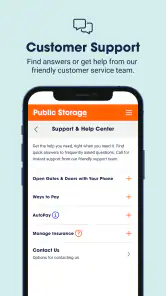
Public Storage is a mobile application designed to help users manage their storage unit rentals. It allows users to search for available storage units, make reservations, pay bills, and access their accounts anytime, anywhere. The app also provides features like unit access information and customer support to streamline the storage experience.
Pros
- Easy online reservation and rental process
- Variety of storage sizes available
- Secure facilities with surveillance
- Flexible access hours for convenience
- Mobile app for easy account management
Cons
- Limited climate-controlled units
- Price increases after initial term
- Some locations lack 24/7 access
- Additional fees for insurance
- Website occasionally slow to load
- Category
- Business
- Version
- 2.19.3











