

PSP Ultimate Database Game Pro
- 51.00
- 3.9
- Installs
- 1.00M
- Price
- Free

Screenshots
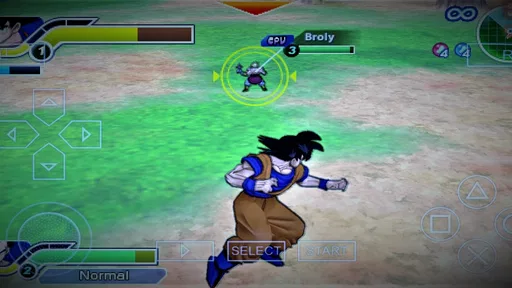

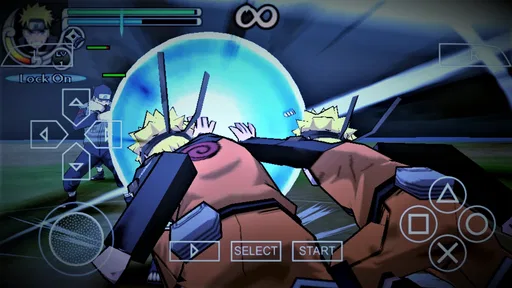



Analysis by Reviewed
PSP Ultimate Database Game Pro is best approached as a nostalgia-focused reference app, not as a promise that a phone can instantly reproduce the whole PSP experience. I’d recommend it to curious fans who want a place to explore the handheld’s game library, while keeping expectations measured: a database can help you discover titles, but browsing a catalog and actually playing a game are different things. That distinction is the key to enjoying this app rather than expecting more from it than its role suggests.
What a catalog can—and cannot—do for a PSP fan
The most useful way to think about a PSP database is as a bridge between a half-remembered game and a more informed decision about what to explore next. It is not the same thing as a console, an emulator, or a collection of games ready to play. I would open it when I want to identify possibilities, then decide separately how I can access a title and whether it is worth my time.
That separation matters particularly if you are browsing on a phone while away from your gaming setup. You can use a spare moment to make a shortlist, but you should not assume that a title shown in a catalog can be launched from the catalog itself. If playing is your only aim, an emulator-focused option is a more direct place to start; if remembering and comparing PSP titles is the goal, a dedicated reference app makes more sense.
A useful starting point for rediscovering PSP games
In the library and demo space, this app’s appeal is the chance to look through PSP games from one mobile destination. I like that kind of focused tool when I’m trying to remember a title or decide what to revisit, rather than jumping between general search results. It can turn a vague thought—“there was a portable RPG I used to love”—into a more directed browsing session. For someone returning to the PSP era, that discovery angle is more useful than treating the app as a game in its own right.
A practical way to use it is to browse with a question in mind: find a familiar series, compare options in a genre you enjoy, or make a shortlist for later. That small change keeps a large catalog from becoming an aimless scroll. If I were checking it during a commute, for example, I’d note a few games I wanted to investigate and look into the details when I had time. It’s a simple workflow, but it makes a database more valuable than casual browsing alone.
The app is free, and TRQ Media is the developer. It has a 3.9 average from around 4,300 ratings, with more than a million installs, which suggests that plenty of people have tried it, though popularity is not a guarantee that every user will find it useful. It is rated Teen and supports Android 5.0 or later. The current version is 1.0.9, and it was released on September 14, 2021.
A Walk Down Memory Lane
When I first installed the PSP Ultimate Database Game Pro, I was instantly hit with a wave of nostalgia. The app is essentially a massive library of PSP games, all neatly organized and easily accessible. Imagine having access to hundreds of titles from various genres, all ready to be played on your Android or iOS device. Whether you’re a fan of RPGs, action games, or even puzzlers, there's something here for everyone.
More From Our News Desk

 Gmail
GmailGmail in a Busy Inbox: Who Benefits Most?
From first account to crowded workday, Gmail earns its place through dependable search and flexible sorting—but its best fit depends on how much inbox maintenance you can tolerate.

 Prime Video
Switching to Prime Video: What Changes in Your Viewing Routine
Prime Video can make a compelling second home for streaming, but switching means learning a different catalog, rental layer, and route from browsing to playback.

 Universal TV Remote Control
Universal TV Remote Control Works Best as a Reliable Backup
A phone remote earns its place through quick setup and reliable habits. Here is how to get more from Universal TV Remote Control—and where its limits show.

 Weather - By Xiaomi
Weather by Xiaomi Review: Clear at a Glance, Less Clear Up Close
Xiaomi’s weather app makes everyday forecasts quick to scan, but its calm surface can leave useful details and recovery paths harder to find than they should be.

 X
XX Under Pressure: Can It Recover When Posting Goes Wrong?
A resilience-focused review of X, examining setup, mistaken posts, interruptions, weak connections, and the gaps that matter when recovery needs to be dependable.

 Clash of Clans
Clash of Clans Is Won Between the Battles
Its raids are quick; its community is a long-term project of coordination, teaching, rivalry, and shared responsibility—with all the friction that entails.
Latest News



Easy Navigation and User-Friendly Interface
One thing that stood out to me right away was how user-friendly the app is. The developers have nailed the interface, making it incredibly easy to navigate through the extensive catalog of games. You can browse through categories, search for specific titles, or even check out what’s trending. It’s like having a well-organized library at your fingertips, without the hassle of dealing with clutter.
That browsing experience is most helpful when you already have some direction. Search is a sensible choice when you remember a title, while categories are better when you know the kind of game you want but not the name. I’d also treat any “trending” area as a discovery prompt, not a definitive ranking: what’s popular may not match your taste or the games that best suit a short session. This is a small but useful distinction when you’re using a catalog to choose what to play next.
Performance That Packs a Punch
Now, let's talk about performance. I was a bit skeptical at first, wondering if my phone could handle the demands of running PSP games. But to my pleasant surprise, the app runs smoothly without a hitch. The graphics are crisp, the sound quality is top-notch, and the controls are intuitive. It’s amazing how well these classic games translate onto modern devices, offering a seamless gaming experience.
For anyone deciding whether this is the right route, I’d separate the database from the usual alternatives. A broad web search may be faster for one quick fact, but it tends to scatter results across pages; a dedicated PSP catalog is more appealing when you want to browse related titles in one place. On the other hand, if your main goal is actually playing old games, a database is not a substitute for a suitable emulator and legally obtained game files. Check what the app itself offers before assuming that finding a title means it can be launched there.
Regular Updates and Community Support
Another aspect that makes this app stand out is the consistent updates from the developers. They are constantly adding new games, fixing bugs, and improving the overall user experience. Plus, there’s a vibrant community of gamers who are always ready to share tips, tricks, and recommendations. It’s like being part of a club where everyone shares the same passion for retro gaming.
There are trade-offs to keep in mind. A large listing is only as useful as the details you need from it, so I would verify a game’s identity and availability before planning a purchase or setting aside time to play. A database also suits people who enjoy browsing more than those who want a polished, guided collection with reviews and personal recommendations built around their tastes. If you prefer a short, curated list, a specialist editorial guide may be a better companion.
Making the catalog useful in everyday life
One practical approach is to use the app as a small research tool rather than a destination for long sessions. Suppose a friend mentions a PSP game you have not thought about in years. I would search for it, note the exact title, then browse nearby categories or related entries to see whether there are other games worth investigating. Later, when I have time, I can check my own collection or look into legitimate ways to access the game. This avoids the common frustration of mistaking discovery for immediate play.
It can also help when choosing a game for a particular mood. Instead of asking only what was popular, I’d narrow the search to a genre I already enjoy and build a short list of candidates. That is more useful than trying to inspect every entry, especially when I have only a few minutes. The trade-off is that the app can point you toward options, but the final decision still depends on your own knowledge of the games and what kind of experience you want.
Who will get the most from it
I’d point PSP fans, people rebuilding a list of childhood favorites, and newcomers curious about the handheld’s library toward this app first. A realistic use is spotting a title during a break, then checking it later against your own device and collection before committing to a play session. It also works as a conversation starter between friends comparing memorable games, because browsing together can surface forgotten names. The best results come from treating it as a discovery aid, not as a replacement for your own judgment about what to play.
I’d skip it if you have no interest in PSP-era games, or if you expect a catalog app to provide a complete gaming setup by itself. It may also be a poor fit if you only want a tiny selection chosen for you; a broad database asks you to do some of the exploring. The Teen rating is worth considering for families, and parents should make their own call about whether the app suits a younger user.
What to check before relying on a listing
If I were using a catalog entry to plan a purchase or a future play session, I would first confirm that I have the right game in mind. Older handheld libraries can include titles with similar names, multiple releases, or familiar series entries that are easy to mix up when relying on memory. The safest workflow is to use the app to identify a candidate, then cross-check the title against your own collection or another trustworthy reference before acting on it.
That extra step is not a knock against a database; it is simply the sensible way to use one. A listing helps narrow the search, but it should not be treated as a guarantee that a game is currently available to you, compatible with your setup, or the version you remember. If you are browsing just for nostalgia, this distinction is less important. If you are spending money or setting up a play session, it can save time and prevent a disappointing mismatch.
A measured recommendation
Compared with a general search engine, the app’s value is its PSP-only focus: it keeps the browsing task centered on one handheld’s library instead of making you sift through unrelated results. Compared with a curated recommendation article, it gives you room to explore rather than steering you toward a short editorial selection. Neither approach is universally better. I would choose this app when I already want to roam through PSP titles, and a focused guide when I want someone else to narrow the field for me.
The same distinction answers the question of whether it is suitable for someone new to the PSP. It can be a useful first stop for learning what kinds of games belong to the library, but it is not a complete introduction to the hardware or a substitute for reviews that explain how a particular game feels to play. Newcomers should use it to collect names and then read more about the titles that catch their attention. Long-time fans can move more quickly because recognition itself is part of the fun.
Where expectations need to stay grounded
The app’s strongest promise is discovery, and I would judge it on that basis. The wording around a game database can easily encourage an assumption that a phone app will also provide playable versions, but those are different jobs. Before installing, ask yourself whether you want to browse a library or play PSP games right away. If it is the latter, prioritize a solution built for gameplay and check its compatibility and legal requirements; this catalog is not the shortcut I would rely on for that.
There is also a personal-preference limit: browsing a large collection can be enjoyable for someone who likes exploring, but tiring for a person who wants a short, handpicked answer. I would keep a simple shortlist instead of trying to remember every promising entry. That turns the app into a practical reference and makes it easier to return to a few games later, without expecting the catalog to make every choice for you.
In conclusion, if you’re a fan of classic PSP games or just someone looking for a solid gaming app, give the PSP Ultimate Database Game Pro a try. It’s a fantastic way to relive the golden days of portable gaming while enjoying the comforts of modern technology. Trust me, once you dive into this app, you’ll find it hard to put down. Happy gaming!
PSP Ultimate Database Game Pro Frequently Asked Questions
What age group is PSP Ultimate Database Game Pro intended for?
PSP Ultimate Database Game Pro has a Teen content rating, so that is worth considering when deciding whether it is suitable for you or someone else who will use the app. Its focus is a database of PSP games, making it a reference app for people interested in exploring information about that library. Check the rating alongside your own preferences before downloading.
What is PSP Ultimate Database Game Pro?
PSP Ultimate Database Game Pro is an extensive gaming application that provides users with a comprehensive database of PlayStation Portable (PSP) games. It offers detailed information, ratings, and reviews for a wide variety of PSP games. This app is designed for gaming enthusiasts who wish to explore and manage their PSP game collection efficiently.
How user-friendly is the interface of PSP Ultimate Database Game Pro?
The interface of PSP Ultimate Database Game Pro is designed with user-friendliness in mind. It features an intuitive layout that allows users to easily navigate through the extensive database of games. The app provides categorization and search functions, making it easy to find specific games or explore new ones based on genre, rating, or popularity.
Does PSP Ultimate Database Game Pro provide updates on new PSP games?
Yes, PSP Ultimate Database Game Pro regularly updates its database to include the latest PSP games. Users can stay informed about new releases and updates through the app. This ensures that gamers have access to the most current information and can keep their collection up-to-date with the latest titles available.
Is there a cost associated with using PSP Ultimate Database Game Pro?
While downloading PSP Ultimate Database Game Pro is free, some features within the app may require in-app purchases or subscriptions. Users can access the basic database for free, but additional features such as ad-free experience, premium reviews, or early access to new game information might come at a cost. It's best to check the app store for detailed pricing.
Pros
- Comprehensive game database.
- User-friendly interface.
- Regular updates with new games.
- Detailed game descriptions.
- Offline access to database.
Cons
- Limited to PSP games only.
- No multiplayer features.
- Ads in free version.
- No custom game recommendations.
- Requires occasional manual updates.










