PSEG
- 789.00
- 3.6
- Installs
- 100.00K
- Price
- Free

Screenshots
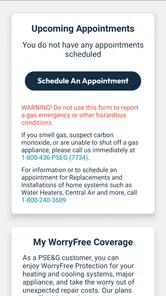
Analysis by Reviewed
Managing a household utility account is rarely something I want to turn into a long desktop task. I usually need a quick answer: whether a payment went through, whether a bill is ready, or whether I am looking at the right account before making a change. PSEG is designed for that kind of on-the-go account management, and after using it, I found its main value comes from putting routine PSE&G tasks in a mobile space rather than making me search through a browser each time.
It is a free business and utility-account app from PSEG, rated for Everyone, with a 3.6 average from around 2,400 ratings and more than 100,000 installs. Those figures suggest a useful but not universally loved tool: plenty of customers rely on it, while the middling score is a fair warning to keep expectations practical. I would describe it as a convenience layer for existing PSE&G customers, not a replacement for every support channel or a complete household-finance system.
Using PSEG when more than one person shares the household
The most convincing use case is a shared home where responsibility for the utility account moves between people. One person may normally handle bills, while another checks the account when traveling, dealing with a service issue, or preparing for a move. Having a dedicated mobile entry point can make those small moments less dependent on one person being at a computer.
A realistic example is a couple leaving for a weekend trip while a bill is due. Instead of waiting until they return, the account holder can open the app, review the available account information, and deal with the payment task from the phone. If another household member asks whether the bill has been handled, the account owner can check directly rather than relying on memory or forwarding an old email. That sounds modest, but it is exactly the kind of friction a utility app should remove.
Shared-device use needs more care. If several people use the same phone or tablet, I would avoid treating the app as a communal dashboard where anyone can casually browse. Utility accounts can expose billing and service details, so the person responsible for the account should remain clear about who is using the signed-in device. The app may be convenient for a household, but convenience does not automatically mean every resident should have unrestricted access.
This is also why I would not install it casually on a child’s phone just because the age rating is Everyone. That rating makes the app broadly suitable from a content perspective; it does not turn a child into an appropriate account manager. A young family member might use the device, but an adult should remain responsible for account decisions, payments, and any information connected with the home.
What the first setup should accomplish
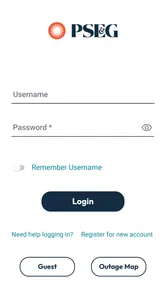
My advice is to begin with one clearly identified account holder and one primary device. That simple boundary prevents a common household problem: several people believing they are looking at the same utility account when one device is signed out, another account is active, or an old session is being used. Before relying on the app during a busy moment, I would verify that the displayed account belongs to the correct PSE&G service relationship.
More From Our News Desk

Weather by Xiaomi Review: Clear at a Glance, Less Clear Up Close

X Under Pressure: Can It Recover When Posting Goes Wrong?

Clash of Clans Is Won Between the Battles

Android Auto Makes the Case for Quieter Car Software

MobiOffice: Transforming Mobile Productivity with Seamless Integration

EA SPORTS FC™ Mobile Soccer: Redefining Mobile Sports Gaming
That check matters especially for people who have moved, manage more than one property, or help a relative with bills. A mobile app feels immediate, but account context still matters. I would not assume that opening the app means every property or responsibility is represented in the same way. If your household has complicated ownership or multiple service arrangements, take a moment to identify what you are actually managing before acting.
The app runs on a minimum OS of 10, so compatibility is an early practical question for older phones. On a supported device, I would install it before an urgent billing situation rather than waiting until a deadline. The current version is 66497, and keeping the app current is sensible for a service tool because sign-in and account access are more useful when the app is maintained rather than left untouched for months.
I also recommend deciding in advance who should perform sensitive actions. One person can be the account owner, while another household member can remind them to check a bill or confirm that a task was completed. That division is safer than passing a phone around and hoping everyone understands which screen they are viewing. The strongest household workflow is shared awareness, not shared credentials.
Coordinating bills without turning the app into a family control system
PSEG works best as a coordination point for adults who already know their responsibilities. I found it more useful for checking the state of an account and taking a routine action than for organizing an entire family’s finances. It should sit alongside a household calendar, a budgeting method, or a simple reminder system rather than replace those tools.
For example, a household can agree that one adult checks the account around the normal billing routine, while the other keeps an eye on the bank balance or shared budget. The app handles the PSE&G side of that arrangement; it does not need to become the place where every family note, deadline, and financial decision lives. Keeping those roles separate makes it easier to see whether a problem belongs to the utility account or to the household’s own planning.
There is a useful distinction between checking and authorizing. A roommate may need to know whether the account has been reviewed, but that does not mean they should make changes on the account holder’s behalf. If you share a home with roommates, I would agree on a clear process before using the app: who checks, who pays, and who contacts PSE&G when something looks wrong. This avoids the awkward situation where two people assume the other has completed the important step.
The app is also a better fit for quick coordination than for detailed record keeping. If you need a long history of household spending, comparisons across many bills, or a combined view of electricity with rent and other expenses, a budgeting app or spreadsheet will usually be more suitable. PSEG can support the utility portion of the process, but it is not the right place to create a complete financial picture of a shared home.
Where the mobile approach helps, and where it adds friction
The clear advantage over using a normal browser is convenience. A dedicated app gives the task a permanent place on the phone, which is helpful when I am away from my desk or trying to handle an account question between other errands. For a customer who checks PSE&G information regularly, that can feel more direct than opening a browser, finding the correct page, and starting again from scratch.
That advantage is not absolute. A browser can be preferable on a larger screen, particularly when I am comparing information, helping an older relative, or trying to understand a complicated account situation. A desktop also makes it easier to keep notes open beside the account. In those cases, the app’s portability is less important than visibility and careful review.
I would also avoid assuming that a mobile interface removes every support problem. If the issue is a confusing charge, an account detail that does not match your records, or a service matter requiring explanation, a quick app session may not be enough. The app can be the first place I look, but I would not let its convenience discourage me from using the appropriate PSE&G support route when the situation needs a human answer.
The 3.6 average is consistent with that balanced view. It is not a reason to dismiss the app, but it does tell me that a smooth experience should not be treated as guaranteed for every customer or every device. Login trouble, account-specific complications, or a task that is easier on the full website can quickly reduce the benefit of having an app. I would install it for convenience, while keeping the browser or another official contact method available as a fallback.
Age, trust, and sensible account boundaries
Because the content rating is Everyone, families do not need to think of PSEG as an entertainment app with mature material. The more important question is responsibility. Utility accounts involve real household obligations, and the person using the app should understand that viewing information and taking action are not the same thing.
For teenagers, I see a reasonable educational use: an adult could show them how a household utility account is organized, explain why bills matter, and let them observe the process. I would still keep final control with the adult who owns or manages the account. That approach teaches practical independence without handing over decisions that could affect the household.
For older relatives, the app may be helpful if they are comfortable with smartphones, but setup should be calm rather than rushed. I would help confirm the correct account and explain what each person is expected to do. A larger-screen browser may be better for someone who finds compact mobile layouts difficult, so the app should be offered as an option rather than imposed as the only method.
Trust matters just as much among adults. A spouse, roommate, or caregiver may need access for legitimate reasons, but the account holder should know who can use the signed-in device. On a shared phone, I would be especially careful about leaving an account open. When the device changes hands often, a dedicated account tool deserves the same caution as a banking or insurance app, even if its main purpose is household utility management.
That boundary also helps when a family member moves out. The person who leaves should not remain the informal account manager simply because they used to handle bills. Reassigning responsibilities clearly is less confusing than allowing old habits to continue through a shared device. PSEG can support the account-management part, but the household still has to decide who is authorized and accountable.
Who should choose PSEG over the usual alternatives?
I would recommend it first to an existing PSE&G customer who wants a straightforward mobile way to reach their account. It makes the most sense for people who check from a phone, travel frequently, divide bill responsibilities with another adult, or dislike repeating the same browser steps. The fact that it is free removes the main financial barrier to trying it, and the Everyone rating makes it broadly approachable for household use.
I would be more cautious if you rarely use a smartphone, prefer printed records, or normally need a wide desktop view. In those cases, the regular website or direct customer support may be more comfortable. Someone managing several properties or complicated account arrangements should also test whether the mobile workflow matches their needs before making it the only method they use.
Compared with a budgeting app, PSEG is more focused: it belongs to the utility-account side of the household routine rather than the broader money-management side. Compared with email reminders, it offers a place to actively check the account instead of relying on a message to tell you what happened. Compared with a browser, it is quicker to reach on a phone but less convenient when a larger workspace is needed.
That trade-off is important. I would not choose it because I expect it to coordinate every person in a household or replace all account records. I would choose it because a dedicated mobile route can make one specific responsibility easier. The narrower the job, the more convincing the app becomes.
My household verdict after using it
PSEG is a practical companion for PSE&G account management, especially when the person responsible for the bill is away from a computer. Its value is not in flashy extras; it is in reducing the distance between a household question and the account that can answer it. I like it most as a focused tool used by a clearly designated adult, with other household members coordinating around it rather than treating it as a shared family command center.
The limitations are equally clear. A phone interface cannot always match the clarity of a desktop browser, and a utility app is not a replacement for support when an account issue needs explanation. Shared-device use also requires care, because the Everyone age rating does not remove the need for sensible privacy and authorization boundaries. Those are not reasons to avoid the app, but they are reasons to use it deliberately.
PSEG was released on November 22, 2019, and its continued presence, along with around 789 written reviews, shows that it occupies a familiar role for customers who want account access away from a computer. My recommendation is simple: install it if you manage a PSE&G account and value quick mobile checks, but keep your household roles clear and retain another access route for complicated situations. For routine utility coordination, it is worth trying; for full household financial management, it is only one carefully defined piece of the process.
PSEG Frequently Asked Questions
Is PSEG free to download, and which devices can run it?
PSEG is a free business app for managing a PSE&G account on the go. Before downloading, check that your device runs at least operating system version 10, since older systems may not be compatible. The app is intended for mobile use, so make sure you are getting it from the official app store for your device and that the developer is PSEG.
Who is the PSEG app intended for?
PSEG is primarily for people who have a PSE&G utility account and want to handle account-related tasks from a phone. Its usefulness depends on whether you are a customer and whether the services tied to your account are supported. If you are considering the app for someone else, they will generally need their own account credentials to access personal billing and service information.
What is PSEG, and what can I use the app for?
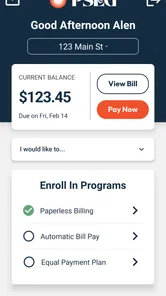
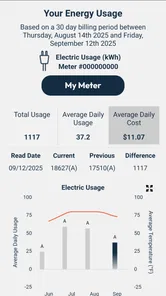
PSEG is the official mobile app for customers who use PSEG utility services. After signing in, users can typically review account information, check bills, make payments, monitor energy usage, manage service details, and receive important notifications. The exact tools available may vary depending on your PSEG service area, account type, and whether you receive electric, gas, or another supported utility service.
Do I need a PSEG account to use the application?
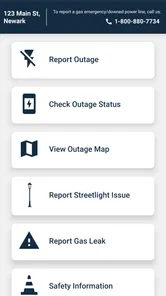
Many of the app’s main features require an active PSEG online account, especially bill viewing, payments, usage information, and account management. New users can generally register with their customer and account details, while existing customers can sign in using their online credentials. Some public information, such as outage updates or safety notices, may be accessible without logging in.
Can I pay my PSEG bill through the app?
Yes, the PSEG app is designed to make bill payments more convenient. Depending on your account and location, you may be able to pay using a bank account, debit card, or credit card, and sometimes enroll in recurring or automatic payments. Before confirming a transaction, carefully review the payment amount, processing date, and any applicable service fees shown in the app.
Pros
- Quickly view account balances
- bills
- and payment due dates.
- Supports convenient bill payments directly from a mobile device.
- Outage reporting and status updates help track service interruptions.
- Usage information can help customers monitor electricity consumption.
- Paperless billing and account alerts reduce reliance on mailed notices.
Cons
- Features are mainly useful to existing PSEG customers.
- Some services may vary depending on your PSEG service territory.
- Account registration requires personal and utility account information.
- Outage updates may not appear immediately during major incidents.
- The app may offer limited value if you rarely manage your utility account.











