Protect Me
- 830.00
- 4.7
- Installs
- 1.00M
- Price
- Free

Screenshots
Analysis by Reviewed
I would be careful about treating any security app as a substitute for sensible phone habits. Protect Me is a free personalization app from Meow Enterprises, and its straightforward pitch is help with phone security. That makes it worth considering if you want a dedicated place to check your device, but I’d first ask what kind of protection you actually need and whether the app’s tools fit that need.
What free access means here
There is no purchase price to weigh against a paid alternative: you can try the app for free. That is useful if you want to see whether a security helper suits your routine before spending money elsewhere. Free access alone, though, does not tell me how every feature works or whether there are optional charges, so I wouldn’t make a buying decision based on assumptions about those details.
The app is rated for Everyone and requires Android 6.0 or later. Its current version is 90036. I’d check that your phone meets the OS requirement before trying it, especially if you use an older device, and keep your expectations grounded: a security tool is only valuable when its functions match the risks you want to manage.
First Impressions Matter
Downloading and setting up Protect Me was a breeze. The app's interface is clean and intuitive, which immediately sets a positive tone. I mean, who doesn’t appreciate an app that doesn’t require a manual to navigate, right?
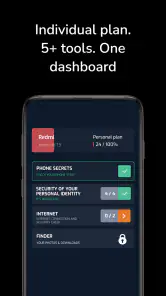
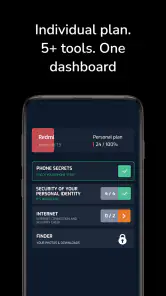
Once inside, you’re greeted with a dashboard that offers a clear overview of your device’s security status. It’s like having a health check-up, but for your phone. You can easily see what’s protected and what needs attention. This holistic approach is something I didn’t realize I needed until now.
What a dashboard can change in practice
A dashboard is most valuable when it turns a vague worry into one clear task. If I open a security helper because I have just installed an unfamiliar app, I want to understand what needs attention before I start changing settings. I would treat the overview as a starting point, then consider each recommendation in the context of how I use the phone.
That distinction matters because “secure” is not a single setting. A phone used for work, banking, family photos, and casual browsing has several different concerns, and a status panel cannot replace judgment about each one. I would use it to direct my attention, not to assume that a reassuring screen means every risk has disappeared.
More From Our News Desk

Clash of Clans Is Won Between the Battles

Android Auto Makes the Case for Quieter Car Software

MobiOffice: Transforming Mobile Productivity with Seamless Integration

EA SPORTS FC™ Mobile Soccer: Redefining Mobile Sports Gaming

How Microsoft OneDrive Became a Mobile Productivity Giant

How Google Translate Breaks Language Barriers Effortlessly
For a less technical user, a clear central screen may be easier to return to than a collection of scattered system menus. For someone who already knows where the Android privacy and security controls are, the benefit is less about discovering those controls and more about having a reason to revisit them. That makes the app’s usefulness depend as much on your habits as on its presentation.
Features that Standout
The app boasts a plethora of features, but there are a few that caught my attention. First up, the real-time threat detection. This feature continually scans for malware and suspicious activity. It’s like having a personal bodyguard for my phone, always on alert.
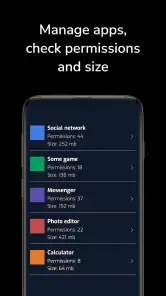
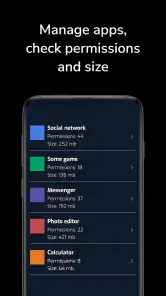
Then there’s the privacy advisor. In today’s world, we download apps without thinking twice about permissions. This feature highlights any apps that might be overreaching. It’s like having a friend who’s always looking out for you, ensuring no app is snooping around where it shouldn’t.
Another nifty feature is the secure browsing option. It ensures that your online activities remain private, blocking malicious websites. In a world where our online footprint is constantly scrutinized, this feature offers some much-needed peace of mind.
Using it as part of a routine
These tools are most helpful when they lead to a small, practical next step. If a privacy check flags an app you rarely use, I’d review whether it still needs its permissions rather than tapping through every warning automatically. Likewise, a scan reminder is more useful when I can pause and look at the result than when I treat the notification itself as proof that the phone is safe.
A realistic moment for this kind of helper is before a trip: I might review unfamiliar apps, check the device’s security status, and be more deliberate before opening links while using public networks. Protect Me can serve as a prompt for that check-in, but I would still avoid entering sensitive information on pages I don’t trust. A browser warning is a useful signal, not a reason to stop paying attention.
Compared with relying only on a phone’s built-in security and privacy settings, a dedicated helper can make checks feel more visible and organized. The trade-off is adding another app to manage. If you already review permissions and use your device’s built-in protections consistently, a separate tool may not change much; if you tend to forget those checks, a central dashboard and reminders may be more useful.
Making alerts useful instead of noisy
One useful way to approach security alerts is to separate urgency from convenience. A notification can bring me back to a check, but it does not tell me whether a suggested action is appropriate for the way I use the device. I would read the explanation, identify the app or activity involved, and make one change at a time. That makes it easier to notice if a change affects something I rely on.
This is especially sensible with permissions. A permission that looks unnecessary at first may be tied to a feature I use, while an app I have not opened in months may no longer need access at all. Rather than revoke everything in one sweep, I’d start with apps I recognize and no longer use, then revisit the ones that support everyday tasks. The benefit is a cleaner review without turning security maintenance into guesswork.
It also helps to think of scanning and browsing protection as different kinds of checks. A scan addresses concerns about the device or installed apps; a browsing warning is relevant when I encounter a risky page. Neither one makes links automatically trustworthy or removes the need to check the address and context. Keeping those roles distinct prevents a security helper from creating more confidence than the situation deserves.
User Experience and Performance
Using Protect Me on a daily basis feels seamless. The app runs quietly in the background, without draining my battery or slowing down my device. This is crucial because, let’s be real, nothing is more annoying than an app that hogs resources.
Moreover, the app sends gentle reminders for regular scans, ensuring that your device remains in tip-top shape. It’s like having a friendly nudge to remind you to stay safe.
One practical tip is to use those reminders as a reason to review the phone, not as a routine you follow blindly. If a result is unclear, I would investigate before changing settings or removing an app. Security notices can be useful, but the best outcome is a more informed choice, not simply fewer alerts.
Where it fits among other security options
The usual alternatives are the protections already built into Android, a standalone security product chosen for a specific need, or simply handling checks manually. Protect Me’s appeal is the helper-style approach: it brings attention to device status and privacy checks in a more approachable place. That can be a good middle ground for someone who wants prompts without building a detailed security routine from scratch.
It is not automatically a better choice than the built-in options. If you are comfortable navigating Android settings and already check permissions, adding another layer may create duplicate alerts or another dashboard to maintain. On the other hand, if you seldom remember to review app access, a dedicated reminder can be more practical than relying on good intentions. I would compare the experience by asking which setup you will actually keep using, rather than which one sounds more comprehensive.
A specialized tool may be preferable if your main concern is a precise feature or a particular kind of protection. In that case, look for clear descriptions of how that feature works and whether it matches your device and habits. A broad security-helper pitch is not enough reason to assume that it covers every threat. Protect Me makes more sense as a prompt for everyday checks than as a promise that no further security decisions are needed.
Who is likely to get value?
I’d point this app toward someone who wants security checks presented in an approachable way and appreciates reminders to revisit them. Its 4.7 average rating, based on around 36,000 ratings, suggests many users have responded positively, while more than one million installs show that it has reached a sizable audience. Those figures can help with context, but they don’t guarantee that it will suit every phone or personal security routine.
I’d skip it if you expect a security app to eliminate online risk, or if you prefer to keep your setup limited to built-in tools you already understand. It may also be a poor fit if your priority is a particular protection feature that you cannot confirm from the app itself. In that case, compare tools based on the specific job you need done instead of choosing by a reassuring name or a high rating.
Meow Enterprises is the developer, and the app was released on September 26, 2023. The listing has 830 reviews, which gives prospective users additional feedback to browse. I’d look for comments that describe a use case close to mine, rather than assuming every review reflects the same device, habits, or expectations.
Everyday situations where I would use it
Imagine a family member has installed several apps while setting up a new phone and is unsure which ones deserve access to location, photos, or other information. I would use a privacy review as a conversation starter: identify apps they recognize, ask what each one is used for, and then decide whether the access still makes sense. The practical win is not a perfect phone overnight; it is helping someone make informed choices instead of accepting every prompt by habit.
Another useful moment is after downloading an app for a one-off task, such as checking a delivery or editing a document. Once that task is finished, I would review whether the app is still needed and whether its permissions remain appropriate. This is a small maintenance habit that a reminder can support, especially for people who tend to accumulate apps and forget why they installed them.
For someone who travels, the app can be part of a pre-departure check rather than an emergency solution. I would review the device before leaving, avoid installing unfamiliar tools in a hurry, and stay cautious with links received while away. That workflow gives a security helper a clear role without expecting it to make public networks or unknown websites risk-free.
Questions worth settling before relying on it
If you are wondering whether it costs anything to begin, the answer is that the app is free to try. I would still assess the experience directly rather than infer that every possible option is included or that no optional charges exist. The sensible value test is whether the functions you can use meet your needs, not whether “free” alone sounds like a complete security plan.
If you are asking whether it works on an older Android phone, the key practical check is the minimum requirement: Android 6.0 or later. A device below that threshold is not a fit. If your phone meets it, I would still check that the app behaves well in your own routine before depending on it, since a compatible operating system does not guarantee the same experience for every device.
If you want to know whether it can replace built-in phone protection, I would not treat it that way. A helper can make checks easier to notice, but keeping Android updated, reviewing app permissions, and using care with links remain worthwhile habits. If your question is whether it is right for a highly specific threat, compare the exact protection you need before choosing it; a general overview and a specialized solution do not necessarily serve the same purpose.
Final Thoughts
In a nutshell, Protect Me delivers on its promises. It’s user-friendly, efficient, and offers comprehensive protection. If you’re looking for a security app that doesn’t just talk the talk but walks the walk, then this might just be your perfect match.
So, if you’re on the fence about getting a security app, give Protect Me a shot. After all, in this digital age, staying protected is not just an option; it’s a necessity.
Protect Me Frequently Asked Questions
Is Protect Me available for free, and what should I expect before installing it?
Protect Me is free to download, which makes it easy to try without paying upfront. It is a personalization app with a security-helper focus, so consider whether that purpose matches what you want from an app before installing. Its Everyone content rating indicates broad age suitability. As with any app, review the permissions requested during setup and decide whether you are comfortable granting them.
What Android version do I need to use Protect Me?
Protect Me requires Android 6.0 or later. Check your phone’s system version before downloading so you can avoid compatibility problems. The app is free and has an Everyone content rating, making it broadly suitable for users across age groups. If your device meets the operating-system requirement, you can then decide whether its security-helper purpose fits the way you use your phone.
Who develops Protect Me, and what kind of app is it?
Protect Me is a personalization app developed by Meow Enterprises. Its store summary describes it as a security advanced helper app, so it is presented as a tool for users interested in personalizing and managing their mobile experience. It is free to download, and its Everyone content rating makes it broadly suitable for users across age groups.
What is Protect Me and how does it work?
Protect Me is a comprehensive mobile security application designed to safeguard your personal data and enhance privacy on your smartphone. It functions by providing real-time threat detection, blocking malicious websites, and securing your internet connection through a VPN. Additionally, it offers anti-theft features and parental controls to help manage and protect your device effectively.
Will Protect Me work on my Android device?
Protect Me supports Android devices running version 6.0 or later, so checking your phone’s system version before downloading is a useful first step. The app is free, and its Everyone content rating indicates broad age suitability. If your device meets the operating-system requirement, you can consider whether its security-focused purpose fits the way you use your phone.
Pros
- User-friendly interface enhances accessibility.
- Comprehensive protection features included.
- Regular updates ensure latest security patches.
- Minimal impact on device performance.
- Offers real-time threat detection.
Cons
- Some features require a premium subscription.
- Initial setup may be time-consuming.
- Limited customer support options.
- Occasional false-positive alerts.
- Advanced features can be overwhelming for beginners.
- Category
- Personalization
- Version
- 90036











