

Pronto - San Diego
- 1.74K
- 4.5
- Installs
- 500.00K
- Price
- Free

Screenshots
Analysis by Reviewed
When I use public transport in San Diego, the annoying part is often not the ride itself but sorting out the fare before boarding. Pronto is built for that specific problem: it is a free Travel & Local app from San Diego MTS for buying MTS and NCTD fares. I found its purpose refreshingly narrow. It is not trying to replace a general map app, a city guide, or a full trip-planning service. It focuses on getting a transit fare ready with less friction.
That focus makes it useful for regular riders, occasional visitors, and anyone who moves between services covered by San Diego MTS and NCTD. It also means I would not treat it as a universal travel companion. If I mainly need walking directions, restaurant suggestions, or broad journey planning, I would still use another tool alongside it. As a fare app, though, it has a clear job and a practical reason to exist.
What using Pronto feels like in everyday travel
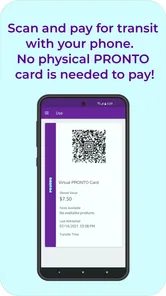
The most realistic way to judge this app is to imagine a normal weekday. I am leaving home, heading toward a transit stop, and do not want to stand at a machine trying to work out which fare applies. With Pronto, the useful workflow is to prepare before I reach the platform, keep the fare option available on my phone, and avoid turning the boarding moment into a payment task.
That small change matters most when I am in a hurry or carrying a bag. It also helps when I am unfamiliar with the area and do not want to make a decision in front of a line of passengers. I would still check that my phone has enough battery and that the fare is ready before I board. A mobile ticket is convenient, but convenience depends on having access to the device at the exact moment I need it.
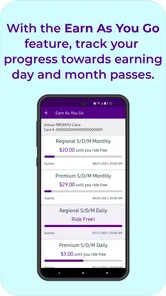
The app’s store summary says it makes buying MTS and NCTD fares easy and aims to apply the best fare. I read that as the central promise rather than a reason to expect every transit task inside one screen. In practice, the value is less about visual polish and more about reducing uncertainty around payment and fare selection.
For a visitor, that can be more helpful than using a general payment method with no transit-specific context. For a daily rider, the benefit is repetition: once the routine is familiar, opening the same app before a trip can feel simpler than handling each journey from scratch. The trade-off is that I need to remember the app and keep my account or payment setup usable.
A useful fit for MTS and NCTD riders
Pronto is especially relevant when a journey involves the San Diego MTS or NCTD network. That is the audience I would recommend it to first. The developer is San Diego MTS, so the app feels tied to the local transit experience rather than being a generic wallet that happens to support transportation.
More From Our News Desk

 Weather - By Xiaomi
Weather by Xiaomi Review: Clear at a Glance, Less Clear Up Close
Xiaomi’s weather app makes everyday forecasts quick to scan, but its calm surface can leave useful details and recovery paths harder to find than they should be.

 X
XX Under Pressure: Can It Recover When Posting Goes Wrong?
A resilience-focused review of X, examining setup, mistaken posts, interruptions, weak connections, and the gaps that matter when recovery needs to be dependable.

 Clash of Clans
Clash of Clans Is Won Between the Battles
Its raids are quick; its community is a long-term project of coordination, teaching, rivalry, and shared responsibility—with all the friction that entails.

 Android Auto
Android Auto Makes the Case for Quieter Car Software
The car interface is no longer judged by how much it can do, but by how quietly it helps. Android Auto shows what drivers now expect—and what still gets in the way.

 MobiOffice: Word, Sheets, PDF
MobiOffice: Transforming Mobile Productivity with Seamless Integration
MobiOffice: Word, Sheets, PDF is redefining mobile productivity with a surprising blend of functionality and innovation.

 EA SPORTS FC Soccer Mobile 26
EA SPORTS FC™ Mobile Soccer: Redefining Mobile Sports Gaming
Dive into EA SPORTS FC™ Mobile Soccer, where immersive gameplay and strategic depth transform mobile sports gaming.
Latest News



Its current version is 4.134.0, and it supports devices running Android 8.0 or later. That makes checking compatibility worthwhile before relying on it for an important trip. Someone using an older phone may need another way to pay or obtain a fare, and that is not a problem I would want to discover at the station.
The app is free and carries an Everyone content rating. Those details make it approachable for families and occasional riders, but they do not remove the practical responsibilities of mobile ticketing. I would still set it up while connected to a reliable network, review the selected fare carefully, and avoid waiting until the vehicle is arriving.
Trust starts with a narrow, understandable purpose
My first trust signal here is not a slogan; it is the limited scope. I can understand why a transit authority would provide a dedicated fare app, and I can also understand what I am asking it to do. That is easier to evaluate than an app that mixes tickets with unrelated services, promotions, social functions, and broad location features.
That does not mean I would assume anything about privacy or security simply because the app is official-looking. I would judge those areas through the permissions, account screens, payment prompts, and privacy choices visible during setup and use. The important distinction is between what the app clearly asks me to do and what I merely imagine it might do.
In my view, a trustworthy setup should make the purpose of an account understandable, show when payment information is being requested, and avoid making an optional choice look mandatory. I would also pay attention to whether the app lets me review or change account details without forcing me through an unclear support process. Those are the moments that shape confidence more than a high-level description.
Permissions and data-sensitive moments
Fare apps naturally create sensitive moments. Adding a payment method, signing in, recovering access, and presenting a fare all deserve more attention than simply browsing a route. I would slow down at those screens, read the labels, and check that the transaction or fare selection matches my intention before confirming.
I would not grant a permission automatically just because the app requests it. If a permission appears, I would ask whether it is needed for the task I am trying to complete. If I only want to buy a fare, I would be cautious about allowing unrelated access. The app should earn that permission through a clear explanation, and I would use the operating system controls to review or withdraw access later when appropriate.
This is also where Pronto should be compared with the usual alternatives. A ticket machine keeps the transaction away from the phone, which some riders may prefer for privacy or battery reasons. A general mobile wallet can feel familiar, but it may not provide the same transit-specific fare context. Pronto sits between those options: more convenient than a machine for many people, but more dependent on an account, device, connectivity, and visible app controls than a physical purchase.
I would be particularly careful when using the app on a shared phone. A stored session, saved payment choice, or visible travel information can become a privacy concern if another person can unlock the device. My practical habit would be to review the account state after a shared-device situation and use the phone’s own security features rather than assuming the app will solve every exposure.
Account control matters more than the first purchase
The first fare purchase is usually straightforward to understand. The harder questions appear later: Can I recognize which account I am using? Can I update my details? Can I tell whether a fare is active? Can I recover access if I change phones? These are the controls I would inspect before making Pronto my only way to travel.
I also prefer to make account changes deliberately rather than tapping through prompts quickly. If the app offers a choice involving notifications, saved payment details, or other optional settings, I would read the wording and choose only what helps my travel routine. Good user agency means I can say no without losing access to the core fare function.
Another useful habit is separating transit planning from payment approval. I might use a map or timetable tool to understand the journey, then use Pronto specifically for the fare. That division gives me a clearer mental check: one app helps me decide where to go, while Pronto handles the MTS or NCTD purchase. It reduces the chance of confusing a route suggestion with a confirmed ticket.
If I were helping a less technical family member, I would set the app up before the travel day, explain where the active fare appears, and show them how to return to that screen. I would not assume that installing the app is enough. The useful preparation is making sure the person can recognize the correct account and fare without needing help while boarding.
Where the app can create friction
The main weakness of a mobile fare system is dependence on the phone. A dead battery, a damaged screen, a lost connection, or an account problem can turn a simple boarding process into a stressful one. I would keep a backup plan in mind, especially for a long day, an unfamiliar route, or a trip where arriving on time matters.
There is also a learning curve for occasional riders. A dedicated transit app may be clearer once configured, but a person who rides only once may find a machine or staffed sales point more immediate. If I am traveling with several people, I would think about whether managing each fare through one phone is convenient or whether another purchase method would be less awkward.
The promise of getting the best fare is attractive, but I would still review what I am buying. Fare rules can depend on the journey, the network, and the rider’s circumstances. I would not treat an automated recommendation as permission to stop checking the selected product. A quick confirmation before payment is a small step that can prevent a larger mistake.
Another limitation is scope. Pronto is not the app I would choose as my only source for every travel question. I would use a separate navigation tool when I need detailed walking directions, broader regional planning, or information unrelated to MTS and NCTD fares. That is not a failure; it is simply the boundary of a focused product.
How it compares with machines, wallets, and general travel apps
Compared with a station machine, Pronto wins on preparation. I can handle the fare before reaching the stop instead of waiting beside the machine. The machine wins when my phone is unavailable, when I do not want to create or use an account, or when I prefer a physical interaction that leaves the transaction outside my handset.
Compared with a general mobile wallet, Pronto has a more specific transit role. A wallet may be quicker for someone who already has a preferred payment routine, while Pronto is more useful when I want fare information and transit purchasing in the same local context. I would choose based on whether I value familiarity or dedicated MTS and NCTD guidance.
Compared with a general travel app, the difference is even clearer. A map app can help me compare walking, driving, and public transport, but it may not be the best place to complete a local transit fare purchase. I see Pronto as the transaction layer in a wider travel workflow, not necessarily the tool that plans the entire journey.
That division also improves trust. I know why I am opening the app, what kind of information I expect to enter, and what result I need before boarding. The fewer unrelated tasks I combine with payment, the easier it is to notice an unexpected prompt or an incorrect selection.
Who should install it and who should be cautious
I would recommend Pronto to regular San Diego transit riders, visitors using MTS or NCTD, and people who prefer preparing fares on a phone. It is also a sensible option for someone who wants a local transit authority’s dedicated purchasing route rather than piecing together information from several unrelated services.
I would be more cautious about recommending it as the sole option to riders with unreliable phones, limited battery access, older unsupported devices, or discomfort with mobile accounts and digital payments. For those users, a machine or another official purchase method may be less stressful. The best choice is the one that remains usable when the journey does not go perfectly.
My advice for a first-time user is simple: install and configure it at home, examine every permission request, check the account and payment choices, and make a low-pressure test purchase before an important trip. I would also learn how to reach the active fare screen quickly. That preparation is more valuable than discovering the interface for the first time while a bus or train is waiting.
A measured verdict after looking at control and confidence
Pronto has earned a strong public response, with an average rating of 4.5 from around 4.5 thousand ratings and more than 500 thousand installs. Those figures suggest that many riders find the service useful, but I would not use popularity as a substitute for checking the app’s controls on my own device.
What I like most is the direct relationship between the app and the local fare task. The developer, San Diego MTS, gives the product a clear regional identity, and the support for MTS and NCTD fares makes it more relevant than a generic travel download for the right rider. The free price also removes a barrier to trying it.
What keeps me from calling it a complete travel solution is the dependence on phone readiness, account access, and careful handling of sensitive screens. I would use it confidently as one part of my transit routine, while keeping an alternative for situations involving a dead battery, an unsupported device, or a preference for non-mobile purchasing.
Overall, I think Pronto is worth installing if your journeys regularly involve San Diego MTS or NCTD. Its best quality is practical: it turns fare preparation into a repeatable phone-based step. My recommendation comes with one condition—use the visible permissions and account controls thoughtfully, confirm each purchase, and keep a backup option for the day your phone cannot do its part.
Pronto - San Diego Frequently Asked Questions
Is Pronto - San Diego suitable for visitors who are new to the city’s transit system?
Yes. Pronto is intended to make using San Diego-area public transportation more straightforward, especially when you need to look up routes, schedules, stops, or fare options in one app. Visitors can use its trip information to get oriented before setting out, while the fare tools can help with boarding participating services. Checking your route and fare before traveling is a practical way to get familiar with the system.
What is Pronto - San Diego, and what can I use it for?
Pronto - San Diego is the official mobile app for the region’s public transportation services. After installing it, users can typically check routes and schedules, plan trips, locate nearby stops, review service information, and manage transit payments or passes where supported. It is designed to make traveling around San Diego using buses, trolleys, and other participating services more convenient from one place. PRONTO makes buying MTS and NCTD fares easy, with fares designed to give you the best fare.
Can I buy or manage transit passes through the Pronto app?
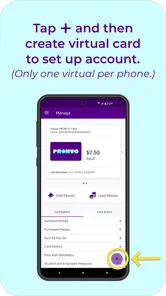
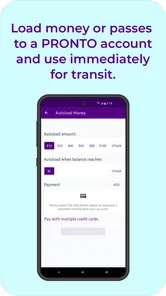
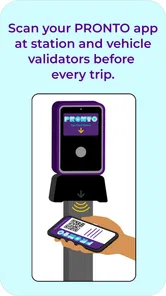
Yes, the app is primarily intended to support digital transit fare management. Depending on the current services and your location, you may be able to create a PRONTO account, purchase passes, add value, activate fare products, and display a mobile pass when boarding. Availability can vary by fare type and participating agency, so it is worth checking the app’s current payment options before relying on it for an important journey.
Does Pronto - San Diego provide real-time arrivals and trip planning?
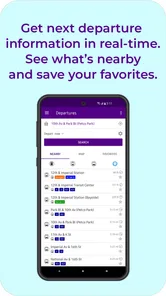
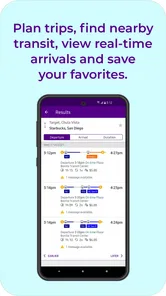
The app offers tools for planning public transportation journeys and checking route information, including stops, schedules, and expected arrivals when real-time data is available. In practical use, these features can help compare routes and estimate travel times across San Diego’s transit network. However, arrival predictions depend on vehicle tracking and network data, so they should be treated as estimates rather than guaranteed departure times.
Do I need an account, internet connection, or location access to use the app?
Some basic information, such as routes and schedules, may be viewable without signing in, but an account is generally useful or required for managing mobile fares, payment methods, and account-related features. An internet connection is recommended for current schedules, service alerts, ticket purchases, and real-time arrivals. Location permission can also improve nearby-stop suggestions, although you may still search for stops manually if you prefer not to share your location.
Pros
- Fast access to San Diego public transit information and trip planning.
- Real-time arrival updates help reduce waiting uncertainty.
- Mobile ticketing avoids carrying cash or searching for paper passes.
- Supports multiple transit options for planning more flexible journeys.
- Service alerts can help users react to delays or route changes.
Cons
- Real-time data may occasionally be delayed or inaccurate.
- Some features depend heavily on a stable internet connection.
- Ticket availability and payment options may vary by transit service.
- The app is mainly useful within the San Diego regional network.
- Account or payment setup may feel inconvenient for occasional riders.











