ProLiant Mobile
- 359.00
- 3.3
- Installs
- 500.00K
- Price
- Free

Screenshots
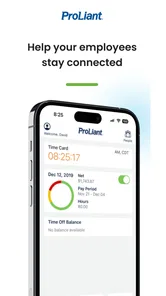
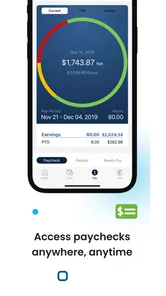
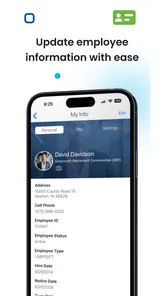
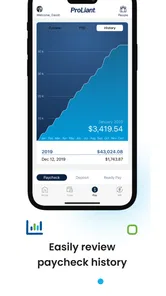
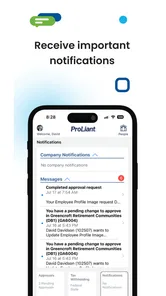
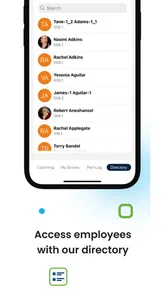
Analysis by Reviewed
ProLiant Mobile is the kind of business app that can seem unremarkable until it becomes part of a regular work routine. Developed by Proliant, Inc, it is built around employee self-service rather than entertainment or broad productivity. I approached it as a practical tool for checking work-related information from a phone, and my overall impression is that its value depends less on novelty than on whether your employer already uses the Proliant system.
That distinction matters immediately. This is not an independent planner, time tracker, payroll alternative, or general office suite that anyone can install and use on their own. It is a companion for employees whose workplace has connected them to the relevant Proliant services. When that connection is in place, having employee information available away from a desktop can remove small but repeated annoyances. Without it, the app has little reason to occupy space on a phone.
How ProLiant Mobile Holds Up Beyond the First Week
I find the best way to judge a workplace app over time is to notice whether it still saves effort after the novelty wears off. Here, the useful test is whether your employer’s Proliant setup makes a recurring employee task easier on a phone than through a browser or a conversation with a colleague. That longer-term perspective also makes it easier to spot which expectations are realistic.
The first-week appeal is convenience, not novelty
During an initial week, the strongest impression comes from the simple idea behind the app: routine employee tasks can be handled from a mobile device instead of waiting until you are at a computer. That is useful for people who work across locations, do not sit at a desk, or need to check workplace information during a normal day without opening a browser and navigating through a larger system.
I would describe the experience as focused rather than expansive. The store identifies it as a Proliant employee self-service application, and that narrow purpose is important when setting expectations. You are not downloading a social workplace hub or a full business-management platform. You are using a mobile doorway into employee services, so the quality of the experience is closely tied to the account and workplace configuration behind it.
A realistic scenario is an employee who remembers a work-related detail while away from a desk. Instead of writing a reminder and hoping to deal with it later, the person can open the app, sign in, review the available information, and return to the day. That small reduction in friction is where the first-week appeal comes from. It is not the sort of application I would install to explore casually; it earns attention when it removes a recurring interruption.
For an employee who already knows the Proliant environment, the mobile format can feel more natural than repeatedly using a desktop browser on a small screen. A phone is already close at hand, and a purpose-built app may be easier to revisit than a saved browser page. Still, I would not assume that every workplace exposes the same options. The employer’s setup determines what the employee can actually do, so two people may have noticeably different experiences even while using the same application.
More From Our News Desk

Weather by Xiaomi Review: Clear at a Glance, Less Clear Up Close

X Under Pressure: Can It Recover When Posting Goes Wrong?

Clash of Clans Is Won Between the Battles

Android Auto Makes the Case for Quieter Car Software

MobiOffice: Transforming Mobile Productivity with Seamless Integration

EA SPORTS FC™ Mobile Soccer: Redefining Mobile Sports Gaming
That dependency also answers an early question many readers will have: can anyone use it independently? In practical terms, it is intended for employees connected to a Proliant workplace system. The download is free, but free installation is not the same as universal access. If your organization does not use the service or has not enabled your account, the app is unlikely to become useful simply because it is installed.
Where it fits among familiar alternatives
The usual alternative is a browser-based employee portal. A browser can be perfectly adequate, especially for occasional tasks or for people who prefer not to add another app. The mobile application makes more sense when you check information often, want a dedicated entry point, or find that a desktop-oriented portal is awkward on a phone.
Another alternative is contacting a manager or human-resources representative for every small question. That approach may be necessary when an account is incomplete, but self-service can reduce avoidable back-and-forth. The trade-off is that a mobile portal only helps with information and actions made available through the employer’s configuration. It does not replace a person when a correction, approval, or explanation is needed.
I also would not compare it directly with broad productivity apps. A notes application can store reminders, and a calendar can track shifts or appointments, but neither is a source of official employee information. ProLiant Mobile’s advantage is not flexibility; it is being connected to a specific workplace system. If you need a general tool that works regardless of your employer, a standard productivity app is the better choice.
What makes it useful month after month
The lasting value comes from repeated, low-effort visits. An employee self-service tool does not need to be opened for long sessions to justify itself. If it helps you check something before work, confirm a detail during a shift, or avoid waiting for access to a computer, the benefit accumulates quietly. That is a healthier pattern for this app than expecting a dramatic feature discovery after installation.
My advice is to judge it by the number of small work interruptions it removes over a normal month. If you regularly need information that your employer has placed in the Proliant system, the app can become a dependable shortcut. If you only need the portal a few times a year, the browser version may be enough and the dedicated installation may not offer much additional value.
There is also a useful separation between convenience and authority. The app can make employee self-service easier, but it should not encourage you to treat every displayed detail as something you can change instantly. Workplace records often involve organizational processes, and the correct next step may still be contacting the appropriate person. I see the app as a way to inspect and handle available tasks, not as permission to bypass workplace rules.
A practical habit is to use it at a consistent point in your routine rather than repeatedly checking it without a reason. For example, an employee might review relevant information before starting a workday, then use the app only when a genuine question comes up. This keeps the app useful without turning it into another source of digital noise. Its recurring value comes from reducing friction, not from demanding attention.
Maintenance is light, but access problems matter
As a free business app, ProLiant Mobile is easy to justify when it serves an active employee account. The current version is 3.6.9, and it supports devices running Android 8.0 or later. Those requirements are modest enough for many users, although anyone with an older phone should check compatibility before planning around it.
Maintenance is less about customizing the app and more about keeping the surrounding account relationship healthy. If your employer changes access, updates internal procedures, or configures different employee services, the app’s usefulness can change without the application itself feeling different. That is one of the less obvious trade-offs: the product is maintained on your phone, but its practical content is maintained by the organization using Proliant.
I would also keep the app updated through the normal app-store process and avoid relying on an old installation for an important workplace task. When a business app is used for time-sensitive information, an outdated version can become an unnecessary variable. At the same time, I would not expect routine updates alone to solve an account or employer-configuration issue. Reinstalling an app is not a substitute for having the correct workplace access.
Another maintenance tip is to test the app before you urgently need it. Sign in during a calm moment, learn where the information you commonly check is located, and make sure you understand the route for recovering access if you become locked out. This is more valuable than exploring every screen. The best preparation is knowing whether the app works for your account before a workday creates pressure.
Where everyday fatigue can appear
The main source of fatigue is the gap between the promise of self-service and the reality of account-dependent access. A user may expect a complete employee dashboard, but the visible experience can be narrower depending on the employer. If a desired function is not enabled, the app may feel limited even though it is operating as configured.
Sign-in friction can also weigh more heavily in a workplace app than in a casual app. People usually open it because they need a specific answer, not because they want to browse. A forgotten credential, an expired session, or an unclear access problem can turn a quick task into a support issue. I recommend treating account recovery details as part of the setup, rather than waiting until the first urgent moment.
There is a psychological fatigue factor as well. Employee apps can blur the boundary between work and personal time if users feel they should keep checking them. ProLiant Mobile is better used as an on-demand utility than as a feed that deserves constant attention. If your workplace expects frequent interaction, establish a sensible routine; if it does not, there is no benefit in opening it reflexively.
The app may also be frustrating for employees who want broad control over workplace records from a phone. Self-service does not necessarily mean every process is fully mobile or immediate. Some matters still require a manager, a human-resources contact, or a separate procedure. That is not a reason to dismiss the app, but it is a reason to avoid assuming that a mobile interface eliminates organizational steps.
Who will keep it installed?
I think it is a sensible choice for employees whose organizations actively use Proliant and whose daily routines include checking employee information away from a computer. It is especially suitable for people who move between worksites, work shifts without a personal desk, or prefer opening a dedicated app instead of remembering a portal address.
It is less compelling for someone who rarely needs employee self-service, already has a smooth browser workflow, or expects a general-purpose business organizer. It is also not the right answer for a person whose employer does not use the Proliant environment. In that situation, the free price does not compensate for the lack of a relevant account connection.
The app has an average rating of 3.3 from around 921 ratings, with roughly 359 written reviews. I read that as a sign to keep expectations practical rather than assuming a universally polished experience. Ratings for workplace tools often reflect both the app and the user’s access situation, so I would pay more attention to whether your employer supports it and whether your device meets the Android requirement than to the score alone.
Its reach is nevertheless substantial, with over 500,000 installs, which suggests that it serves a meaningful audience of employees rather than being a niche experiment. The Everyone content rating and free availability make it straightforward to try, but those points should not be confused with a guarantee that it will be useful for every phone owner. The relevant question is whether it connects to your working life.
My long-term verdict on ProLiant Mobile
After the first impression fades, I see ProLiant Mobile as a utility that earns its place through habit. It does not need to entertain me or replace every workplace process. It needs to make a few employee tasks easier often enough that opening it feels more convenient than using the usual alternative. When that condition is met, keeping it installed is reasonable.
Its limitations are equally clear. The experience depends on employer configuration, access can become the real bottleneck, and the app is too specialized for people looking for a general business tool. Employees who want a rich, independent workspace may prefer a browser, a productivity suite, or direct support depending on the task. Those alternatives can be better when flexibility or human explanation matters more than quick access.
My recommendation is therefore conditional but positive: install it if your employer uses Proliant and you have recurring reasons to reach employee self-service from a phone. Spend a few minutes learning your normal path, test access before you need it, and use it as a focused utility rather than another app to monitor. For the right workplace, it earns lasting space by quietly saving time; for everyone else, it is simply the wrong tool for the job.
ProLiant Mobile was released on May 27, 2015, and its continued relevance comes from that practical role rather than from novelty. With Proliant, Inc behind it, a current version of 3.6.9, and support for Android 8.0 or later, it remains a straightforward employee self-service option. I would recommend it to the employee who already has a reason to use the Proliant system—not as a universal download, but as a dependable companion when that system is part of everyday work.
ProLiant Mobile Frequently Asked Questions
Who is ProLiant Mobile intended for?
ProLiant Mobile is a business app from Proliant, Inc, intended for people whose work involves employee self-service. Its usefulness depends on whether an employer uses the related Proliant services and has enabled access for employees. Before downloading, consider whether your organization uses Proliant and whether you have the account details or access needed to use its employee self-service features.
What is ProLiant Mobile used for?
ProLiant Mobile is designed to help IT administrators monitor and manage compatible HPE ProLiant server environments from a mobile device. It can provide access to server health information, alerts, hardware status, and selected management functions, depending on the server generation, HPE management software, network configuration, and permissions assigned to the user. It is mainly intended for professional administration rather than casual users.
Which servers and devices are compatible with ProLiant Mobile?
Compatibility can vary according to the version of ProLiant Mobile, the HPE ProLiant server model, operating system, firmware, and supporting management services such as HPE iLO or related infrastructure. Before downloading, users should check the current store listing and HPE documentation for supported devices. The app may install on many modern Android or iOS devices, but installation alone does not guarantee that every server-management feature will be available. The current version is 3.6.9, and the minimum operating system requirement is 8.0.
Does ProLiant Mobile require an internet connection or special network access?
Yes, ProLiant Mobile generally needs network access to communicate with the managed server or with the HPE management platform connected to it. Depending on the setup, this may involve a local Wi-Fi network, VPN, secure gateway, or internet connection. Remote access might not work if firewalls, authentication policies, certificates, or ports are configured incorrectly. Administrators should confirm that mobile access is allowed by their organization’s security policy.
Is ProLiant Mobile safe for managing production servers?
ProLiant Mobile can be useful for checking alerts and responding to server-management tasks, but security depends heavily on how it is configured and used. Users should protect the phone with a strong passcode or biometric lock, use secure connections, keep the app and server firmware updated, and assign only necessary permissions. Avoid sharing credentials or using unsecured public networks, especially when performing actions that could affect production systems.
Pros
- Quick access to server health and hardware status on the go.
- Useful alerts help administrators spot potential issues sooner.
- Supports remote monitoring without needing a full desktop interface.
- Clear hardware details make routine checks easier to perform.
- Convenient companion for teams managing HPE ProLiant environments.
Cons
- Limited usefulness if your organization does not use HPE ProLiant servers.
- Some features may require compatible HPE management software or services.
- Remote access depends heavily on reliable network connectivity.
- The interface may feel dated compared with newer monitoring apps.
- Advanced troubleshooting still requires a desktop tool or direct server access.











