Profit AI trading signals bot
- 31.00
- 4.6
- Installs
- 100.00K
- Price
- Free
Screenshots
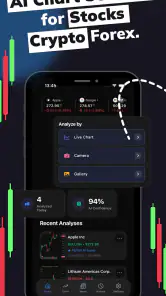
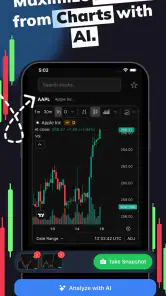
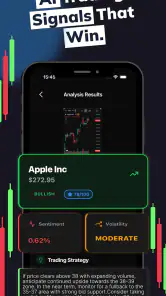
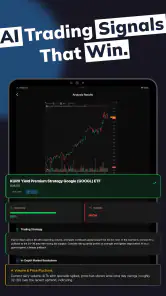
Analysis by Reviewed
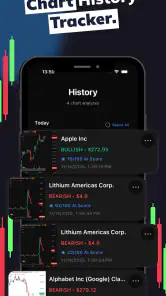
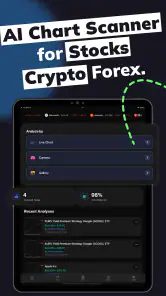
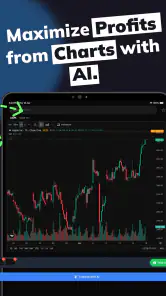
I approached Profit AI as a practical finance app rather than as a magic button for making trades. Its purpose is to examine charts for stocks, forex, and crypto, then turn that visual market information into an AI-assisted reading. That makes it interesting for people who want a quicker second opinion while watching prices move on a phone, but it also means the quality of the experience depends heavily on the chart being current, readable, and available when you need it.
In my experience, the most useful way to think about it is as a chart-analysis companion. It can help organize what I am seeing, point my attention toward patterns, and make a fast market check feel less intimidating. It is not a replacement for learning what a candle, trend, support level, or risk limit means. I would use it to support a decision process, not to hand over responsibility for the decision itself.
How the chart-focused approach feels in everyday use
The app comes from SwiftSoft Apps and sits in the finance category. It is free to install, with optional purchases ranging from a few dollars to amounts approaching thirty dollars per item. That combination makes the first step easy, but I would still treat any paid tools as something to evaluate slowly. A free entry point is useful for testing whether the analysis style fits your habits before spending anything.
The store presents it as an AI chart-analysis tool for stock, forex, and crypto markets, while the short description calls it “Profit AI.” Those markets look similar on a chart, but they behave very differently. A pattern that seems meaningful on a cryptocurrency chart may be much less reliable in a major currency pair or an individual stock. The app is therefore most helpful when I already know which market I am looking at and what time frame matters to me.
The current version is 2.0.1, and the app can run on Android versions starting with 7.0. That broad compatibility is convenient for people using an older phone, especially if they do not want to replace working hardware just to follow charts. At the same time, an older operating system can make the overall experience depend more on the phone’s browser components, memory, display quality, and network behavior than on the app alone.
The public response is encouraging without being a reason to lower my guard: it has a 4.6 average from around fourteen thousand ratings and more than one hundred thousand installs. Those figures suggest that many people find the concept worthwhile, but they do not tell me whether the app suits my particular trading style. A high average cannot turn an uncertain signal into a certain outcome.
Where connectivity changes the experience
The important practical point is that chart analysis is tied to fresh market information. When I am connected and the chart loads cleanly, the app can fit naturally into a quick review: open the relevant market, inspect the visible movement, and consider the AI reading alongside my own reasoning. When the connection is weak, the experience becomes less dependable because a delayed or incomplete chart can change the context of the analysis.
More From Our News Desk

Clash of Clans Is Won Between the Battles

Android Auto Makes the Case for Quieter Car Software

MobiOffice: Transforming Mobile Productivity with Seamless Integration

EA SPORTS FC™ Mobile Soccer: Redefining Mobile Sports Gaming

How Microsoft OneDrive Became a Mobile Productivity Giant

How Google Translate Breaks Language Barriers Effortlessly
This matters most during busy market moments. A person checking a stock before work, watching a currency pair during a commute, or following a crypto move from a crowded café may have only a short window to make sense of the screen. I would not treat a stalled chart or a partially loaded result as a signal to act. The safer response is to wait for the current information to appear, verify the instrument and time frame, and then decide whether the result is still relevant.
A useful habit is to prepare before the urgent moment. I would decide in advance which instruments I actually follow, which chart period I care about, and what would make me ignore a signal. That reduces the temptation to open the app in a rush, see an attractive pattern, and mistake speed for accuracy. The app’s value increases when it is part of a repeatable routine rather than a source of impulsive alerts or guesses.
There is also a subtle trade-off between convenience and context. A compact mobile chart is quick to inspect, but it may show less surrounding history than a desktop trading platform. If the visible movement looks convincing only because the screen is zoomed tightly, I would widen the view before trusting the interpretation. AI can analyze what is presented; it cannot compensate for a chart window that hides the larger trend.
Using it in real mobile situations
One realistic use case is a lunch-break check. Suppose I am interested in a stock but do not want to open a full desktop workstation. I can use the app to review the chart, note what the analysis suggests, and then compare that reading with the broader information I already follow. The best outcome is not necessarily a trade. It may simply be deciding that the setup is unclear and returning to it later.
Another use case is comparing markets without jumping between several complicated tools. A beginner who is learning the difference between stocks, forex, and crypto may appreciate having a common chart-analysis starting point. I would still keep the comparison disciplined: use the same general time horizon where appropriate, write down what I expected before viewing the AI result, and check whether the conclusion changed because of evidence or because the wording sounded confident.
Phone use introduces distractions that are easy to underestimate. Notifications, a small screen, a weak signal, and one-handed scrolling can all encourage shallow decisions. I would avoid analyzing a chart while walking, driving, or multitasking. The app may be mobile, but the financial consequences are not. A quiet minute with a stable connection is more valuable than a hurried glance in a noisy situation.
For people who already use a broker, exchange, or dedicated charting service, Profit AI can work as an additional interpretation layer rather than a complete workspace. I would not expect it to replace order execution, account management, detailed research, or the broader tools found in a full trading platform. Its strongest role is narrower: helping me think about chart structure before I decide what to do elsewhere.
What to do when loading or analysis goes wrong
Connectivity problems deserve a clear recovery routine. If a chart does not load, I would first check whether the phone has a stable connection, then reopen the relevant view instead of repeatedly tapping an action that may create confusion. After a successful reload, I would confirm that I am looking at the intended asset and time frame. A result attached to the wrong chart is more dangerous than an obvious error message.
If the screen appears frozen or the analysis takes longer than expected, patience is part of risk control. I would not infer a bullish or bearish meaning from silence, and I would not act on an old screen simply because it was the last thing visible. Market information changes while a phone is reconnecting. In a fast-moving market, the correct recovery may be to skip the decision entirely until the information is current.
I also recommend keeping a simple note of the situation when something feels inconsistent: the market, the time frame, what was visible, and whether the connection was unstable. That is more useful than relying on memory. It helps distinguish a one-off loading problem from a repeatable weakness in a particular workflow. It also prevents me from blaming the AI for a chart that never arrived properly.
There is a second kind of failure: a perfectly loaded analysis that does not match my expectations. That is not automatically a technical problem. I would compare the result with the visible trend, recent volatility, and my original reason for checking the chart. If I cannot explain why the result makes sense, I would treat it as a prompt for further study, not as an instruction.
Keeping mobile data use sensible
Because the app is built around charts and connected analysis, I would be selective about when I use it on cellular data. A short review is different from repeatedly refreshing several markets. If my plan is limited, checking one clearly chosen instrument is more sensible than cycling through every available chart out of curiosity. The goal is to improve a decision, not to turn the phone into a constant stream of market movement.
My preferred workflow is to use a reliable connection for the main review, avoid unnecessary refreshes, and record the conclusion in my own words. That last step is important. A note such as “trend looks uncertain; wait for confirmation” is more useful later than a vague memory that the AI seemed positive. It also reduces the need to reopen the same chart again and again.
Data-conscious use is not only about the phone bill. It is also about information quality. Frequent checking can create the illusion that more observations automatically produce better decisions. In reality, repeated glances at short-term movement may amplify anxiety and encourage overtrading. I would set a reason for opening the app each time, such as reviewing a planned time frame or checking whether a previously identified condition has changed.
Privacy and account decisions deserve the same caution as data consumption. I would read the app’s own permission and purchase screens carefully, avoid entering sensitive financial credentials into a tool unless its role clearly requires it, and remember that chart analysis is not the same as secure trade execution. Since optional purchases are available, I would try the free experience long enough to understand what I actually use before considering an upgrade.
Who will appreciate it, and who should look elsewhere
I think Profit AI is a good fit for a curious beginner who wants help reading charts without starting with an overloaded professional terminal. It can also suit an intermediate user who already has a process and wants an extra viewpoint when a pattern is difficult to interpret. The app is especially appealing to someone who checks markets from a phone and values a quick, focused analysis rather than a large collection of research panels.
I would be more cautious recommending it to someone who expects guaranteed profit, automatic decisions, or a substitute for financial education. It is also not my first choice for a trader who needs deep fundamental research, complex technical customization, detailed portfolio management, or a complete execution environment. A dedicated charting platform is usually better when the main requirement is precise drawing, extensive indicators, and long historical comparisons.
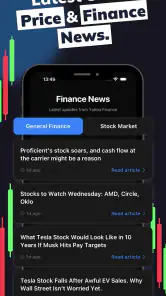
Compared with a basic finance news app, this tool is more focused on the chart itself and less useful for understanding company reports, economic events, or broader market news. Compared with a broker’s app, it is better viewed as an analysis aid than as the central place to manage a portfolio. Compared with manual chart reading, it saves time and may offer a useful challenge to my first impression, but it can also tempt me to accept a conclusion before I have understood the underlying pattern.
The trade-off is therefore clear: convenience and a second opinion in exchange for less control than a specialist workstation and a continuing need for personal judgment. That is not a flaw by itself. It simply defines the app’s proper place. I would use it before a decision, alongside other information, and never as the only reason to put money at risk.
My final view on the connected experience
After looking at the way this app fits into mobile finance habits, I see its main strength in focused assistance. It gives chart-oriented users a way to bring AI into a quick market review, and the free starting point makes experimentation approachable. The 4.6 average and broad install base add confidence that the concept has found an audience, while the Everyone age rating keeps the presentation accessible to a wide range of users.
Its limitations are just as important. The usefulness of a chart reading depends on current information, a stable connection, a correctly selected market, and enough context around the visible price movement. A delayed screen, a narrow mobile view, or an overconfident interpretation can lead to poor judgment. Optional purchases also mean I would examine the free experience carefully before paying for anything, rather than assuming extra access will solve a reasoning problem.
My recommendation is to try it if you want a mobile chart-analysis companion and are willing to treat its output as one input among several. Build a calm routine, verify the chart after any connection interruption, conserve unnecessary refreshes, and write down your own conclusion before acting. The best use of Profit AI is not replacing judgment; it is making that judgment more deliberate.
Profit AI trading signals bot Frequently Asked Questions
Can I use Profit AI on both Android and iOS?
Profit AI is a finance app with a minimum Android operating system requirement of 7.0. Before downloading, check that your device meets the relevant system requirements and that you are selecting the official app from the store you normally use. Make sure the developer name matches SwiftSoft Apps so you can distinguish the app from similarly named products.
Is Profit AI appropriate for all ages?
Profit AI has an Everyone content rating, so its app-store age classification is broad. That rating describes the content category, not whether trading is suitable for a particular person. Financial markets involve risk, and anyone considering using signals should take time to understand how trading works and make decisions appropriate to their circumstances.
How popular and well-reviewed is Profit AI?
Profit AI has an average rating of 4.6 from around 14,000 ratings, with 31 written reviews and over 100,000 installs. These figures offer a sense of its reach and user feedback, but ratings cannot predict your own experience or establish that trading signals will perform well. Read recent reviews and judge the app’s features for yourself.
Is Profit AI suitable for someone new to trading?
Profit AI is a finance app focused on AI chart analysis for stocks, forex, and crypto. Beginners may find its trading suggestions useful as a starting point, but signals are not a substitute for learning how markets work. Before acting on any suggestion, understand the asset and the risks involved, and consider practicing with a demo account rather than committing money.
Which markets does Profit AI trading signals bot cover?
Profit AI’s summary describes AI chart analysis for stock, forex, and crypto markets, so it may appeal to users who follow more than one asset class. Market availability and the signals offered can depend on the app’s features and setup. Check that the instruments you want to follow are available before relying on the app as part of your trading routine.
Pros
- Provides automated market analysis without requiring constant chart monitoring.
- Can help beginners identify potential trading opportunities more quickly.
- Signal-based approach may reduce emotional
- impulsive trading decisions.
- Useful for comparing AI-generated insights with your own technical analysis.
- Accessible from a mobile device
- making alerts convenient while traveling.
Cons
- AI signals can be inaccurate during sudden news-driven market movements.
- Profitability depends on execution speed
- fees
- and the chosen trading strategy.
- Users may misunderstand signals without basic knowledge of risk management.
- Automated tools can encourage overtrading when alerts arrive frequently.
- Availability of features and supported assets may vary by region or plan.
- Category
- Finance
- Version
- 2.0.1











