

PRO1 Connect
- 289.00
- 4.3
- Installs
- 50.00K
- Price
- Free

Screenshots
Analysis by Reviewed
Managing a thermostat from a phone sounds like a small convenience, but it becomes surprisingly useful when the weather changes while you are away, when someone else in the household needs to adjust the temperature, or when you simply do not want to get up and cross the room. I spent time looking at PRO1 Connect as a House & Home app, and my impression is that it works best as a focused remote control for a compatible PRO1 thermostat rather than as a complete smart-home command center.
The app is free, aimed at Everyone, and comes from PRO1 IAQ. It has built a modest but meaningful user base, with more than fifty thousand installs and a 4.3 average from roughly five hundred ratings. Those figures suggest that many owners find the basic idea useful, while also leaving room for the practical limitations that come with an app designed around one thermostat family.
My everyday baseline workflow with the thermostat
The first thing I would do with this app is keep the setup simple. Install it on the phone that will be used most often, connect it to the compatible PRO1 thermostat, and make sure the thermostat itself is operating normally before trying to solve anything through the app. That order matters. If the wall control is not configured correctly, a phone interface cannot compensate for it.
Once the connection is ready, the normal routine is straightforward: open the app when I want to check the current setting, make an adjustment, and close it. I would not treat it like an app that needs constant attention. Its value is in removing small interruptions from the day, not in turning heating and cooling into a hobby.
A realistic example is leaving home in the morning and realizing that the thermostat was left at a more comfortable indoor setting. With PRO1 Connect, I can try to correct that from outside instead of returning home. When I am heading back later, I can make another adjustment before arriving. That is a useful habit for people who have irregular schedules, pets at home, or rooms that become uncomfortable quickly.
Another practical situation is sharing responsibility. If one person normally handles the wall thermostat but is away, another household member can use the app instead of guessing at the controls. This is especially helpful for relatives who find a physical thermostat difficult to read or operate. The phone does not remove the need to understand the home’s heating and cooling setup, but it can make ordinary changes less awkward.
I would still begin by learning the physical thermostat. The app is a companion, not a replacement for knowing where the equipment is, what mode it is using, and how the household normally sets it. If the phone is unavailable, the wall control remains important. Treating the app as one access point rather than the only access point is the safer and more practical approach.
More From Our News Desk

 Gmail
GmailGmail in a Busy Inbox: Who Benefits Most?
From first account to crowded workday, Gmail earns its place through dependable search and flexible sorting—but its best fit depends on how much inbox maintenance you can tolerate.

 Prime Video
Switching to Prime Video: What Changes in Your Viewing Routine
Prime Video can make a compelling second home for streaming, but switching means learning a different catalog, rental layer, and route from browsing to playback.

 Universal TV Remote Control
Universal TV Remote Control Works Best as a Reliable Backup
A phone remote earns its place through quick setup and reliable habits. Here is how to get more from Universal TV Remote Control—and where its limits show.

 Weather - By Xiaomi
Weather by Xiaomi Review: Clear at a Glance, Less Clear Up Close
Xiaomi’s weather app makes everyday forecasts quick to scan, but its calm surface can leave useful details and recovery paths harder to find than they should be.

 X
XX Under Pressure: Can It Recover When Posting Goes Wrong?
A resilience-focused review of X, examining setup, mistaken posts, interruptions, weak connections, and the gaps that matter when recovery needs to be dependable.

 Clash of Clans
Clash of Clans Is Won Between the Battles
Its raids are quick; its community is a long-term project of coordination, teaching, rivalry, and shared responsibility—with all the friction that entails.
Latest News



The app’s release history also shows that it is not a brand-new experiment: it first appeared on May 29, 2019, and the current version is 2.2.1+2996. That gives it a more established feel than a newly launched controller, although the experience will still depend heavily on the particular PRO1 thermostat model and the quality of the connection around it.
What I would check before relying on it
Before using the app for an important trip, I would test it while standing near the thermostat. Change one setting, wait for the wall unit to reflect the change, and then return the setting to normal. This simple test separates an installation problem from a remote-use problem. It also prevents the common mistake of assuming that a button press automatically means the thermostat has received and applied the instruction.
I would repeat that test from another room and then from the location where I am most likely to use the app. If it behaves reliably at home but not away from home, the issue may be the network path rather than the thermostat controls. That distinction is worth knowing before a cold evening or hot afternoon arrives.
One of the most useful habits is to make a change deliberately instead of tapping several controls quickly. I prefer to adjust one thing, pause, and confirm the resulting state. This is slower than rapid tapping, but it reduces uncertainty when the app is communicating with a device in another room or another location.
Settings worth checking before building habits
Because PRO1 Connect is centered on a compatible PRO1 thermostat, the important settings are the ones that already exist in the thermostat system. I would pay attention to the operating mode, the target temperature, and any schedule or hold behavior offered by the connected model. The exact choices can vary by thermostat, so I would avoid assuming that every PRO1 unit exposes the same controls in the app.
That model dependence is one of the first trade-offs to understand. A phone application can present the controls, but it cannot create capabilities that the installed thermostat does not support. If a particular scheduling option is missing, that may be a limitation of the thermostat rather than a defect in the phone interface.
I also recommend comparing the phone display with the wall unit during the first few uses. Look for differences in how temperatures, modes, or active settings are presented. Small interface differences can lead to mistakes, especially when someone switches between the physical control and the app. Once I know which screen represents the active state, I can use the app with much more confidence.
For a shared home, I would agree on a basic household rule: use the app for temporary comfort changes, but make schedule changes intentionally and communicate them. A quick adjustment before bedtime is different from changing the routine for the entire week. Without that distinction, two people can unknowingly undo each other’s choices.
There is also a useful maintenance mindset here. If the app suddenly appears unable to control the thermostat, I would first check whether the thermostat itself responds at the wall, then check the phone connection, and only after that consider reinstalling or resetting anything. This sequence protects the existing setup and avoids turning a small communication issue into a larger configuration problem.
The free price makes experimentation easy, but free does not mean every home will get the same experience. The essential question is compatibility. Someone who owns a supported PRO1 thermostat has a reason to try it; someone looking for a universal controller should not assume that this app will manage unrelated heating and cooling hardware.
Small settings decisions that improve daily use
I would keep the app in a convenient place on the phone rather than burying it in a folder. That sounds minor, but the whole benefit is reduced friction. If opening it takes several steps, I am more likely to walk to the thermostat instead, which defeats the point during quick changes.
I would also avoid making temperature changes based only on a single glance immediately after opening the app. Give the displayed state a moment to settle, especially when the thermostat has recently been adjusted by someone else. A repeatable pause-and-check routine is more reliable than trusting the first visual impression every time.
For households with different comfort preferences, I find it better to define a few agreed targets rather than constantly experimenting. For example, decide what “away,” “sleeping,” and “returning home” mean in your household, then use those choices consistently where the thermostat supports them. The advantage is not a magical feature; it is reducing decision fatigue and accidental overcorrection.
Faster patterns for experienced users
After the basic workflow is stable, the next improvement comes from repetition. I would use the app at predictable moments: before leaving, before returning, and when preparing for sleep. These checkpoints are easier to remember than reacting to discomfort after it has already developed.
A particularly effective pattern is to combine the app with a short verbal or written household routine. Before leaving, check the mode and target setting. Before returning, make one planned adjustment. At night, confirm that the setting matches the agreed sleeping routine. This turns remote control into a habit rather than a series of random interventions.
Another good pattern is to use the physical thermostat and the app for different jobs. I would use the wall unit for setup, detailed inspection, or situations where the phone is not available. I would use PRO1 Connect for quick checks and changes from a distance. Splitting responsibilities this way avoids forcing either interface to do everything.
If a family member asks whether the heating or cooling is running, I would check the app before changing anything. That prevents a well-meaning second adjustment from fighting the first one. In a shared home, observation is often more valuable than another command.
Travel is where the app can earn its place. Before leaving for several days, I would make a final adjustment at the wall thermostat, then use the app later only for a deliberate check or correction. I would not rely on repeated remote changes as a substitute for preparing the home properly. The best workflow is still to set things up carefully before departure and use the phone as a backup layer.
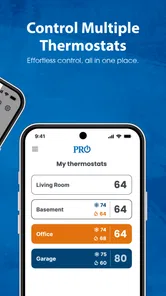
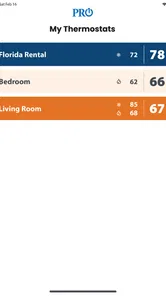
For people who manage more than one living space, the practical question is how clearly the app distinguishes the connected thermostat or location. I would verify that before making remote changes. A controller is only helpful when I can confidently identify the device I am adjusting. If the interface does not make that clear enough for my situation, I would prefer the physical control or a different solution rather than guessing.
These habits reveal the app’s strongest quality: it can make a compatible thermostat more accessible without demanding that I redesign my entire home. It is not trying to replace every household tool. It simply shortens the distance between me and a specific control.
Where the usual alternatives may be better
The most obvious alternative is walking to the thermostat. For a small apartment, that may be faster than unlocking a phone and opening an app. If the wall control is already easy to reach, remote access may feel unnecessary. PRO1 Connect becomes more convincing when the thermostat is upstairs, in a less convenient room, or away from the user’s normal routine.
A programmable thermostat can also reduce the need for frequent manual changes. If the installed PRO1 model offers schedules, setting them at the thermostat may be better than repeatedly adjusting the temperature from the phone. The app is then most useful for exceptions: an early return, an unexpected absence, or a temporary comfort change.
A broader smart-home platform may be preferable for someone who wants lights, locks, sensors, and climate controls in one place. PRO1 Connect is more focused. That focus can make it easier for a thermostat owner, but it also means it should not be judged as a universal home automation hub.
Voice assistants and other automation tools may suit users who want hands-free control, provided their equipment and chosen platform support that arrangement. I would choose those alternatives when cross-device routines matter more than direct thermostat access. I would choose PRO1 Connect when the main need is simply controlling a compatible PRO1 unit from a phone.
Advanced limits I would keep in mind
The biggest limitation is compatibility. The app’s purpose is tied to a compatible PRO1 thermostat, so it is not a sensible download for someone who owns a completely different brand or expects one app to discover every climate device in the house. Check the thermostat model and installation situation first rather than assuming that the app alone is enough.
There is also a difference between commanding a thermostat and confirming comfort in a room. The app can help me change a setting, but I should not confuse that with knowing exactly how warm or cool every part of the home feels. Insulation, sunlight, airflow, doors, and room use still affect comfort. Remote control improves access; it does not eliminate the physical behavior of the building.
Network dependence is another practical limitation. A phone-based controller is less useful when the thermostat or phone cannot communicate properly. That is why I would never remove the physical thermostat from my normal plans or assume that a remote adjustment has worked without checking the resulting state.
I would also be cautious about using remote control to make dramatic changes repeatedly. Small, planned adjustments are easier to verify and less likely to create confusion. If the home has vulnerable occupants, pets, or equipment that requires a stable environment, the app should support a broader care routine rather than become the only safeguard.
The app is not the right choice for someone seeking detailed energy analysis, extensive automation, or a single dashboard for many unrelated smart-home products. It is also less compelling for a user who rarely changes the thermostat and has the wall control within easy reach. In those cases, the phone adds another interface without solving a real problem.
On the other hand, it is a good match for a PRO1 thermostat owner who values convenience, wants to make occasional adjustments from another room or location, and prefers a dedicated control app over a much larger smart-home system. The Everyone content rating and free access make it approachable for a household, though the actual usefulness still comes down to device compatibility and reliable communication.
How I would troubleshoot before giving up
If an adjustment does not appear to work, I would avoid repeating the same tap several times. First, check the wall thermostat. Next, confirm that the phone is connected normally. Then reopen the app and look for the current state. If the physical control works but the phone does not, I would focus on the app connection; if neither responds as expected, the issue may be with the thermostat or the home system itself.
I would also make sure that another household member has not changed the setting at the same time. Shared control can look like a technical failure when it is really a timing problem. A simple message such as “I am adjusting the thermostat now” can prevent conflicting commands.
When the app behaves inconsistently, I would record what happened: the location, the type of adjustment, and whether the wall unit reflected it. That small record can make support conversations more useful and can reveal whether the problem occurs only away from home, only with certain controls, or only after another person has used the thermostat.
Finally, I would keep the app updated through the normal platform process and remember that version 2.2.1+2996 is the current version associated with this review. Updating is sensible, but I would still test the basic control afterward instead of assuming that every change has preserved my preferred workflow.
My verdict after building a repeatable routine
PRO1 Connect is a focused, practical app rather than an ambitious smart-home platform. I like it most when I think of it as a remote extension of a compatible PRO1 thermostat: useful for checking the state, making a planned adjustment, and avoiding unnecessary trips to the wall control.
Its real strength appears after the initial novelty fades. The best users will not constantly experiment with it. They will establish a baseline, learn which thermostat controls are available, create a few repeatable moments for checking the setting, and use the app for exceptions when schedules change. That approach makes the convenience feel dependable instead of gimmicky.
I would recommend it to owners of compatible PRO1 thermostats who want straightforward phone access and do not need a broad automation ecosystem. I would skip it if I wanted universal equipment support, deep energy reporting, or elaborate cross-device routines. In those situations, a wider smart-home platform or a more advanced thermostat solution would be a better fit.
For the right household, the free app is easy to justify because it addresses a specific annoyance: controlling the thermostat when the wall unit is inconvenient. My final advice is to test it locally first, confirm how the app and physical thermostat reflect one another, and then build a modest routine around it. The app works best when it adds confidence to an existing thermostat setup, not when it is expected to replace that setup entirely.
PRO1 Connect Frequently Asked Questions
What devices and operating systems can I use with PRO1 Connect?
PRO1 Connect is intended for compatible PRO1 thermostats, so check that your thermostat is supported before downloading. The app is available for Android and iOS, and its Android version requires Android 7.0 or later. Once installed, the app serves as a way to set up and control a compatible thermostat rather than as a standalone temperature-control tool.
What is PRO1 Connect and what is it used for?
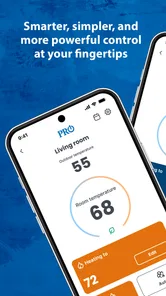
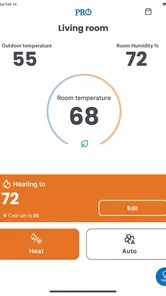
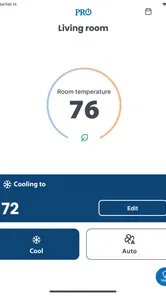
PRO1 Connect is a companion app designed to work with compatible PRO1 smart thermostats and related home climate-control devices. After pairing the thermostat with the app, users can view the current temperature, adjust heating or cooling settings, change operating modes, and manage schedules remotely. Its usefulness depends on owning a supported PRO1 device and having a reliable internet connection for remote access.
How do I connect PRO1 Connect to my thermostat?
To connect PRO1 Connect, install the app on your Android or iOS device, create or sign in to an account if requested, and follow the in-app setup instructions. You will generally need to place the compatible thermostat into pairing or Wi-Fi setup mode, select it from the app, and enter your home network details. Keep your phone near the thermostat during setup and use a supported Wi-Fi network.
Can I control my home temperature remotely with PRO1 Connect?
Yes, when the thermostat is compatible, connected to Wi-Fi, and linked successfully to your account, PRO1 Connect can let you adjust temperature settings from outside the home. You may be able to change the setpoint, switch between heating, cooling, and automatic modes, or modify schedules. Remote control will not work correctly if the thermostat, router, or cloud service is offline.
Does PRO1 Connect support schedules and multiple thermostats?
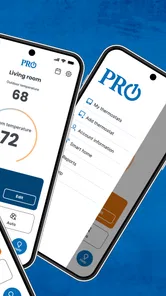
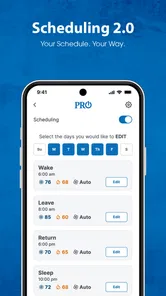
PRO1 Connect may provide scheduling features that help automate your preferred temperatures throughout the day, such as separate settings for waking, leaving home, returning, and sleeping. Compatible installations can also support more than one thermostat or location, although the exact options depend on the PRO1 model and app version. Check the device compatibility information before downloading.
Pros
- Simple interface makes connecting with PRO1 devices straightforward.
- Supports an efficient
- focused workflow for compatible PRO1 hardware.
- Connection status and device information are easy to check.
- Useful companion app for users already invested in the PRO1 ecosystem.
- Lightweight design should be easy to run on most supported phones.
Cons
- Its usefulness is limited if you do not own a compatible PRO1 device.
- Compatibility may vary across Android and iOS versions.
- Some features depend on an active device connection.
- The app may offer little value beyond basic companion functions.
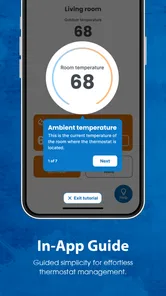
- Troubleshooting can be difficult without detailed in-app guidance.







