

Princess Cruises
- 1.10K
- 2.6
- Installs
- 500.00K
- Price
- Free

Screenshots





Analysis by Reviewed
Before relying on a cruise app as your only source of travel information, I’d treat it as a handy companion for the trip rather than a replacement for planning ahead. Princess Cruises is aimed at people sailing with Princess, and its usefulness is most apparent when you want trip details and onboard choices gathered in one place. If you’re comparing it with general travel apps, the difference is focus: those are better for arranging flights, hotels, and independent sightseeing, while this one is intended to support the cruise itself.
What to expect from everyday use
I’d approach its speed with sensible expectations. The app’s purpose involves checking plans and browsing options, but the feel of any travel app can depend on the phone, connection, and moment you use it. Before departure, I’d open it at home to get familiar with the screens and check the details I’ll need, rather than waiting until I’m in a busy terminal. That small step also makes it easier to notice whether anything needs refreshing before I’m away from a dependable connection.
A realistic use case is a port day with several competing plans: I might check the day’s schedule over breakfast, compare the available activities with a shore visit, and then confirm where I need to be. The trade-off is that a cruise schedule can change, so I wouldn’t treat a screenshot or an earlier glance as the final word. I’d reopen the app when making a decision, and use any official onboard guidance if the current instructions differ.
Busy days, practical workarounds
Heavy-use moments are likely to come when many passengers are checking schedules or making plans at once. I wouldn’t assume every screen will feel equally responsive in a crowded or weak-connection setting. My practical approach would be to look up the next day’s essentials when I have time, note the meeting place and timing, and avoid leaving a reservation or activity decision until the last moment. This is especially useful for a group: one person can check the plan, then share the key details plainly so everyone is not relying on separate phones at once.
For coordination, the app can be useful, but I’d agree on a fallback meeting point with travel companions before splitting up. Messaging is convenient when it works, yet a simple plan matters if someone’s battery runs low or they are not checking their phone. That is a small but worthwhile cruise habit, particularly for families or friends who prefer exploring different parts of the ship.
Who benefits, and who may prefer another tool
This is most appealing if you already have a Princess sailing planned and want a cruise-focused place to follow the experience. It is less useful as a general trip planner: someone arranging an independent holiday, comparing transport across a destination, or organizing a stay with several unrelated providers will still need broader travel tools. I’d also avoid choosing a cruise solely because an app looks convenient; the app supports the holiday, but it doesn’t replace checking whether the itinerary and onboard experience suit you.
The app is free, and Global Experience Innovators is its developer. Its average rating is 2.6 from around 2,600 ratings, so I’d keep expectations measured rather than assume every interaction will be smooth. That score is a reason to try it early and judge it on the tasks you actually need, not a reason to dismiss its cruise-specific role outright. It has over 500,000 installs, but popularity alone cannot tell me how well it will work on a particular device or during a busy sailing.
More From Our News Desk

 Weather - By Xiaomi
Weather by Xiaomi Review: Clear at a Glance, Less Clear Up Close
Xiaomi’s weather app makes everyday forecasts quick to scan, but its calm surface can leave useful details and recovery paths harder to find than they should be.

 X
XX Under Pressure: Can It Recover When Posting Goes Wrong?
A resilience-focused review of X, examining setup, mistaken posts, interruptions, weak connections, and the gaps that matter when recovery needs to be dependable.

 Clash of Clans
Clash of Clans Is Won Between the Battles
Its raids are quick; its community is a long-term project of coordination, teaching, rivalry, and shared responsibility—with all the friction that entails.

 Android Auto
Android Auto Makes the Case for Quieter Car Software
The car interface is no longer judged by how much it can do, but by how quietly it helps. Android Auto shows what drivers now expect—and what still gets in the way.

 MobiOffice: Word, Sheets, PDF
MobiOffice: Transforming Mobile Productivity with Seamless Integration
MobiOffice: Word, Sheets, PDF is redefining mobile productivity with a surprising blend of functionality and innovation.

 EA SPORTS FC Soccer Mobile 26
EA SPORTS FC™ Mobile Soccer: Redefining Mobile Sports Gaming
Dive into EA SPORTS FC™ Mobile Soccer, where immersive gameplay and strategic depth transform mobile sports gaming.
Latest News



For reliability, I’d think in terms of preparation rather than promises: open important screens before you need them, keep the phone charged, and know where to ask onboard if the app doesn’t behave as expected. If it pauses or fails to refresh, I’d close and reopen it, check the connection, and try again when conditions are better. I wouldn’t rely on the app as the sole record of a time-sensitive plan.
It is rated for Everyone and is free to download. The current version is 1.7.4, and it requires Android 7.0 or later. Those details help with basic compatibility, but they don’t guarantee the same performance on every phone; keeping the operating system and app current is a sensible first step if you run into trouble. If your device is older or short on storage, I’d make room before travel and test the app at home instead of troubleshooting at the port.
My verdict is that this works best as a focused companion for a Princess cruise, not as an all-purpose travel organizer. Use it to support decisions and keep track of cruise-related plans, while leaving yourself a backup for essential times and meeting points. If that balance suits the way you travel, it can be worth having ready before sailing.
Ahoy there, cruise enthusiasts! If you’re dreaming of setting sail on a luxurious maritime adventure, then Princess Cruises might just be the ticket to your next unforgettable vacation. Let’s dive into what this app offers and why it could be your next travel buddy.
Setting Sail with Princess Cruises
When I first downloaded the app, I was immediately impressed by its sleek design and user-friendly interface. It’s like having a personal cruise assistant right in your pocket. The app promises to enhance your cruise experience, and I must say, it delivers on that front. You can manage your booking, check out the itinerary, and even explore the ship’s layout, all from the comfort of your smartphone.
All Aboard the Features
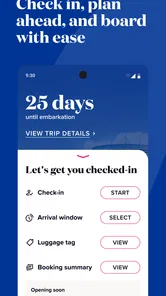
The app is packed with features that make your cruise experience smoother than a calm sea. You can easily check-in before your cruise, which saves you a lot of time at the port. No more standing in long lines! There's also a handy countdown feature, so you can keep track of how many days are left until you set sail. For someone like me who gets excited about upcoming trips, this is a fantastic feature.
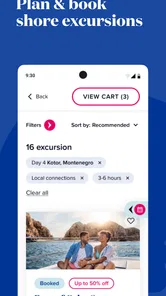
But that’s not all! Once you're on board, the app becomes your digital concierge. You can view daily activities, make dinner reservations, and even book shore excursions. It’s like having a pocket-sized itinerary planner. I found this incredibly useful, especially when trying to decide between lounging by the pool or exploring a new port of call.
Entertainment and Dining at Your Fingertips
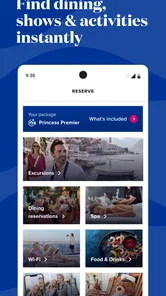
Princess Cruises offers a plethora of dining and entertainment options, and the app makes navigating these choices a breeze. From gourmet meals to casual bites, you can peruse menus and even place orders through the app. Dining reservations are just a tap away, ensuring you never miss out on your favorite meal times.
Entertainment is another highlight. The app keeps you updated on all the shows and events happening on board. Whether you’re into live music, theater performances, or movie nights under the stars, the app ensures you’re always in the know.
Staying Connected
One of the aspects I particularly appreciated was the app’s ability to keep me connected with my travel companions. Through the app, you can message fellow cruisers without needing an internet package. This feature is perfect for coordinating meet-ups or just sharing the excitement of your journey.
Choosing it for the cruise, not the whole holiday
I’d use it alongside, rather than instead of, the tools I normally rely on for the parts of a trip outside the ship. A map app is more useful for finding a street address in port, and a general booking service is better suited to comparing flights or hotels across different providers. The cruise app’s value is narrower but more relevant once the sailing itself becomes the centre of the day: it keeps cruise decisions close to the itinerary instead of mixing them with unrelated travel plans.
That distinction matters if you are travelling with people who have different routines. One person may want to browse onboard entertainment while another is arranging independent time ashore. I’d let each person use the tool that fits the task, then agree on the practical details—where to meet and when—rather than expecting one app to coordinate every part of the holiday.
A useful routine for the day before and the morning of a port call
For a port day, I’d check the schedule the evening before, identify the next morning’s first commitment, and make sure everyone in the group knows the plan. In the morning, I’d check again before leaving the ship, since a saved screenshot can preserve an old time or location. This two-step habit avoids repeatedly opening the app just to remember the basics, while still leaving room to catch a change before it affects the day.
If you are choosing between an onboard activity and time ashore, I’d compare the timing first, then decide whether the activity is worth structuring the rest of the day around. The app can bring those cruise choices into view, but it cannot make the trade-off for you. I’d keep the plan flexible when the port visit is the priority and avoid booking a tight sequence of activities that leaves no breathing room.
Small-screen planning and shared decisions
Browsing several options on a phone can make details easy to overlook, especially when you are moving quickly or discussing plans with a group. I’d read the relevant time and location carefully before confirming anything, then tell companions the important parts in plain language. This is more dependable than assuming everyone has checked the same screen or interpreted the schedule the same way.
For families, the app is most helpful when an adult handles the day’s plan and shares only what each person needs to know. For friends travelling together, it can help one person compare options while the group decides what suits everyone. In either case, keep a simple backup plan for meeting up; digital coordination is useful, but it should not be the only way your group knows where to reconnect.
What the rating means for a cautious first try
The modest average rating is worth taking seriously, but I would not use it as a precise prediction of how the app will behave on your phone. Reviews can reflect different devices, sailings, expectations, or particular tasks. The practical takeaway for me is to install it and test the parts I expect to use before travel, especially booking access and the screens that matter to my itinerary. If those essentials are awkward for you, decide early how you will get the same information another way.
It has been available since November 24, 2023, and the current release is 1.7.4. I’d treat version details as a reason to check that my installation is current before sailing, not as a guarantee that every issue is fixed. If something behaves differently after an update, I’d reopen the relevant screen and verify the plan rather than assuming that a familiar layout means the information has refreshed.
Who should skip it, and what to check first
If you are not sailing with Princess, there is little reason to install this app simply to plan a general holiday. It is also not the right primary tool for someone who prefers paper schedules, has limited access to a compatible phone, or wants one organizer for flights, accommodation, local transport, and sightseeing. Those travellers may be better served by a paper itinerary or general travel planner, with official cruise information checked separately when needed.
Before departure, I’d check that I can access the booking and understand the main navigation, then make a short list of the tasks I actually expect to use: trip details, the day’s schedule, dining or entertainment choices, and group coordination. Testing those tasks is more revealing than browsing every screen without a purpose. It also helps answer the practical question of whether the app is convenient enough for your travel style.
Final Thoughts
In conclusion, the app is a must-have for anyone embarking on a cruise with this renowned line. It brings convenience, excitement, and a touch of luxury to your fingertips. From managing your itinerary to staying entertained, it’s got everything you need for a seamless cruise experience. So, if you’re planning your next oceanic adventure, make sure to download this app and set sail with confidence!
My more measured recommendation is to have it ready if a Princess sailing is already part of your plans, then judge it by the tasks you personally need rather than expecting a flawless all-in-one travel service. I’d keep essential times and meeting arrangements easy to recover, and use another tool whenever the question is about the wider journey or local navigation. With that realistic role, it can be a convenient onboard companion; if you expect it to plan an entire holiday or guarantee uninterrupted access, a broader tool and a simple backup will serve you better.
Princess Cruises Frequently Asked Questions
Is the Princess Cruises app suitable for someone planning a cruise for the first time?
The Princess Cruises app is a travel guide for guests preparing for or taking a cruise, with tools intended to help organize parts of the experience. Its schedule, ship map, reservations, and excursion features can make it easier to keep trip details together. The app is free to download, and its content rating is Everyone, so it can be considered by travelers of different ages.
What features does the Princess Cruises app offer to enhance my cruising experience?
The Princess Cruises app offers a variety of features designed to enhance your cruising experience. Key functionalities include a detailed ship map, daily schedule of activities, dining reservations, and shore excursion bookings. You can also enjoy seamless communication with fellow passengers and access real-time updates about your voyage, ensuring a smooth and enjoyable cruise.
Is the Princess Cruises app available for both Android and iOS devices?
Yes, the Princess Cruises app is available for download on both Android and iOS devices. You can easily find it on the Google Play Store for Android users and the Apple App Store for iOS users. The app is designed to be user-friendly and compatible with a wide range of smartphones and tablets. On Android, it requires version 7.0 or later.
Do I need to pay for any services within the Princess Cruises app?
The Princess Cruises app itself is free to download and use. However, certain services or features within the app may incur additional charges, such as premium dining experiences or exclusive shore excursions. It is advisable to check the app for any fees associated with specific services before making a reservation.
Can I use the Princess Cruises app without an internet connection?
While some features of the Princess Cruises app require an internet connection, such as real-time updates and booking services, other functionalities can be accessed offline. For instance, you can view your itinerary and the ship's map without internet access, which is particularly useful during times when connectivity is limited at sea.
Pros
- User-friendly interface with intuitive navigation.
- Extensive itinerary options for global travel.
- Real-time updates on cruise activities and events.
- Rich multimedia content for an immersive experience.
- Easy booking and reservation management.
Cons
- Limited offline access to content and features.
- Occasional bugs causing app crashes.
- Requires a stable internet connection.
- Limited customization options for user profile.
- Notifications can be overwhelming at times.











