

Prepware Remote Pilot UAS
- 112.00
- 4.3
- Installs
- 10.00K
- Price
- $4.99
Screenshots
Analysis by Reviewed
When I prepare for the FAA remote pilot exam, I find it helps to treat study as more than a run of practice questions. The useful part is noticing which ideas I can explain and which ones I only recognize by sight. That is the lens I use for Prepware Remote Pilot, an education app from Aviation Supplies & Academics. It costs $4.99, is rated for Everyone, and has a 4.3 average from around 150 ratings. Its focused exam-prep purpose makes it most useful when I already know I am working toward the FAA test, rather than looking for a general introduction to flying drones.
Deciding what kind of preparation you need
Before buying an exam-prep app, I ask myself a simple question: do I need help learning to fly, or help organizing my preparation for a knowledge exam? Those are different jobs. Prepware Remote Pilot is best considered for the second one. It gives a prospective remote pilot a way to work with FAA exam subjects through questions and practice, rather than serving as a broad introduction to drone operation.
That distinction matters if you are new to the subject. A question can reveal that you do not understand an idea, but a quiz alone may not teach every concept from the ground up. If I were starting with little aviation knowledge, I would use a course, textbook, or other clear instructional resource to build the basics, then use this app to check what I can recall and where I still hesitate. If I already have that foundation, the question-based approach can make study feel more directed.
The app comes from Aviation Supplies & Academics, a name that fits its exam-preparation focus. It is an education app rather than a flight-planning or drone-control tool, so I would not install it expecting maps, aircraft operation guidance, or practical flying instruction. Its audience is narrower: people who want to prepare for the FAA remote pilot knowledge exam and are willing to learn by answering, checking, and reviewing.
Getting Started with Prepware
So, diving headfirst into Prepware Remote Pilot was super easy. The app's interface is clean and straightforward, which I absolutely love. You don't get overwhelmed with options or settings, and everything is pretty intuitive. Whether you're a tech-savvy person or someone who struggles with apps, you'll find it a breeze to navigate.
Features That Make It Stand Out
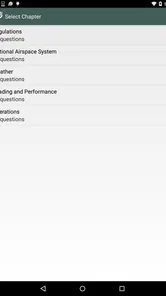
One of the first things I noticed—and really appreciated—was the comprehensive question bank. It's packed with questions that mirror what you'll face in the actual FAA exam. This isn't just a random selection of questions; they are well-organized into categories like regulations, airspace, weather, and more, which means you can focus on your weak areas.
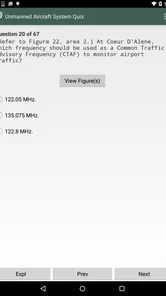
Another cool feature is the detailed explanations that accompany each question. If you get something wrong, the app doesn't just leave you hanging; it actually helps you understand why. It's like having a virtual instructor in your pocket!
More From Our News Desk

 Gmail
GmailGmail in a Busy Inbox: Who Benefits Most?
From first account to crowded workday, Gmail earns its place through dependable search and flexible sorting—but its best fit depends on how much inbox maintenance you can tolerate.

 Prime Video
Switching to Prime Video: What Changes in Your Viewing Routine
Prime Video can make a compelling second home for streaming, but switching means learning a different catalog, rental layer, and route from browsing to playback.

 Universal TV Remote Control
Universal TV Remote Control Works Best as a Reliable Backup
A phone remote earns its place through quick setup and reliable habits. Here is how to get more from Universal TV Remote Control—and where its limits show.

 Weather - By Xiaomi
Weather by Xiaomi Review: Clear at a Glance, Less Clear Up Close
Xiaomi’s weather app makes everyday forecasts quick to scan, but its calm surface can leave useful details and recovery paths harder to find than they should be.

 X
XX Under Pressure: Can It Recover When Posting Goes Wrong?
A resilience-focused review of X, examining setup, mistaken posts, interruptions, weak connections, and the gaps that matter when recovery needs to be dependable.

 Clash of Clans
Clash of Clans Is Won Between the Battles
Its raids are quick; its community is a long-term project of coordination, teaching, rivalry, and shared responsibility—with all the friction that entails.
Latest News



Turning answers into understanding
The explanations are most valuable when I use them as a starting point for active recall. After seeing why an answer is right, I would cover the explanation and try to state the reasoning again without looking. If I can only remember the wording but cannot explain the idea, I treat that as a sign to revisit the subject rather than count the question as mastered.
This is especially useful for topics where a small difference in wording can change what an answer means. I would slow down on a missed question, identify the specific distinction I overlooked, and then look for another question in the same subject that tests the concept from a different angle. That is a more reliable use of a question bank than repeating the same answer until it becomes familiar.
There is a trade-off here: explanations can clarify why a particular choice is correct, but they do not replace a fuller lesson when I have no context for the topic. If I repeatedly miss questions in the same category, I would pause the quiz routine and study that material elsewhere before returning. Otherwise, I risk turning the app into a cycle of recognizing answers without being able to apply the underlying knowledge.
Practice Makes Perfect
Prepware offers different modes to suit your study style. From practice exams that mimic the real deal to study sessions where you can learn at your own pace, this app has it all. I found myself getting hooked on the practice exams, trying to beat my previous scores each time. It's not just educational but also kind of fun—like a game!
For a more useful routine, I would avoid taking full practice tests every time I open the app. A short study session on one subject can help me find the exact rule or concept I am mixing up; then I can use a practice exam later to check whether that understanding holds when topics are combined. If I miss a question, I try to explain the reason for the correct answer in my own words before moving on. That small pause is more valuable than simply memorizing the option that happened to be right.
Performance Tracking
One of the highlights for me was the performance tracking feature. The app keeps tabs on your progress and shows you areas where you need improvement. It's pretty motivating to see your progress charted over time. Plus, it gives you a confidence boost when you see those scores climbing higher and higher.
The tracking is most helpful when I use it to decide what to study next, not as proof that I am automatically exam-ready. A stronger overall score can hide a stubborn gap in a particular topic, so I would revisit any area that keeps appearing as weak instead of chasing a personal best. This is also a practical way to use small pockets of time: review a weak subject during a break, then reserve a quieter evening for a full practice run.
A Study Tool for Real Schedules
A realistic routine might be a few focused questions before work, followed by a closer review of missed answers after dinner. That split keeps preparation manageable and gives me time to think about why an answer is correct instead of tapping through a long session while distracted. Before an exam, I would use a practice test as a final check of readiness, while treating explanations and subject review as the main learning work.
For example, imagine I have a short break between errands and only enough time to work on one subject. I could choose a topic that has been giving me trouble, answer a small set of questions, and make a note of the ideas that still feel uncertain. Later, when I can concentrate, I would review those concepts and use a mixed practice session to see whether I can recognize them outside the original topic. The point is not to squeeze in as many taps as possible; it is to make each study period answer a specific question about what I know.
This kind of routine is useful for someone whose study time arrives in uneven pieces, but it will not suit everyone. If I know I study better with a teacher-led sequence, scheduled classes, or long-form reading, a question bank may feel fragmented. I would choose a structured course as the main resource in that case, then use Prepware as a supplement for retrieval practice rather than expecting it to set the entire pace of learning.
Compared with a broad drone-learning resource or general online reading, this app is more directly aimed at exam preparation: its organized questions and practice sessions give a clear way to work through test material. The trade-off is that quiz practice is not a substitute for learning the underlying concepts or getting practical flying experience. Someone who wants a complete beginner’s guide to operating a drone, or help with hands-on skills, should pair exam prep with other appropriate learning rather than expect this app to cover everything.
Compared with free videos and scattered web pages, the benefit of a dedicated question-based tool is having a more focused way to test recall and notice recurring weak spots. The drawback is that free material may offer more explanation, demonstrations, or a connected lesson sequence. I would not treat those options as rivals where one must replace the other: reading or instruction can build understanding, while practice questions can show whether I can retrieve it under test-like conditions. The best choice depends on whether I need a syllabus, explanations, practice, or a combination.
Who Benefits Most
I would recommend it to a prospective remote pilot who wants a structured way to study FAA exam topics and can make use of short, repeated sessions. It is also a sensible fit for someone who has already studied elsewhere and wants to identify weak areas through questions. If you are only casually curious about drones, are not preparing for the FAA exam, or prefer lessons presented as a full course from the ground up, the focused question-bank approach may feel too narrow.
I would also think carefully about the role this app should play if I am studying alongside practical drone work. It can help with exam knowledge, but memorizing answers should not be confused with being ready to make sound decisions while operating an aircraft. Someone who needs hands-on confidence should seek suitable practical instruction and experience as well. The app makes more sense as one part of preparation than as a claim that a learner is fully prepared for every real-world situation.
The rating is 4.3 from around 150 ratings, and the app has passed 10,000 installs. I take those figures as a sign that it has found an audience, not as a guarantee that its study style will suit me. I would judge the fit by whether I want a focused exam tool and can make time to review answers carefully; a popular app still cannot replace a learning method that matches my needs.
The app has more than 10,000 installs and is currently at version 1.37.1, with support for devices running Android 5.1 or later. Those details make it worth checking compatibility before buying, especially if you use an older phone. At $4.99, I would consider whether I will actually follow a study routine: the value comes from using the material actively, reviewing mistakes, and returning to weak subjects, not from installing it and taking occasional random quizzes.
Since it is paid, I would decide before purchasing whether I expect to use it regularly and whether a question-led format suits me. A learner who only wants a one-time overview of drones may not get enough from it, while someone preparing for the FAA knowledge exam could return to the questions throughout a focused study period. The Everyone age rating makes it broadly accessible, but the subject itself is specifically aimed at people with an exam goal, not casual entertainment.
One practical question is whether this can be my only study resource. I would say it is better treated as a strong practice companion than as the entire plan, particularly if I am new to aviation concepts or need hands-on skills. Another is how to tell when I am ready: I would look for consistent understanding across topics, not just a pleasing score, and make sure I can explain why answers are right. For a learner who already has a sound foundation, that combination of targeted practice and self-checking is where the app is most convincing.
In summary, Prepware Remote Pilot is an absolute must-have if you're serious about acing the FAA remote pilot exam. It's thorough, user-friendly, and incredibly effective. I can't recommend it enough. So, if you're gearing up for the test, do yourself a favor and give this app a shot. Trust me, you'll be glad you did!
Prepware Remote Pilot UAS Frequently Asked Questions
Who develops Prepware Remote Pilot, and what is the app’s main purpose?
Prepware Remote Pilot is an education app from Aviation Supplies & Academics for aviators preparing for FAA Knowledge Exams. Its store summary describes it as a preparation, study, and test tool, while its short description is “Prepware Pilot.” If you are considering it specifically for Remote Pilot study, the existing questions below cover the exam-preparation audience and the kinds of learning support described for the app.
What is Prepware Remote Pilot and who is it for?
Prepware Remote Pilot is an app designed to help aspiring and current drone pilots prepare for the FAA's Remote Pilot certification exam. This app is ideal for individuals who wish to operate drones commercially in the United States and need to pass the Part 107 test to receive their certification. Whether you're a beginner or an experienced pilot, this app is tailored to provide comprehensive study materials and practice questions.
What features does the Prepware Remote Pilot app offer for exam preparation?
The Prepware Remote Pilot app offers a variety of features designed to aid in exam preparation. Users can access a vast array of practice questions that simulate the actual test environment, detailed explanations for each answer, and up-to-date content that reflects the current FAA rules and regulations. Additionally, the app provides progress tracking and performance analytics to help users identify areas where they need improvement.
Is Prepware Remote Pilot suitable for beginners with no prior drone experience?
Yes, Prepware Remote Pilot is suitable for beginners. The app is structured to cater to all levels of knowledge, from newcomers to seasoned pilots. It provides introductory lessons on drone operations, airspace classifications, and FAA regulations, ensuring that even users with no prior experience can build a solid foundation before attempting the certification exam. The user-friendly interface makes it easy for anyone to navigate and learn effectively.
How often is the content in Prepware Remote Pilot updated to reflect FAA changes?
Prepware Remote Pilot is consistently updated to ensure that users have access to the most current information and regulations set by the FAA. The app's developers work closely with aviation experts to incorporate any changes or updates to FAA guidelines, ensuring that users are always studying the most relevant and up-to-date material. This commitment to accuracy helps users stay informed and well-prepared for the certification exam.
Pros
- Comprehensive study materials.
- User-friendly interface.
- Regularly updated content.
- Practice quizzes available.
- Detailed performance analytics.
Cons
- Requires internet connection.
- Limited free content.
- Some features are paid.
- Not available offline.
- Occasional app crashes.













