

Prepware Powerplant FAA Tests
- 157.00
- 3.7
- Installs
- 50.00K
- Price
- $4.99

Screenshots
Analysis by Reviewed
When I prepare for a powerplant knowledge exam, I want practice that shows me what I can recall and where I need to slow down. Prepware Powerplant is built for that focused kind of study: it gives aviation maintenance learners a portable way to work through exam-style material and review their reasoning. I see it as a useful companion to instruction and reference books, not a replacement for either.
Who will get the most from it
I’d choose this FAA exam preparation app if I already had a course, textbook, or hands-on training and wanted a focused way to check what I can recall. It suits students who need to identify weak topics between classes, as well as working technicians who want short review sessions rather than a full lesson. It is less suitable as a first and only resource: answering questions can reveal gaps, but it is not a substitute for learning the systems and principles behind them.
A realistic routine might be to review a subject after class, attempt a short set of questions later that day, then write down the concepts behind any misses. At the next study session, I’d revisit those notes before answering more questions. That small habit makes practice more useful than repeatedly tapping through items until familiar answers feel easy. For unfamiliar material, I’d return to a trusted manual or instructor rather than treating a correct choice as proof of deep understanding.
Getting Started with Prepware Powerplant
First things first, downloading and installing the app is a breeze. It is available for Android and iOS, so it can fit into a phone-based study routine. The interface is straightforward enough that I can focus on the material rather than spend time figuring out where to begin. The home screen gives access to practice tests, explanations, and progress tracking, which makes it easy to move from answering questions to deciding what to review next.
A Deep Dive into Features
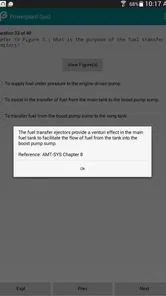
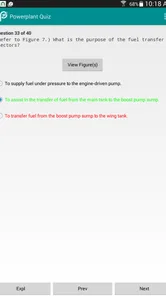
The app is packed with features that cater to both beginners and seasoned professionals. One of the standout features is the extensive database of questions. These are not just any questions but are directly aligned with the FAA's actual test questions. This means you're not just practicing; you're practicing smart. What's more, each question comes with a detailed explanation, so you can understand the reasoning behind the correct answers.
For a more disciplined approach, I’d avoid relying on one large session to judge readiness. A stronger pattern is to use the progress tracker to decide what to study next, then switch the subject you review only after you can explain why an answer is right. If the same concept keeps causing trouble, pause the quiz and study it elsewhere before returning. The app is most helpful when it guides the next step, not when it becomes the whole study plan.
Another feature worth mentioning is the exam simulation mode. This mode mimics the actual exam environment, which can significantly help reduce test-day anxiety. It's like having a mock test at your fingertips anytime, anywhere. Plus, the progress tracker is a fantastic tool to monitor your improvement over time. It displays which areas you’re acing and where you need to buckle down and study harder.
More From Our News Desk

 Gmail
GmailGmail in a Busy Inbox: Who Benefits Most?
From first account to crowded workday, Gmail earns its place through dependable search and flexible sorting—but its best fit depends on how much inbox maintenance you can tolerate.

 Prime Video
Switching to Prime Video: What Changes in Your Viewing Routine
Prime Video can make a compelling second home for streaming, but switching means learning a different catalog, rental layer, and route from browsing to playback.

 Universal TV Remote Control
Universal TV Remote Control Works Best as a Reliable Backup
A phone remote earns its place through quick setup and reliable habits. Here is how to get more from Universal TV Remote Control—and where its limits show.

 Weather - By Xiaomi
Weather by Xiaomi Review: Clear at a Glance, Less Clear Up Close
Xiaomi’s weather app makes everyday forecasts quick to scan, but its calm surface can leave useful details and recovery paths harder to find than they should be.

 X
XX Under Pressure: Can It Recover When Posting Goes Wrong?
A resilience-focused review of X, examining setup, mistaken posts, interruptions, weak connections, and the gaps that matter when recovery needs to be dependable.

 Clash of Clans
Clash of Clans Is Won Between the Battles
Its raids are quick; its community is a long-term project of coordination, teaching, rivalry, and shared responsibility—with all the friction that entails.
Latest News



Settings and study habits that matter
The product comes from Aviation Supplies & Academics, a developer associated with aviation study materials, and is an education app rather than a general-purpose quiz game. Before settling into a routine, I’d check the current version, 1.37.2, and make sure the device meets the stated minimum operating-system requirement of 5.1. The app is rated for Everyone, but its subject matter is specifically aimed at people preparing for aviation maintenance knowledge exams.
It costs $4.99, so I’d think of the purchase as a focused study aid, not a replacement for a course or reference book. Its 3.8 average from around 440 ratings, alongside over 50,000 installs, suggests it has found a practical audience, though that rating is a reminder to weigh your own needs rather than assume every learner will enjoy the same workflow. It was released on May 2, 2011, so checking that the installed version works comfortably on your device is sensible before building a daily routine around it.
One useful trade-off is portability versus depth. A phone makes it easy to fit in a quick review while waiting for class or during a break, but a small screen is not ideal for lengthy reading or drawing out how components relate. I’d use the app for recall and explanations, then use a larger reference when a question points to a system I need to understand in context. If studying without a reliable connection matters to you, check how the app behaves on your own device before depending on it for travel; don’t assume a particular offline workflow.
Faster practice, with sensible limits
Compared with broad aviation learning resources, this is a narrower tool: its value is concentration on powerplant exam preparation, while a textbook or instructor can provide fuller context and a general quiz app may offer less subject-specific structure. I’d keep a simple miss-log outside the quiz—just the topic and the reason I chose incorrectly—so repeated errors become visible instead of disappearing into a succession of scores. That is especially helpful when two answer choices seem plausible: explain the distinction in your own words before moving on.
When study time is short, I would use brief, purposeful sessions rather than rush through a simulated exam every day. A simulation is more useful as a check after reviewing weak areas than as a warm-up, because otherwise a disappointing result may tell you little beyond “I need more study.” On a day when I have only a few minutes, I’d review one troublesome concept and its explanation; on a quieter day, I’d use a longer practice session to see whether that knowledge holds across questions.
The main limitation is the risk of mistaking familiarity for mastery. Repeated exposure to question wording can make answers feel obvious without preparing you to explain the underlying operation or apply it in a new situation. I’d pair practice with class notes and authoritative study materials, and I wouldn’t use a high score alone as evidence that every subject is secure. Learners seeking video lessons, a broad aviation curriculum, or a substitute for instructor feedback will be better served by adding another resource.
Making short sessions count
A useful everyday scenario is the gap between a class and the next scheduled study block. I might use a break to answer a small batch, but I would stop after noticing a pattern rather than chase a higher score. If I miss questions on related concepts, I’d write down what the questions have in common and take that issue to my notes or instructor. That turns a few spare minutes into a specific study task instead of letting a quick quiz become aimless tapping.
Another practical choice is to separate retrieval practice from learning new material. I’d use the app when I have already encountered a topic and want to test whether I can retrieve it without prompts. If I cannot explain an answer after reading its explanation, I would mark the concept for a deeper review rather than immediately retrying until I remember the wording. This is a small but important distinction: the app can expose uncertainty quickly, while a book or instructor can help resolve it.
For learners balancing work and study, a repeatable schedule can be more valuable than occasional marathon sessions. I’d set a modest goal for each sitting—one weak subject, a review of recent mistakes, or a later simulation—and note what I intend to do next before closing the app. That makes it easier to resume without spending the first few minutes deciding where to start. It also discourages using progress indicators as a substitute for understanding.
Where it fits among study options
Compared with a printed question resource, the phone format is easier to carry and makes quick self-testing convenient, while paper can be more comfortable for annotating, sketching relationships, or keeping a broad view of a topic. Compared with a general aviation quiz app, this one is more specifically aimed at powerplant exam preparation. A course or technical reference remains the better choice when I need structured teaching, fuller explanations, or help connecting an isolated answer to an entire system.
I would not treat those alternatives as competitors that must be chosen one at a time. The most sensible setup for many learners is a primary source for instruction, a reference for checking details, and this app for recall practice. If budget or study time means choosing only one resource, I’d start with the option that teaches the material rather than a question tool. If the concepts are already familiar and the gap is regular exam practice, the app becomes a more compelling addition.
The purchase is a modest, focused commitment, but it still makes sense to consider how you actually study. Someone who dislikes learning through multiple-choice questions, needs extensive visual demonstrations, or depends on detailed instructor feedback may not get enough from it on its own. A learner who is comfortable using questions to diagnose gaps can make better use of the app, provided they are willing to leave it and consult a deeper source when a concept remains unclear.
Why It Stands Out
What sets Prepware Powerplant apart from other study aids is its attention to detail and user-centric design. The app doesn’t just throw information at you; it structures your learning journey. With regular updates, the app ensures that all the content is up-to-date with the latest FAA guidelines. This is crucial for anyone serious about passing their exams.
Moreover, the app is designed to be used on-the-go. Whether you’re commuting, on a lunch break, or relaxing at home, you can easily squeeze in some study time. This flexibility is invaluable, especially for those juggling multiple responsibilities.
What I would check before relying on it
Because a study routine depends on more than the question content, I’d first make sure the app runs comfortably on the device I plan to use and that I can read explanations without straining. I’d also try a few sessions in the places where I expect to study: a quiet desk, a short break, or a commute where it is safe and practical to use a phone. That gives me a realistic sense of whether the format fits my habits before I depend on it as part of exam preparation.
I would also decide in advance how to handle a correct guess. If I cannot explain why the selected answer fits better than the alternatives, I would count it as something to review, not as a secure point. This avoids a common trap in question-based study: a good-looking run can come from recognizing familiar phrasing rather than being able to reason through the subject. Keeping that rule consistent makes the progress information more useful to me.
One question learners often have is whether this can replace a textbook or course. My answer is no: I would use it to rehearse knowledge and identify weak areas, while relying on teaching materials for the depth and context that a quiz format cannot provide by itself. Another is whether it is useful for a complete beginner. It can help a beginner check what has been taught, but I would not begin with it as the only source of instruction.
For someone already studying, the more relevant question is how to fit it around existing work. I’d use it after a lesson to test recall, return to missed concepts in the primary material, and save a simulated exam for a later check. If the app’s question style does not suit the way I learn, or if I need diagrams and demonstrations to make sense of a system, I would spend more time with a book, class, or instructor and use the app only when it adds something useful.
Final Thoughts
All in all, Prepware Powerplant proves to be an invaluable tool for anyone preparing for their powerplant certification exams. With its comprehensive content, realistic exam simulations, and user-friendly interface, it's a powerhouse of a study aid. If you're looking to boost your confidence and ensure you're well-prepared come exam day, this app is definitely worth considering. Happy studying!
I’d recommend it most to learners who want a portable way to rehearse powerplant knowledge alongside a course or reference, and least to anyone expecting a complete, stand-alone teaching program. My practical verdict is to use its practice and explanations to steer your study, keep notes on recurring mistakes, and reserve simulated exams for checking progress. That turns a compact quiz tool into a more deliberate part of preparation without asking it to do a textbook’s job.
Prepware Powerplant FAA Tests Frequently Asked Questions
Does Prepware Powerplant match the subject I need to study?
Yes. Prepware Powerplant focuses on preparation for the FAA Aviation Mechanic Powerplant Knowledge Test, making it relevant if your goal is to study powerplant topics rather than another exam subject. It is an educational app from Aviation Supplies & Academics, intended for aviation students, mechanics, and others pursuing aviation maintenance. Check that this specific subject matches your exam plans before downloading.
What is Prepware Powerplant and who is it for?
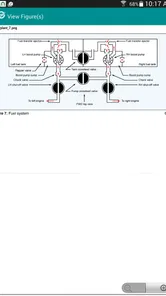
Prepware Powerplant is a comprehensive study tool designed for those preparing for the FAA Aviation Mechanic Powerplant Knowledge Test. It's ideal for aviation students, mechanics, and anyone pursuing a career in aviation maintenance. The app provides detailed explanations, illustrations, and practice tests to ensure users have a thorough understanding of powerplant systems.
How user-friendly is the Prepware Powerplant app?
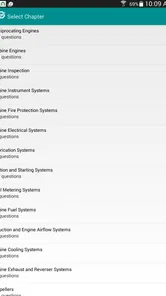
Prepware Powerplant is designed with user-friendliness in mind, featuring an intuitive interface that makes navigation easy for all users. The app is organized into sections that cover different topics, allowing users to focus on specific areas of study. It also offers customizable study sessions, making it adaptable to individual learning paces and preferences.
What features does Prepware Powerplant offer to enhance learning?
The app includes a variety of features to enhance learning, such as detailed explanations of concepts, high-quality illustrations, and a large database of practice questions. Users can take simulated exams that mimic the actual FAA test format, track their progress over time, and identify areas where they need improvement. Additionally, the app is regularly updated to reflect the latest regulations and test standards.
Can Prepware Powerplant be used offline?
Yes, Prepware Powerplant can be used offline, allowing users to study without an internet connection. This feature is particularly beneficial for those who may not always have access to Wi-Fi or mobile data, such as when traveling or in remote locations. However, users should connect to the internet periodically to receive updates and new content.
Pros
- Comprehensive study material.
- User-friendly interface.
- Regular content updates.
- Offline access available.
- Includes practice exams.
Cons
- Limited free content.
- No interactive learning tools.
- Requires large storage space.
- Occasional app crashes.
- Customer support response slow.













