Premier Bowl Scorekeeper
- 95.00
- 4.7
- Installs
- 5.00K
- Price
- $3.99

Screenshots
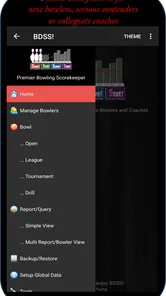
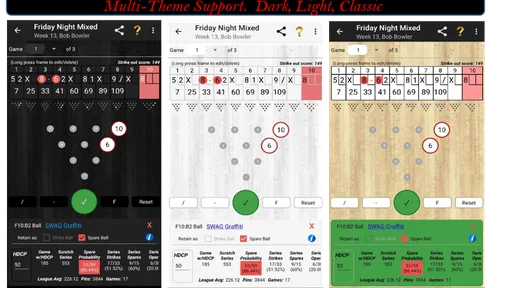
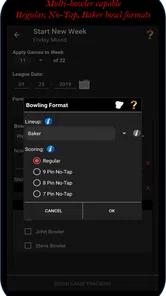
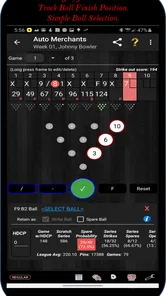
Analysis by Reviewed
When I bowl with friends, I want to focus on the next shot rather than argue over how a frame should be scored. That’s the practical appeal of Premier Bowl Scorekeeper: it gives bowlers and coaches a dedicated place to enter scores and review performance. I’d consider it most useful when a group wants more than a quick tally, though its paid entry point means casual players should think about how often they will use it.
Who gets the most from a bowling scorekeeper
I can see this fitting regular league bowlers, coaches, and anyone who likes to compare sessions over time. In a typical night at the lanes, one person can enter each player’s rolls while the rest of the group plays. That keeps the scoring task from falling to mental arithmetic and gives the group a record to look back on later. For a one-off outing where everyone is happy with the center’s scoring display, using a separate app may be unnecessary.
The useful distinction from a paper score sheet or a basic calculator is the combination of score entry and bowling-focused metrics. A paper sheet is dependable and easy to share, but it leaves the calculations and any longer-term review to you. A calculator can check a frame, but it does not serve as a running bowling record. The app’s value depends on whether that extra tracking helps you make decisions about your game, not just whether it can total a score.
A more deliberate way to use your session history
For a bowler working on consistency, I’d treat the past-game record as a prompt for a short review after a session, rather than trying to draw big conclusions from one good or bad night. Compare games across multiple visits and note whether a change in approach seems to hold up. That is a more useful habit than checking a single score and deciding that your form has changed overnight. Coaches may also find the metrics helpful as a conversation starter, while still relying on what they observe at the lanes.
There is a small but important trade-off in entering scores during play: the person keeping the record has to stay attentive. If rolls are entered late or incorrectly, the record becomes less useful, even when the app is doing the calculations. I’d agree before the first frame who is entering results and make corrections as soon as they happen. That simple routine matters more in a lively group than any analytics screen.
What its current version tells me—and what it doesn’t
Developed by Steve Neglia, this is a paid sports app, priced at $3.99, with optional in-app purchases ranging from $0.99 to $2.99 per item. Its current version is 7.1.0.p, and it has been available since March 19, 2017. That history suggests an established product rather than a brand-new scoring experiment; it does not, by itself, prove what changed between releases, so I wouldn’t assume a particular feature was recently added.
For existing users, a current version number is useful when checking compatibility or deciding whether to keep the app updated, but I’d judge an update by whether it continues to fit your scoring routine. The app has a 4.7 average from around 190 ratings, with roughly 100 written reviews, and has passed 5,000 installs. It is rated for Everyone, and the stated minimum operating system is Android 5.0. Those details make it easier to assess whether it suits your device and comfort level, while the paid price is still the clearest reason a very occasional bowler might prefer a free or built-in option.
More From Our News Desk

 Gmail
Gmail in a Busy Inbox: Who Benefits Most?
From first account to crowded workday, Gmail earns its place through dependable search and flexible sorting—but its best fit depends on how much inbox maintenance you can tolerate.

 Prime Video
Switching to Prime Video: What Changes in Your Viewing Routine
Prime Video can make a compelling second home for streaming, but switching means learning a different catalog, rental layer, and route from browsing to playback.

 Universal TV Remote Control
 Works Best as a Reliable Backup
A phone remote earns its place through quick setup and reliable habits. Here is how to get more from Universal TV Remote Control—and where its limits show.

 Weather - By Xiaomi
Weather by Xiaomi Review: Clear at a Glance, Less Clear Up Close
Xiaomi’s weather app makes everyday forecasts quick to scan, but its calm surface can leave useful details and recovery paths harder to find than they should be.

 X
X Under Pressure: Can It Recover When Posting Goes Wrong?
A resilience-focused review of X, examining setup, mistaken posts, interruptions, weak connections, and the gaps that matter when recovery needs to be dependable.

 Clash of Clans
 Is Won Between the Battles
Its raids are quick; its community is a long-term project of coordination, teaching, rivalry, and shared responsibility—with all the friction that entails.
Latest News



Scorekeeping Made Easy
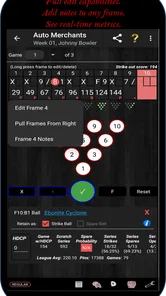
First off, let's talk about its main feature – the scorekeeping. Gone are the days of fumbling with paper and pen trying to calculate your score. Premier Bowl Scorekeeper takes care of all that. You just input your pins knocked down after each roll, and bam! It calculates your score instantly. It's like having your personal scorekeeper right in your pocket! Plus, it supports multiple players, so you can easily keep track of your friends’ scores too.
Intuitive Interface
One of the things I love about this app is its user-friendly interface. It's straightforward and intuitive, making it easy for anyone to use. Whether you're a tech-savvy individual or someone who's not very familiar with apps, you'll find it easy to navigate through the various features. The clean and simple design ensures that you can focus on your game without any distractions.
Additional Features
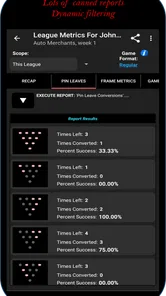
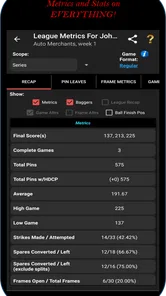
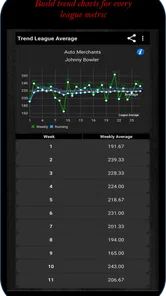
Aside from just keeping scores, the app also offers some additional features that I found really handy. For instance, it keeps a record of your past games, so you can track your progress over time. It's pretty cool to see how your skills improve, or in my case, how consistent my gutter balls are! The app also provides stats and analytics, which can help you identify patterns in your playing style and areas for improvement.
Another neat feature is the ability to customize the scoring rules. If you prefer playing with certain house rules, you can easily adjust the settings to accommodate that. It's always nice to have that flexibility, especially when you're playing with a group that has its own set of rules.
Using it without letting scorekeeping take over
For a practical routine, I’d decide before arriving whether I’m tracking every player or only one bowler. If I’m helping a friend work on their game, keeping the record focused on that person makes the later review easier to interpret. If the group wants everyone included, I’d assign one person to enter rolls and let everyone else concentrate on bowling. That small decision avoids turning each frame into a discussion about whose turn it is to use the phone.
A useful habit is to check the entry after any unusual frame rather than waiting until the end of the game. A missed roll or mistaken pin count can affect what follows, and fixing it while the details are fresh is less disruptive than reconstructing several frames later. I’d also keep the phone with the designated scorekeeper instead of passing it around after every turn. It is a simple way to reduce interruptions and keep the record consistent.
When the metrics are useful—and when to ignore them
Bowling numbers are most helpful when they answer a question you already have. If I am trying to become more consistent, I might use the saved games to see whether my results are trending in the direction I want across visits. If I am coaching, I could use the record to start a specific conversation about a session, then compare it with what I saw in person. The figures can organize observations, but they cannot explain why a shot went wrong or replace technique feedback.
I would avoid treating one unusually high or low score as proof that a new habit is working or failing. Lane conditions, fatigue, concentration, and the mix of players all affect a night’s results, so a single session is a noisy sample. A better approach is to make one small note about what you were trying to do, then revisit the pattern over multiple sessions. That keeps the app’s history useful without asking it to diagnose your bowling for you.
Picking the right tool for the night
Compared with a bowling center’s built-in display, a separate scorekeeper is worthwhile when you want your own record or want to review performance beyond the current game. The center display is usually the least-effort choice for a casual visit: it is already part of the lane experience and does not require someone to maintain another record. A paper sheet works well when several people want to see or mark the score together, while a calculator is enough if all you need is to verify a total.
This app occupies the more deliberate middle ground: it is meant for people who want bowling-specific score entry and metrics, not merely a replacement for a display. I’d choose it for recurring practice, a league routine, or a coaching session where looking back has a purpose. I would skip it for a spontaneous game if nobody wants to manage another screen, or if the group is satisfied with the lane’s scoring. The best option depends less on which tool has the most features and more on whether you will actually use the record later.
Limits to consider before relying on it
The clearest friction is the attention required during play. Even a convenient scorekeeper adds a task between rolls, and entering information while chatting or moving between turns makes errors more likely. If the phone is being used by several people, the handoff can also slow the group down. A single scorekeeper and prompt entries are a better fit than asking every player to manage their own record during a fast-moving game.
There is also a cost decision: the app is not a free alternative to a paper sheet, and optional purchases can add to the expense if you choose them. I’d decide whether saved history and bowling-oriented analysis are genuinely part of my routine before paying. Someone who bowls only now and then may get everything they need from a lane display or paper. For a regular bowler, the cost is easier to justify if the app becomes part of a consistent practice review rather than something opened once and forgotten.
The Verdict
All in all, I have to say that Premier Bowl Scorekeeper is a must-have app for anyone who loves bowling. It's practical, easy to use, and packed with features that enhance the whole bowling experience. Whether you're a casual bowler or a seasoned pro, this app is bound to make your time at the lanes more enjoyable. So, next time you head out for a bowling night, make sure to have this app downloaded and ready to go. Trust me, you won't regret it!
My bottom line
I’d recommend it most to people who bowl often enough to benefit from a saved history and who enjoy looking beyond the final score. If you mainly need to keep a casual group moving, the lane’s own scoring display or a paper sheet may be simpler and cost nothing extra. The app makes more sense when tracking your own sessions, supporting a coach’s review, or keeping several players’ games together is part of the fun.
Before committing, I’d check that the version available for your device meets its operating-system requirement and decide whether you’ll use the optional purchases. During play, enter rolls promptly; after the game, use the saved record to compare sessions rather than overreacting to one result. For me, that is the clearest way to get lasting value from this bowling tool: let it handle the bookkeeping, then use its history and metrics to guide a more thoughtful next visit.
Premier Bowl Scorekeeper Frequently Asked Questions
What bowling experience or device setup should I have before downloading Premier Bowl Scorekeeper?
Premier Bowl Scorekeeper is a sports app for bowlers and coaches, and its minimum operating system requirement is Android 5.0. It is designed for use as a bowling scorekeeper, so it is most relevant if you want to record bowling scores or review performance metrics. The app is rated for Everyone, making its listed content suitable for a broad audience.
What is Premier Bowl Scorekeeper and who is it for?
Premier Bowl Scorekeeper is a specialized application designed to assist bowling enthusiasts in keeping track of their scores efficiently. It caters to both amateur and professional bowlers, providing a user-friendly interface that simplifies scorekeeping during games. The app is perfect for individuals looking to enhance their bowling experience by maintaining accurate records of their performances.
What features does Premier Bowl Scorekeeper offer?
The app boasts a variety of features aimed at enhancing the bowling experience. Key features include real-time score tracking, historical data storage for analyzing past performances, customizable settings to suit personal preferences, and a user-friendly interface. Additionally, it offers the ability to share scores with friends and participate in online bowling communities, making it a comprehensive tool for all bowling enthusiasts.
Is Premier Bowl Scorekeeper available for both Android and iOS devices?
Yes, Premier Bowl Scorekeeper is available for download on both Android and iOS platforms. Users can find it on the Google Play Store for Android devices and the Apple App Store for iOS devices. This accessibility ensures that a wider audience can benefit from its features, regardless of their mobile operating system.
Does Premier Bowl Scorekeeper require an internet connection to function?
Premier Bowl Scorekeeper primarily operates offline, allowing users to track scores without needing an active internet connection during games. However, an internet connection is necessary for certain features, such as sharing scores online and participating in community challenges. This hybrid functionality ensures that users can enjoy the app both on and offline.
Pros
- User-friendly interface for all ages
- Real-time scoring updates
- Customizable game settings
- Offline mode available
- Supports multiple player profiles
Cons
- Limited free features
- Ads can be intrusive
- Occasional app crashes
- Subscription needed for premium features
- No live chat support