

Posh – Create & Find Events
- 165.00
- 4.8
- Installs
- 100.00K
- Price
- Free

Screenshots



Analysis by Reviewed
I judge an event app by what it helps me do when plans are still taking shape: find something worth going to, make sense of the details, and keep the moving parts from becoming a chore. Posh – Create & Find Events is built around both sides of that process, bringing eventgoers and organizers into one place. That makes it more useful than a simple calendar, but it also means your experience depends on what events and people are active in your orbit.
Posh is a free events app from Posh, with a Teen age rating. It has a 4.9 average from around 2.2K ratings, and more than 100,000 installs. Those figures suggest a positive reception, though they can’t tell you whether the events in your area match your interests. The practical question is whether you want a dedicated place to explore and organize events rather than relying entirely on group chats, social feeds, or a calendar.
Finding events without losing track of the plan
I start this section with the practical question behind event discovery: can I turn a promising listing into a plan without letting details vanish into a group chat? I’ll look at how Posh’s shared focus on attendees and organizers can help, and where familiar tools may still be the better fit. The next section turns from planning habits to what I’d expect during everyday use.
What the combined event focus changes
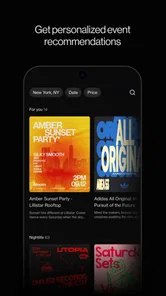
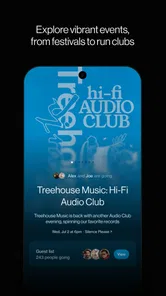
Many people discover events in one app, discuss them in another, and save the date somewhere else. Posh’s appeal is that it is designed for the event itself: it connects people looking to attend with people putting events together. In my view, that shared focus is the most meaningful reason to try it. It gives event discovery and event organization a common home instead of treating them as unrelated tasks.
The app’s summary describes an ecosystem of over 5 million eventgoers and organizers. I would read that as a sign of its intended reach, not a promise that every neighborhood has a busy selection. Before making it your main source for plans, check whether the kinds of events you actually enjoy appear in your area. A large overall community can still feel quiet locally, particularly if your interests are specific.
For a realistic use case, imagine a friend sending a Posh event while you are arranging a weekend out. Rather than letting the details disappear into a busy chat, you can use the event-focused app as the place to investigate the plan and connect it to the wider event community. The benefit is less about replacing every tool your group uses and more about giving the event a clearer center of gravity.
When discovery is useful—and when it isn’t
Posh is a stronger fit when you want to browse with an open mind, meet events through an organizer-led community, or create an event rather than merely add someone else’s invitation to your schedule. It is less compelling if your plans are almost always private gatherings arranged among a small group. In that situation, a messaging app and a regular calendar may already be faster because everyone you need is there.
More From Our News Desk

 Gmail
GmailGmail in a Busy Inbox: Who Benefits Most?
From first account to crowded workday, Gmail earns its place through dependable search and flexible sorting—but its best fit depends on how much inbox maintenance you can tolerate.

 Prime Video
Switching to Prime Video: What Changes in Your Viewing Routine
Prime Video can make a compelling second home for streaming, but switching means learning a different catalog, rental layer, and route from browsing to playback.

 Universal TV Remote Control
Universal TV Remote Control Works Best as a Reliable Backup
A phone remote earns its place through quick setup and reliable habits. Here is how to get more from Universal TV Remote Control—and where its limits show.

 Weather - By Xiaomi
Weather by Xiaomi Review: Clear at a Glance, Less Clear Up Close
Xiaomi’s weather app makes everyday forecasts quick to scan, but its calm surface can leave useful details and recovery paths harder to find than they should be.

 X
XX Under Pressure: Can It Recover When Posting Goes Wrong?
A resilience-focused review of X, examining setup, mistaken posts, interruptions, weak connections, and the gaps that matter when recovery needs to be dependable.

 Clash of Clans
Clash of Clans Is Won Between the Battles
Its raids are quick; its community is a long-term project of coordination, teaching, rivalry, and shared responsibility—with all the friction that entails.
Latest News



It also isn’t a substitute for deciding whether an event suits you. I would treat an appealing listing as the beginning of the decision, then read its details carefully and check any practical questions that matter to your plans. An event app can make discovery easier, but it cannot make a vague plan specific or guarantee that a listing fits your preferences.
How it compares with familiar alternatives
Compared with a general social feed, an event-focused service has a clearer purpose: the event is the thing you are trying to find or organize, not one post among many kinds of content. Compared with a basic calendar, it speaks more directly to discovery and the people behind events. That distinction matters if you want to explore beyond invitations already circulating among your friends.
The trade-off is that a calendar is often better for the final, no-surprises record of your commitments, while a group chat is often better for quick coordination among people who already know one another. I would not expect Posh to eliminate those habits. A sensible workflow is to use it for event discovery or organizing, then rely on the tools your group already checks for last-mile reminders and personal scheduling.
A practical way to decide whether it fits
When I try an event platform, I look beyond whether its first screen seems interesting. I want to know whether it helps me move from curiosity to a clear choice. A useful first test is to search for the kind of outing you would genuinely consider this week, then ask whether the available options make sense for your location, interests, and schedule. If the answer is no, that is meaningful information: a broad community does not automatically translate into a useful local feed.
It is also worth deciding what you want the app to do before inviting friends into it. If you are mainly hoping to discover something new, explore on your own first. If you are organizing, think about whether the people you want to reach are likely to use an event-focused service or whether a familiar group chat will get the information in front of them more reliably. That small distinction prevents the common frustration of trying to move a whole group into a new tool before there is a reason for them to join.
Speed, busy moments, and dependable use
Here I shift from choosing an event to relying on the app while plans are active, including how I’d handle interruptions and a busy stretch of coordination. I’ll keep performance expectations grounded in what can reasonably be judged, then consider the Android compatibility baseline and who may prefer a simpler option. That leads to a practical verdict on when Posh earns a place in my routine.
What to expect from everyday speed
Posh is currently at version 8.22.0, but a version number alone does not tell me how quickly it opens or how smoothly it behaves on a particular phone. I would set expectations around the type of work it does rather than assume a specific speed: browsing events and moving between event-related tasks should feel most comfortable when the app has a useful selection to explore and the phone has a reliable connection.
Discovery apps can feel slow even when the software itself is behaving normally. A sparse local scene, incomplete event details, or a need to switch between listings and conversations can make the process feel less direct than opening a calendar entry. My practical advice is to test it with a real plan, not just a quick install: search for something you might attend, inspect the information, and see whether the route from interest to a decision suits you.
Using it during a busy planning stretch
The most demanding moment is likely to be a day when several plans are competing for attention: comparing possible events, coordinating with friends, and keeping track of which event is the priority. Posh’s event-centered approach can help keep the discovery part from being scattered across unrelated feeds. But it does not remove the human part of planning. People still need to agree on timing, travel, and whether they are actually going.
One useful habit is to separate browsing from commitment. I would first use Posh to identify promising options, then settle on one plan with the people involved, and finally place the confirmed commitment in the calendar everyone relies on. This avoids a common planning trap: saving several possibilities and later mistaking one of them for a definite booking or meeting. It is a simple workflow, but it makes an event app more helpful without asking it to become your entire planning system.
For organizers, the same distinction is important. An event can be the shared point of reference, but the organizer still needs to make the important details clear and communicate changes where attendees will see them. The app’s combined audience of organizers and attendees gives it a natural role in that process; the quality of the information and follow-through remains a responsibility of the people creating the event.
Reliability and recovering from interruptions
I would be cautious about treating any event app as the only place where a time-sensitive plan exists. Phones lose connectivity, people miss updates, and plans change at inconvenient moments. For an event I care about, I would make sure I know the key details before setting off and keep essential information somewhere I can find it without having to reconstruct the whole conversation.
This is not a claim that Posh is unreliable; it is sensible preparation for any app used to coordinate real-world plans. If you are organizing, communicate significant changes clearly rather than assuming every attendee is watching the app continuously. If you are attending, check the latest event information before travel. That small routine reduces the chance that a perfectly usable app becomes a source of confusion simply because someone expected it to replace direct communication.
Recovery also matters when you have been interrupted. If you switch away while comparing events, it helps to remember the practical details you were weighing—such as which plan fits your schedule—rather than relying on a half-finished browsing session to preserve your decision. I would treat the app as a place to return to the event, not as a substitute for making a clear choice with your group.
Device fit and resource expectations
The listed minimum operating-system requirement is Android 8.0. That gives owners of many older Android devices a clear baseline to check before installing, but compatibility does not guarantee identical performance on every phone. A device that is already short on storage, slow with other apps, or running an older system may make browsing feel less comfortable than it does on a newer handset.
I would avoid assuming that an event app needs a powerful phone, but I also would not promise that it has no effect on battery, storage, or data use. Those depend on the device and how you use it. If your phone is constrained, try it during ordinary browsing first and notice whether it fits your routine before depending on it for a tightly scheduled day. That is especially worthwhile if you often have limited mobile data or keep many apps open while coordinating plans.
Posh is also not the best choice for someone who simply wants a lightweight place to record a date. A built-in calendar is more direct for that job and may already be available on the device. The extra value here comes from the events community and the connection between finding and organizing, so it makes sense only if you expect to use those parts.
Who I’d recommend it to
I’d recommend Posh to people who enjoy discovering events, to organizers who want an event-focused place to connect with potential attendees, and to anyone whose social plans currently get buried across several feeds. It is particularly worth considering if you are open to finding new events rather than only managing invitations from people you already know.
I would skip it if your event life is mostly private meetups, if your local selection does not reflect what you want to do, or if you need a straightforward personal calendar and nothing more. It may also be a poor fit if you expect every friend to adopt a new app before you can coordinate. In that case, use the tools your group already checks, and consider Posh only for the discovery or organizer side of the process.
Small planning choices that make a difference
One practical way to avoid turning browsing into an endless scroll is to set a purpose before opening the app: find one worthwhile option, check whether it fits, and then decide whether to share it. That keeps discovery connected to a real plan rather than becoming another stream of possibilities to revisit later. For groups, sending one considered event is often easier to act on than passing around several options without saying which one you prefer.
If you are an organizer, I would treat clarity as part of the event experience. Put the essentials where attendees can find them and make important changes explicit instead of assuming people will infer them from a conversation. That does not guarantee attendance or remove the need for direct communication, but it gives the event a better chance of being understood by people who discover it outside your immediate circle.
My verdict on performance and everyday value
Posh’s strongest quality is its clear focus: it brings eventgoers and organizers together around discovering and creating events. That gives it a more purposeful role than a general feed and a more community-oriented one than a basic calendar. The app is free, which makes trying it an easy decision if you are curious, while its Teen rating is a useful consideration for families checking age guidance.
My overall recommendation is conditional but positive. If you want a dedicated way to explore events and your local options are active, Posh is worth trying; its strong average rating and growing install base make it a credible choice in the events space, not proof that it will fit every person or city. If you only need to remember a date, keep using your calendar. If you do try Posh, judge it by whether it helps you find or organize a real event with less scattered effort—not by how many possibilities you can scroll past.
For me, Posh works best as the starting point for an event plan, not the sole keeper of every detail. Use it to bring the event and its community into view, confirm the practical arrangements with the people involved, and keep your final schedule somewhere dependable. That balance makes the app useful without expecting it to solve every part of going out.
Posh – Create & Find Events Frequently Asked Questions
What is Posh – Create & Find Events?
Posh is an event discovery and ticketing app designed to help people find gatherings nearby and keep track of plans. Depending on what is available in your area, listings may include parties, concerts, social meetups, and other events. You can browse event details, check practical information such as date and venue, and use the app to explore events hosted by organizers on the platform.
How do I find events and buy tickets on Posh?
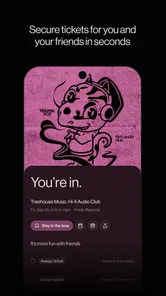
Browse the event listings or use any available search and filtering options to narrow down what you are looking for. Open an event page to review its description, schedule, location, and ticket information before deciding whether to attend. Ticket types, prices, availability, and checkout methods are set for each event, so check the listing carefully; availability and features can vary by event and location.
Can I create and manage my own event with Posh?
Posh also supports event hosting, allowing organizers to create a listing and share it with potential attendees. The setup process may ask for details such as the event name, date, venue, description, and ticket options. After publishing, use the tools provided in the app to review or manage the listing. Available organizer features and any fees or requirements may change, so confirm the current terms before publishing.
Does Posh require an account, and what personal information does it use?
Some browsing or sharing options may be available without signing in, but purchasing tickets, saving plans, or hosting an event may require an account. Registration and checkout can involve personal details, and payment information may be requested when buying a ticket. Before signing up, review the app’s current privacy policy and permissions, and provide only the information needed for the features you choose to use.
Is Posh free, and is it available everywhere?
Downloading the app may be free, but that does not mean every event is free: organizers can set ticket prices, and applicable taxes or service fees may appear during checkout. Event selection depends on local organizers and activity, so some areas may have fewer listings than others. Check the ticket total before paying and verify that the app and the specific event are available in your region.
Pros
- Create event invitations with custom designs and details.
- Discover events and experiences based on your interests.
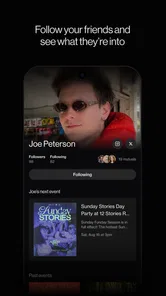
- Share event pages with friends to coordinate plans.
- Keep event information organized in one place.
- Useful for finding social activities beyond your usual circles.
Cons
- Event availability and activity can vary by location.
- Some events may require separate tickets or payments.
- The app is less useful if few people nearby use it.
- Event details depend on hosts and may change at short notice.
- Sharing personal interests and location may raise privacy concerns.











