Pool-Calculator
- 87.00
- 4.4
- Installs
- 5.00K
- Price
- Free

Screenshots
Analysis by Reviewed
Pool water questions tend to arrive at inconvenient moments: just before guests come over, after a spell of hot weather, or when a test result looks different from last week’s. I find Pool-Calculator most useful as a practical aid for turning those readings into a next step, rather than relying on a hunch. It is a free House & Home app from Pool and Spa Resources, aimed at making pool care less intimidating for everyday owners.
What I’d consider before choosing a pool app
The main decision is whether you want help with the arithmetic of water care or a broader record-keeping system. A calculator is valuable when you already test the water and need to work out what to add. It cannot replace testing, careful measuring, or the product label: the usefulness of any recommendation depends on entering sound readings and following the chemical’s directions.
Pool-Calculator has an average rating of 4.4 from around 218 ratings, and it has passed 5,000 installs. It is free, rated for Everyone, and version 6.0.1 requires Android 7.0 or later. The app was released on June 28, 2014, so it is an established option rather than a brand-new tool. Those details make it easy to assess the basic fit, but I would still choose it for the job it does, not simply for its popularity.
Using Pool-Calculator for everyday pool care
For an ordinary owner, the useful workflow is straightforward: test the water, enter the results, and use the calculation to plan an adjustment. I would treat that output as a measured starting point, not an instruction to pour chemicals in without checking the container’s guidance. Pool volume and the accuracy of a test matter; a calculation based on a mistaken input can give a confident-looking answer that is still wrong.
Where a calculator earns its place
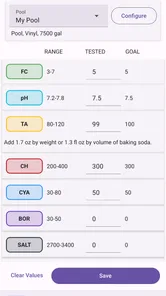
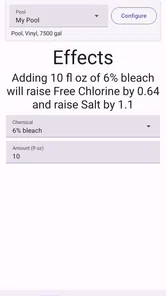
The app is designed to calculate chemical amounts for balancing pool water, including chlorine, pH, and alkalinity. That focus is handy when the question is specific—how to respond to a reading—rather than general, such as how to plan an entire maintenance season. I like the idea of keeping the calculation close to the test result, because it can reduce mental arithmetic and make the next action clearer.
A realistic example is checking the pool before a weekend swim after several hot days. I would take a fresh reading first, enter it carefully, then compare the suggested amount with the directions on the chemical I actually own. I would also make one planned adjustment at a time and retest as appropriate, instead of adding several products together based on a single glance. That routine helps separate a genuine water-balance issue from an input or measurement mistake.
Useful guidance, with a few practical cautions
Pool care involves more than chlorine and pH, and the app also addresses alkalinity and calcium hardness. That last topic is easy to neglect when attention is fixed on a more immediate reading. A useful habit is to keep a note of each test and adjustment outside the moment of calculation, so you can spot whether a recurring imbalance needs attention rather than repeatedly treating the same symptom.
More From Our News Desk

 Gmail
Gmail in a Busy Inbox: Who Benefits Most?
From first account to crowded workday, Gmail earns its place through dependable search and flexible sorting—but its best fit depends on how much inbox maintenance you can tolerate.

 Prime Video
Switching to Prime Video: What Changes in Your Viewing Routine
Prime Video can make a compelling second home for streaming, but switching means learning a different catalog, rental layer, and route from browsing to playback.

 Universal TV Remote Control
 Works Best as a Reliable Backup
A phone remote earns its place through quick setup and reliable habits. Here is how to get more from Universal TV Remote Control—and where its limits show.

 Weather - By Xiaomi
Weather by Xiaomi Review: Clear at a Glance, Less Clear Up Close
Xiaomi’s weather app makes everyday forecasts quick to scan, but its calm surface can leave useful details and recovery paths harder to find than they should be.

 X
X Under Pressure: Can It Recover When Posting Goes Wrong?
A resilience-focused review of X, examining setup, mistaken posts, interruptions, weak connections, and the gaps that matter when recovery needs to be dependable.

 Clash of Clans
 Is Won Between the Battles
Its raids are quick; its community is a long-term project of coordination, teaching, rivalry, and shared responsibility—with all the friction that entails.
Latest News



Pool-Calculator is not a substitute for a reliable test kit or for understanding the chemical being used. Test strips and other testing methods can produce different levels of precision, and pool volume estimates can be off, especially when a pool has an unusual shape. If the result seems surprising, I would retest and check the inputs before acting. For persistent or complicated water problems, advice from a pool professional is a better next step than repeatedly changing chemicals on guesswork.
When another kind of tool may suit you better
Compared with a paper chart or a calculator on a phone, a dedicated pool calculator can make the chemical math more convenient and keep the task focused. A notebook may be better for someone who mainly wants a dependable history of test results and prefers to record every detail in their own format. A broader pool-management tool may suit an owner who wants many kinds of household or maintenance tasks together, while a professional service is more appropriate when the water is persistently difficult to balance.
The trade-off is that a focused calculator only helps as much as the information you give it. If you do not test regularly, do not know the pool’s volume, or want an app to make decisions without your involvement, this is probably not the right fit. I would also avoid treating any app’s calculation as a guarantee that water is safe to swim in; testing and sound judgment still belong to the owner.
Getting value without making pool care complicated
To get more from the calculations, I would use the same testing routine each time and enter readings before adding anything. Keep the chemical container nearby so you can verify the product instructions, and avoid changing multiple variables at once. This makes it easier to understand what helped if the next test looks different. It also prevents a common trap: making a second adjustment before the first one has had a fair chance to take effect.
If you are switching from a paper chart or another calculator, the main cost is not money—the app is free—but the small effort of learning its process and entering your readings consistently. You do not need to abandon a notebook; keeping it as a record alongside the app can be a sensible backup. That approach is particularly useful if you want to compare results over time or share a clear history with someone helping maintain the pool.
Choosing a workflow that fits your pool
One small but useful distinction is whether you are trying to correct a single reading or understand a pattern. For a one-off adjustment, a calculation may be all you need. If readings keep drifting in the same direction, I would write down the test, the amount added, and when the next test was taken. The calculator can help with the immediate arithmetic, while that simple log gives you context that a single result cannot provide.
Pool shape can also change how much confidence I put in an answer. A rectangular pool is usually easier to estimate than one with curved sides, shelves, or several depths. If your volume is only a rough guess, I would avoid treating a calculated dose as exact; refine the volume estimate first, or ask a knowledgeable pool professional if a large correction is being considered. The app is most useful when its inputs are dependable, not when it is asked to compensate for uncertainty.
For a shared household, it helps to agree on one routine before anyone makes adjustments. One person can test and enter the readings, while another checks the label and records what was added. That avoids the familiar muddle of two people responding to the same result differently. The app can make the calculation easier, but the household still needs a clear handoff so an adjustment is not repeated simply because someone else did not know it had already been made.
Questions to settle before relying on it
Does it eliminate the need for a test kit? No. The calculation starts with a reading, so you still need an appropriate way to test the water and the patience to follow the kit’s instructions. Is it useful if you already know the pool volume and have test results? That is the situation where a focused calculator makes the most sense: it reduces arithmetic without pretending to do the testing for you.
Can it tell you whether the pool is safe to swim in? I would not use any chemical calculation as a standalone safety clearance. Follow the guidance for your test method and chemicals, and use professional help when results are confusing or the water remains difficult to manage. Will it replace a detailed maintenance log? I would not choose it for that purpose alone; a notebook or a dedicated record-keeping tool is a better fit if your priority is a complete history.
Those distinctions make the app easier to judge fairly. It is a calculator for owners willing to take part in the process, not a remote pool technician. If you want a tool that makes every decision for you, the required testing and checking may feel like extra work. If you would rather understand each adjustment and stay in control, that involvement is a strength rather than a drawback.
My recommendation for the right pool owner
I would recommend Pool-Calculator to a pool owner who already tests the water and wants a more convenient way to work out chemical adjustments. It is especially appealing to someone new to pool care who finds the arithmetic stressful but is willing to check readings and follow product directions. Its free price and Everyone rating also make it approachable for household use.
I would skip it if what you really need is hands-on diagnosis, a complete maintenance service, or a record system that suits a very detailed routine. For those needs, a professional or a more comprehensive approach may be more useful. For the everyday question of how to turn a test result into a sensible calculation, though, I think this app can make pool maintenance feel more manageable—provided you treat it as a helper, not an authority.
Getting Started
First things first, downloading the app was a breeze. I found it easily in the app store. Once installed, it welcomed me with a clean and intuitive interface. No need to wade through complicated menus; everything was right where you expected it to be.
Features That Make a Splash
One of the standout features is its ability to calculate the exact amount of chemicals needed to balance your pool water. Whether you're dealing with chlorine, pH, or alkalinity, the app has got you covered. I simply plugged in the current levels of my pool, and within seconds, it gave me precise recommendations. It’s like having a pool chemistry wizard right at your fingertips!
Not only does it handle the basics, but it also provides detailed instructions and tips on maintaining a healthy pool. I found the advice on maintaining calcium hardness particularly helpful, as it's something I often overlook. Plus, with its user-friendly charts and graphs, tracking changes over time is as easy as pie.
Why It’s a Game Changer
Being a pool owner can sometimes feel like a full-time job. But with this app, I felt more in control and less overwhelmed. The reminders feature is a lifesaver, ensuring I never forget to check my pool’s levels. It even syncs with my calendar, which is super handy during the busy summer months.
Another great perk is the community section within the app. Here, I could connect with other pool owners, share tips, and even troubleshoot common issues. It’s like having a support group for pool enthusiasts!
The Final Verdict
Overall, the app is a must-have for any pool owner. It simplifies pool maintenance, making it more manageable and less daunting. If you're looking for an app that offers both functionality and ease of use, then look no further. Whether you're a new pool owner or a seasoned pro, this app is bound to make your life a whole lot easier.
So, next time you find yourself guessing how much chlorine to add, remember there's an app for that. Dive into the world of easy pool maintenance, and keep your pool sparkling all season long.
Pool-Calculator Frequently Asked Questions
Who develops Pool-Calculator, and who might find it useful?
Pool-Calculator is a House & Home app from Pool and Spa Resources, aimed at people who want help with routine swimming-pool care. Its focus is reflected in the short description, “Pool-Calculator,” and the summary, “Pool Chemistry made easy.” It may suit pool owners looking for a practical starting point when working out chemical requirements, whether they are new to pool maintenance or already familiar with it.
What is Pool-Calculator and how does it work?
Pool-Calculator is a mobile application designed to help pool owners manage and maintain their swimming pools effectively. It provides users with tools to calculate the chemical needs of their pool based on size and current water conditions. The app offers easy-to-follow instructions to ensure optimal pool health, making it a must-have for pool enthusiasts.
Is Pool-Calculator available on both Android and iOS?
Yes, Pool-Calculator is available for download on both Android and iOS platforms. Users can find it on the Google Play Store for Android devices and the Apple App Store for iOS devices. This wide availability ensures that all smartphone users can benefit from its features to maintain their pools efficiently.
Does Pool-Calculator offer features for different types of pools?
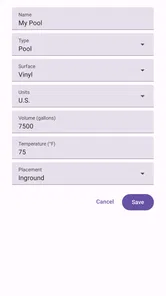
Pool-Calculator caters to various types of pools, including in-ground and above-ground pools. It allows users to input specific pool dimensions and types to accurately calculate the necessary chemical treatments. This adaptability makes Pool-Calculator a versatile tool for all pool owners, regardless of their pool type.
How user-friendly is Pool-Calculator for beginners?
Pool-Calculator is designed with a user-friendly interface that is easy to navigate, even for beginners. The app provides step-by-step guides and detailed instructions for each calculation, ensuring that users can confidently manage their pool's chemical needs without needing prior experience. Its simplicity makes it accessible to everyone.
Pros
- User-friendly interface for quick navigation.
- Offers precise pool chemical calculations.
- Supports various pool types and sizes.
- Regular updates enhance functionality.
- Offline functionality for remote areas.
Cons
- Limited free features
- subscription needed.
- Ads can be intrusive at times.
- No integration with smart home devices.
- Lacks detailed water testing guides.
- Occasional crashes on older devices.