Poll Everywhere
- 147.00
- 3.4
- Installs
- 1.00M
- Price
- Free

Screenshots
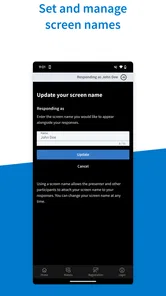
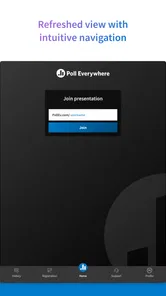
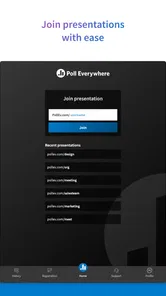
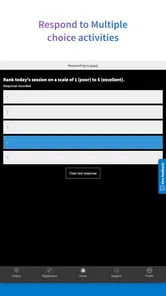
Analysis by Reviewed
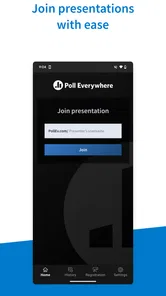
I found Poll Everywhere most useful when a group needs to collect quick responses without turning a meeting into a parade of raised hands. It is a free business app from Poll Everywhere Services, designed for answering live activities from an Android phone or tablet. In practice, I see it as a companion for presentations, workshops, classrooms, team check-ins, and events where the speaker wants participation to happen in the moment rather than after the session.
That simple purpose also defines its limits. This is not a full project-management tool, a discussion forum, or a replacement for a carefully designed survey platform. Its value appears when someone is already running a live activity and wants the audience to respond from a mobile device. I spent time looking at that experience through a practical accessibility lens: how easy the app is to read and navigate, how much physical effort it demands, how it behaves in different environments, and which barriers may still affect participation.
How the live-response experience works for different people
I look at the live-response experience from the participant’s side first: how someone joins in, follows a prompt, and answers while a meeting or presentation is moving along. That view also makes clear why the host’s pacing and wording matter as much as the phone in someone’s hand. Next, I turn to the practical access considerations that shape whether this workflow suits a particular group.
Readability and navigation during a busy session
The strongest part of the concept is its narrow focus. When I open the app for a live activity, I am not asked to work through a large business dashboard before reaching the response itself. That matters in a room where the presenter is moving quickly and the audience may already be dividing attention between a screen, a speaker, notes, and a phone.
The interface is most comfortable when the activity is clearly identified and the question is short. A participant who is familiar with joining live activities can usually concentrate on the answer instead of learning a complicated workflow. That makes it a sensible choice for a team meeting where several people may be using the app for the first time.
Readability still depends heavily on the activity created by the presenter. Poll Everywhere can display the response task, but it cannot rescue a question that is crowded with text, unexplained abbreviations, or several instructions packed into one screen. For an inclusive session, I would write one direct question at a time, use plain language, and explain verbally what the audience should do before expecting responses.
There is also an important difference between reading a prompt on a phone and reading it on a larger presentation display. The audience should not have to zoom mentally between the presenter’s screen and the mobile interface. I would repeat the essential instruction aloud, especially when the session includes people who have difficulty reading small text, are seated far from the display, or are joining while handling another task.
More From Our News Desk

Weather by Xiaomi Review: Clear at a Glance, Less Clear Up Close

X Under Pressure: Can It Recover When Posting Goes Wrong?

Clash of Clans Is Won Between the Battles

Android Auto Makes the Case for Quieter Car Software

MobiOffice: Transforming Mobile Productivity with Seamless Integration

EA SPORTS FC™ Mobile Soccer: Redefining Mobile Sports Gaming
Navigation becomes less predictable when the host changes activities rapidly. A participant may understand the first question but need a moment to recognize that a new response is now required. That is not necessarily a flaw in the app itself; it is a live-session design issue. A short pause and a spoken transition such as “the next question is ready” can make the experience much easier for people who process information more slowly.
One useful habit is to test the entire participant route before the meeting begins. I would join from the same type of device the audience is likely to use, check whether the activity is easy to identify, and confirm that the answer can be submitted without hunting through unrelated controls. This small rehearsal often reveals more than simply checking that the host’s presentation looks correct.
Motor and sensory considerations
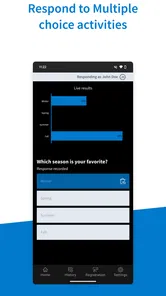
For many participants, the app asks for only a few actions: open it, reach the live activity, choose or enter a response, and submit. That relatively short chain is helpful for people who find lengthy forms tiring. It also makes the tool practical when a presenter wants a quick temperature check rather than a detailed questionnaire.
However, “quick” does not mean effortless for everyone. Touchscreen interaction can be difficult for people with tremors, limited dexterity, joint pain, or difficulty maintaining precise contact. The physical demands may be modest, but they are still real. A host should never treat a missing response as proof that someone has no opinion; the person may be unable to operate the phone comfortably in that moment.
I would make room for an alternative response route, such as telling the presenter privately, using a paired participant’s device with permission, or responding verbally when the activity allows it. The app works best as an invitation to participate, not as a gate that determines who gets heard.
People with visual sensitivities may also experience the session differently depending on the presenter’s content and the surrounding display. Rapidly changing presentation material, bright screens, glare, and a crowded room can make a supposedly simple poll harder to follow. Poll Everywhere does not control the lighting, projection, or pace of the event, so inclusive use requires attention outside the app.
For participants with hearing loss, the mobile response itself may be manageable, but the spoken explanation around it can become the weak point. If the host only announces the activity aloud and assumes everyone heard it, the app cannot compensate. I would show the activity identifier or instructions in writing, repeat them at a steady pace, and make sure the question is visible long enough for people to read it.
People who rely on assistive technologies should evaluate the actual device and operating-system combination they plan to use rather than assuming that a mobile app will behave identically everywhere. The experience may depend on text size, screen reader settings, contrast preferences, keyboard access, and the structure of the particular activity. I would test those settings before a high-stakes event and keep a human alternative available.
Situational access in meetings, classrooms, and events
The most convincing everyday scenario is a hybrid team meeting. Imagine a manager asking whether a new process is clear. People in the room and remote colleagues need a low-pressure way to answer, and some employees may not want to speak first. A live mobile response can give the manager an early signal before opening a discussion. I like this workflow because it separates the first reaction from the loudest voice in the room.
It can also help in a workshop where the facilitator wants to discover confusion without embarrassing anyone. An anonymous-feeling response, when the activity has been configured that way, may encourage people to admit that an instruction was unclear. The important caution is that the host must explain how responses will be used. Participants should know whether the result is a private check, a visible group result, or the start of a conversation.
In a classroom, the app can make a lecture more interactive, but it should not become the only way to demonstrate understanding. A student may have a low battery, limited data access, an older device, difficulty typing, or discomfort with responding publicly. A paper option, partner response, or verbal alternative can preserve the learning goal without making phone ownership the hidden requirement.
Large events introduce a different set of pressures. Network congestion, noise, poor seating, and the need to keep a phone in one hand can all reduce the practical benefit of a live poll. I would avoid using the app for the only decision that matters, such as selecting a final answer in a time-sensitive exercise. It is better suited to gathering input, surfacing questions, and guiding the next part of a session.
Situational access also includes language and cognitive load. A participant may be comfortable with the phone but not with the vocabulary used in a corporate presentation. Short questions, one concept per activity, and an example response can make the experience more welcoming. If the host uses a scale, explaining what the ends mean is more helpful than assuming everyone interprets the numbers in the same way.
Another practical tip is to give people a response window that matches the task. A one-tap choice may need only a brief pause, while an open-ended answer deserves more time. Ending the activity too quickly favors fast typists and people who already know the subject. The application can collect the response, but the presenter decides whether the timing is fair.
What makes it different from ordinary alternatives
The usual alternative is a show of hands or verbal round-robin. Those methods are immediate, but they favor people who are comfortable being visible or speaking quickly. A live mobile response can widen participation by giving everyone a separate moment to answer. That is its clearest advantage in a group setting.
Another alternative is a general-purpose online form. Forms are usually better when the organizer needs detailed information, branching questions, longer written answers, or responses collected over hours or days. Poll Everywhere feels more appropriate when the question is part of a presentation and the answer should influence what happens next.
Chat tools are useful for conversation, but chat can become difficult to scan when many people reply at once. A focused activity can produce a cleaner signal for a single question. On the other hand, chat may be better for participants who need to explain their situation, ask for clarification, or avoid switching between applications.
In my view, the trade-off is clear: this app favors immediacy and group participation over deep response design. If your goal is a live pulse check, it has a sensible role. If your goal is a formal research instrument, a long feedback form, or an ongoing community conversation, I would choose a more specialized option.
Remaining barriers that hosts should plan around
The first barrier is dependence on the host’s preparation. A confusing activity remains confusing on a phone. The presenter needs to decide whether the question is readable, whether the response method matches the audience, and whether enough time has been allowed. That makes Poll Everywhere less “plug and play” than its short purpose might suggest.
The second barrier is device inequality. Even though the app is free, participation can still involve a phone, a compatible operating environment, connectivity, battery life, and the confidence to use a live digital tool in front of others. Free access removes one cost, but it does not remove every practical obstacle.
The third barrier is social pressure. A participant may worry that a response is identifiable, visible, or judged by colleagues. The host should explain the activity’s expectations before asking for honest feedback. For sensitive subjects, a live poll may not be the right instrument at all; a private channel or one-to-one conversation could be safer.
There is also a pacing barrier. People who need more time to read, type, translate, or operate a device can be left behind if the facilitator treats the first submitted answers as the complete result. I recommend leaving the activity open long enough for the slowest reasonable route, then verbally checking whether anyone needs another moment.
Finally, the app should not be mistaken for an accessibility solution by itself. It can support a more flexible participation pattern, but inclusive access comes from the combination of clear content, considerate facilitation, suitable technology, and alternatives. That distinction is important for organizations that want to involve people with different abilities rather than simply add a response button to a meeting.
Who should use it and who should skip it
I would recommend it to presenters, trainers, teachers, meeting facilitators, and event organizers who regularly ask short questions in real time. It is especially useful when the group is quiet, distributed, or too large for everyone to speak. The free price makes it easy to try, and the Everyone age rating keeps it broadly approachable for general audiences.
I would be more cautious if your audience includes people who cannot reliably use a touchscreen, people with limited connectivity, or participants who need extensive text-entry support. That does not automatically rule the app out, but it means you should prepare another route before the session starts. I would also skip it for confidential feedback unless the chosen activity and the surrounding process clearly protect the level of privacy participants expect.
The app has reached over a million installs, which suggests that the live-response idea has broad practical appeal, but popularity does not remove the need to test it with your specific audience. Its average rating is 3.4 from around 1,400 ratings, a mixed signal that fits my overall impression: the concept is useful, while the quality of a session depends greatly on setup, context, and expectations.
The current release is v15, and the app has been available since August 6, 2014. Those details are useful when judging it as an established tool rather than a brand-new experiment, but I would still test the current participant flow on the devices your audience actually uses. A mature product can have a familiar workflow while still feeling different across phones, settings, and activity designs.
My inclusive verdict
Poll Everywhere is a focused business app that can make live participation less dependent on speaking first or raising a hand. I appreciate that its central task is easy to understand: respond to an activity while the conversation is happening. For a well-prepared host, that can create a quieter, more balanced way to gather opinions and check understanding.
Its inclusive value is conditional rather than automatic. The best results come when the presenter uses readable questions, explains the process in more than one way, gives enough time, and offers a non-digital or human alternative. Those steps matter just as much as the app’s controls.
My recommendation is to use it as one participation channel, not the only doorway into the conversation. If you need fast input during a meeting or lesson, it is worth trying. If your audience needs extensive accessibility support, detailed surveys, strong privacy assurances, or asynchronous participation, another tool may serve you better. Used with that judgment, Poll Everywhere can be a practical bridge between a presentation and the people expected to take part in it.
Poll Everywhere Frequently Asked Questions
Can I use Poll Everywhere on a phone or tablet?
Yes. Poll Everywhere is designed for responding to live activities from a phone or tablet, which can be convenient when you are attending a presentation or class in person. The app is focused on joining and responding to activities rather than replacing the presenter’s full setup. Your experience will depend on the activity instructions and having a working internet connection.
Who develops Poll Everywhere, and is it suitable for all ages?
Poll Everywhere is developed by Poll Everywhere Services and is listed for a general audience, with an Everyone content rating. Its main purpose is to let people participate in live polls and other audience-response activities, so the experience is shaped by the event and questions created by the presenter. It may be used in educational or business settings, as well as other presentations where audience participation is useful.
What is Poll Everywhere and what can I use it for?
Poll Everywhere is an interactive audience-response platform for live presentations, classes, meetings, workshops, and virtual events. After creating a question, participants can respond from a phone or computer using a web link, text message, or the available app options. Results can appear immediately as charts, word clouds, rankings, or other visual formats, making it easier to collect opinions and encourage participation.
Do participants need to install the Poll Everywhere app?
Not necessarily. In many situations, participants can join through a browser by entering the presenter’s activity link or response page, so downloading an app is not always required. Depending on the event setup, text-message participation may also be available. The presenter should provide clear instructions, because available response methods can vary according to account settings, location, device compatibility, and the plan being used.
Is Poll Everywhere free to use?
Poll Everywhere is free to download, and it generally offers a free option, but that option includes limitations that may affect larger presentations or frequent users. Restrictions can apply to the number of participants, activities, response types, customization features, reporting, and collaboration tools. Paid plans are designed for schools, businesses, and professional presenters that need more capacity and advanced controls. Check the current pricing and plan details before relying on it for a major event.
Pros
- Live responses appear instantly
- keeping presentations interactive.
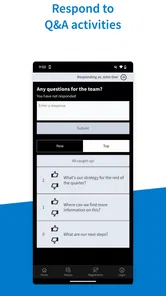
- Supports multiple question formats
- including polls
- Q&A
- and word clouds.
- Participants can join from phones without creating an account.
- Works well for classrooms
- meetings
- and remote events.
- Audience engagement data can help presenters review participation.
Cons
- Free plans impose limits on audience size and available activities.
- Some advanced features require a paid subscription.
- Large events may need reliable internet to avoid response delays.
- The interface can feel complex for first-time presenters.
- Participants may encounter distractions when answering on mobile devices.











