Police Detector - Speed Radar
- 2.43K
- 4.4
- Installs
- 10.00M
- Price
- Free
Screenshots
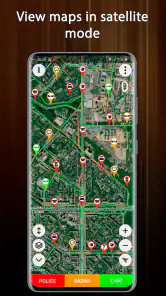
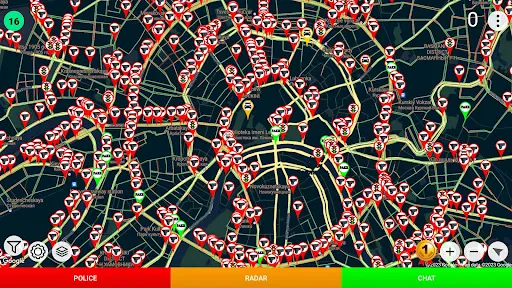
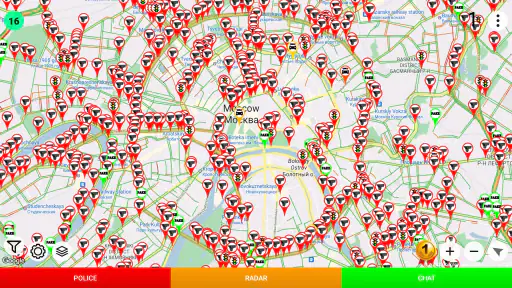
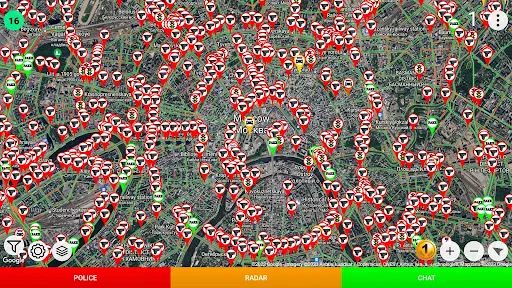
Analysis by Reviewed
I treat Police Detector - Speed Radar as a focused driving aid, not as a tool that can tell me everything happening on the road. Its usefulness depends on what has been reported in the places I travel, so my first decision is practical: do I want a second map for enforcement reports, or do I need a complete navigation system? Those are different jobs, and knowing which one matters most makes it easier to decide whether this app belongs in my routine.
Choose it for awareness, not as a complete navigator
As a free Maps & Navigation app from M.I.R., it has a narrow purpose. Its 4.4 average from around 56,000 ratings and over 10 million installs suggest broad interest, while the Everyone age rating makes it suitable for a general audience. The practical distinction is more important than popularity: a conventional navigation app is usually the better starting point when you need route planning, turn-by-turn directions, or a broader travel toolkit. This app is more relevant if you already know where you’re going and want a map centered on reported enforcement locations.
A useful everyday routine is to check the map while parked before setting off, especially before an unfamiliar stretch or a long drive. If you’re commuting on the same roads, reports may help you notice locations worth approaching carefully, but repeated use shouldn’t turn into an assumption that an unmarked road is clear. Community reports can become stale or vary in coverage, so I’d treat each alert as a prompt to check your speed and surroundings—not as live confirmation of what is ahead.
Where a focused map helps—and where it doesn’t
The app’s value is its narrow focus: reported cameras and police are the point, rather than one layer among many travel features. That can make it a useful companion for a driver who wants this information without relying on a general-purpose navigation interface. The trade-off is that it should not be your only tool for a trip. If you need dependable directions, traffic-aware route choices, or a complete picture of a journey, your usual navigation option may fit better; use this app only when its specific map adds something useful.
There’s also a simple safety trade-off: voice alerts, if available in your setup, can reduce the temptation to watch the screen, but handling the phone while driving is still a distraction. I’d set things up before moving and keep attention on the road. Local rules about detector and warning apps can differ, so check what applies where you drive rather than assuming the same use is allowed everywhere.
Cost, setup, and who should pass
The app is free to install, with optional in-app purchases listed between $0.99 and $6.99 per item. I’d begin with the free experience and decide whether any paid option is worthwhile only after seeing how useful the map is on routes you actually travel. The current version is 4.10, and it requires Android 6.0 or later. Before switching from a familiar navigation app, consider whether you’re willing to check another map and whether reports in your area make that extra step worthwhile.
I’d skip it if you expect a detector that independently identifies every enforcement device, guaranteed warnings, or a full navigation system. It also may not add much for drivers who rarely travel by car or prefer to keep their phone completely out of reach while driving. For someone who wants a narrowly focused map and is comfortable treating reports as fallible hints, though, it can be a reasonable extra tool.
More From Our News Desk

Weather by Xiaomi Review: Clear at a Glance, Less Clear Up Close

X Under Pressure: Can It Recover When Posting Goes Wrong?

Clash of Clans Is Won Between the Battles

Android Auto Makes the Case for Quieter Car Software

MobiOffice: Transforming Mobile Productivity with Seamless Integration

EA SPORTS FC™ Mobile Soccer: Redefining Mobile Sports Gaming
What to test before making it part of a drive
I’d judge this app on a short, familiar route rather than on a major journey. Before leaving, look at the map while parked and note whether the reports are understandable and relevant to roads you recognize. That small trial answers a useful question: does the information add context, or does it create another screen to check? If the map is confusing or sparse in your usual area, there is little benefit in forcing it into your routine.
It is also worth deciding in advance what you want an alert to change. The safest response is simply to check the posted limit and your surroundings, then continue driving normally. An alert should not trigger abrupt braking, a detour, or a search for the reported vehicle. This makes the app more useful as a reminder of attention than as a way to react to a specific enforcement location.
On a longer drive, I would keep route guidance in the app I already trust for navigation and use this one only if its separate map is genuinely helpful. Switching back and forth while moving is a poor trade: a missed turn, divided attention, or confusion about which screen to follow can outweigh the value of a report. If managing two apps feels awkward, staying with one navigation tool is the sensible choice.
How it differs from familiar driving tools
Compared with a standard navigation app, Police Detector puts its attention on reported enforcement locations rather than making route guidance the main reason to open it. That distinction can suit drivers who already know their route and want a dedicated view of reports. A broader navigation app remains the more practical choice for unfamiliar destinations, route changes, and ordinary trip planning; this app is best considered an optional companion, not a replacement.
It is also different from dedicated detector hardware. The name may suggest equipment that senses enforcement devices directly, but the app’s stated role is to show locations marked on a map. I would not buy or use it expecting independent detection or guaranteed coverage. If your priority is reliable turn-by-turn directions, use navigation; if your priority is equipment with a different detection method, research that category and the local rules separately.
For drivers who prefer minimal phone use, the comparison is simpler still: no warning app may be the better fit. If you do not want to mount or configure a phone, or you find alerts distracting, you can get the essential safety benefit by following posted limits and staying attentive without adding another tool. The app makes most sense when its focused information is useful to you without changing those habits.
Questions worth answering on a real route
A common concern is whether the map should be trusted as a complete record. I wouldn’t treat it that way. A report reflects information available to the app, not a promise that every camera or police presence will appear. That matters most on less familiar roads: an empty map is not evidence that there is nothing to watch for, so keep driving according to signs and conditions.
Another practical question is whether it can replace navigation. I would say no if you need directions or route planning as the core of your trip. The app is most appropriate when you know where you are going and want a separate awareness layer. If you need just one app open, choose the tool that handles the central task of that drive rather than expecting this focused map to cover every need.
People also wonder whether they need to pay before they can tell if the app suits them. Since it is free to install and optional purchases are available, I’d try the basic experience first and assess the map on routes I actually use. Paying only makes sense if an available paid option addresses a need I have; I wouldn’t spend on the assumption that payment guarantees better reports or complete coverage.
Finally, I’d check whether using a warning app is permitted where I drive. Rules differ by location, and a driver should not assume that the same approach is acceptable on every trip. That is especially relevant for cross-border journeys. Checking local requirements before setting off is a better habit than discovering a restriction after relying on the app.
Ever found yourself cruising down the highway, windows down, music blaring, only to be jolted by the sudden realization that you might be over the speed limit? Yep, been there, done that. That's where Police Detector - Speed Radar comes into play. It's like having a buddy in the passenger seat who's always on the lookout for speed traps and police radars. Let's dive into what makes this app a must-have for every driver.
Getting Started
First things first, downloading Police Detector - Speed Radar is a breeze. Available for both Android and iOS, you just hit download, and you're ready to roll. Once installed, the app greets you with a simple and intuitive interface. It's not cluttered with unnecessary buttons or options, making it super easy to navigate, even if you're not a tech wizard.
Features That Stand Out
One of the standout features of this app is its real-time updates. The app relies on a community of users who report speed traps and police radar locations, ensuring you have the most up-to-date information at your fingertips. It's like Waze, but specifically for speed detection.
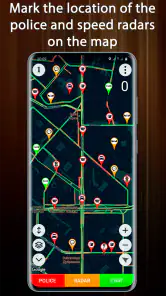
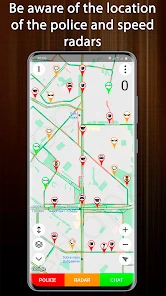
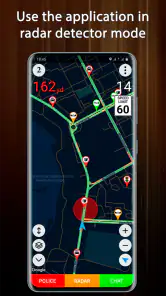
Another cool feature is the map view, which highlights all the reported speed traps in your vicinity. You can zoom in and out, swipe around, and get a bird's eye view of potential trouble spots. Plus, the app offers voice alerts, so you don’t have to keep your eyes glued to the screen, keeping distractions to a minimum.
How It Enhances Your Driving
Imagine you're on a long road trip. The open road stretches out ahead, and you're making good time. Suddenly, your phone pings, and a voice alert warns you of a speed trap a few miles ahead. You ease off the gas, and as you pass the hidden patrol car, you can't help but feel a little smug. That's the beauty of this app; it keeps you in the know and helps you avoid those pesky tickets.
But it's not just about avoiding fines. The app also encourages safer driving by reminding you of speed limits in different areas. It's like having a gentle nudge to stay within legal limits, making roads safer for everyone.
Final Thoughts
In a world where speeding tickets can cost an arm and a leg, having an app like Police Detector - Speed Radar is a game changer. It's easy to use, packed with useful features, and most importantly, it works. Whether you're a seasoned driver or someone who's just starting out, this app is a handy tool to have on your smartphone.
So, next time you hit the road, make sure to have this app by your side. Drive safe, stay alert, and let Police Detector - Speed Radar be your co-pilot. Happy driving!
One practical question is whether it makes sense to run this alongside navigation. I’d avoid juggling screens while moving: choose your route before departure, then decide while parked whether this focused map adds value. If you do use it as a companion, keep the phone mounted and rely on audio only where your setup supports it; a notification is not worth taking your eyes off traffic. On an unfamiliar drive, a missed turn or confusing map matters more than a possible enforcement report, so navigation should remain the priority.
Make reports useful without relying on them
For a repeat commute, the best use is pattern awareness rather than prediction. If the same locations appear in reports over time, I’d take them as places to be especially mindful of posted limits, not proof that enforcement is always present there. On a one-off trip, a sparse map may simply reflect limited reporting. That is a meaningful limitation of community-based information: a quiet screen can mean no reports, not necessarily no cameras or police.
The app was released on April 27, 2017, and the current version is 4.10. I’d check that the version available for your device meets its requirements before installing; for Android, the minimum is 6.0. If you’re moving from another navigation tool, there is little reason to abandon it outright. Try this as a supplementary map on a short, familiar drive first, then keep it only if its reports are clear and useful in your area.
A sensible final choice
My recommendation is for drivers who want a simple, focused way to view reported speed-camera and police locations and who understand the limits of community information. It is less compelling for anyone expecting guaranteed detection, comprehensive route guidance, or a substitute for careful driving. I’d treat the app as an optional awareness aid: check it before setting off, follow the speed limit regardless of what appears, and choose a full navigation alternative when directions and route planning are the main need.
Police Detector - Speed Radar Frequently Asked Questions
Is Police Detector - Speed Radar free, and are there optional purchases?
Police Detector - Speed Radar is free to download, so you can try its map-based police and speed-camera marking without paying upfront. In-app purchases are available, priced from $0.99 to $6.99 per item. Check the purchase details in the app before confirming anything, and make sure any optional spending fits your needs.
Can I use the app without handling my phone while driving?
Yes. You can review the map and any available reports before setting off, then keep your attention on the road while driving. Avoid looking at or operating your phone in moving traffic; if you need to check the app, pull over somewhere safe and legal first. The app is intended as navigation assistance, not a substitute for attentive driving.
What devices can run Police Detector - Speed Radar?
Police Detector - Speed Radar is available for Android devices running Android 6.0 or later. Before downloading, check your device’s operating system version to make sure it meets that requirement. The app is intended for mobile use, so drivers can access its map and alerts while planning or making a trip.
Who makes Police Detector - Speed Radar, and what kind of app is it?
Police Detector - Speed Radar is a Maps & Navigation app developed by M.I.R. Its focus is helping drivers view marked speed-camera and police locations on a map. It has an average rating of 4.4 from around 56,000 ratings, giving prospective users a sense of its reception among people who have rated it.
What is Police Detector - Speed Radar, and how does it work?
Police Detector - Speed Radar is a mobile application designed to help drivers detect speed cameras and police patrols in real-time. The app utilizes a community-based system where users can mark and share locations of speed traps, traffic accidents, and other road hazards. By using GPS technology, the app provides alerts to users about nearby speed traps, helping them avoid fines and drive more safely.
Pros
- Accurate speed detection capabilities.
- User-friendly interface and design.
- Real-time police alerts and updates.
- Customizable alert settings.
- Wide range of supported devices.
Cons
- May drain battery quickly.
- Requires constant GPS access.
- Potential legal issues in some areas.
- Ads can be intrusive.
- Needs stable internet connection.
- Category
- Maps & Navigation
- Version
- 4.10












