

PointCare
- 28.00
- 3.5
- Installs
- 10.00K
- Price
- Free

Screenshots
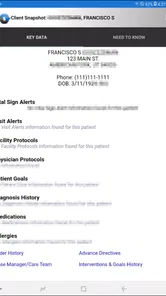
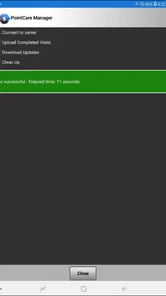
Analysis by Reviewed
PointCare is the kind of medical app that makes sense only when you already belong to a particular care workflow. I approached it less like a general health tool and more like a focused companion for authorized users of the Homecare Homebase EMR. In that setting, its purpose is practical: clinical visit information can be handled from a mobile device instead of being tied entirely to a desktop workstation. That distinction matters, because the app’s usefulness depends as much on the organization and role behind it as on the phone itself.
Developed by Homecare Homebase, LLC, this free medical app is aimed at Everyone from an age-rating perspective, although its real audience is professional and operational rather than casual. It has passed the ten-thousand-install mark and holds an average rating of 3.5 from roughly one hundred ratings, with a smaller body of written feedback. Those figures suggest a specialized product with a modest footprint, not a mainstream wellness app. I would recommend treating it as a work tool for an existing HCHB environment, not as something to download simply to track personal health.
How PointCare feels to use in real care work
I focus here on how mobile access changes the practical handling of a clinical visit, rather than treating PointCare as a general health app. In my view, the useful question is whether having visit information close at hand helps a worker stay oriented without making the phone another source of distraction. That leads naturally to the everyday situations where this focused tool can earn its place.
Readability and navigation in a clinical workflow
My first impression is that PointCare’s value comes from keeping attention on the visit rather than surrounding the user with consumer-health distractions. A clinician or authorized staff member is likely opening it with a specific task in mind: reviewing or recording information connected with a clinical visit. That focused purpose can be easier to understand than a broad medical app filled with articles, reminders, charts, and promotional panels.
The important question is not whether the interface looks exciting. It is whether a person can move through the required visit workflow without losing their place. For someone already familiar with the Homecare Homebase EMR, the connection between the mobile app and the wider record system should make the product easier to interpret. Familiar terminology and an established work routine can reduce the mental effort needed to decide what to tap next.
That advantage has a clear limit. A new user who has never worked with HCHB may not immediately understand the app’s structure or the meaning of each clinical step. PointCare is not presented as a general-purpose medical organizer, so I would not expect it to teach healthcare documentation from scratch. Training from an employer or team remains important, especially when the user needs to distinguish between viewing information and completing an official visit task.
Readability also depends on the phone being used and the conditions around it. Medical information can contain long names, detailed notes, and values that need careful checking. A small screen may make comparison harder than a larger workstation, particularly when a user needs to move between several parts of a record. I see the mobile format as most helpful for targeted review and in-the-moment work, while a desktop remains more comfortable for extended reading or complicated administrative follow-up.
More From Our News Desk

 Gmail
GmailGmail in a Busy Inbox: Who Benefits Most?
From first account to crowded workday, Gmail earns its place through dependable search and flexible sorting—but its best fit depends on how much inbox maintenance you can tolerate.

 Prime Video
Switching to Prime Video: What Changes in Your Viewing Routine
Prime Video can make a compelling second home for streaming, but switching means learning a different catalog, rental layer, and route from browsing to playback.

 Universal TV Remote Control
Universal TV Remote Control Works Best as a Reliable Backup
A phone remote earns its place through quick setup and reliable habits. Here is how to get more from Universal TV Remote Control—and where its limits show.

 Weather - By Xiaomi
Weather by Xiaomi Review: Clear at a Glance, Less Clear Up Close
Xiaomi’s weather app makes everyday forecasts quick to scan, but its calm surface can leave useful details and recovery paths harder to find than they should be.

 X
XX Under Pressure: Can It Recover When Posting Goes Wrong?
A resilience-focused review of X, examining setup, mistaken posts, interruptions, weak connections, and the gaps that matter when recovery needs to be dependable.

 Clash of Clans
Clash of Clans Is Won Between the Battles
Its raids are quick; its community is a long-term project of coordination, teaching, rivalry, and shared responsibility—with all the friction that entails.
Latest News



One useful habit is to prepare before beginning a visit. If the workflow allows it, I would identify the relevant patient and task first, then avoid opening unrelated phone notifications or switching between multiple apps. This is not a hidden feature; it is a practical way to reduce navigation mistakes in a focused clinical setting. The more the user treats PointCare as one step in a defined process, the less likely the small screen will become a source of confusion.
Motor and sensory considerations
PointCare’s mobile design can be helpful for people who need to work away from a fixed desk, but mobility does not automatically mean accessibility for every user. Touch interaction requires deliberate taps, scrolling, and movement through screens. A person with limited dexterity, tremor, hand fatigue, or difficulty maintaining a steady grip may find repeated phone interaction tiring, particularly during a long sequence of documentation.
For that reason, I would judge the app alongside the device rather than in isolation. A larger phone, a stable surface, and sensible system text settings may make reading and tapping more manageable. A user who relies on a particular operating-system accessibility setup should test the actual PointCare workflow with their organization before depending on it during visits. Compatibility can vary by screen, and a setting that helps in one part of the phone may not solve every problem inside a specialized app.
Visual clarity matters especially in clinical work. Good lighting, reduced glare, and a screen size that allows the user to read without constant zooming can make a meaningful difference. Someone with low vision may prefer completing the most demanding review on a larger display if the mobile view feels cramped. On the other hand, a worker who mainly needs quick access to a known visit record may benefit from having the relevant information close at hand instead of walking back to a workstation.
There is also a sensory and cognitive side to the experience. A quiet, predictable sequence is easier to manage than a workflow interrupted by unrelated alerts. I would recommend turning the visit into small checkpoints: confirm the correct record, review the needed information, complete the intended action, and pause to verify it before leaving the screen. That approach helps users who become overloaded by multitasking and also protects against a common professional risk: rushing because the phone makes the task feel informal.
Voice control, screen-reader behavior, color contrast, vibration, and other accessibility details should be tested directly rather than assumed. I would not describe PointCare as universally accessible simply because it runs on a phone. The more responsible conclusion is that the app may support flexible working contexts, while the actual experience depends on the device, operating-system settings, organizational workflow, and the individual user’s abilities.
Situational access: where the mobile format helps
The strongest use case is a clinician or authorized worker who needs visit information while moving between care locations. A realistic example would be a home-care professional arriving at a scheduled visit, checking the correct patient context, reviewing the information needed for that encounter, and handling the relevant clinical workflow without carrying a laptop from room to room. That can reduce the distance between the record and the moment when the information is useful.
This kind of access can also help teams that divide their time between travel, patient care, and office duties. A mobile tool is more convenient than waiting until the end of the day to reconstruct details from memory. It may support a more immediate routine: check the task, perform the visit, and address the associated record while the context is still fresh. The benefit is not merely speed; it is the possibility of reducing the gap between care activity and documentation.
However, I would not treat mobile access as a replacement for every part of the usual alternative. A desktop EMR is generally better suited to wide layouts, detailed review, prolonged typing, and work that involves several records or administrative layers. PointCare is more compelling when the user is physically away from the office or needs a focused view during a visit. If the job is primarily desk-based and involves extensive documentation, the larger environment may remain more comfortable and efficient.
Situational access also includes the user’s surroundings. A home visit may involve poor lighting, background noise, interruptions, gloves, limited space, or a need to keep the phone clean. Each condition changes how easy it is to read and tap accurately. I would plan for those realities instead of assuming that a phone is automatically easier than paper or a computer. A stable place to set the device, a deliberate pause before submitting information, and a routine for checking the patient context can make the difference between convenient access and stressful access.
Privacy is part of situational usability too. A phone used in a shared environment can expose sensitive information if it is left visible or passed between people. PointCare deals with clinical visit data, so I would use it only within the organization’s approved practices and avoid treating the screen like an ordinary personal app. The app’s professional purpose makes careful handling more important than convenience alone.
What can still create barriers
The largest barrier is authorization and ecosystem dependence. PointCare is designed for authorized users of the HCHB EMR, so downloading it does not turn it into an independent medical record. Someone without the appropriate organizational access may find that the app is irrelevant to their needs. This is the first question I would ask before installation: does my employer or care organization actually use the Homecare Homebase system, and am I expected to access visit information through this mobile tool?
That dependency also affects support. If a user cannot see the expected information or becomes stuck in a workflow, the solution may involve the organization’s setup, role permissions, training, or EMR process rather than a simple phone setting. A consumer app can often be evaluated alone; PointCare must be evaluated as part of a workplace system. That makes local guidance especially valuable for new staff and for anyone who needs an adapted workflow.
The version listed for the app is 26.9.1, and it supports devices running Android 5.0 or later. The operating-system requirement is broad enough to include older Android phones, which may help organizations working with mixed device fleets. At the same time, an older compatible operating system does not guarantee an equally comfortable experience on every handset. Screen quality, performance, battery condition, and the user’s input needs can all affect practical access.
Another barrier is the difference between occasional convenience and sustained use. A person may manage a short lookup comfortably but struggle with a long visit workflow, especially if they have visual, motor, or cognitive needs that make repeated scrolling difficult. I would test the complete sequence that the job actually requires, not just whether the app opens. The right evaluation includes signing in through the approved process, finding the relevant visit, reading the necessary information, completing the expected action, and confirming the result.
There is also a learning barrier that the simple store label does not reveal. Because the app belongs to a professional EMR environment, users may need to understand local conventions before they can work confidently. A colleague’s quick demonstration may not be enough for someone who needs more time, larger text, repeated practice, or a written sequence. Teams should make room for different learning speeds rather than assuming that every worker will adapt to the same mobile routine.
If a user needs a personal symptom tracker, medication reminder, appointment organizer, or broad health education, I would skip PointCare and choose a consumer medical app designed for that purpose. If a worker needs complex record analysis at a desk, the main HCHB environment may be preferable. PointCare is the better fit when the specific need is authorized clinical visit access in a mobile context.
Small workflow choices that improve the experience
I found three practical trade-offs worth keeping in mind. First, mobile access can reduce delay, but it can also encourage hurried interaction. The best routine is to use the phone for the part of the work that benefits from being near the patient or visit, then move to a larger screen for tasks that require sustained comparison or typing.
Second, flexibility can create inconsistency. If several staff members use different phone sizes or system settings, the same workflow may feel easy for one person and cramped for another. A team should compare the actual steps, not merely confirm that everyone can install the app. This is particularly important for workers who use enlarged text, alternative input methods, or other personal adjustments.
Third, immediate access is useful only when the user can keep attention on the correct record. I would make record verification a fixed checkpoint before reviewing or entering anything. In a busy home-care schedule, this simple pause is more valuable than trying to make every interaction faster. It supports safer use while also helping people who need an extra moment to orient themselves.
These are not replacements for formal training or organizational procedures. They are ways to make the mobile format fit real human variation. PointCare’s strongest promise is not that every person will use it in the same way, but that an authorized worker may have a more practical route to visit information when a workstation is inconvenient.
My inclusive verdict on PointCare
I see PointCare as a specialized medical app with a clear professional role. Its free price removes a direct purchase barrier, and its mobile format can be genuinely useful for authorized HCHB users who work across care locations. The developer, Homecare Homebase, LLC, has built it for a specific EMR context rather than for casual health tracking, and that focus is both its strength and its main limitation.
For accessibility, I would give it a conditional recommendation. It can support situational flexibility by bringing clinical visit information closer to the worker, and that may help people who find constant desk-based work difficult. Yet the app should not be assumed to meet every visual, motor, sensory, or cognitive need. The phone, operating-system settings, organizational training, and workflow design all influence the result.
The average rating of 3.5 shows a mixed reception rather than a reason to dismiss the app. With around one hundred ratings and over ten thousand installs, it appears to serve a defined audience rather than compete with large consumer health platforms. I would read that context carefully: a specialized tool can be valuable to the right professional even if it is not broadly appealing.
My final advice is simple. If your organization uses HCHB and expects you to handle clinical visit data from a mobile device, PointCare is worth testing as part of that workflow. Ask for the correct access, try the full task on your own device, and check whether the text, tapping, navigation, and pace work for you. If you are looking for a general health app or need a richer desktop-style record experience, choose something else. PointCare is most inclusive when it is paired with the right support and treated as one adaptable part of clinical work, not as a complete solution for every user or situation.
PointCare Frequently Asked Questions
Is PointCare free to download?
PointCare is a free medical app developed by Homecare Homebase, LLC. The app is intended to provide clinical visit data to authorized users of the HCHB EMR, so downloading it alone may not give you access to its features. If you plan to use it for work, first check that your organization uses the system and can provide the account access you need.
What devices and operating systems can run PointCare?
PointCare requires Android 5.0 or later. Before installing, check your device’s operating-system version and make sure you have enough available storage for the app. Keeping your device and app updated can also help avoid compatibility problems. PointCare is a medical app, so confirm with your organization that your device is suitable for its work requirements before relying on it in the field.
What is PointCare and what is it used for?
PointCare is a mobile application designed to support healthcare-related workflows, such as collecting, reviewing, and managing patient or service information while working in the field. Its exact features may depend on the organization using it and the account permissions assigned to each user. Before downloading, confirm that your employer, care provider, or organization supports PointCare and has provided the required login details.
Who can use the PointCare app?
PointCare is generally intended for authorized healthcare professionals, care coordinators, field workers, or other users connected to an organization that uses the platform. It is not typically a general-purpose app for casual users. Access may require an organization-issued username, password, invitation, or secure authentication method. If you cannot sign in after installation, contact your organization’s administrator rather than creating multiple accounts.
Does PointCare require an internet connection?
PointCare may need an internet connection for signing in, synchronizing records, downloading assignments, and sending completed information to the organization’s systems. Depending on the version and configuration, some tasks may be available temporarily without a connection, but offline support should not be assumed. Use a reliable Wi-Fi or mobile-data connection when possible and verify that information has synchronized successfully before leaving the work area.
Pros
- Simple interface makes patient information easy to access.
- Supports faster communication between care teams and patients.
- Useful for organizing appointments
- tasks
- and clinical updates.
- Can reduce paperwork and improve day-to-day workflow efficiency.
- Mobile access helps users stay connected while away from a computer.
Cons
- Requires a stable internet connection for many features.
- Some functions may depend on an organization’s PointCare setup.
- The interface can feel overwhelming for first-time users.
- Notification settings may need manual adjustment to avoid interruptions.
- Availability and features can vary by healthcare provider or region.











