

PMED - Preço de Procedimento
- 0.00
- 0.0
- Installs
- 10.00K
- Price
- $4.99

Screenshots

Analysis by Reviewed
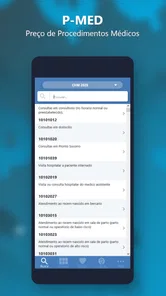
When I look at a medical pricing app, I do not judge it by appearance alone. I want to know whether the calculation is understandable, whether I can check the table being used, and whether the app helps me make a careful decision rather than simply producing a number. PMED - Preço de Procedimento is aimed at that very specific task: calculating the price of medical procedures and comparing TUSS with other pricing tables. In my experience, that narrow focus is both its main strength and the reason it will not suit everyone.
This is a paid medical app from OAZEZ Software & Tecnologia, listed for Everyone and available for Android devices running version 6.0 or later. It costs $4.99, with optional in-app items priced between $0.99 and $1.99. That pricing makes me view it less like a casual reference tool and more like a specialist utility for people who regularly deal with procedure values, medical billing, clinic administration, or price checking.
What PMED is really useful for
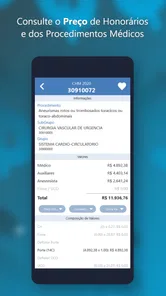
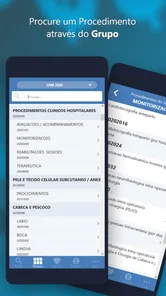
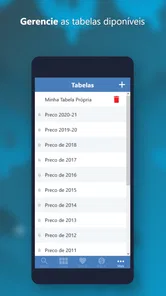
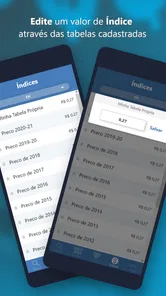
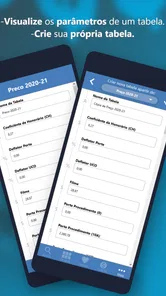
The app’s purpose becomes clearer when I imagine a normal working day. A clinic administrator may receive a procedure request, need to identify the corresponding TUSS entry, and then compare that value with another table before preparing an estimate or checking a bill. Instead of moving between a general web search, a spreadsheet, and a separate reference document, PMED is designed to bring the calculation and comparison into one focused place.
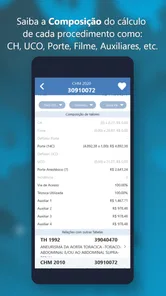
That workflow is more valuable than the short store description might suggest. The important point is not merely that the app “calculates” a price. It is that a price can depend on the reference table selected and on the exact procedure being matched. A small difference in wording can lead to the wrong entry, so I would treat the search and comparison stage as seriously as the final amount.
I would recommend it first to professionals who already understand the terminology around medical procedures and TUSS. It may also help students or trainees who need to become familiar with how procedure references are organized, although I would not use it as a substitute for formal instruction. For a patient who only wants to know the likely cost of one appointment, the app may feel too specialized unless a clinic or billing professional has already explained which procedure and table apply.
Its focused design also means I would not expect it to replace a full clinic management system, accounting software, insurer portal, or official billing workflow. Those tools normally cover broader tasks such as patient records, scheduling, invoices, or claims. PMED is better understood as a calculation and reference companion. That distinction matters because buying it will not automatically solve every administrative problem around medical pricing.
Why table comparison matters in practice
Comparing TUSS with another table is useful when two parties are discussing the same procedure but working from different reference points. In that situation, a single unexplained figure is not enough. I want to see which table produced it and whether the difference comes from the reference itself rather than from a typing mistake.
More From Our News Desk

 Gmail
GmailGmail in a Busy Inbox: Who Benefits Most?
From first account to crowded workday, Gmail earns its place through dependable search and flexible sorting—but its best fit depends on how much inbox maintenance you can tolerate.

 Prime Video
Switching to Prime Video: What Changes in Your Viewing Routine
Prime Video can make a compelling second home for streaming, but switching means learning a different catalog, rental layer, and route from browsing to playback.

 Universal TV Remote Control
Universal TV Remote Control Works Best as a Reliable Backup
A phone remote earns its place through quick setup and reliable habits. Here is how to get more from Universal TV Remote Control—and where its limits show.

 Weather - By Xiaomi
Weather by Xiaomi Review: Clear at a Glance, Less Clear Up Close
Xiaomi’s weather app makes everyday forecasts quick to scan, but its calm surface can leave useful details and recovery paths harder to find than they should be.

 X
XX Under Pressure: Can It Recover When Posting Goes Wrong?
A resilience-focused review of X, examining setup, mistaken posts, interruptions, weak connections, and the gaps that matter when recovery needs to be dependable.

 Clash of Clans
Clash of Clans Is Won Between the Battles
Its raids are quick; its community is a long-term project of coordination, teaching, rivalry, and shared responsibility—with all the friction that entails.
Latest News



A practical habit is to record the procedure wording alongside the result instead of saving only the final value. If I were checking a quote for a clinic, I would note the selected description, the table used, and any adjustment applied. This makes a later conversation much easier because I can retrace the calculation instead of asking, “Where did this number come from?”
That is one of the less obvious strengths of a specialist calculator: it can encourage a more disciplined process. The app does not make a price authoritative simply by displaying it. I still need to verify that the chosen procedure matches the service actually being discussed and that the relevant table is appropriate for the agreement or billing context.
How I would use it during a busy workday
Imagine a receptionist receives a request for an estimate while the billing colleague is handling another task. I would first identify the exact procedure name from the request, then search for the closest matching entry rather than choosing the first familiar phrase. Next, I would compare the TUSS value with the other available table, review the calculation, and write down the reference used before passing the estimate to the patient or clinician.
This approach avoids a common mistake: treating similar-sounding procedures as interchangeable. Medical terminology often contains small distinctions that matter. A calculator can speed up arithmetic, but it cannot decide whether two descriptions represent the same service in a particular clinical or contractual setting. I would always pause when the wording is broad, abbreviated, or supplied informally.
For repeated work, I would also use a consistent naming habit in my own notes. Keeping the original wording from the request beside the selected procedure makes it easier to audit a result later. That is especially helpful when several procedures have related names or when a colleague needs to review the estimate without repeating the entire search.
Trust starts with what the app does not pretend to be
I find a specialist tool more trustworthy when I keep its role within sensible limits. PMED can support a calculation, but I would not treat its output as a medical recommendation, a guarantee of reimbursement, or proof that a charge will be accepted by a particular insurer. The app belongs to the medical category because it handles procedure pricing, yet pricing is still an administrative matter that depends on context.
That distinction is important for patients. If a result is used to explain a possible cost, I would describe it as a reference calculation and confirm the final amount with the clinic. The person providing the service may apply a different agreement, table, or billing rule. A clear explanation of the source is more useful than presenting the number as universal.
For professionals, the same caution applies in a different way. A calculation should be checked against the current internal process before it is placed on an invoice or sent to a payer. The app can reduce manual work, but responsibility for selecting the correct procedure and reference remains with the user.
Controls, privacy moments, and everyday confidence
When I review an app through a trust lens, I separate visible user choices from assumptions. PMED is presented as a focused calculation tool, and the relevant user choice is which procedure and table to work with. I would pay close attention to those selections because they directly affect the result. I would not assume that a convenient number is correct unless I can explain how it was reached.
The app’s age rating is Everyone, which makes it broadly accessible from a content perspective. That does not mean every user will find it easy or appropriate for independent billing decisions. A simple age classification says little about professional complexity. Someone unfamiliar with TUSS may still need guidance from a clinic, supervisor, or billing specialist.
The current version is 17.7, and the app has been available since August 22, 2012. I see that long presence as useful context, but not as automatic proof of quality or current suitability. What matters in daily use is whether the references and calculations fit the user’s present requirements. A long-running app can be valuable, yet I would still check results carefully when the financial consequence is significant.
Because this tool deals with medical procedure pricing, sensitive moments can arise even if the task itself is administrative. A user may type a procedure connected to a patient’s treatment, or may combine a price calculation with identifying notes in another system. My practical advice is to keep the calculation focused: enter only what is needed to identify the procedure, avoid placing patient names or unnecessary clinical details into any field, and do not treat a pricing screen as a patient record.
This is not a claim about hidden data behavior; it is a sensible user-controlled habit. When an app is used around healthcare information, I prefer minimizing exposure wherever possible. If I am preparing a quote, I can usually work with the procedure description and reference table without adding a patient’s full identity or diagnosis.
What to check before relying on a result
I would use a short verification routine every time the amount matters. First, I would confirm the procedure description. Second, I would check that the intended table is selected. Third, I would review whether the displayed calculation reflects the value I expected. Finally, I would compare the result with the clinic’s or organization’s applicable billing rule before communicating it externally.
- Match the wording: do not select a procedure just because its name looks familiar.
- Identify the reference: record whether the figure came from TUSS or another table.
- Separate calculation from approval: a generated amount still needs the responsible professional’s confirmation.
- Protect context: keep personal and clinical details out of a basic pricing exercise whenever they are unnecessary.
This routine adds only a little time, but it prevents the most damaging kind of error: a precise-looking amount based on the wrong procedure. In my view, that is the central skill required to use PMED well. The app can make comparison quicker, but careful interpretation remains more important than speed.
Where the paid model makes sense
At $4.99, the app asks for an upfront purchase rather than presenting itself as a free casual calculator. The optional items, priced from $0.99 to $1.99 each, may matter to users who need additional capabilities or content, so I would consider the total cost before making it part of a regular workflow. For someone who checks a procedure once or twice, a paid specialist app may not be worthwhile.
For a clinic worker who repeatedly compares procedure values, the calculation time saved may justify the purchase. The value is not in entertainment or broad convenience; it is in reducing the friction of a recurring, specialized task. I would make the decision based on frequency of use and the cost of mistakes, not simply on the number of features shown in the store.
The app has over ten thousand installs, which suggests that it serves a real niche without making it a mainstream consumer tool. I interpret that scale realistically: it may be a practical choice for a specific professional audience, but I would not expect the same level of broad community guidance or universal familiarity found around major healthcare platforms.
How it compares with the usual alternatives
The most obvious alternative is a spreadsheet. A spreadsheet can be customized, shared, and connected to a clinic’s own calculations. It may be better when a team needs formulas, approval columns, historical records, or a full audit trail. However, maintaining reference tables manually can introduce errors, and a spreadsheet does not automatically make procedure matching easier.
Another alternative is searching online or consulting printed references. Those methods can work when the user already knows exactly what to look for, but they are less convenient when the task involves comparing TUSS with another table and calculating a result in the same session. Online searching also encourages copying the first plausible figure without understanding its source.
A full billing or practice-management platform may be the better choice for an organization that needs patient administration, invoices, claims, and reporting in one place. PMED is more attractive when the immediate need is narrower and the user wants a dedicated reference utility rather than a complete business system.
My preference would be to use PMED alongside an official or organizational source when the amount has contractual or regulatory consequences. The app can act as a fast working reference, while the official process remains the final checkpoint. That combination is more dependable than asking any single tool to carry the entire responsibility.
Who should use it, and who should skip it
I would suggest PMED to medical office staff, billing teams, independent professionals, and others who regularly need to calculate procedure prices or compare TUSS with another table. It is also potentially useful for someone who has been given a clear procedure description and wants to understand how different references affect the estimate.
I would skip it if I only need general health information, symptom guidance, appointment reminders, or a personal medical record. None of those needs is addressed by a procedure-price calculator. I would also hesitate to recommend it to a patient who expects a single guaranteed answer without knowing which procedure code or table applies.
It may not be the right choice for a large organization seeking centralized controls, shared records, or a formal approval history. In that setting, a broader administrative platform may provide better oversight. PMED makes more sense as a focused tool in the hands of someone who understands the surrounding workflow.
My final view after weighing usefulness and caution
I like the fact that PMED aims at a concrete problem instead of trying to become an all-purpose health app. Its value comes from bringing procedure-price calculation and TUSS comparison into a specialized utility. For the right user, that focus can save repeated manual searching and make it easier to explain where an estimate came from.
My reservation is equally clear: the app cannot remove the need for professional judgment. The wrong procedure selection, an unsuitable table, or an outdated internal rule can make a carefully calculated number misleading. I would therefore use it as a working aid, not as the final authority for a patient charge, reimbursement decision, or contractual interpretation.
My cautious recommendation is simple: choose PMED if you regularly handle medical procedure pricing and are prepared to verify each result; skip it if you want general healthcare guidance or a complete clinic-management system. The purchase is easiest to justify when the task is frequent, specialized, and currently handled through scattered references. Used with a clear record of the selected procedure and table, it can be a practical addition to a billing workflow while keeping the user—not the calculator—in control of the final decision.
PMED - Preço de Procedimento Frequently Asked Questions
Is PMED - Preço de Procedimento available for both Android and iOS?
PMED - Preço de Procedimento is a medical app developed by OAZEZ Software & Tecnologia. Before downloading, check that the version offered for your device is compatible with its operating system; the app requires Android 6.0 or later. Its age rating is Everyone, so it is suitable for a broad audience, though its medical pricing information is most useful to people researching healthcare procedures.
What does PMED compare when helping users look up procedure prices?
The app’s description highlights calculating the price of medical procedures and comparing TUSS with other tables. That focus can help users explore pricing references in one place, whether they are researching a procedure or preparing to discuss costs with a provider. Treat the comparison as a starting point: the meaning and relevance of a reference table may depend on the procedure and the circumstances in which care is provided.
What is PMED - Preço de Procedimento used for?
PMED - Preço de Procedimento is designed to help users consult and compare reference prices for medical, dental, or healthcare procedures. It can be useful for patients researching expected costs, professionals preparing estimates, or anyone who wants a clearer overview before contacting a clinic. The app is primarily an information and consultation tool, not a substitute for a formal quote from a qualified healthcare provider.
Are the prices shown in PMED final and guaranteed by clinics?
No. The prices displayed in PMED should be treated as reference values rather than guaranteed final costs. The amount charged by a clinic or professional may vary according to location, provider experience, materials, equipment, examination complexity, and the patient’s individual needs. Before scheduling a procedure, users should confirm the current price, what is included, and whether additional consultation, laboratory, anesthesia, or follow-up fees apply.
Does PMED - Preço de Procedimento require an internet connection?
The app may require an internet connection for downloading current procedure information, updating price data, or accessing online features. Availability can depend on how the application stores its database and on the version installed on your Android or iOS device. If you plan to use it while visiting a clinic or in an area with weak connectivity, open the relevant information beforehand and keep the app updated for the most reliable experience.
Pros
- Quickly consults procedure prices in a practical mobile format.
- Useful reference for clinics
- professionals
- and healthcare administrators.
- Helps compare expected costs before planning a procedure.
- Focused content makes relevant price information easy to locate.
- Lightweight app that can be convenient for routine price checks.
Cons
- Price information may vary by region
- provider
- or negotiation.
- Limited usefulness outside users familiar with Portuguese terminology.
- May require updates to keep procedure values accurate and current.
- Does not replace official quotations or contracts with healthcare providers.
- A narrow purpose means it offers little value for casual users.











