

Plexamp
- 2.95K
- 4.5
- Installs
- 500.00K
- Price
- Free

Screenshots
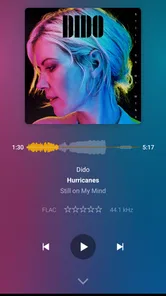
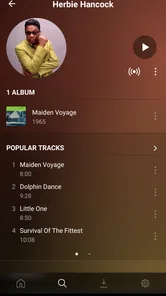
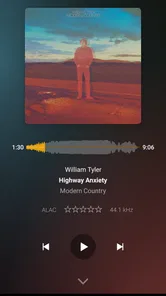

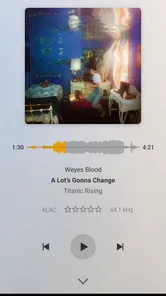
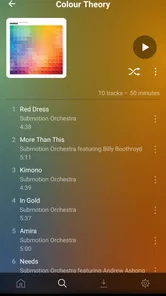

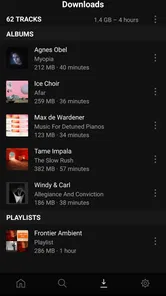
Analysis by Reviewed
I came away from Plexamp with a fairly clear impression: it is most rewarding when your music collection already lives inside Plex and you want a player that feels focused, quick, and personal rather than crowded with unrelated recommendations. As a free Music & Audio app from Plex, Inc., it treats your own library as the main event. That sounds simple, but it changes how the whole listening experience feels.
I would not recommend it automatically to everyone who just wants to press play on a huge streaming catalog. For that job, a conventional streaming service is usually easier because discovery, subscriptions, and ready-made playlists are built into the same place. Plexamp makes more sense when you care about albums, artists, playlists, and a collection you have taken the time to organize. In that setting, it feels less like a storefront and more like a dedicated music room.
Why the listening experience feels different
The strongest part of Plexamp is its sense of purpose. Many music apps divide their attention between music, podcasts, video, social features, promotions, and recommendations. Here, the interface is centered on listening to music through Plex. I found that focus useful when I already knew what I wanted: a particular album, a favorite artist, or a playlist I had built over time.
That focus also makes the app a good companion for people who have collected music across many years. A personal library often contains albums that do not fit neatly into current streaming habits: live recordings, obscure releases, carefully sequenced compilations, or music bought and kept locally. Plexamp gives that collection a proper front end instead of making me browse it through a generic file manager.
The app’s visual presentation is one of its more convincing qualities. The store summary calls it a beautiful Plex music player, and while that wording is brief, it points toward the right experience. The design feels made for album listening rather than simply displaying a long list of tracks. Artwork, artist context, and library navigation help the collection feel intentional.
In daily use, I appreciate the difference between searching for a song and exploring a library. Search is useful when I have a specific destination, but the more interesting moments come from moving through related artists, albums, or playlists and finding something I had forgotten. That makes Plexamp especially pleasant for a personal collection with enough variety to support casual exploration.
One practical tip is to treat playlists as listening tools rather than permanent filing cabinets. I get more value from making temporary collections for a commute, a weekend project, or a particular mood than from trying to create one perfect master playlist. Because the app is built around a Plex library, those smaller listening paths can make a large collection feel much easier to approach.
More From Our News Desk

 Gmail
GmailGmail in a Busy Inbox: Who Benefits Most?
From first account to crowded workday, Gmail earns its place through dependable search and flexible sorting—but its best fit depends on how much inbox maintenance you can tolerate.

 Prime Video
Switching to Prime Video: What Changes in Your Viewing Routine
Prime Video can make a compelling second home for streaming, but switching means learning a different catalog, rental layer, and route from browsing to playback.

 Universal TV Remote Control
Universal TV Remote Control Works Best as a Reliable Backup
A phone remote earns its place through quick setup and reliable habits. Here is how to get more from Universal TV Remote Control—and where its limits show.

 Weather - By Xiaomi
Weather by Xiaomi Review: Clear at a Glance, Less Clear Up Close
Xiaomi’s weather app makes everyday forecasts quick to scan, but its calm surface can leave useful details and recovery paths harder to find than they should be.

 X
XX Under Pressure: Can It Recover When Posting Goes Wrong?
A resilience-focused review of X, examining setup, mistaken posts, interruptions, weak connections, and the gaps that matter when recovery needs to be dependable.

 Clash of Clans
Clash of Clans Is Won Between the Battles
Its raids are quick; its community is a long-term project of coordination, teaching, rivalry, and shared responsibility—with all the friction that entails.
Latest News



A strong choice for personal music libraries
The app is at its best when Plex is already part of your setup. If you use Plex to make your music available across devices, Plexamp gives that library a dedicated music-first interface. This is more satisfying than opening a broader media app and navigating past video sections every time I want to hear an album.
That distinction matters for households with mixed media. A Plex server may contain films, shows, and music, but a music listener does not necessarily want those categories blended together. Plexamp narrows the experience to the part that matters, which makes it easier to settle into an album without feeling like I am managing a media library.
I also see value in the app for people who care about continuity. A personal collection can be arranged around complete albums, artist histories, genres, or playlists that have meaning beyond an algorithmic recommendation. Plexamp respects that investment. It does not require me to rebuild my taste from scratch inside a new service.
There is a trade-off, though. The quality of the experience depends heavily on how well the Plex library itself is organized. If album names, artist names, artwork, or other library details are messy, the player cannot magically turn that material into a perfectly curated catalog. I would spend some time cleaning the underlying collection before judging the app too harshly.
That preparation is one of the less obvious lessons with Plexamp: the app rewards library maintenance. A little work done before listening can improve browsing much more than repeatedly changing playback settings. If you have duplicate albums or inconsistent artist information, fixing those issues at the source can make the app feel dramatically more coherent.
Useful in ordinary routines
Imagine a normal weekday morning. I am getting ready, I want music quickly, and I do not want to decide among dozens of services or advertisements. In Plexamp, I can go directly to a familiar playlist or album in my Plex collection and start listening. That simple path is one of the app’s biggest strengths.
The same applies to a longer drive or an afternoon of work. I can choose a sequence in advance instead of relying entirely on a streaming service’s idea of what I might like next. For focused listening, that control is valuable. It also reduces the temptation to interrupt an album every few minutes to investigate something unrelated.
Another useful workflow is keeping separate playlists for different kinds of attention. I might use one for background music, another for full-album listening, and a third for tracks that work well when I need energy. This is more effective than putting every favorite song into one enormous list, because each playlist has a clear purpose when I open the app.
For listeners with large libraries, I recommend starting with a small set of dependable entry points. Pick a handful of favorite artists, albums, and playlists, then expand gradually. Browsing everything at once can make a personal collection feel like work. Plexamp becomes more enjoyable when the library supports quick decisions instead of demanding constant organization.
The app can also suit listeners who want to revisit music they already own rather than chase whatever is currently promoted. That is a different kind of convenience. Streaming services are excellent at offering endless options, but endless options can become a distraction. Plexamp’s narrower purpose can be a benefit when I want to listen rather than shop.
The important limitation: it is not a complete streaming replacement
The biggest weakness is also the clearest boundary. Plexamp is not the obvious first choice for somebody whose priority is instant access to a broad commercial catalog without maintaining a personal Plex setup. If you want to type an artist’s name and immediately receive a complete streaming experience, a mainstream subscription service may be less demanding.
That does not make Plexamp poor; it makes the app specialized. The setup and library relationship are part of the bargain. A person who has no interest in managing personal media may see that as unnecessary friction. Someone who already has a carefully maintained collection may see the same arrangement as the reason to use it.
I would also be cautious about recommending it to a family that expects every listener to have the same habits. One person may love browsing a personal collection, while another may want instant playlists and effortless discovery. Plexamp can be excellent for the first listener and less convenient for the second. The right choice depends on whether the household values ownership and organization over maximum catalog simplicity.
There is another practical trade-off in the app’s focused design. Because it emphasizes your Plex music environment, its usefulness can feel limited if your library is small or rarely updated. A streaming service may offer more immediate variety during the early stages of building a collection. Plexamp becomes more compelling as the music you care about accumulates and gains structure.
For that reason, I would not install it expecting the app alone to solve every music need. It works best as the listening layer for a Plex-based collection. If you are choosing between it and a streaming service, ask yourself whether your first priority is access to new music or a better way to enjoy music you already have. That question usually makes the decision straightforward.
Who should give it a serious try
I think Plexamp is particularly well suited to listeners who have invested in digital music and want a polished way to use it. It also makes sense for people already comfortable with Plex and looking for a music-specific experience instead of a general media interface. Album-focused listeners, collectors, and anyone who prefers deliberate playlists are the natural audience.
It can also work well for someone who is tired of algorithmic listening but still wants convenient browsing. You do not have to abandon discovery completely; you simply begin from your own collection and let forgotten albums, related artists, and carefully arranged playlists guide the session. That feels more personal than being pushed toward whatever a service is promoting.
I would suggest trying it if you frequently say things such as, “I know I own that album somewhere,” or “I want to listen to my collection without opening the video side of Plex.” Those are exactly the problems the app addresses. It gives a music library a clearer identity and makes returning to familiar material feel less cumbersome.
On the other hand, I would skip it if your music life is almost entirely based on discovering releases you do not own, following service-made playlists, or avoiding any kind of library administration. In that situation, the usual streaming alternatives will probably feel more direct. Plexamp is not trying to win by being everything; its value comes from doing one part of the job with more attention.
The app is free, which makes experimenting relatively easy, although in-app purchases are listed from $0.99 to $949.99 per item. I would not treat that range as a reason to judge the everyday player experience by itself; instead, I would review any purchase screen carefully and decide whether the available functions match your own Plex setup. The important question is whether the music workflow suits you before you commit further.
Compatibility, maturity, and everyday expectations
Plexamp arrived on April 16, 2020, and the current version is 4.12.4. It supports Android 6.0 and later, so owners of older compatible devices may still be able to use it. I would nevertheless keep expectations realistic on aging hardware: a music player can be light in purpose while still depending on the wider Plex environment and the condition of the device.
The app is rated for Everyone, which fits its straightforward role as a music and audio player. It has reached over 500 thousand installs, with an average rating of 4.5 from roughly twenty-three thousand ratings and about three thousand written reviews. Those figures suggest that it has found a meaningful audience, but they do not remove the need to check whether your own library habits match its design.
When deciding whether to use it, I would ask three practical questions. Do I already have music organized through Plex? Do I prefer choosing from my own collection to browsing an enormous streaming catalog? Am I willing to spend a little time maintaining that collection? If the answer is yes to all three, Plexamp is much easier to recommend.
A fourth question is whether I need a single app for every kind of audio. If the answer is yes, this may not be the best fit. Its strength comes from being music-centered, not from replacing every audio service or media tool. I prefer that honesty in a product, but it means the app should be chosen for the right reason.
One final tip is to judge it over several listening sessions rather than one quick launch. The benefit is not merely the first screen or the act of pressing play. The real test is whether your usual albums become easier to reach, whether your playlists support real routines, and whether you return to music you had stopped hearing. That is where the dedicated approach either proves useful or fails to justify itself.
My final recommendation
I recommend Plexamp to anyone who wants a focused front end for a Plex music library. Its strongest qualities are the music-first presentation, the respect for personal collections, and the way it encourages intentional listening instead of constant catalog browsing. For my own use, that focus is more valuable than having every possible feature in one crowded app.
I would not recommend it as a universal answer for people who simply want the broadest streaming catalog with no setup or library upkeep. A conventional streaming app will usually be better for that audience. Plexamp asks for a different kind of commitment: you bring the collection, and the app gives it a dedicated place to live.
My bottom line is simple: choose Plexamp when your music library is personal, established, and worth revisiting. If that describes you, the app can turn a scattered Plex collection into a much more inviting listening habit. If it does not, the same focused design may feel like a limitation rather than an advantage.
Plexamp Frequently Asked Questions
Can Plexamp stream my music when I’m away from home?
Plexamp can access music through your Plex Media Server, so listening away from home depends on having your server and library available to the app. This can make your own collection accessible while you are out, rather than limiting playback to your home network. For trips or places with unreliable connectivity, downloading music in advance can be a useful alternative when your account and subscription support offline listening.
Will Plexamp work with music I already own?
Plexamp is designed for a personal music library managed through Plex Media Server, making it a good fit if you have digital music you want to organize and play. The music needs to be part of a library available from your Plex server; Plexamp is not a standalone catalog service that supplies a complete collection for you. If you are starting without a library or server, its main purpose may be less relevant.
Can I use Plexamp on Android and iPhone?
Plexamp is available for mobile listening on Android and iPhone, making it possible to access your Plex music library from a phone as well as from other supported platforms. Before downloading, check that your device meets the app’s operating-system requirements. You will also need access to a Plex account and a music library on a Plex Media Server to make the app useful.
Who makes Plexamp, and is it suitable for all ages?
Plexamp is developed by Plex, Inc. and is a music and audio app intended for listening to a personal music library through Plex. Its content rating is Everyone, so its listed age classification is broad. As with any music player, the material you hear depends on the music in your library and the choices made by the person managing that collection.
What is Plexamp, and what can I use it for?
Plexamp is a music player designed for listening to a personal music library managed through Plex Media Server. It focuses on a polished, audio-first experience with features such as playlists, albums, artists, radio stations, gapless playback, downloads, and personalized discovery. It is especially useful if you already own digital music and want to stream or organize it across Android, iPhone, desktop, and supported car or casting systems.
Pros
- Excellent audio quality with high-resolution and lossless playback support.
- Smart playlists and Sonic Sage make discovering music effortless.
- Offline downloads are useful for listening without an internet connection.
- Clean
- responsive interface designed specifically for music collections.
- Supports gapless playback
- crossfade
- ReplayGain
- and detailed audio settings.
Cons
- Requires a Plex Media Server for personal music streaming and full functionality.
- Many advanced features require a Plex Pass subscription.
- Initial library scanning can be slow for large music collections.
- Remote streaming depends heavily on your home upload speed and server setup.
- Some settings and playback tools may feel overwhelming for casual listeners.












