

Plex: Find Movies & TV Shows
- 42.40K
- 3.6
- Installs
- 100.00M
- Price
- Free

Screenshots
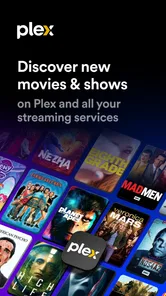
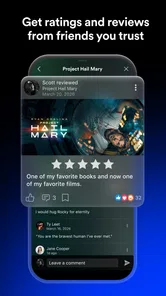
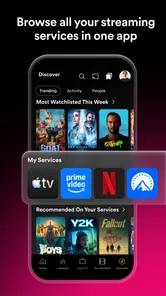
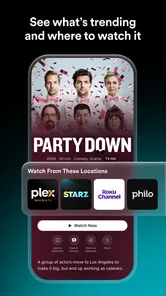
Analysis by Reviewed
For me, the most useful way to think about Plex: Stream Movies & TV is as a viewing hub rather than just another place to pick a film. It brings together entertainment you can watch through the app and, for people who already keep their own media, a way to reach that collection on a phone. That combination is the idea I kept coming back to: Plex is most appealing when you want fewer separate places to look, not when you expect every title you fancy to be available on demand.
Why the hub approach matters
The distinction between a hub and a conventional streaming service is practical. When I open a subscription platform, I generally know I am there for its catalogue. Plex can serve a less focused purpose: I might browse its viewing options, check what is on live TV, or look for something from my own collection. That flexibility is useful when I have not decided what I want yet, but it also means I should not expect the same tightly curated experience as a service built around one catalogue.
I also find it helps to think of Plex as an addition to an existing setup, rather than a promise to replace it. If I already pay for a service because it has a particular show, Plex does not remove the reason I use that service. Its appeal is the extra place to explore and the possibility of bringing personal media into the same general viewing routine. That makes the app most worthwhile for someone who values variety of use, rather than someone looking for one exclusive programme.
The All-in-One Media Hub
Plex is a free entertainment app from Plex, Inc., and its central appeal is the mix of movies and shows, live TV channels, and access to personal media. It has been around since Feb 16, 2011, and its Teen age rating makes it more suitable for older children and adults than for a young child browsing alone. The app has a 3.8 average from around 467,000 ratings, with more than 50 million installs, so it is a familiar option for people looking beyond a single subscription service. Some in-app purchases range from $0.99 to $324.99 per item, so I would check the purchase details before confirming anything.
User-Friendly Interface and Navigation
Upon launching the app, the user interface is a breath of fresh air. It's intuitive and visually appealing, making it easy even for the tech-challenged among us to find what we're looking for. Navigating through the app is a breeze; everything is where you expect it to be. The search function is pretty robust too, so finding that obscure indie film you’ve been dying to watch is just a few taps away.
Streaming Quality and Performance
Let’s talk about streaming quality. I tested Plex on both Wi-Fi and mobile data, and it performed admirably on both. The streams were smooth with hardly any buffering, which is a crucial aspect for any streaming app. Who wants to watch a movie that keeps stopping midway, right? Plus, the quality of the video was consistently high, even on less-than-perfect connections.
Content Variety
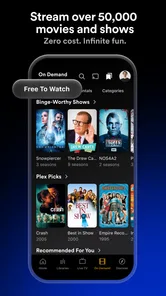
Speaking of content, the variety on Plex is quite impressive. From blockbuster hits to beloved classics and even a selection of international films, there’s something for everyone. I spent an entire weekend binge-watching shows I hadn’t even heard of before, and it was a blast. They also offer some live TV options, which is a nice little bonus.
More From Our News Desk

 Gmail
GmailGmail in a Busy Inbox: Who Benefits Most?
From first account to crowded workday, Gmail earns its place through dependable search and flexible sorting—but its best fit depends on how much inbox maintenance you can tolerate.

 Prime Video
Switching to Prime Video: What Changes in Your Viewing Routine
Prime Video can make a compelling second home for streaming, but switching means learning a different catalog, rental layer, and route from browsing to playback.

 Universal TV Remote Control
Universal TV Remote Control Works Best as a Reliable Backup
A phone remote earns its place through quick setup and reliable habits. Here is how to get more from Universal TV Remote Control—and where its limits show.

 Weather - By Xiaomi
Weather by Xiaomi Review: Clear at a Glance, Less Clear Up Close
Xiaomi’s weather app makes everyday forecasts quick to scan, but its calm surface can leave useful details and recovery paths harder to find than they should be.

 X
XX Under Pressure: Can It Recover When Posting Goes Wrong?
A resilience-focused review of X, examining setup, mistaken posts, interruptions, weak connections, and the gaps that matter when recovery needs to be dependable.

 Clash of Clans
Clash of Clans Is Won Between the Battles
Its raids are quick; its community is a long-term project of coordination, teaching, rivalry, and shared responsibility—with all the friction that entails.
Latest News



Personal Media Heaven
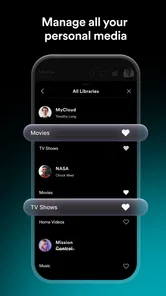
Now, if you’re like me and have a ton of personal media, Plex offers a unique feature where you can stream your own content. I uploaded my home movies and music collection to the app, and being able to access them from anywhere was a game-changer. It's like having a personal cloud service dedicated to media, and it works seamlessly!
Making a personal library useful day to day
The personal collection is particularly handy for media that is meaningful to me but unlikely to appear in a commercial catalogue: home videos, recordings, or other files I have kept over the years. Rather than searching several folders on a device, I can treat the collection as a place to revisit those items. The payoff is not just convenience; it is being able to bring the same personal library into a viewing routine that also includes other entertainment.
There is a useful trade-off here. A personal library gives me more control over what I keep available, but it asks me to do some organizing before the convenience arrives. If filenames and folders are chaotic, browsing can feel less tidy than opening a professionally arranged catalogue. I would begin with a small, familiar group of files and see how they appear in the app before spending time moving an entire archive into the setup.
This is also why I would not recommend Plex as a shortcut for someone who simply wants to press play on any film they can name. The personal-media side is valuable when there is already a collection worth accessing. If there is no interest in organizing or maintaining one, the app’s broader viewing choices may still be appealing, but the feature that most distinguishes it will matter less.
What the Personal Collection Changes
The personal-library side is the feature that most clearly separates Plex from a typical subscription streamer. A subscription app is usually the simpler choice when I want one service’s catalogue with minimal setup. Plex makes more sense if I already have videos or music I want to organize and reach from different places. The trade-off is that a personal collection takes preparation: the files have to be available to the setup I use, and I need to think about how I keep that library organized. It is not a magic shortcut for finding every film in one place.
A practical routine is to use the app in two different ways. At home, I can browse my own collection when I want a familiar movie or a home recording; when I have spare time, I can look through the entertainment and live-TV options instead. Before relying on personal media while away, I would check that the relevant setup is ready and that the files I want are accessible. That small check matters more than endlessly searching for a title after leaving home.
Best for relaxed discovery, not a specific must-watch
For a realistic evening, imagine I have finished dinner, want something on in the background, and have no title in mind. I can browse Plex’s available entertainment or try a live channel rather than first choosing which subscription app to open. If nothing catches my attention, I can switch to a familiar item from my own library, provided I have organized and made it available. That mix makes the app a useful option for unplanned viewing, not a guarantee that a particular new release will be waiting for me.
For a different routine, I might be visiting family and want to show a home video without passing a file around or searching through a camera roll. Having personal media accessible through the viewing setup can make that moment simpler. I would still prepare beforehand: test the file, make sure it is reachable from the device I plan to use, and avoid assuming that a setup I have only used at home will behave exactly as I want elsewhere.
Where It Fits in Everyday Viewing
Picture a quiet evening when I have no particular film in mind. Plex gives me a place to browse without first deciding which paid service to open, and live channels offer a more casual alternative to choosing a specific show. On another day, I might want a family video that is not part of any streaming catalogue. That is where the personal-media angle earns its keep. It is a useful pairing of discovery and collection, though the experience depends on what I want to watch and how prepared my own library is.
Compared with the usual streaming alternatives, Plex is less compelling if my only goal is a particular exclusive series on a service I already pay for. Those focused services can be more direct for that purpose. Plex’s advantage is breadth of role: it can sit alongside them as a place for free viewing options and my own media, rather than replacing every subscription. I would treat it as a complement, especially if I value one home for personal files and casual browsing.
What to expect from live channels
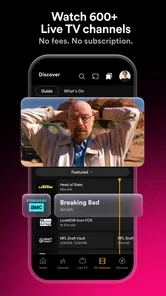
Live TV has a different rhythm from an on-demand library. It suits me when I want to drop into something without picking a precise episode or film, but it is not the right tool if I have a specific programme in mind and need to know it will be available at a particular moment. I treat channels as an option for casual browsing, much like turning on television to see what is on, rather than as a replacement for a schedule I depend on.
That distinction helps set expectations for people choosing between Plex and a traditional live-TV service. If the main need is a dependable lineup built around particular channels or scheduled viewing, a service designed around that need may be a better fit. If I want live viewing as one part of a broader app that also includes on-demand entertainment and personal media, Plex has a more interesting role.
Small Checks That Improve the Experience
I would start by searching for a few titles I genuinely like before making Plex part of my routine; catalogue discovery is more useful when I know whether its available choices suit my taste. For personal media, I would also test one file at home and then try reaching it from another device or location before depending on it for a trip. That reveals whether my setup works as expected without turning a long journey into troubleshooting. Live TV is better approached as something to browse casually than as a guaranteed substitute for a particular scheduled program.
Another sensible habit is to distinguish between free viewing and any optional purchase prompt. The app itself is free, but in-app purchases are available, so I would read each screen carefully rather than assuming every item or feature costs nothing. If I want a straightforward, curated subscription library with a specific show, I may be happier opening that service directly. If I want a flexible place to explore and keep my own collection within reach, Plex is a stronger fit.
Who gets the most from Plex
I would recommend Plex most readily to someone who already has personal videos or other media they want to reach conveniently, and who also likes browsing rather than arriving with one fixed title in mind. It can be a sensible companion to subscription services because its role is not limited to competing for the same exclusive catalogue. The free starting point also makes it easier to see whether its combination of viewing options and personal media fits the way I watch.
By contrast, I would steer a viewer toward a focused subscription app if they care mainly about a named show, a consistent catalogue organized around that service, or the simplest possible route from opening an app to pressing play. I would also suggest caution for a household where a young child will browse alone: the Teen rating is a reason for adults to consider whether the content and browsing experience suit their family.
One practical question is whether I need to pay just to try it. The app is free to start with, while optional in-app purchases are offered; I would review any purchase screen before deciding what to buy. Another is whether it replaces every other streaming service. I would not plan on that: it is better understood as a flexible hub that can complement a service with a must-watch catalogue.
For personal files, the useful question is less “Can I find everything automatically?” and more “Have I prepared the collection I want to access?” I would check the files I care about and test access before relying on them away from home. For live TV, I would ask whether casual channel browsing is enough, or whether I need a particular programme at a fixed time. Those answers make it easier to judge the app against my own habits instead of treating all streaming as the same job.
In conclusion, if you're looking for a versatile and reliable streaming service, Plex: Stream Movies & TV is definitely worth checking out. Its ability to stream both your personal media and a wide array of movies and TV shows makes it a unique contender in the streaming world. So go ahead, give it a try, and turn your smartphone into the ultimate entertainment hub!
Plex: Find Movies & TV Shows Frequently Asked Questions
Can I use Plex on Android and iOS?
Yes. Plex: Stream Movies & TV is available as an app for Android and iOS, so you can use it on a compatible phone or tablet. Its main purpose is entertainment: you can explore movies, TV shows, and Live TV channels, as well as connect to a personal Plex media library. If you plan to watch on other kinds of screens, check that device’s app availability separately.
What kind of content can I watch in Plex?
Plex brings together movies, TV shows, and Live TV channels, including free entertainment you can stream without a subscription. It can also connect to a personal media library if you have a Plex server set up. This combination makes the app useful for browsing available streaming content and accessing your own collection, though the experience depends on which of those features you choose to use.
Is Plex appropriate for younger children?
Plex is rated Teen, so it may be suitable for some teenagers, but families should consider that its entertainment catalog can include content intended for different audiences. Parents may want to review what is available and supervise younger viewers’ use of the app. The app’s broad mix of movies, shows, and live channels makes it helpful to choose content deliberately rather than assuming every option is appropriate for every age.
Do I need to set up a Plex server before I can use the app?
No server setup is needed to start exploring Plex’s free entertainment content, including movies, TV shows, and Live TV channels. The app can also connect to a personal Plex media library, which involves having a Plex server available to organize and stream your own media. That distinction makes Plex useful both as a standalone streaming app and as a companion for a personal collection.
Does Plex require a subscription to watch movies, TV shows, or Live TV?
Plex’s core appeal is that it offers movies, TV shows, and Live TV channels without a subscription. Some optional purchases are available in the app, so the free experience and paid extras are separate considerations. If you mainly want to browse its free entertainment selection, you can begin without committing to a recurring subscription; check the purchase details in the app before choosing any optional extras.
Pros
- Extensive library of movies and TV shows.
- Intuitive user interface for easy navigation.
- Supports multiple devices and platforms.
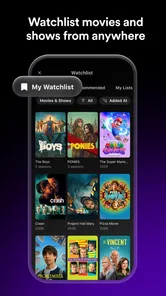
- Customizable watchlists and recommendations.
- Offers both free and premium content.
Cons
- Requires a stable internet connection.
- Ads can be intrusive in the free version.
- Some premium content can be expensive.
- Limited offline viewing options.
- Occasional streaming lags reported.












