

Playground: Child Care App
- 137.00
- 4.9
- Installs
- 100.00K
- Price
- Free

Screenshots
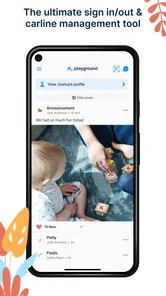
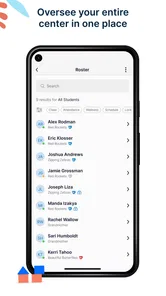
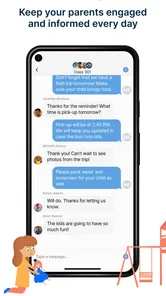
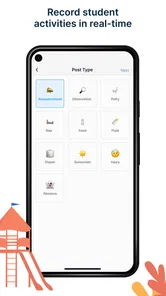
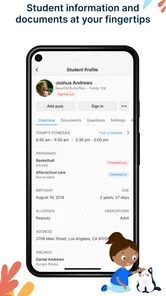
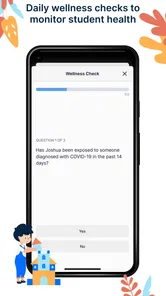
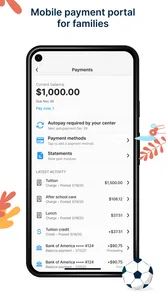
Analysis by Reviewed
When I look at Playground: Child Care App, the most useful idea is also the simplest one: it brings child-care coordination into a single place instead of leaving parents and caregivers to piece everything together through scattered conversations. After School Development presents it as an education app, but I found its practical value less about lessons and more about making the everyday care routine easier to follow.
That focus matters because child care often becomes difficult through small misunderstandings. A parent may need to know what is happening during the day, a caregiver may need a clear way to keep families informed, and everyone benefits when the same information is easy to find. Playground is built around that shared-care situation. It is free, rated for Everyone, and available for Android devices running Android 8.0 or later, which makes it approachable for families who do not use the newest phones.
I would not describe it as a full replacement for every communication tool. Instead, I see it as a focused option for organizing the relationship between families and child-care providers. Its current version, 3.3.0, has earned a 4.9 average from around 1.5 thousand ratings, while more than 100 thousand people have installed it. Those figures suggest that the straightforward approach connects with its intended audience, although a high store rating cannot tell you whether it matches the exact workflow of your own child-care setting.
One shared place for the child-care routine
I find the idea of one shared place most useful when several adults are involved in a child’s routine, because it gives everyone a common starting point rather than making one person the messenger. In this section, I’d focus on how that shared setup can reduce small handoff misunderstandings, then turn to the moments when reliable connectivity matters most.
Why the central idea is useful
The strongest capability here is centralization. Rather than treating child care as a series of unrelated messages, Playground gives the care relationship a dedicated digital home. That distinction is important. A general messaging app is excellent for quick questions, but it can become noisy when family updates, reminders, photos, schedule changes, and urgent notes all appear in the same personal chat.
With a child-care-focused app, the conversation has a clearer purpose. I can imagine opening it with a specific question in mind: what happened during the day, what should be remembered for tomorrow, or whether a caregiver has shared an update. The benefit is not flashy technology. It is the reduction of mental searching that happens when information is spread across text messages, email, paper notes, and verbal handoffs.
This is especially helpful for parents who share responsibility. One parent may collect a child while another handles morning preparation. If both can consult the same care channel, fewer details depend on one person remembering to forward them. Grandparents or other regular caregivers may also find a dedicated child-care space easier to understand than a long family group chat, provided the care provider supports their participation.
More From Our News Desk

 Instagram
Instagram’s Power Comes From Its Place in Your Phone
A close look at how Instagram turns Meta’s reach, recommendation systems and everyday camera habits into durable platform power—and what that costs users.

 Gmail
GmailGmail in a Busy Inbox: Who Benefits Most?
From first account to crowded workday, Gmail earns its place through dependable search and flexible sorting—but its best fit depends on how much inbox maintenance you can tolerate.

 Prime Video
Switching to Prime Video: What Changes in Your Viewing Routine
Prime Video can make a compelling second home for streaming, but switching means learning a different catalog, rental layer, and route from browsing to playback.

 Universal TV Remote Control
Universal TV Remote Control Works Best as a Reliable Backup
A phone remote earns its place through quick setup and reliable habits. Here is how to get more from Universal TV Remote Control—and where its limits show.

 Weather - By Xiaomi
Weather by Xiaomi Review: Clear at a Glance, Less Clear Up Close
Xiaomi’s weather app makes everyday forecasts quick to scan, but its calm surface can leave useful details and recovery paths harder to find than they should be.

 X
XX Under Pressure: Can It Recover When Posting Goes Wrong?
A resilience-focused review of X, examining setup, mistaken posts, interruptions, weak connections, and the gaps that matter when recovery needs to be dependable.
Latest News



What this changes for caregivers
For a caregiver or child-care team, the value is consistency. A dedicated app makes it easier to think in terms of the child’s care record rather than an informal stream of messages. That can encourage more deliberate updates and reduce the chance that an important note gets buried beneath unrelated conversation.
I would still avoid assuming that the app automatically solves communication problems. A tool can organize information, but the people using it still need agreed habits. Families should know when to check for updates, which matters belong in the app, and what requires a direct conversation. Playground is most effective when it becomes the normal place for routine child-care communication, not merely another optional channel that sits beside several others.
Where it differs from ordinary alternatives
The usual alternative is a combination of messaging apps, email, paper notebooks, and calendar reminders. That combination can work, especially for a small family arrangement where everyone already communicates well. It may even be faster for a one-off question. The weakness is that it depends heavily on personal organization.
Playground’s advantage is its purpose. The app is not asking families to create their own system from general-purpose tools. It is designed around child care, so the context is clearer from the moment it is opened. The trade-off is that its usefulness depends on adoption by the relevant care provider and family members. If only one person uses it while everyone else continues with texts and paper notes, the centralization benefit quickly disappears.
The real win is not having another inbox; it is having one agreed place for the care relationship. That is the capability I would judge first before worrying about visual polish or extra conveniences.
How I would use it during a normal day
Imagine a parent preparing for work while a child is attending care. In the morning, the parent can check the app for the information that has already been shared and use the same space for a relevant note. During the day, the caregiver can communicate with the family through the child-care channel rather than relying on a personal phone number or a message that might be missed.
At pickup time, the parent does not need to reconstruct the day from memory alone. The app can serve as the reference point for the information that has been communicated. Later, another caregiver in the household can review the same updates without asking the first parent to summarize everything.
This scenario sounds ordinary, and that is exactly why it matters. Child-care software should earn its place by removing small daily frictions, not by demanding that parents learn a complicated system. Playground’s appeal is strongest for people who want a simple routine: open the app, check the shared care information, respond when needed, and return to the rest of the day.
Practical habits that make the app more useful
My first recommendation would be to decide who is responsible for checking updates. If every adult assumes someone else has seen a message, the app cannot prevent missed information. A simple household rule, such as checking at a consistent point in the morning and evening, can make the shared channel more dependable.
My second recommendation is to keep routine information in the app and reserve urgent matters for the fastest available contact method. A child-care app is useful for organized communication, but I would not treat any app as a guarantee that a time-sensitive message has been seen immediately. That distinction is easy to overlook when a digital channel feels official.
Third, I would use the app as a shared reference rather than duplicating every update across multiple services. Copying the same note into texts, email, and Playground may feel safer at first, but it creates several versions of the truth. If the care provider has chosen Playground as the main channel, families will get more value by checking it consistently instead of maintaining parallel systems.
The best setting for Playground
The clearest fit is a structured child-care arrangement where a provider and families need a common communication point. In that environment, the app’s purpose gives it an advantage over a casual group chat. It can help separate care-related information from personal conversation and make shared responsibility easier to manage.
It also suits families who feel that paper notes are easy to lose or that ordinary messaging threads become difficult to search. Parents who divide pickup duties, work changing hours, or rely on more than one regular caregiver may appreciate having a common place to check rather than depending on verbal handovers.
A realistic example would be a family with two working parents and a grandparent who occasionally collects the child. The parent who receives an update first does not need to become the household’s permanent information gatekeeper. The other adults can consult the same child-care space, which reduces repeated questions and makes the transition between caregivers smoother.
That does not mean every family needs it. If care is handled informally by one relative and communication already happens clearly in person, adding an app may create more work than value. Likewise, a parent who wants a broad family organizer with meal planning, household tasks, shared calendars, and financial tracking may find a general family-management app more suitable. Playground’s strength is its narrower purpose, not its ability to manage an entire household.
What the focused design may not solve
The same focus that makes the app approachable can also feel limiting. Families expecting a complete parenting dashboard may want more than a child-care communication tool. I would not choose it solely because it has a high rating if the provider’s needs extend into areas outside the care relationship.
There is also a social trade-off. The app works best when the child-care organization actively uses it and sets clear expectations. If updates continue to arrive through several channels, Playground may become a duplicate rather than a replacement. Before asking every family member to install it, I would confirm how the provider intends to use it and whether all regular caregivers can participate.
Another point is device compatibility. Android users need version 8.0 or newer, so anyone using an older phone should check compatibility before planning around the app. The app is free, which removes a financial barrier, but free access does not remove the practical cost of learning a new routine or monitoring another communication channel.
The Everyone content rating makes it suitable from an age-classification perspective, but that should not be confused with the app being intended for children to manage independently. Its meaningful audience is the adults coordinating care. Parents should still think about who can access the shared information and follow the care provider’s own rules for participation.
Questions I would settle before switching
The first question is whether the child-care provider actually treats Playground as a primary channel. If the answer is no, the app may not deliver its main advantage. I would ask where daily updates are posted, how schedule changes are communicated, and whether a message in the app is considered acknowledged only after a reply.
The second question is whether every adult who needs the information can use it comfortably. A shared system is only as strong as its least-connected participant. If one parent has limited access to the required device or prefers paper communication, the household may need a backup routine.
The third question is how the app fits alongside urgent contact. I would want a clear understanding of what should be handled through Playground and what should be communicated by phone or directly to the caregiver. This is not a criticism of the app; it is a sensible boundary for any digital care tool.
The fourth question is whether the app’s focused design matches the family’s expectations. If the goal is simply to keep child-care communication organized, that focus is a benefit. If the goal is to coordinate every part of family life, another category of app may be a better choice.
Who is most likely to benefit
I think Playground is best for parents and caregivers who want less fragmentation. It makes the most sense when several adults share responsibility, when a child-care provider needs a consistent communication route, or when ordinary chats have become difficult to manage. The free price also makes it easy to try without committing household money, and the broad age classification keeps the app approachable for families.
It is less compelling for someone looking for academic learning tools, despite its education category. The app’s child-care purpose should guide expectations. I would also skip it if your care arrangement is entirely informal and already works through direct conversation, or if you need a feature-heavy family organizer rather than a dedicated care channel.
My overall view is positive, but deliberately practical. Playground is not valuable because it promises to replace every tool a family uses. It is valuable when it gives a child-care team and the adults around a child one dependable place to communicate. After School Development has kept the idea focused, and that focus can make daily coordination calmer when everyone agrees to use it consistently.
For a family deciding whether to install it, I would start with the provider rather than the app store page: confirm that the care setting uses Playground, identify who needs access, and agree on what belongs there. If those pieces line up, Playground: Child Care App is a sensible free option for turning scattered child-care updates into a more manageable shared routine.
Playground: Child Care App Frequently Asked Questions
What devices can I use Playground: Child Care App on?
Playground: Child Care App is an education app available for Android and iOS. On Android, it requires version 8.0 or later, so check your device’s operating system before installing. The app is free to download, and its Everyone age rating makes it broadly suitable for users, though parents should still review how its features fit their family’s needs.
Who develops Playground: Child Care App, and is it well established?
Playground: Child Care App is developed by After School Development. It has reached over 100,000 installs and has an average rating of 4.9 from around 1,500 ratings, alongside 137 written reviews. Those figures offer a snapshot of its reach and user feedback, but families should still read recent reviews and assess whether the app’s current features suit their childcare needs.
What is Playground: Child Care App and who is it designed for?
Playground: Child Care App is designed to help parents and caregivers discover, organize, or manage child-friendly activities and care-related routines, depending on the features available in the current version. It may be useful for families looking for structured play ideas, daily engagement, or childcare support. Before downloading, review the app description carefully to confirm that its tools match your child’s age, needs, and your location.
Is Playground: Child Care App suitable for babies and older children?
Suitability depends on the app’s recommended age range and the specific activities or services it provides. Some content may be intended for toddlers, while other features could be more appropriate for preschool or school-age children. Parents should check age guidance, read activity descriptions, and supervise children during use. The app should complement, rather than replace, attentive adult care and age-appropriate real-world play.
Does Playground: Child Care App require an internet connection or account?
Many childcare and activity apps require an internet connection for registration, updates, location-based information, messaging, or access to online content. Some features may work offline after they have been loaded, but this should not be assumed. An account, email address, or other personal details may also be requested. Check the sign-up process, subscription terms, and privacy policy before entering family information.
Pros
- Simple routines help children learn daily habits independently.
- Colorful activities keep young users engaged without overwhelming controls.
- Parents can use it to encourage positive behavior through play.
- Short sessions make it suitable for quick activities during busy days.
- Child-friendly design is easy for younger users to understand.
Cons
- Some activities may become repetitive after extended use.
- Younger children may still need adult guidance to complete tasks.
- Limited customization may not suit every family’s routine.
- The app may require a compatible device and sufficient storage space.
- Progress tracking may feel basic for parents wanting detailed reports.











