

Planet Anime Kansas City
- 0.00
- 0.0
- Installs
- 10.00K
- Price
- Free

Screenshots
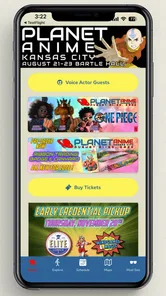
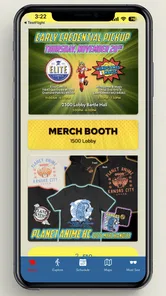
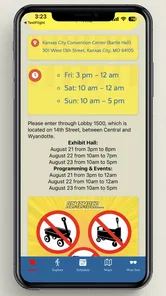
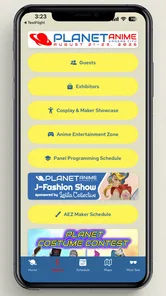
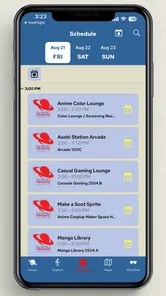
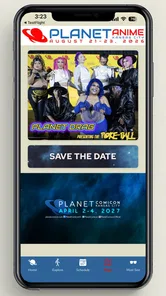
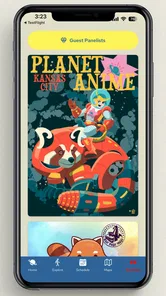
Analysis by Reviewed
Planet Anime Kansas City is the kind of event companion I would install before leaving home, not because it replaces every planning tool, but because it puts the event itself at the center of the experience. I found it most useful as a focused reference for attendees who want the official information close at hand while moving between activities. It is a free Events app from PlanetComiconKC, with the store summary identifying it as the official app and the short description pointing to Planet Anime.
That distinction matters. This is not a general anime social network, a streaming service, or a game. Its value depends on how closely your visit is connected to the Planet Anime Kansas City event. If you are attending, considering a visit, or helping a friend organize one, a dedicated companion can be easier to consult than scattered browser tabs and screenshots. If you are only looking for anime news or a year-round community, I would choose a different kind of app.
How I would use it from the first planning session to the event floor
My baseline workflow would begin before arriving. I would install Planet Anime Kansas City, open it on a comfortable connection, and spend a few minutes learning how the information is arranged rather than waiting until I was already in a crowded venue. That small habit makes a difference: an event app is most helpful when I already know where to look for the details I care about.
I would then decide what kind of visitor I am. Someone focused on panels needs a different plan from someone mainly interested in guests, shopping, cosplay, or simply spending a few relaxed hours exploring. The app works best when I use it as a decision aid rather than trying to absorb everything at once. I would identify a short list of priorities, keep a little flexibility around them, and return to the app when the day changes.
A realistic example is a Saturday visit with a friend who wants to attend a particular activity while I am more interested in browsing. Instead of repeatedly asking each other what comes next, we could check the official event information together, agree on one meeting point and one time window, then split up without turning the day into a rigid timetable. That is a modest use case, but it is exactly where a focused event companion earns its place.
I also like the idea of checking the app at three distinct moments: while planning, shortly before leaving, and during the visit. The first check helps shape expectations. The second gives me a chance to refresh my understanding of the current program. The third is for quick decisions, such as choosing between two activities or confirming what I wanted to see next. Treating those as separate workflows is more practical than endlessly browsing from the moment of installation.
Because this is the official app associated with PlanetComiconKC, I would give it priority over reposted schedules or old screenshots when making event-related decisions. That does not mean I would stop using common sense. I would still allow time for queues, walking, meals, and unexpected changes. An app can organize information, but it cannot make a busy convention move at my preferred speed.
More From Our News Desk

 Gmail
GmailGmail in a Busy Inbox: Who Benefits Most?
From first account to crowded workday, Gmail earns its place through dependable search and flexible sorting—but its best fit depends on how much inbox maintenance you can tolerate.

 Prime Video
Switching to Prime Video: What Changes in Your Viewing Routine
Prime Video can make a compelling second home for streaming, but switching means learning a different catalog, rental layer, and route from browsing to playback.

 Universal TV Remote Control
Universal TV Remote Control Works Best as a Reliable Backup
A phone remote earns its place through quick setup and reliable habits. Here is how to get more from Universal TV Remote Control—and where its limits show.

 Weather - By Xiaomi
Weather by Xiaomi Review: Clear at a Glance, Less Clear Up Close
Xiaomi’s weather app makes everyday forecasts quick to scan, but its calm surface can leave useful details and recovery paths harder to find than they should be.

 X
XX Under Pressure: Can It Recover When Posting Goes Wrong?
A resilience-focused review of X, examining setup, mistaken posts, interruptions, weak connections, and the gaps that matter when recovery needs to be dependable.

 Clash of Clans
Clash of Clans Is Won Between the Battles
Its raids are quick; its community is a long-term project of coordination, teaching, rivalry, and shared responsibility—with all the friction that entails.
Latest News



What I would check before committing to a full day
The first question is whether the app supports the kind of visit I am planning. If I am attending with children, I would pay attention to how easily I can explain the day’s options and keep the plan simple. The content rating is Everyone, which makes the app broadly approachable from an age-rating perspective, but that does not automatically mean every event activity will suit every child. I would still make choices based on the individual event information and the child’s interests.
For a solo visitor, the app can serve as a lightweight itinerary. I would mark mentally which activities are essential and which are optional, then avoid filling every gap. For a group, its bigger advantage is shared reference: everyone can consult the same event-focused source instead of relying on one person’s memory. The trade-off is that the app does not remove the need for communication. Friends still need a meeting plan, especially if they separate inside a busy venue.
I would also decide whether I need a complete schedule or only a few anchors. Trying to follow every listing can create a frustrating day, particularly when activities are spread out or when one delay affects the next choice. The better pattern is to use the app to create a skeleton: one or two must-see items, a flexible block for discovery, and enough open time to handle real-world interruptions.
Settings and preparation habits worth checking
There may be no reason to change every phone setting just because an event app is installed. I would begin with practical checks on my device: notification permissions, battery behavior, available storage, and whether the app is allowed to use a connection when I need it. I would not assume that every useful detail will be available without an internet connection, so I would review the important information in advance rather than depending on perfect reception.
That is one of the less obvious lessons with event companions: preparation is partly about the phone, not only the app. I would make sure the screen does not lock too quickly when I am actively checking information, while avoiding wasteful battery settings for the rest of the day. A portable charger is often more useful than spending the morning repeatedly reopening pages, taking screenshots, and searching again.
I would also keep the app updated through the normal app-store process. The current version is 2.0.5, and the minimum operating-system requirement is Android or iOS 10. That makes it accessible to a broad range of devices, while still leaving the usual practical question: an older phone may meet the requirement but feel slower or have less battery endurance than a newer one. I would test the app at home before the event rather than discovering a device-specific problem at the entrance.
My strongest preparation tip is to separate stable information from information that may change. I might save a brief personal note with the activities I care about, but I would return to the app for the latest event details instead of treating a screenshot as permanent truth. This avoids a common mistake: preserving convenience while losing the reason an official companion exists in the first place.
I would not turn on every notification automatically. If the app offers notification controls on my device, I would choose only what helps me. Too many alerts can make an event feel like a stream of interruptions, while too few may mean missing a useful reminder. The right balance depends on whether I am following a tight schedule or attending casually. I would rather use the app deliberately than let it dictate the whole day.
Faster patterns for using the app on a crowded day
Experienced event visitors tend to build repeatable habits, and I would use Planet Anime Kansas City in the same way. Before entering an activity, I would check the next decision rather than repeatedly scanning the entire app. After finishing something, I would look for the nearest worthwhile option or the next time block that fits. This keeps the phone work short and leaves more attention for the event itself.
Another useful pattern is a two-person check. If I am with a friend, one person can open the relevant event information while the other handles bags, directions, or the physical surroundings. Then we can confirm the plan aloud and put the phone away. This sounds simple, but it prevents the familiar problem of both people staring at separate screens and still ending up with different assumptions.
I would also use a “must, maybe, skip” mental system. Must items are the reason I came. Maybe items are attractive if timing and energy allow. Skip items are not failures; they are the activities I can ignore without regret. The app becomes more useful when it helps me choose between these levels instead of encouraging me to chase completeness.
For a family, I would adapt that system into shorter blocks. Pick one shared activity, one break, and one optional discovery period. Let each person choose one personal priority if the schedule allows. This reduces the pressure on the app to solve every coordination problem and makes it easier to recover when someone needs food, rest, or a quieter space.
For a creator or cosplayer, I would use the app as a timing reference rather than as a replacement for a personal production checklist. The event companion can help establish when I need to be in a particular place, but I would keep separate notes for costume repairs, equipment, contacts, and personal commitments. Combining those two kinds of information in one place can become confusing, especially when the event day gets busy.
One trade-off compared with a general calendar app is that Planet Anime Kansas City is more event-specific, while a calendar is better for combining the convention with travel, hotel check-in, meals, and appointments. I would not force one tool to do the other’s job. I would use the official app for event context and my normal calendar or notes for the rest of the trip. That division keeps both systems clearer.
Where a dedicated event app is better than ordinary alternatives
The usual alternative is a web browser with several tabs open. Browsing can be perfectly adequate, especially for someone who only needs a quick look or is not attending. However, a dedicated app feels more appropriate when I expect to revisit event information throughout the day. It gives the event a single place on my phone and reduces the temptation to mix official details with unrelated search results.
Another alternative is social media. Social platforms are useful for conversation, reactions, and discovering what other attendees are excited about, but they are not always the clearest place to build a personal plan. Posts can be easy to miss, discussions can become noisy, and a shared image may not reflect the latest change. I would use social media for atmosphere and community, while relying on the official companion for my core reference.
A paper schedule still has one advantage: it never runs out of battery. For that reason, I would not treat the app as my only backup. A short handwritten note with my top priorities, meeting point, and essential times can be sensible. The app remains the more adaptable tool, but paper provides resilience when the phone is inconvenient or the day becomes too hectic for repeated checking.
Compared with a broad convention-management app, this one’s focused identity is appealing if Planet Anime Kansas City is the event I care about. A general tool may offer wider planning functions, but it can also require more setup and may not present this event’s information as directly. The choice comes down to scope: I would choose the dedicated app for event-specific reference and a broader planner for a multi-event trip.
Limits I would keep in mind before relying on it
The main limitation is scope. Planet Anime Kansas City is not a universal anime utility, and its usefulness outside the event context is naturally limited. I would skip it if my goal were streaming shows, tracking a collection, finding manga, chatting with fans year-round, or managing a general entertainment calendar. Installing it for those purposes would create the wrong expectation.
I would also avoid assuming that an app can replace venue awareness. Even with good information on the screen, I still need to watch signs, listen for announcements, allow time for movement, and respect staff instructions. A schedule can tell me what I want to do; it cannot tell me how long a crowded hallway will take or whether I will still feel like attending the next activity after a long wait.
There is a second limitation in the way people use official apps: they can become a source of overplanning. It is tempting to treat every listed option as an obligation. My advice is to keep the app subordinate to the experience. If a conversation, performance, shop, photo opportunity, or unexpected discovery becomes more enjoyable than the next planned item, I would be willing to change course.
Device age and connectivity are practical concerns too. The minimum operating-system requirement is low enough to include many older phones, but compatibility alone does not guarantee a smooth day. I would check loading behavior, battery condition, and screen readability before traveling. If my phone is unreliable, I would prepare a compact offline backup of the details that matter most rather than blaming the app for a hardware problem.
Finally, an official label should make me more attentive, not less. I would still read the information carefully and verify that I am looking at the right event context before making travel decisions. The app is a strong reference point, but responsible planning includes checking my own tickets, transportation, accommodation, and personal needs separately.
Who will get the most from Planet Anime Kansas City
I think the best audience is an attendee who wants a simple, event-centered way to prepare and make decisions on the move. It is especially suitable for first-time visitors who feel overwhelmed by the amount of information surrounding a convention. Having one official companion can reduce the initial friction, provided the visitor uses it to build a realistic plan rather than trying to schedule every minute.
Regular convention-goers may appreciate it for a different reason. They already know how quickly plans change, so they can use the app as a quick reference while keeping their own habits for meeting friends, managing energy, and choosing priorities. The dedicated format is most valuable when it shortens the path from “What can I do next?” to a sensible answer.
Parents and group organizers should see it as a shared information source, not a complete supervision system. I would establish meeting rules independently, keep contact details available, and agree on what happens if someone gets separated. The app can support those arrangements, but it should not be expected to carry them.
I would recommend skipping it if the event is not part of your plans or if you dislike installing temporary apps for short-term needs. In that case, a browser and a small personal note may be enough. The app earns its space when repeated event-day reference is more convenient than searching from scratch.
My verdict after building a repeatable routine
My honest view is that Planet Anime Kansas City works best as a disciplined companion rather than a magical all-in-one solution. I would install it, explore it before traveling, adjust only the phone settings that affect access and battery, and use it in short checks throughout the day. That routine gives me the practical benefit without allowing the screen to dominate the convention.
The free price makes trying it straightforward, and the Everyone content rating keeps the app broadly approachable. It has reached over ten thousand installs, which suggests that it has found an audience among people looking for an event-specific tool. The developer is PlanetComiconKC, so the app feels most relevant when my plans are directly tied to Planet Anime Kansas City rather than to anime culture in general.
What I value most is the possibility of replacing scattered planning with a repeatable habit: prepare early, choose priorities, check the official source at sensible moments, and keep a backup for the details that would cause real trouble if forgotten. That is more useful than simply downloading an app and hoping it will organize the day for me.
My recommendation is simple: use Planet Anime Kansas City as your event anchor, not your entire travel system. Pair it with ordinary judgment, a realistic schedule, and a little flexibility. For an attendee who wants the official event experience close at hand, it is a sensible free download. For someone seeking a permanent anime community or a general planner, another category of app will be a better fit.
Planet Anime Kansas City Frequently Asked Questions
Is Planet Anime Kansas City app free, and what devices can run it?
Planet Anime Kansas City is a free Events app developed by PlanetComiconKC. It is available for Android devices running version 10 or later, so check your phone’s operating system before downloading. The app is intended for Everyone, and its current version is 2.0.5. Its free price makes it straightforward to try as an event companion, while admission to the event itself is a separate matter.
What is Planet Anime Kansas City?
Planet Anime Kansas City is an event-focused experience centered on anime, manga, gaming, cosplay, Japanese pop culture, and related entertainment. Depending on the edition, it may include guest panels, meet-and-greets, workshops, screenings, vendors, contests, and interactive activities. Before downloading or using any companion app, check the current event details because schedules, guests, locations, and available features can change.
Is there an official Planet Anime Kansas City app for Android or iOS?
Planet Anime Kansas City has an official app from PlanetComiconKC. Its store summary identifies it as “The Official App,” and its short description is “Planet Anime.” It is listed as an Android app; check the official event channels for current platform availability before searching for an iOS download. As with any event app, confirm the developer name before installing a similarly titled result.
What can I do with a Planet Anime Kansas City companion app?
A companion app may help attendees view the event schedule, explore guests and exhibitors, receive announcements, locate rooms or activities, and save favorite sessions. Some versions may also provide ticket information, maps, notifications, or event updates. Features are not guaranteed for every edition, so review the current app description and verify whether the content is available offline or requires an internet connection.
Do I need tickets or an account to use the Planet Anime Kansas City app?
Many event companion apps allow visitors to browse general information without creating an account, but certain functions may require registration or ticket verification. Access to panels, special guests, premium activities, or reserved experiences can also depend on the ticket purchased. Read the event’s official admission rules carefully, since installing the app does not automatically provide entry or guarantee access to every activity.
Pros
- Easy way to discover anime-related events and activities in Kansas City.
- Useful for connecting with local fans who share similar interests.
- Can help users find conventions
- screenings
- meetups
- and themed gatherings.
- Local focus makes recommendations more relevant than general anime apps.
- May provide updates about community happenings in one convenient place.
Cons
- Content may be limited if few Kansas City events are scheduled.
- Not as useful for users living outside the Kansas City area.
- Event details can change
- so information may require independent confirmation.
- The app may have limited value between major conventions or gatherings.
- Community activity and response times may vary depending on local participation.











