PixAI: AI Anime Art Generator
- 1.19K
- 4.5
- Installs
- 1.00M
- Price
- Free

Screenshots


Analysis by Reviewed
If you're an anime enthusiast like me, you're going to love PixAI: AI Anime Art Generator. This nifty app has quickly become one of my go-to tools for creating anime art with just a few taps. Let me tell you why it's so captivating.
What to expect from an anime-focused art app
PixAI is a free art and design app from Mewtant Inc., built around making anime-style images with AI. Its Teen age rating is worth keeping in mind if you are choosing an app for a younger artist. The app has a 4.5 average from around 44,000 ratings, and more than a million installs; that gives a newcomer a useful sense of its reach, though it does not tell you whether its particular approach will suit your taste.
I would approach it as a place to explore visual ideas, rather than as a replacement for learning to draw or for a full desktop illustration workflow. AI can turn a description or a starting image into something surprising, but that result is not the same as having precise control over every line. If your goal is a quick character concept, a playful image for a chat, or a starting point for your own drawing, that distinction is helpful from the beginning.
Unleashing Creativity with AI
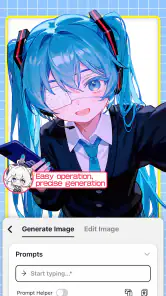
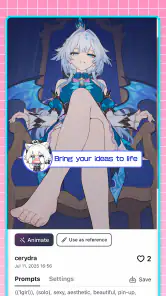
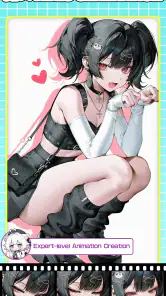
One of the most exciting features of PixAI: AI Anime Art Generator is its ability to transform simple sketches or ideas into polished anime artwork. The app uses advanced AI algorithms to interpret your input and create stunning pieces that could easily pass for professional art. Imagine drawing a rough sketch on your phone and watching it evolve into a masterpiece—it's like having a personal anime artist in your pocket!
Getting started without overthinking it
When I open a creative app for the first time, I want to reach a useful result before getting lost in settings. With PixAI, I would start with one clear subject and a few visual details, rather than a long prompt that tries to describe an entire scene. For example, begin with a character, a simple pose, and a mood; once you have a direction you like, adjust one element at a time. This makes it easier to understand which changes actually affect the image.
A practical first session could be sketching a character idea during a commute, then using the generated image as a reference when you have time to draw later. I would save the wording that produced a promising result before experimenting further. That small habit helps you return to the original idea instead of trying to reconstruct it from memory. It also makes the app useful even when the final artwork is meant to be made by hand.
User-Friendly Interface
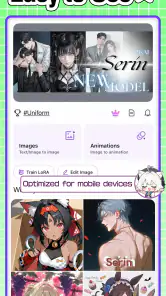
Let's talk about the interface for a second. It's incredibly intuitive, even for someone who might not be tech-savvy. The app's layout is straightforward, with all the tools and options clearly labeled. You can easily navigate through various styles and effects, which means you spend less time figuring out how to use the app and more time creating.
More From Our News Desk

Weather by Xiaomi Review: Clear at a Glance, Less Clear Up Close

X Under Pressure: Can It Recover When Posting Goes Wrong?

Clash of Clans Is Won Between the Battles

Android Auto Makes the Case for Quieter Car Software

MobiOffice: Transforming Mobile Productivity with Seamless Integration

EA SPORTS FC™ Mobile Soccer: Redefining Mobile Sports Gaming
For a first-time user, I still recommend changing just one setting between attempts. If you alter the subject description, style direction, and other choices all at once, it becomes hard to tell why the result changed. Treat each try as a small test: keep what works, then make one deliberate adjustment. That is a more reassuring way to learn than expecting the first image to match a very specific idea perfectly.
Customization Galore
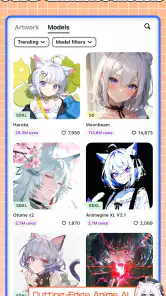
Customization is where this app truly shines. Whether you want to adjust the color palette, tweak the textures, or experiment with different anime styles, PixAI offers a plethora of options. You can personalize every aspect of your artwork, ensuring that your creation is uniquely yours. The level of detail you can achieve is impressive, making it a fun tool for both beginners and seasoned artists.
The trade-off with customization is that more choices can make it tempting to keep tweaking without a clear goal. I find it more useful to decide what matters most in an image—such as the character's expression or the overall palette—and judge each version against that priority. If the result is close but not quite right, a focused adjustment is more productive than changing everything. For someone who needs exact, repeatable control over a finished illustration, a conventional drawing app may still be the better final step.
Community and Sharing
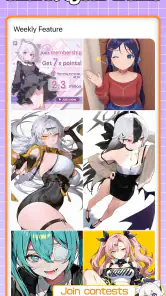
Another fantastic aspect of the app is its community feature. You can share your creations with other users, get feedback, and even collaborate on projects. This social element adds a whole new dimension to the experience, and it's a great way to connect with fellow anime fans and artists. Plus, there's nothing quite like the thrill of seeing your artwork appreciated by others.
Sharing can also be a way to learn: I would ask for feedback on one concrete choice, such as whether a pose reads clearly, rather than simply asking if people like the image. That gives other users something specific to respond to and can help you decide what to try next. If you prefer to keep experiments private or want a strictly offline sketching tool, the social side may be less appealing, and a standard illustration app could fit better.
How it compares, and what to keep in mind
Compared with a general-purpose drawing app, PixAI puts AI-assisted anime creation at the center instead of asking you to build every mark yourself. That makes it approachable for quick concepts and style exploration, while a drawing app is usually a stronger choice when you want to control each stroke or refine a finished piece by hand. I see the two approaches as useful for different stages, not as direct substitutes.
PixAI is free to start, but it also offers in-app purchases ranging from $0.99 to $599.99 per item, so I would check the purchase details carefully before spending. The current version is 4.4.1, and it requires Android 8.0 or later. If you are comparing options, consider whether you want AI to generate a starting image, hands-on drawing tools, or both; that answer matters more than a long list of options.
Who will get the most from it
I think PixAI is a strong fit for anime fans who want to turn loose ideas into visual drafts, beginners who enjoy experimenting, and artists looking for a source of character concepts. It is less suited to someone who expects exact results from a single attempt, needs detailed manual control throughout, or simply wants a traditional canvas without AI generation. Keeping that difference in mind makes the first session feel more like exploration and less like a test the app has to pass.
A small project that makes the workflow click
One useful way to learn the app is to pick a tiny project rather than aiming for a finished portfolio piece. I might choose a character for a personal story, write down the two or three traits that matter most, and use those as the backbone of the first prompt. After seeing the result, I can decide whether the character's mood, clothing, or pose is the part worth revisiting. This turns image generation into a series of understandable choices instead of a vague hunt for a perfect picture.
There is also a practical distinction between using a generated image as an endpoint and using it as a visual note. If I am making a mood board for a story, a rough but evocative result may be enough. If I want a clean reference to draw from, I would look more closely at whether the pose and important details are readable, and I would be willing to discard an attractive image that is confusing in those areas. The best-looking result is not always the most useful one.
Making prompts easier to revise
When an output misses the mark, I would avoid rewriting the whole description immediately. Keep the parts that clearly worked and change only the detail that caused the mismatch. For instance, if the overall character idea feels right but the atmosphere is wrong, make the mood the focus of the next attempt rather than replacing every description. This is a simple way to preserve a good direction and learn what your wording is doing.
I also find it helpful to keep a short note outside the generation process when I am exploring a design: the core idea, the detail I changed, and what improved or got worse. It sounds more methodical than a casual art session, but it saves time when several similar versions start to blur together. This matters most when you are making concepts for a comic, role-playing character, or story and want to build on one consistent idea rather than collect unrelated images.
Choosing it for the right kind of creativity
PixAI makes the most sense when the fun is in directing an image and reacting to what the AI produces. That is different from the satisfaction of drawing every part yourself. If the process of practicing linework, painting, or refining anatomy is the main reason you make art, a conventional illustration app gives you a more direct path to those skills. I would not ask an AI generator to replace that practice; I would use it as a separate tool for inspiration or visual brainstorming.
It can also be a poor fit when a project depends on exact continuity. A character design may need the same face, clothing details, and proportions across several scenes, and a generation-based workflow can require patience when you are trying to keep those elements aligned. For a one-off concept or an exploratory draft, variation is part of the appeal. For precise production work, I would move the idea into a drawing program where I can edit specific details directly.
Keeping expectations and spending sensible
Because the app is free to start and includes optional purchases, I would first learn whether its way of creating suits me before paying for anything. A newcomer does not need to treat every available option as necessary. Try a focused prompt, see how much iteration your idea takes, and decide whether the result is useful enough to justify any purchase that appears in the app. The listed purchase range is broad, so checking the exact item and terms at the point of purchase is the sensible move.
For parents or younger users, the Teen rating is a useful reminder to consider whether the app and its community features are appropriate for the person using it. I would also talk through sharing choices before posting creative experiments publicly. That is not a PixAI-specific technical hurdle so much as a thoughtful habit for any social creative space, especially when a young artist is involved.
What a first-time user should remember
If your first result is not what you imagined, I would not take that as proof that the app is difficult or that your idea was bad. Treat it as a draft, simplify the description, and make one clear change. That approach works particularly well on a phone, where a short creative session can easily turn into a string of random adjustments if you do not decide what you are testing.
The app is developed by Mewtant Inc., and its current version is 4.4.1. It is available for Android devices running version 8.0 or later. Those details matter when deciding whether your device can run it, while the more important personal question is whether you want an AI partner for anime-style ideation or a manual drawing surface. Knowing that difference before installing makes the first session much less frustrating.
To sum it up, PixAI: AI Anime Art Generator is a game-changer for anyone interested in anime art. Its combination of advanced AI technology, user-friendly design, and extensive customization options make it a must-have app for artists and anime lovers alike. Whether you're looking to create art for fun, or you want to delve into more serious projects, PixAI has got you covered. So why not give it a try and see where your creativity takes you?
PixAI: AI Anime Art Generator Frequently Asked Questions
Can I try PixAI without paying?
PixAI is free to download and offers a freemium model, so you can explore its basic capabilities without making a purchase. Some tools or options may involve in-app purchases, which range from $0.99 to $599.99 per item. If you want to keep spending under control, review any purchase choices carefully before confirming them.
Who develops PixAI: AI Anime Art Generator?
PixAI: AI Anime Art Generator is developed by Mewtant Inc. It is an Art & Design app centered on AI-assisted anime imagery, making it relevant to people who want to experiment with digital art as well as anime fans curious about generating pictures. Knowing the developer and the app’s focus can help you decide whether it matches what you want from a creative tool.
What devices and operating systems can run PixAI?
PixAI is an Art & Design app for mobile devices, with a minimum operating-system requirement of version 8.0. Before downloading, check that your device meets this requirement and has enough available space for an app. PixAI is developed by Mewtant Inc. and is rated Teen, so it is intended for teen users and older.
Is PixAI: AI Anime Art Generator suitable for teens?
PixAI has a Teen content rating, which makes it a consideration for teen users and families deciding whether the app is appropriate. The rating is useful context before installing, but parents and guardians may still want to review the app together and discuss how AI-generated art and creative tools will be used.
What is PixAI: AI Anime Art Generator?
PixAI: AI Anime Art Generator is an innovative application that combines the power of artificial intelligence with artistic creativity to generate stunning anime-style artwork. Users can create unique and personalized anime images by simply inputting their preferences, making it accessible for both artists and anime enthusiasts alike.
Pros
- Generates high-quality anime art quickly.
- User-friendly interface for easy navigation.
- Offers a wide range of anime styles.
- Includes editing tools for customization.
- Regular updates enhance app performance.
Cons
- Limited free features; many are premium.
- Occasional glitches in image rendering.
- Requires stable internet connection.
- Ads can be intrusive at times.
- Lacks a community sharing platform.
- Category
- Art & Design
- Version
- 4.4.1











