

Pivo AI - AI Video Maker
- 14.00
- 4.1
- Installs
- 5.00M
- Price
- Free

Screenshots




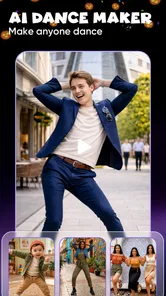
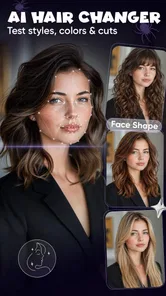
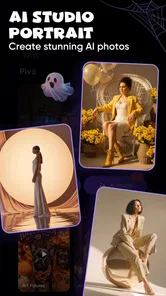
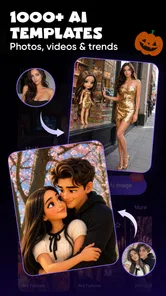
Analysis by Reviewed
I tried Pivo AI as the kind of app you open when a folder of photos feels more useful as a short video than as a gallery. It belongs to the video players and editors category, but its real appeal is narrower and more practical: turning still images into stylized clips without asking me to learn a full editing workflow. The developer is DooMoon, and the app is free to install, with optional in-app purchases ranging from $7.49 to $29.99 per item.
That simplicity is the reason it is immediately attractive. I can start with photos, choose a ready-made visual style, and work toward something that feels more finished than a basic slideshow. The important question, though, is not whether the first result looks entertaining. Many AI video tools can create a pleasant first impression. The better test is whether I would still open this app after the novelty wears off, when I need to make another clip next week or next month.
My first week with Pivo AI
The first-week experience is built around reducing decisions. Instead of beginning with a blank timeline, I approach the app with a small collection of images and let its modern preset styles provide the direction. That makes it especially approachable for people who know what they want to share but do not know how to build it manually.
I found that the strongest starting material is a group of photos with a clear connection: a birthday, a short trip, a product set, a pet, or a handful of portraits from the same day. Random images can still produce a clip, but the result feels less intentional. The app is more convincing when the photos already have a story and the selected style adds movement and mood rather than trying to invent the story from nothing.
One useful habit is to prepare the photo sequence before opening the editor. I remove near-duplicates, avoid mixing landscape and portrait images without a reason, and choose one image that can work as the visual opening. This small amount of preparation matters because an automated style can make a weak selection look busy instead of fixing it. The quality of the input still controls the quality of the finished video.
The ready-made approach also changes how I think about editing. In a traditional editor, I might spend time choosing transitions, timing each image, and adjusting the overall rhythm. Here, I first judge the style as a complete package. If it clashes with the photos, I would rather change the style or simplify the source images than endlessly correct individual moments.
That is where Pivo AI feels different from a conventional mobile editor. Apps built around manual timelines give me more control, but they also make every small decision my responsibility. Pivo AI is more like a shortcut from “I have photos” to “I have something presentable.” For quick social posts and personal memories, that shortcut is genuinely useful.
More From Our News Desk

 Gmail
GmailGmail in a Busy Inbox: Who Benefits Most?
From first account to crowded workday, Gmail earns its place through dependable search and flexible sorting—but its best fit depends on how much inbox maintenance you can tolerate.

 Prime Video
Switching to Prime Video: What Changes in Your Viewing Routine
Prime Video can make a compelling second home for streaming, but switching means learning a different catalog, rental layer, and route from browsing to playback.

 Universal TV Remote Control
Universal TV Remote Control Works Best as a Reliable Backup
A phone remote earns its place through quick setup and reliable habits. Here is how to get more from Universal TV Remote Control—and where its limits show.

 Weather - By Xiaomi
Weather by Xiaomi Review: Clear at a Glance, Less Clear Up Close
Xiaomi’s weather app makes everyday forecasts quick to scan, but its calm surface can leave useful details and recovery paths harder to find than they should be.

 X
XX Under Pressure: Can It Recover When Posting Goes Wrong?
A resilience-focused review of X, examining setup, mistaken posts, interruptions, weak connections, and the gaps that matter when recovery needs to be dependable.

 Clash of Clans
Clash of Clans Is Won Between the Battles
Its raids are quick; its community is a long-term project of coordination, teaching, rivalry, and shared responsibility—with all the friction that entails.
Latest News



It is also a good fit for someone who dislikes the technical side of video creation. I would recommend it to a friend who wants a polished-looking result but does not want to study keyframes, layers, audio tracks, or detailed color controls. The app’s appeal is not that it replaces a professional editor; it is that it makes a different promise and usually gets me moving faster.
Where the novelty helps
The AI angle is most valuable when I use it as a source of momentum. Starting with a finished-looking style can break the hesitation that often stops people from making anything at all. I can test an idea quickly, see whether the photos work together, and decide whether the clip deserves more effort.
A realistic everyday example would be a family member asking for a short birthday video on the same evening. I could select a few clear photos, choose a suitable style, and produce a shareable memory without turning the request into a long editing project. For a small business owner, the same workflow could help turn a product photo set into a quick promotional draft before investing time in a more carefully branded version.
My advice is to treat the first generated result as a draft, not as the final answer. Look at the opening image, watch for awkward changes in subject or orientation, and check whether the visual effects distract from the people or objects in the photos. This review step is easy to skip because the result arrives with a sense of completion, but it is the difference between a merely automatic clip and one I would actually send to someone.
What the first week does not solve
Automation cannot fully understand the personal importance of an image. A style may emphasize a technically striking photo while giving less attention to the moment I consider most meaningful. It may also make a collection feel more dramatic than the occasion deserves. For a quiet family memory, an energetic treatment can feel wrong even if it looks impressive for a few seconds.
This is the first important trade-off: Pivo AI saves editing time by narrowing creative control. If I want a very specific sequence, exact timing, carefully chosen text, or a precise visual identity, a standard editor remains the better tool. Pivo AI is strongest when I am comfortable accepting a style’s interpretation and making only light decisions around it.
Does it earn a place after the first month?
After the initial experimentation, the app’s lasting value depends on how often I create photo-based videos. If I regularly turn images into short clips, the ready-made workflow can become a useful habit. If I only wanted to test an AI effect once, the app may lose its appeal quickly because the central experience is focused rather than broad.
I see three recurring uses that can justify keeping it installed. The first is personal recap videos: a few images from a day out, a celebration, or a seasonal event. The second is quick social content when I have photos but no time to build a full edit. The third is rough creative exploration, where I want to see whether a set of images has enough energy to become a video before I commit to detailed work elsewhere.
That third use is easy to overlook. Pivo AI can function as an idea filter. I can test several groups of photos and discover which set has a coherent visual feeling. Even if I later finish the project in another editor, the automated preview helps me decide what is worth developing. In that role, the app is not competing directly with a powerful timeline editor; it is helping me choose which projects deserve one.
The free entry point makes this experimentation approachable. The app is listed as free, while in-app purchases are available between $7.49 and $29.99 per item. I would not pay simply because the first generated clip looks novel. I would consider paying only after identifying a repeatable need, such as making regular promotional drafts or producing frequent personal videos. The recurring value has to come from saved time, not from the excitement of seeing one automated effect.
There is another practical reason to keep expectations realistic. A style that looks excellent on a handful of portraits may not work as well with screenshots, documents, food photos, or mixed lighting. Before treating the app as part of a monthly routine, I would test it with the kinds of images I actually collect. This is more useful than judging it only with ideal sample material.
Who will keep using it?
I think Pivo AI has the best chance of becoming a regular tool for casual creators, families, small sellers, and anyone who repeatedly needs a quick visual post. It is also suitable for people who feel blocked by traditional editing interfaces. The app gives them a defined path, which can be more valuable than a long list of advanced controls.
It is less convincing for experienced editors who already have a fast workflow in a conventional video app. If I am comfortable arranging clips manually and need exact results, the AI presets may feel restrictive rather than convenient. The same applies to creators whose identity depends on consistent typography, branded colors, carefully timed narration, or a repeatable template system.
I would also skip it if my main goal is to edit existing video footage. Pivo AI’s clear strength is photo-to-video creation, so someone looking for detailed trimming, multi-clip storytelling, audio mixing, or more involved post-production should choose a broader editor. The category may overlap, but the working style is different.
Maintenance, repetition, and creative fatigue
The maintenance burden is fairly low in one sense: I do not need to build a complicated project structure every time. The main work is selecting better photos, choosing a style that matches the occasion, and checking the result before sharing. That is a manageable routine for occasional use.
However, low technical maintenance does not mean unlimited creative freshness. If I repeatedly use the same kind of images with the same visual treatment, the results can begin to feel interchangeable. The app’s convenience may encourage me to publish the first acceptable version instead of asking whether the video says anything distinctive.
My solution is to create a small personal rule for each project. For a travel recap, I might organize the images around a beginning, a detail, and a final scene. For a product clip, I might reserve the clearest image for the opening and use close-up details later. For a family video, I might keep the most emotional image near the end rather than letting the app’s default rhythm decide everything. These choices preserve some authorship without turning the process into manual editing.
Another useful tip is to keep the source set deliberately small when the story is simple. Adding every available photo can make the outcome feel crowded and reduce the impact of the strongest images. A shorter, more selective set often gives an automated style a clearer job. This is not a hidden button or a technical trick; it is a workflow decision that makes the app’s automation work more effectively.
Fatigue can also come from the gap between expectation and control. The phrase “AI video maker” may suggest that the app will understand the emotional meaning of a collection, but the more realistic expectation is assisted styling. It can help arrange a visual presentation, yet I still need to supply judgment about what belongs together and whether the mood feels right.
How it compares with ordinary video editors
Compared with a manual mobile editor, Pivo AI wins on the first minute. I can move from a photo selection to a stylized concept without learning an interface full of tracks and settings. That makes it better for speed, casual sharing, and creative prompts.
The conventional editor wins once the project becomes specific. If I need to control every transition, place text at an exact moment, adjust audio carefully, or maintain a consistent brand look, manual tools provide the precision Pivo AI intentionally avoids. I would use Pivo AI for the quick draft and a broader editor for the final production when the stakes are higher.
Compared with a basic slideshow maker, Pivo AI feels more visually ambitious because it focuses on modern styles rather than simply placing images one after another. The trade-off is that a slideshow tool may be more predictable. When predictability matters more than visual energy, the simpler alternative can be the safer choice.
It is also worth separating this app from full AI production suites. Those products may target text-to-video, extensive generative editing, or detailed control over scenes. Pivo AI is much more focused on using photos as the starting point. That focus is a strength for the right user, but it means I would not install it expecting an all-purpose AI studio.
Compatibility and practical expectations
The app is available for Android users running version 7.0 or later, and it carries an Everyone content rating. That makes it broadly approachable for everyday family and personal use. It has reached over five million installs and holds a 4.1 average from around nine thousand ratings, which suggests that the concept has found a substantial audience without making it universally satisfying.
The current version is 0.4.8, so I would approach it as a focused tool that is still developing rather than as a mature replacement for every editing app. That does not make it unsuitable. It simply reinforces the need to judge it by the job it performs now: quickly shaping photos into styled videos.
Before sharing anything important, I would watch the entire clip rather than relying on a preview. Check the first and last images, confirm that the selected photos are appropriate for the audience, and make sure the style supports the subject. This is especially important for family material or business images, where an accidental awkward moment can matter more than the convenience of automatic creation.
My long-term verdict
I like Pivo AI most when I treat it as a fast photo-to-video assistant, not as a replacement for a complete editing suite. Its first-week appeal is real: the ready-made styles reduce friction, help me experiment, and make it easier to turn a neglected photo collection into something shareable.
Its month-to-month value is more conditional. I would keep it installed if I regularly need quick visual recaps, social drafts, or simple promotional concepts. I would not keep paying for optional extras merely to repeat the same novelty. The app earns lasting space when it becomes part of a predictable workflow, not when it is used only to admire one surprising result.
The maintenance is light, but the creative responsibility remains with me. I still need to select coherent images, reject unsuitable styles, and review the final sequence. The biggest source of fatigue is repetition: automated videos can start to look alike if I stop making deliberate choices. Using smaller, better photo sets and assigning each project a simple story helps preserve the personal element.
For a friend who wants attractive results without wrestling with a timeline, I would recommend trying it. I would describe it honestly as a focused convenience app: excellent for quick photo-based experiments and everyday sharing, less appropriate for exact editing or serious production. If that boundary matches your needs, the free starting point makes it easy to judge for yourself.
My final view is positive but measured. Pivo AI does not need to replace every tool on my phone to be useful. It only needs to make a recurring task faster and more enjoyable. When I have a clear set of photos and want a finished-looking video with minimal setup, it does that well enough to remain relevant after the initial AI excitement fades.
Pivo AI - AI Video Maker Frequently Asked Questions
What devices can I use Pivo AI - AI Video Maker on?
Pivo AI is a mobile app in the Video Players & Editors category, developed by DooMoon. It requires Android 7.0 or later, so check your device’s operating system before downloading. The app is free to install, and its age rating is Everyone. If you use an iPhone or iPad, check the relevant app store for compatibility before proceeding.
What is Pivo AI - AI Video Maker and what can I create with it?
Pivo AI - AI Video Maker is a mobile video creation app designed to help users produce polished social media videos with less manual editing. Its focus is turning photos into videos using ready-made styles, making it useful for creators, small businesses, influencers, and casual users who want quick results without learning complex desktop editing software. The styles offer a more guided starting point for making visual content.
Is Pivo AI - AI Video Maker free to download and use?
The app is free to download, but some features or content may require in-app purchases. These purchases range from $7.49 to $29.99 per item. Check the purchase details in the app before confirming anything, so you understand what is included and whether a particular style or tool requires payment. You can start by exploring the free access available to you.
Do I need an internet connection to use Pivo AI - AI Video Maker?
An internet connection is generally needed for the app’s AI-powered functions because media processing, generation, and cloud-based effects may take place online. Basic actions such as viewing locally saved projects might work without a connection, but this can vary by feature and device. For the smoothest experience, use stable Wi-Fi when uploading large videos or generating AI content.
Can Pivo AI - AI Video Maker export videos for TikTok, Instagram, YouTube, or other platforms?
Pivo AI - AI Video Maker is intended for creating shareable video content, and its editing tools may support common portrait, landscape, and square formats used by social platforms. Export quality, resolution, frame-rate choices, and watermark removal can depend on your plan and device. Always preview the finished video before publishing to confirm that captions, music, cropping, and visual effects appear correctly.
Pros
- Turns text prompts and photos into short videos quickly.
- Offers ready-made templates for social media content.
- Simple interface suitable for beginners with little editing experience.
- AI effects can add motion and style to otherwise static images.
- Useful for creating promotional clips without advanced video skills.
Cons
- Output quality can vary depending on the prompt and source image.
- Some features and export options may require a paid subscription.
- AI-generated motion may occasionally look unnatural or distorted.
- Short video formats may feel limiting for longer projects.
- Processing can be slower when creating complex or high-resolution videos.












